UiChemy users
5 star rating Rated 4.9 out of 5 Trusted by 90,000+ Figma designers
AI Express Mode NEW

We Take Your Approved ucwr figma mark Figma Design
And Hand You A Finished ucwr wordpress WordPress Page

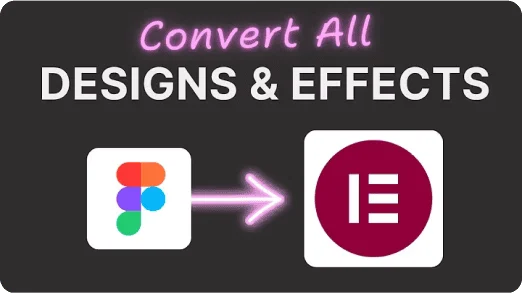
Pick your frame and UiChemy builds the real page inside your builder: layout, spacing, hover, motion, responsive breakpoints, header and footer, all standing before you open the editor. It reads the design, builds native widgets, then self-checks and fixes its own spacing and contrast. You review a live page instead of rebuilding one. Converts to Elementor now, with Gutenberg and Bricks landing next.

Every Layer Mapped For You Self-Fixes Spacing and Contrast Hover and Motion Included Responsive On Every Breakpoint Live Page In 5 Clicks
Introducing UiChemy AI Express Mode
90,000 +
Designers shipping pages
5
Clicks frame to live page
0
Layers you tag by hand
95 %
Breakpoints, all handled
Where every export stops

Every Export Hands You A Starting Point, Not A Finished Page

The design was the easy part. Then the export lands as a rough draft of your own work: boxes roughly in place, none of the life. So you rebuild it by hand, section by section, the same page you already designed.

01

Re-typing the spacing.

02

Rebuilding the hover states.

03

Re-teaching every breakpoint how to behave.

That last stretch is where the hours go and where the craft quietly flattens, and by the end you are not designing anymore, you are just rebuilding.

From brief to live page
Requirement Gathering
Research & Planning
Wireframing
Design System (Variables & Styles)
UI Design in Figma
Client Approval
Figma to WordPress Export Pending
Rebuild Layouts in WordPress Pending
Apply Global Styles Pending
Custom Styling & Animations Pending
Responsive Optimization Pending
Elementor editor
Converted page, Proton Widget panel visible
From design to finished page

We Finish The Build So You Never Start Over

AI Express rebuilds every section as native Elementor widgets, spacing and styles intact. You open a finished page ready to edit and publish, not a to-do list.

01

Motion and hover land exactly where you set them.

02

The layout responds on your builder's own breakpoints, not a guess.

03

Your colors and type come through synced to the global styles, so one change still updates everywhere.

The converted page is your start line, not your finish line: refine it by hand, or talk to Chat AI and let us make the edit for you.

How AI Express works

Figma To A Live WordPress Page In Five Clicks

Connect Figma, pick a frame, run AI Express. We build the full page in native elements. Review and publish.

1

Open AI Express In Figma

Pick the frame you want live.

2

Connect Your Live WordPress Site

Link your site once with a single Connection Link.

3

Pick Your Builder And Motion

Full site or a single page, keep the design as drawn or let us fix the gaps, and set motion to off, subtle, or immersive.

4

Convert To Real WordPress

It spends Credits and hands back native editable widgets, not a flat export.

5

Preview Your Live, Editable Page

Preview the live page and start editing.

Native widgets, fully editable

You Get A Real Editable Page, Not A Screenshot Of One

What we hand back is native to your builder: real widgets, blocks, or elements you can click, restyle, duplicate, and extend. Nothing is baked into a flat image, nothing is trapped in code you cannot touch. Open it in Elementor and it behaves like you built it there yourself, because for every purpose that matters, you did. Gutenberg and Bricks are next.

Figma design
Live in WordPress
Motion you control

Pick How Much Motion Your Page Ships With

Motion is your call, set at three levels. Off keeps the page still and lets the layout do the talking. Subtle brings the quiet touches, entrances and hover states that make it feel alive without pulling focus. Immersive carries the full choreography you designed, scroll and all. Pick a level, and we apply it as we build.

Subtle

The quiet touches, entrances and hover states that make it feel alive without pulling focus.

Immersive

The full choreography you designed, scroll and all.

Responsiveness

Your Page Looks Right On Every Screen Size

Conversions arrive responsive on Elementor's breakpoints, desktop, tablet, and mobile. Fine-tune any breakpoint yourself, right inside the Proton Widget.

  • Arrives responsive on Elementor's breakpoints: desktop, tablet, and mobile.
  • Fine-tune any breakpoint by hand, right inside the Proton Widget.
  • No separate tool to learn, responsiveness lives in the same widget you edit.
yoursite.com
The Proton Widget

A real editor lands in WordPress, not an export

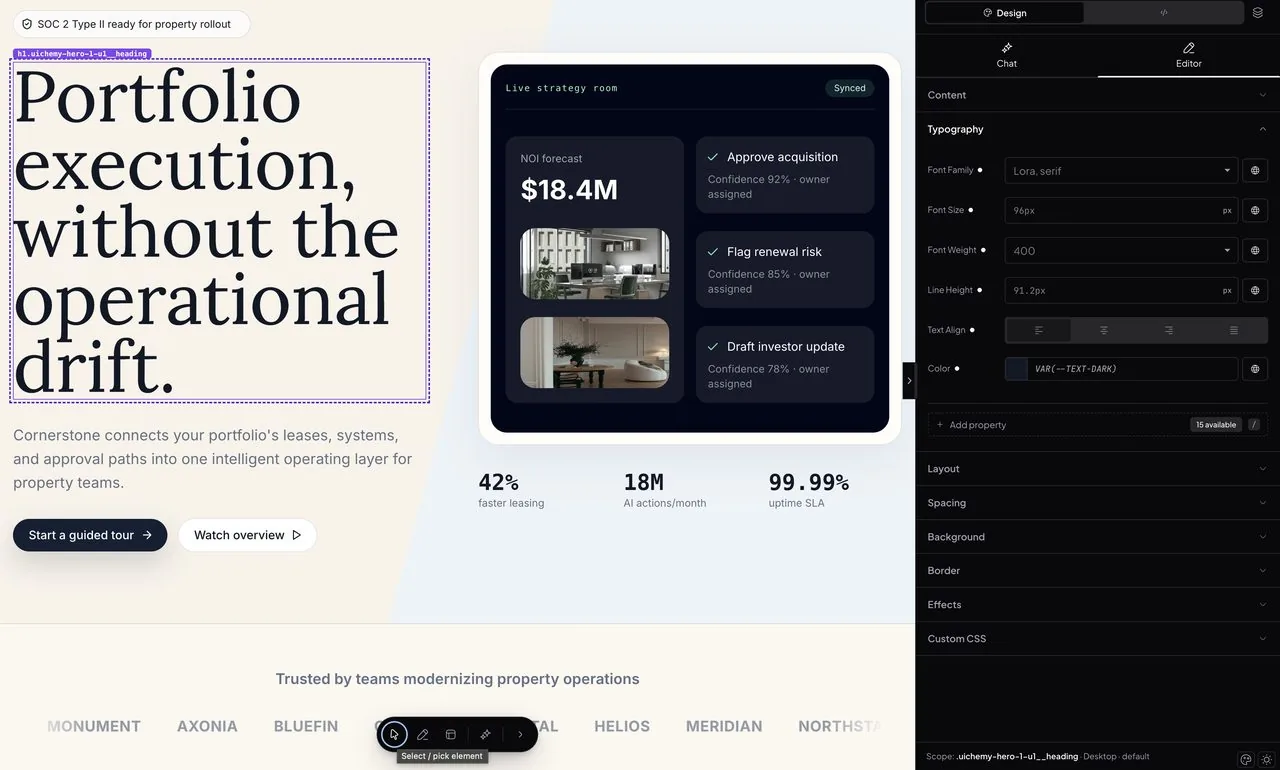
Every section is a live Proton Widget. Flip between Design and Developer mode, work in Chat, Editor, or Code.

Design mode · Chat

Describe the change, watch it happen

Design mode keeps clients clear of code. Scope any element and say what you want. Chat reaches classes too.

Plain-language editsEdit widget-wideEdit page-wide
Design mode · Editor

Point-and-style, no CSS in sight

Content, type, layout, spacing, and border controls laid out like Elementor. Nudge a value and see it live.

Familiar visual panelLive previewZero class management
Developer mode · Editor

Real, reusable classes

Every element gets a real, reusable class, not inline styles. Style it once and it holds everywhere it's used.

Reusable classesLocal & global scopesAttributes & states
Developer mode · Code

Open the hood, edit the source

The real HTML, CSS, and JS behind each widget, one click to your clipboard. Hand-edit for precision.

Editable HTML / CSS / JSFormat & copyShips as-is
Claude CLI Claude Opus 4.7
Targeting div.card-background · changes apply to this element only. ×

What do you want to do?

CONTEXT div.card-background ×
Make it a semi-transparent glassmorphism background with a blur effect and a thin border.
Claude Opus 4.7 Send ⌘↩
Content
Typography
Layout
Display flex
Position relative
Width 100 %
Height 100 vh
Inset
INSETpx
00auto00
Add property34 available/
Spacing
Background
Border
Scope: .hero-container · Desktop · default
.hero-container<div> Attributes Mark as
Local hero-container× Add class Default
Content
Typography
Layout
Displayflex
Positionrelative
Width100% %
Height100vh vh
Inset
INSETpx
00auto00
Flex Container
Flex Direction
Flex Wrap
Scope: .hero-container · Desktop · default
<>HTML FormatCopy
1
2
3
4
5
6
7
8
9
<div class="hero-container" id="heroContainer"> <!-- Animated tech grid background --> <div class="tech-grid"> </div> <!-- Main 3D card container --> <div class="card-container" id="cardContainer"> <!-- Background effects --> <div class="card-background"> <div class="glow-overlay" id="glowOverlay">
#CSS AssetsFormatCopy
1
2
3
4
5
6
7
8
9
.hero-container { position: relative; width: 100%; height: 100vh; display: flex; align-items: center; justify-content: center; perspective: 1200px; }
JSJavaScript Assets 1FormatCopy
1
2
3
4
5
6
7
8
const card = document.getElementById('cardContainer'); const glow = document.getElementById('glowOverlay'); window.addEventListener('mousemove', (e) => { const { clientX, clientY } = e; glow.style.setProperty('--x', clientX + 'px');
UiChemy MCP

The UiChemy MCP Converts Right Inside Your AI Editor

Call UiChemy through the MCP in Claude, Cursor, Codex, or Antigravity, and convert without leaving your editor.

uichemy-mcp · claude MCP
Page builders

UiChemy Converts To Elementor Now, Gutenberg And Bricks Next

AI Express converts to Elementor today. Gutenberg and Bricks are next, the same no-tagging way.

ElementorElementorLive
GutenbergGutenbergComing soon
BricksBricksComing soon
Days of rebuild, one pass

Skip The Days Of Rebuilding By Hand

Rebuilding every section by hand, then matching styles and motion, takes days. AI Express does it in one pass.

30–60hManual Work
  • Rebuild every section by hand in WordPress from the Figma design10–20h
  • Match spacing, styles & typography by eye5–10h
  • Add every image & all content manually3–6h
  • Set responsiveness across every breakpoint5–10h
  • Make it functional & interactive4–8h
  • Add motion & on-load animation3–6h
4–7hWith AI Express Mode
  • Go with AI Express Mode & pick your design in FigmaA few clicks
  • Choose your motion tier & cleanupA few clicks
  • Responsive, Globals, Functional Layouts, Motion & AnimationHandled for you
  • Touch-ups with Chat AI & review2–4h
  • Final QA & publish2–3h
Time saved
00 hours

Roughly 75–85% less time. No more building the whole WordPress site from scratch by hand.

Loved by designers

90,000+ Designers Rate Us 4.9 Out Of 5

90,000+ working Figma designers convert with us instead of rebuilding by hand, and rate it 4.9 out of 5.

FAQ

Figma To WordPress With AI, Answered

AI Express maps every layer, spacing, color, and type token from your frame, then rebuilds it as native widgets. It reads your design closely, and because the output is fully editable you can nudge anything that is not exact right inside the builder.

Both. At conversion you choose a single page or a full site, so you can start with one frame and scale up when you are ready.

Keep editing. You get real WordPress widgets you can click, restyle, duplicate, and delete. Nothing is locked, flattened, or export-only.

Classic needs your tagging. AI Express reads it and finishes styling, motion, responsive, header, and footer.

No. AI Express reads and maps every layer for you. Manual tagging stays available in Classic Mode when you want pixel-level control.

Yes. Pick motion at conversion: Off for fastest load, Subtle scroll fades, or Immersive cursor effects.

Conversions come out responsive on Elementor's breakpoints, and you can fine-tune any breakpoint by hand right inside the Proton Widget.

A single frame usually goes from Figma to a live, editable page in a few minutes. You spend the time reviewing and touching up, not rebuilding.

You run the UiChemy plugin inside Figma on the frame you pick, so it only reads the design you point it at. Connecting your site takes one Connection Link pasted from your dashboard.

You generate one Connection Link in your UiChemy dashboard and paste it into the Figma plugin. That is the whole setup.

Works on most WordPress hosts. If Wordfence or a managed host blocks it, our docs and support get you connected.

Yes. Local and staging sites connect the same way, with a Connection Link.

AI Express spends Credits per conversion, and it costs more than Classic because it does the styling, motion, and responsive work for you. Classic conversions cost almost nothing, and your pool refills every month.

You can install the UiChemy plugin from WordPress.org to see the workflow, and paid plans include a monthly Credit pool. See the Pricing page for the current starter allowance.

Your pool refills every month. If you need more before then you can upgrade your plan, and failed conversions never drain your balance since Credits are only spent on completed pages.

Yes. Both modes run on one shared balance of UiChemy Credits, so you never manage two pools. Every plan includes a monthly Credit amount, with top-ups available anytime. See the pricing page for what each plan includes.

One unit per conversion. AI Express costs more, Classic almost nothing, and your pool refills every month.

No. Credits are spent on completed conversions, so a failed attempt does not drain your balance.

AI Express converts to Elementor today. Gutenberg and Bricks are on the roadmap, and Classic Mode already supports more builders. Check the Roadmap for current status.

You get native builder elements, not a heavy embed or iframe, so pages perform like anything you would build by hand in Elementor. No Elementor Pro is required to convert.

You get native, editable widgets, not exported code or a flat image, and no Elementor Pro required to convert.

Yes. Clone any live site, or bring Lovable, HTML, Stitch, Relume, and v0 into editable WordPress.

Connect UiChemy MCP and run conversions from your own AI tools, like Claude, Cursor, Codex, or Antigravity, without leaving your editor.

Still have a question?Chat with AI
Support

We Help You With Real Docs, Videos, And People

Search the docs, watch a walkthrough, or ask our team. Real answers from people who built the product.

Friendly support

Talk to a real person who knows the product and wants you to win.

Documentation

Clear, searchable docs for every feature and workflow.

Video tutorials

Follow along with step-by-step videos on every core feature.

Active community

Join 90,000+ designers sharing tips and templates.

No spam guarantee

We Send Figma Tips Worth Opening, And Nothing Else

Figma-to-WordPress tips, feature drops, and teardowns. One useful email, no spam, unsubscribe in one click.

Convert from anything you design in