Claude to Elementor: Make Your Website Editable With Composer
 Sagar Patel
You can bring a Claude-generated design into Elementor and make its supported content editable through UiChemy Composer. The result is a Composer widget containing your design, with content fields and visual editing tools. It is not a promise that every HTML element becomes a separate Elementor Heading, Image, or Button widget.
That distinction matters when the website belongs to a client. A page may look finished while a routine headline change still requires someone to find and edit code. This guide explains how to plan a Claude to Elementor workflow around the changes people will actually make after launch.
For the wider publishing workflow, start with our Claude to WordPress guide. Here, the focus is editing, layout checks, and handoff.
What “Editable In Elementor” Means
Before choosing an import method, decide what your editor needs to control. Changing a button label, rearranging a section, and adding a new form are different jobs.
UiChemy describes Composer as a widget that holds HTML, CSS, and JavaScript and provides visual, code, and AI editing routes inside Elementor. The underlying section remains a Composer design. See the Composer overview for the product model.
| Approach | What You Edit | Best Fit | Handoff Question |
|---|---|---|---|
| Individual Elementor Widgets | Separate builder elements and their controls | A project whose maintenance process requires individual stock widgets | Can the client find the correct widget and change its settings? |
| Elementor HTML Widget | A field containing embedded code | A custom snippet maintained by someone comfortable with code | Who maintains the markup and scripts? |
| UiChemy Composer | A code-based section with supported content slots and visual style controls | A custom design that needs a practical editing interface | Are the client’s recurring changes exposed and demonstrated? |
Elementor officially supports HTML, CSS, shortcodes, and JavaScript in its HTML widget. That is a legitimate way to place code on a page. Its code field is different from a set of content controls generated for a section.
Choose the editing model before implementation. If your contract specifically requires individual stock widgets, document that requirement rather than describing any design visible in Elementor as equivalent.
Prepare Claude Output For The Editing You Need
Consider an illustrative agency landing page: a hero, service cards, a testimonial, and a contact call to action. The agency owner expects to update the headline, replace a photo, and change a booking link. Those are the first tasks to validate.
Ask Claude to keep important copy in the HTML rather than generating it only after JavaScript runs. Give every call to action a real destination. Replace demonstration images with assets you own or have permission to use. Keep a list of libraries, fonts, and services the design depends on.
If your starting point is a React application, identify its runtime and build requirements before importing anything. A component file is not automatically a standalone HTML section. This workflow does not promise that arbitrary React projects, server routes, or application backends will work when pasted into a widget.
An Illustrative Preparation Prompt
Prepare this hero section for a WordPress page using UiChemy Composer in Elementor. Return the section HTML and CSS separately, without a full document wrapper. Keep the headline, paragraph, image, and button as ordinary HTML content. List JavaScript and external asset dependencies separately. Preserve the supplied copy and design direction. Explain anything that needs manual integration.
This is a starting prompt, not a tested conversion result. Review the output against your actual source design. If you are still exploring the design itself, our AI website builder guide covers that earlier stage.
Bring The Section Into Composer
Start with a draft page and one representative section. A hero containing text, an image, and a link provides a useful first check before moving a long page.
- Open the page in Elementor and add a Composer widget.
- Open its code editor and place the section markup in the HTML tab.
- Place the CSS in the CSS tab. Remove full-page wrappers such as
<html>and<head>. - Handle external libraries through the documented Assets panel rather than pasting external script tags into the section.
- Compare the preview with the intended design, then inspect the content controls.
These steps follow UiChemy’s paste and import documentation. It also explains automatic content extraction and import limitations.
If you want Claude to work through a site connection, use our separate Claude and WordPress MCP setup guide. Keep the same editing checks regardless of whether the section arrives through a connection or a manual paste.
Make Routine Content Changes Through Slots
Slots are the content fields Composer extracts from supported elements. In the Content tab, look for Text, Links, and Media. The slots guide explains how to identify the associated element and update its value.
Work through the page using real replacement content:
- Headline: replace the current title with a longer, realistic alternative. Check wrapping and the space below it.
- Image: choose a replacement from the media library, review its crop, and update its alternative text.
- Button: change its label and URL. Open the destination in the visitor-facing preview.
- Repeated content: change one service description and confirm you edited the intended card.
The slots documentation identifies limits: CSS-generated content and text produced by JavaScript after loading may not appear as editable fields. Slots also do not change an element’s type or add new elements. If an expected control is missing, investigate the markup rather than promising the client that every visible item has a field.
For an editable Claude WordPress website, the useful acceptance test is specific: can its owner complete the agreed updates without requesting a new code generation each time?
Adjust Styles Without Losing The Design
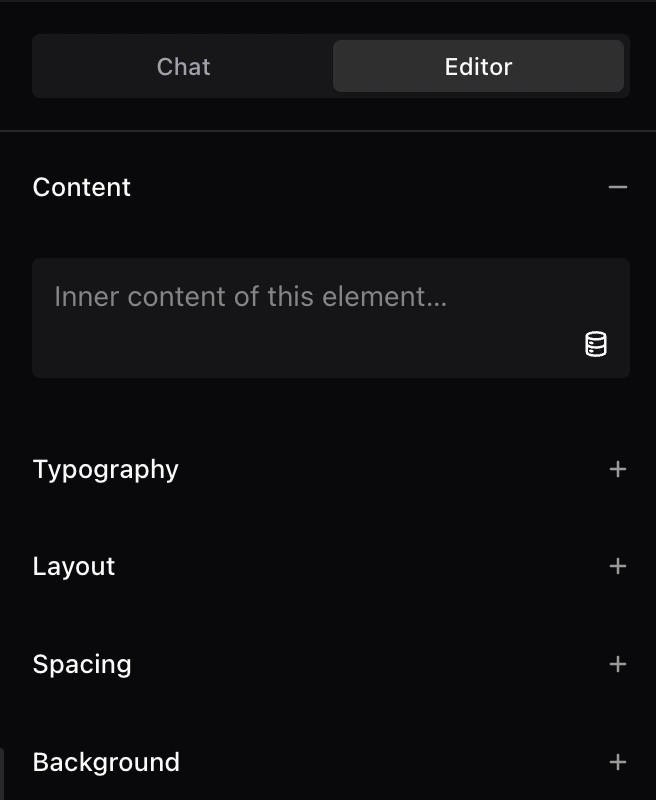
Composer’s Editor tab provides a layer view and controls for typography, layout, spacing, backgrounds, borders, and effects. Select the relevant element before changing its appearance.
Make one adjustment at a time. For a crowded hero, check the section padding, text width, and line height separately. Changing all three together makes it harder to identify the cause of a new layout problem.
Keep content editing distinct from structural work. Adding a pricing tier or changing how a form behaves requires a different review from changing existing text. UiChemy’s Design mode guide places structural changes and breakpoint changes outside routine Design mode editing.
An Illustrative Revision Prompt
Review only this hero section. On narrow screens, the heading should wrap naturally and the button should remain visible without horizontal scrolling. Preserve the desktop arrangement, copy, links, and image. Explain the proposed change before applying it, and identify the screen sizes I should check afterward.
Use a prompt like this to define the scope of a revision. It does not replace checking the result in the browser.
Check The Website As A Visitor And An Editor
A convincing preview is only one part of the job. Run these checks on the saved page:
- Content: remove placeholder claims, names, numbers, and example destinations.
- Responsive behavior: check narrow and wide screens, long headings, image crops, and horizontal overflow.
- Navigation: follow every primary button, menu link, phone link, and in-page anchor.
- Interactions: operate menus and accordions with a keyboard as well as a pointer.
- Forms: submit a realistic test entry and confirm where it arrives. A visible form alone is not proof of delivery.
- Editing: save a content change, reopen the editor, and inspect the visitor-facing result.
- Recovery: document the backup and restoration process before handing over responsibility.
These are recommended acceptance checks, not reported test results for a sample site. Record what passed on your project and what still needs work.
Hand Over Tasks The Client Can Repeat
Create a short handoff recording using the client’s actual page. Demonstrate changing a headline, replacing an image, updating a destination, and saving the page. Ask the client to repeat the sequence while you observe.
Include a one-page editing note with the page name, section location, allowed routine changes, and the contact responsible for structural revisions. Record the plugins the implementation depends on and the person who maintains them.
Agree on the boundary explicitly: “You can update these content fields; ask us before adding a new section or changing an interaction.” That is a more useful promise than calling a whole website editable without explaining how.
Frequently Asked Questions
Can I Use Claude Code With Elementor?
For a Claude Code Elementor workflow, define the output and connection method first. This guide covers bringing prepared HTML and CSS into Composer. Direct site operations require a compatible, configured connection; they should not be inferred from having Claude Code installed.
Does HTML To Elementor Mean Separate Native Widgets?
Not necessarily. HTML to Elementor can refer to an HTML widget, a Composer section, or a rebuild using individual widgets. For the Composer approach here, inspect and maintain the section through Composer’s supported editing controls.
Can My Client Edit Everything Without Code?
Supported content fields and visual style controls cover useful routine work. Unsupported content patterns, new functionality, and structural revisions may need developer involvement. Validate the client’s task list before promising a completely code-free handoff.
Does This Guide Also Apply To Gutenberg Or Bricks?
This walkthrough is specific to Elementor. Confirm the currently available import and editing route for Gutenberg or Bricks before planning an equivalent handoff.
Start with one section whose editing requirements you can clearly describe. Explore UiChemy’s Claude to WordPress workflow, then validate the content changes your team needs before moving the rest of the site.