
Skip to content

🔥 UiChemy Now Supports Elementor v4 (Atomic Elements) 🚀 See how it works →

uichemy-logo
  • Plugins
    • Elementor-Logo-Symbol-Red

      Figma to Elementor Convertor

      Gutenberg-logo-symbol

      Figma to Gutenberg
      Convertor

      Bricks-logo-symbol

      Figma to Bricks
      Convertor

  • Figma Templates
  • Resources
    • Explore

      New Updates

      Learn How to optimize design

      Request Feature

      Roadmap

      Educational File

      Community

      Blogs & Announcements

      Facebook Community

      Video Tutorials

      Join Affiliate

      Support

      Documentation

      Community Support

      Pro Helpdesk

      Live Chat

  • Pricing
  • Plugins
    • Elementor-Logo-Symbol-Red

      Figma to Elementor Convertor

      Gutenberg-logo-symbol

      Figma to Gutenberg
      Convertor

      Bricks-logo-symbol

      Figma to Bricks
      Convertor

  • Figma Templates
  • Resources
    • Explore

      New Updates

      Learn How to optimize design

      Request Feature

      Roadmap

      Educational File

      Community

      Blogs & Announcements

      Facebook Community

      Video Tutorials

      Join Affiliate

      Support

      Documentation

      Community Support

      Pro Helpdesk

      Live Chat

  • Pricing
Book Demo
Get Started
    Plugins
    Figma To Elementor
    Figma To Gutenberg
    Figma To Bricks
    How it works?
    Figma Templates
    Resources
    Explore
    New Updates
    Request Feature
    Roadmap
    Educational Figma Guide
    Community
    Blogs & Announcements
    Facebook Community
    Video Tutorials
    Join Affiliate
    Support
    Documentation
    Community Support
    Pro Helpdesk
    Live Chat
    Pricing
Book Demo Get Started

How to Upgrade Your UiChemy Plan to Pro

Updated on September 25, 2024

Key Takeaways

  • UiChemy Figma plugin offers two methods to upgrade to a Pro account: upgrading an existing license or purchasing a new Pro license.
  • Users can reset the user limit by navigating to the 'Manage Sites' section under UiChemy in their dashboard.
  • Activating a new Pro license requires logging out of the existing account and pasting the new license key in the UiChemy Plugin.

Home – Documents – How to Upgrade Your UiChemy Plan to Pro

Table of Contents

Upgrading to a premium account in the UiChemy Figma plugin can unlock many advanced features, making your design workflow smoother and more efficient. If you’re considering upgrading to Pro, you have two straightforward options. 

In this guide, we’ll walk you through both methods step-by-step and address any common issues you may encounter, ensuring a hassle-free upgrade process. Let’s dive in!

You can upgrade your UiChemy plan to Pro in two ways:

  1. Upgrade the existing license from the Plugin.
  2. Purchase a new Pro license from the pricing page.

Method 1: Upgrade the Existing License from the Plugin

1. Open the UiChemy Plugin in Figma.

2. Click on the Hamburger Menu.

3. Then click on the Pricing (Upgrade Now) option.
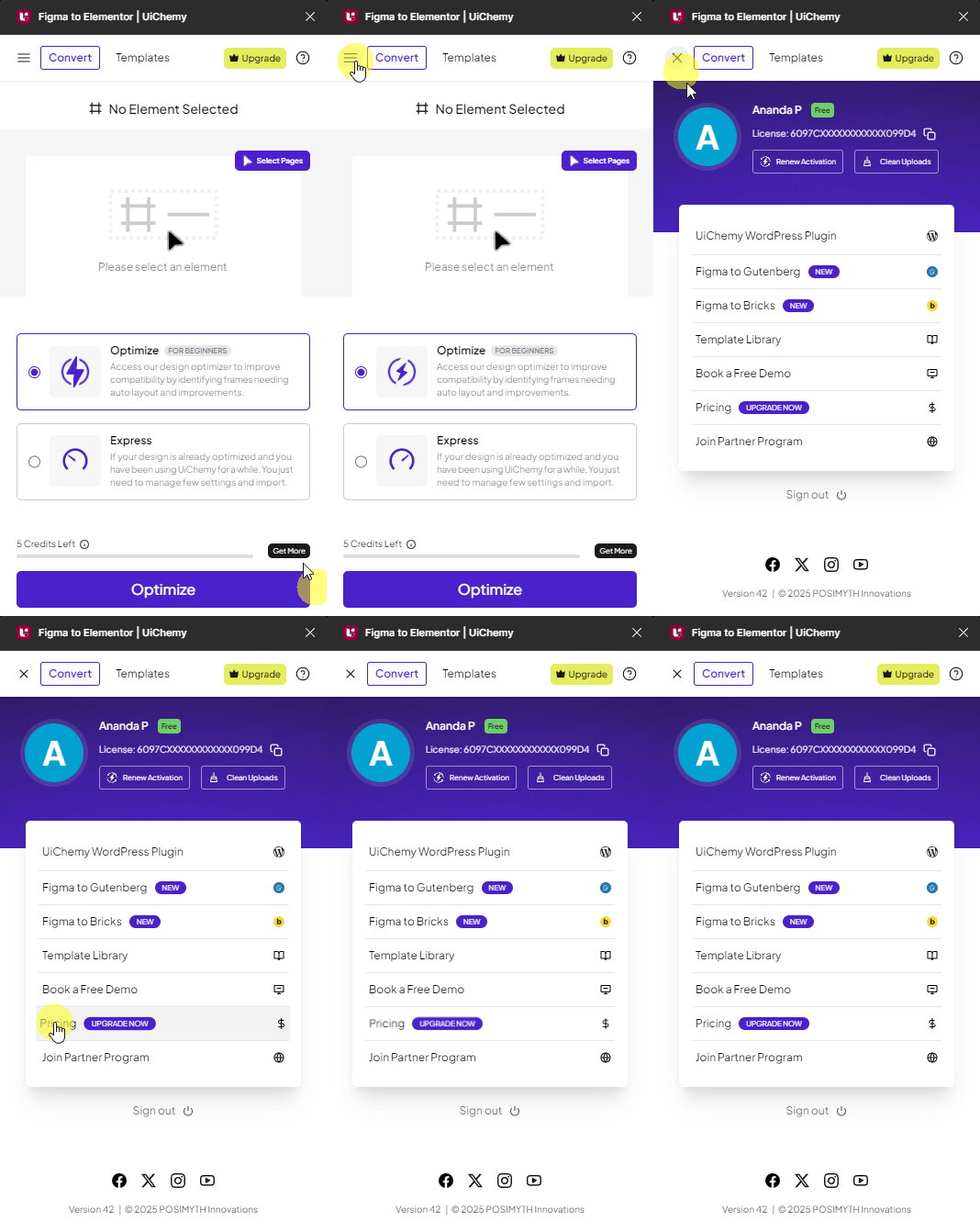
uichemy pricing upgrade new ui

4. It will take you to the UiChemy pricing page, select the suitable pro plan and follow the steps to complete the checkout. 

5. Then go back to Figma and open your UiChemy Figma plugin 

6. Click on the Hamburger Menu.

7. Then click on the Renew Activation button, it will upgrade your existing license.
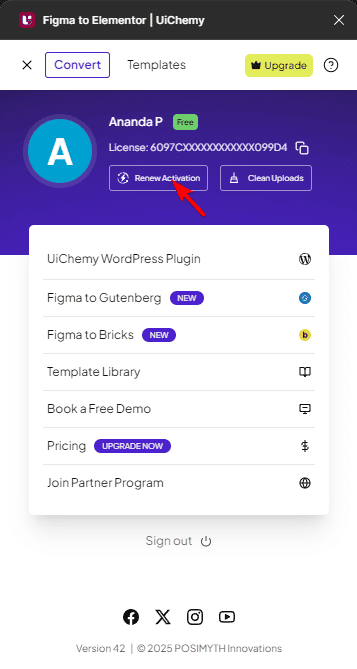
uichemy renew activation new ui

Method 2: Purchase a New Pro License from the Pricing Page

If you’ve purchased a new Pro license, then follow these steps to activate your account:

1. Go to store.posimyth.com and sign in to your account.

2. In your dashboard, locate your Pro plan and copy the license key.
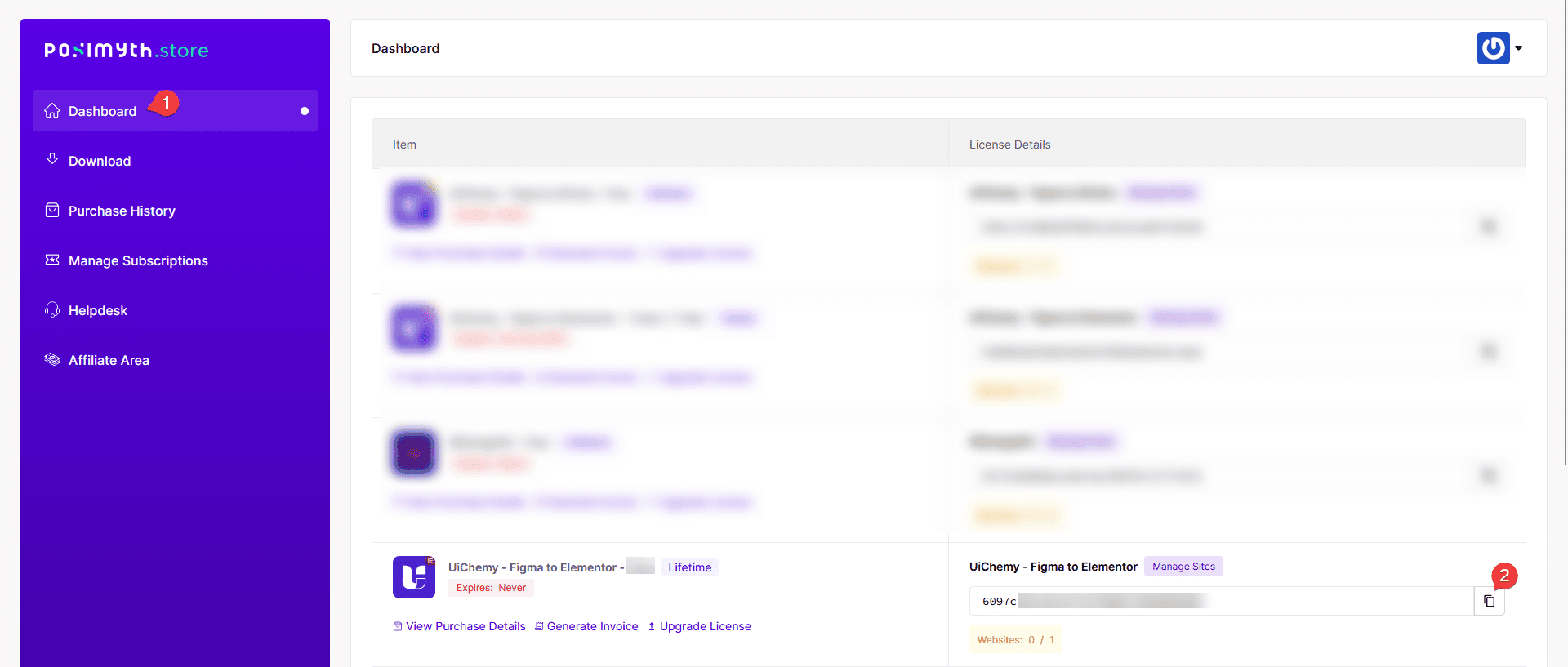
uichemy key new ui

3. Open the UiChemy Plugin in Figma.

4. Log out from your existing account/license key.

5. Then paste the new Pro license key in the plugin and activate it.
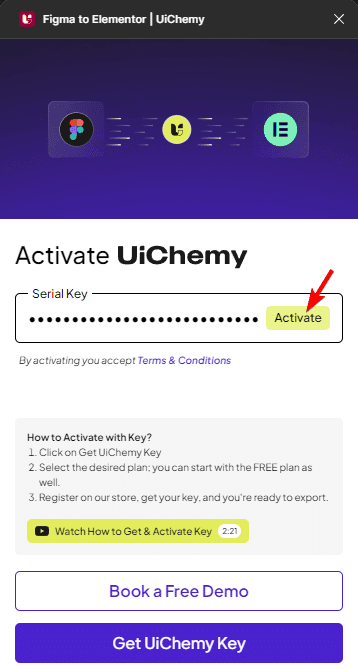
uichemy activate account new ui

Note: Both the processes will be the same for all the UiChemy plugins like Figma to Elementor, Figma to Bricks, and Figma to Gutenberg.

Fix the User Limit Reached issue.

While activating your license key, at times you might encounter the error message: User Limit Reached! 

It is because your current plan allows 1 user, and it’s already in use. 

To fix the issue you have to reset the user limit or upgrade your plan to continue.

Follow these steps to reset the user limit and fix the issue.

1. Go to store.posimyth.com and sign in to your account.

2. In your Dashboard, navigate to the “Manage Sites” section under UiChemy.

3. On the next page, you can reset the user limit or deactivate an existing user to free up a slot.
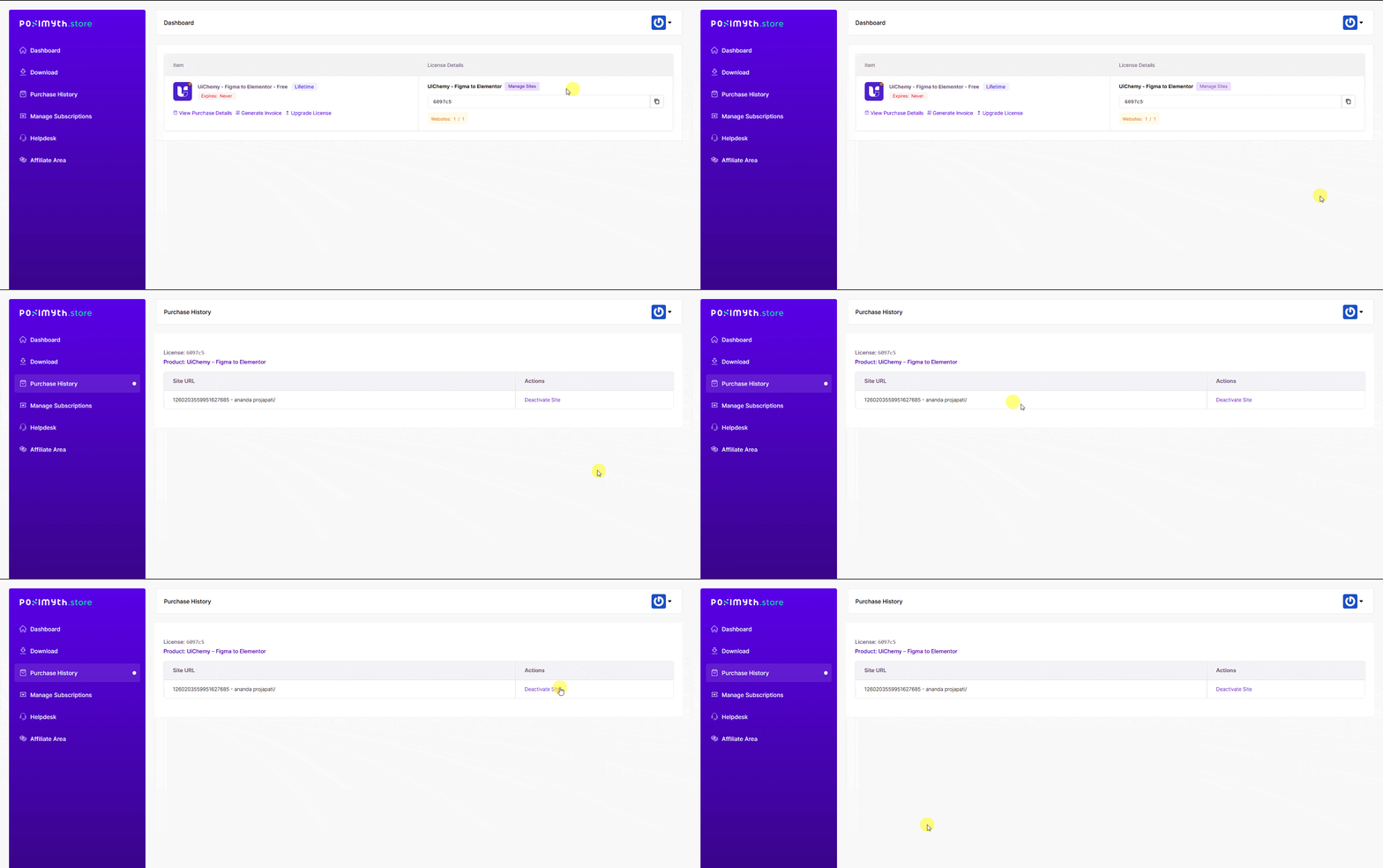
uichemy license manage sites new ui

4. Once done, then try activating the Pro license key again from the UiChemy plugin in Figma.

Following these steps should help you successfully activate your UiChemy Pro account after upgrading your plan. If you encounter any further issues, feel free to reach out to support for additional assistance.

About the Author

Photo of Sagar Patel CEO of UiChemy
Sagar Patel
CEO · UiChemy · 11 years experience

Sagar is the Founder & CEO of POSIMYTH Innovations, with 10+ years building WordPress products trusted by 100,000+ websites globally. He has led the development of The Plus Addons for Elementor, Nexter, WDesignKit, and UiChemy, all built hands-on from concept to launch. His work focuses on making website building faster, more flexible, and accessible for creators and businesses worldwide.

WordPressFigmaUI DesignWeb DesignElementorBricksAutomationClaudeAI
LinkedIn X Website
Previous PostHow to Cancel Subscription of UiChemy Pro?
Read NextHow to Get a Refund for UiChemy Pro

Still in Doubt? Let us Assist You — Raise a Ticket Now

Join our Design Community

Related Frequently Asked Questions


What should I do if I encounter the 'User Limit Reached' error while upgrading?

If you see the 'User Limit Reached' error, it means your current plan allows only one user, and that slot is already in use. To resolve this, sign in to your account at store.posimyth.com, navigate to the 'Manage Sites' section, and either reset the user limit or deactivate an existing user. This will free up a slot for your Pro license activation.

What happens if I purchase a new Pro license for UiChemy?

When you purchase a new Pro license for UiChemy, you'll need to activate it in the UiChemy Figma Plugin. After signing in to your account at store.posimyth.com and copying your license key, log out of your existing account in the plugin, paste the new key, and activate it. This process ensures you can access all the advanced features of your new Pro plan.

Are there any specific steps to follow when upgrading to a Pro plan?

To upgrade to a Pro plan, you have two methods: either upgrade your existing license from the UiChemy Figma Plugin or purchase a new Pro license from the pricing page. Each method has specific steps, such as clicking the Hamburger Menu and selecting the appropriate options in the plugin, so it's essential to follow the instructions carefully for a smooth upgrade.

Does the upgrade process differ for different UiChemy plugins like Figma to Elementor?

No, the upgrade process is the same for all UiChemy plugins, including UiChemy Figma to Elementor, UiChemy Figma to Gutenberg, and UiChemy Figma to Bricks. Regardless of which plugin you are using, you can upgrade your plan by following the same steps outlined for the UiChemy Figma Plugin.

What are the benefits of upgrading to a Pro account in UiChemy?

Upgrading to a Pro account in UiChemy unlocks advanced features that enhance your design workflow, making it smoother and more efficient. These features can significantly improve your experience when converting Figma designs to WordPress pages, allowing for greater customization and flexibility in your projects.

Last reviewed: April 14, 2026

Related Docs

What Happens if I Don’t Renew My Subscriptions?

How to Renew UiChemy PRO License?

How to Generate Invoice on Renewal Purchase?

How to Generate Invoice after Purchase of UiChemy?

How to Get a Refund for UiChemy Pro

How to Cancel Subscription of UiChemy Pro?

How to Update Your Payment Method?

Is Google Login not working at the POSIMYTH Store? [Steps to Resolve]

How to Create a UiChemy Account and Activate it?

Enterprise grade security to protect customer data

By Your Side, Ready to Assist

Our Friendly Support

Our Friendly Support

Documentations

Documentations

Detailed Video Tutorials

Detailed Video Tutorials

Active Users Community

Active Users Community

NO SPAM GUARANTEE
Get Exclusive Figma Tips, Tricks and Product Updates Delivered Straight to Your Inbox!

Features

Learn How to optimize design

Convert Figma to WordPress

Convert Figma to Elementor

Convert Figma to Gutenberg

Convert Figma to Bricks

Figma Templates

Resources

Pricing

Hot

WordPress Figma Plugin

What's New ?

Updated

Request Feature

Roadmap

Affiliate
Program

Recurring Commissions

Blogs

Educational File

Book a Demo

Uptime

99%

Brand Kit for Press & Media

Get Support

Login to Portal

Helpdesk

Documentation

Updated

Facebook Community

Video Tutorials

Our Products

The Plus Addons for Elementor

NexterWP - Blocks, Theme & Extensions

New

WDesignKit - Templates, Widget Builder & More

New

Company

Website

About Us

Our Team

Career

Join Us

Contact Us

Legal

Refund Policy

60 Days Guarantee

Cookie Policy

Privacy Policy

Terms of Services

Support Policy

Security Program

Acceptable Use Policy

visa-icon-new
PayPal-icon-New
mastercard-icon-new
norton-icon-new
encrypt-icon-new
uichemy-logo

© POSIMYTH Innovations 2026

facebooksvg
twitter
images (3)
instagramsvg
pintrestsvg