
Skip to content

🔥 UiChemy Now Supports Elementor v4 (Atomic Elements) 🚀 See how it works →

uichemy-logo
  • Plugins
    • Elementor-Logo-Symbol-Red

      Figma to Elementor Convertor

      Gutenberg-logo-symbol

      Figma to Gutenberg
      Convertor

      Bricks-logo-symbol

      Figma to Bricks
      Convertor

  • Figma Templates
  • Resources
    • Explore

      New Updates

      Learn How to optimize design

      Request Feature

      Roadmap

      Educational File

      Community

      Blogs & Announcements

      Facebook Community

      Video Tutorials

      Join Affiliate

      Support

      Documentation

      Community Support

      Pro Helpdesk

      Live Chat

  • Pricing
  • Plugins
    • Elementor-Logo-Symbol-Red

      Figma to Elementor Convertor

      Gutenberg-logo-symbol

      Figma to Gutenberg
      Convertor

      Bricks-logo-symbol

      Figma to Bricks
      Convertor

  • Figma Templates
  • Resources
    • Explore

      New Updates

      Learn How to optimize design

      Request Feature

      Roadmap

      Educational File

      Community

      Blogs & Announcements

      Facebook Community

      Video Tutorials

      Join Affiliate

      Support

      Documentation

      Community Support

      Pro Helpdesk

      Live Chat

  • Pricing
Book Demo
Get Started
    Plugins
    Figma To Elementor
    Figma To Gutenberg
    Figma To Bricks
    How it works?
    Figma Templates
    Resources
    Explore
    New Updates
    Request Feature
    Roadmap
    Educational Figma Guide
    Community
    Blogs & Announcements
    Facebook Community
    Video Tutorials
    Join Affiliate
    Support
    Documentation
    Community Support
    Pro Helpdesk
    Live Chat
    Pricing
Book Demo Get Started

How to Generate Invoice on Renewal Purchase?

Updated on April 16, 2025

Key Takeaways

  • UiChemy Pro users log in to the Posimyth Store to access their Purchase History.
  • Users locate the renewal transaction and click the Download Invoice button to obtain a PDF invoice.
  • The support team is available for assistance with any issues related to invoice generation.

Home – Documents – How to Generate Invoice on Renewal Purchase?

Table of Contents

Thank you for choosing UiChemy Pro. We understand that you may need an invoice for your renewal purchase, and we’re here to guide you through the process.

To generate an invoice for your renewal purchase, please follow the steps below:

  1. Visit the Posimyth Store and log in to your account using the same login details that you used during checkout.
  2. Once logged in, navigate to the Purchase History section from your dashboard.
  3. Locate the specific renewal transaction you wish to generate an invoice for.
  4. Click on the Download Invoice button next to the renewal order. Your invoice will be downloaded as a PDF.

Your renewal invoice will then be downloaded, and you’ll be able to store it for your records.
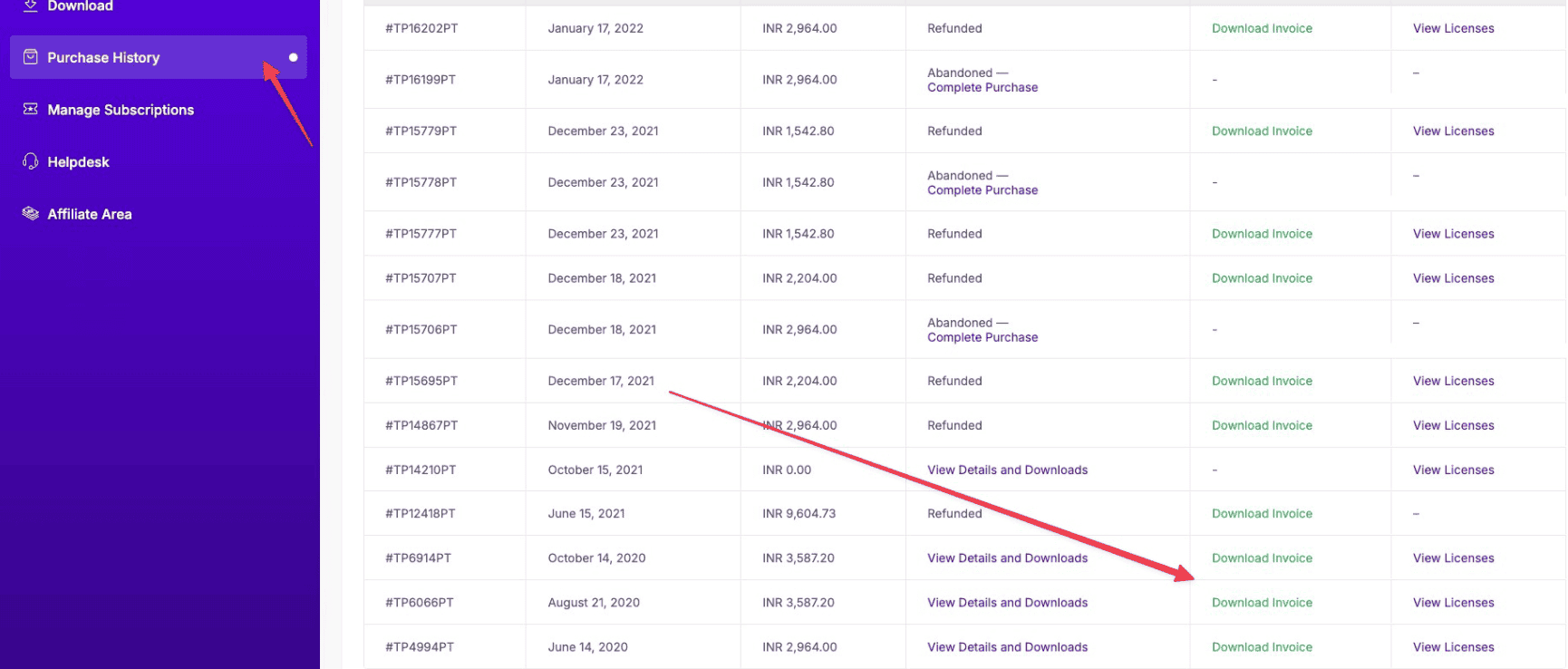
uichemy purchase history generate invoice renewal charge

If you have any issues with generating your invoice or any other concerns, please don’t hesitate to reach out to our support team. We’re always here to assist you with any questions or issues you may have.

Thank you again for choosing UiChemy Pro. We appreciate your business and look forward to providing you with the best possible experience!

About the Author

Photo of Sagar Patel CEO of UiChemy
Sagar Patel
CEO · UiChemy · 11 years experience

Sagar is the Founder & CEO of POSIMYTH Innovations, with 10+ years building WordPress products trusted by 100,000+ websites globally. He has led the development of The Plus Addons for Elementor, Nexter, WDesignKit, and UiChemy, all built hands-on from concept to launch. His work focuses on making website building faster, more flexible, and accessible for creators and businesses worldwide.

WordPressFigmaUI DesignWeb DesignElementorBricksAutomationClaudeAI
LinkedIn X Website
Previous PostHow to Generate Invoice after Purchase of UiChemy?
Read NextHow to Renew UiChemy PRO License?

Still in Doubt? Let us Assist You — Raise a Ticket Now

Join our Design Community

Related Frequently Asked Questions


What should I do if the Download Invoice button isn't working?

If the Download Invoice button doesn't respond, ensure you're logged into the Posimyth Store with the same credentials used during checkout. Sometimes, browser issues can cause buttons to malfunction, so try clearing your cache or using a different browser. If the problem persists, reach out to the support team for assistance.

What format will my renewal invoice be downloaded in?

Your renewal invoice will be downloaded as a PDF file. This format is widely used and ensures that the invoice maintains its formatting across different devices, making it easy to store and share for your records.

Are there any issues I might encounter while generating an invoice?

Common issues include being logged out of your account or not finding the specific renewal transaction in your Purchase History. If you encounter problems, double-check your login status and ensure you're looking at the correct section. If issues persist, contact support for help.

What information will be included in my renewal invoice?

While the page does not specify the exact details included in the renewal invoice, typically, invoices contain information such as the purchase date, transaction ID, and itemized list of products or services purchased. This helps in maintaining accurate financial records.

Is there a way to access my invoices later if I forget to download them?

Invoices can usually be accessed later through your Purchase History in the Posimyth Store. If you forget to download an invoice, simply log back into your account, navigate to the Purchase History, and download it at your convenience.

Last reviewed: April 14, 2026

Related Docs

What Happens if I Don’t Renew My Subscriptions?

How to Renew UiChemy PRO License?

How to Generate Invoice after Purchase of UiChemy?

How to Get a Refund for UiChemy Pro

How to Upgrade Your UiChemy Plan to Pro

How to Cancel Subscription of UiChemy Pro?

How to Update Your Payment Method?

Is Google Login not working at the POSIMYTH Store? [Steps to Resolve]

How to Create a UiChemy Account and Activate it?

Enterprise grade security to protect customer data

By Your Side, Ready to Assist

Our Friendly Support

Our Friendly Support

Documentations

Documentations

Detailed Video Tutorials

Detailed Video Tutorials

Active Users Community

Active Users Community

NO SPAM GUARANTEE
Get Exclusive Figma Tips, Tricks and Product Updates Delivered Straight to Your Inbox!

Features

Learn How to optimize design

Convert Figma to WordPress

Convert Figma to Elementor

Convert Figma to Gutenberg

Convert Figma to Bricks

Figma Templates

Resources

Pricing

Hot

WordPress Figma Plugin

What's New ?

Updated

Request Feature

Roadmap

Affiliate
Program

Recurring Commissions

Blogs

Educational File

Book a Demo

Uptime

99%

Brand Kit for Press & Media

Get Support

Login to Portal

Helpdesk

Documentation

Updated

Facebook Community

Video Tutorials

Our Products

The Plus Addons for Elementor

NexterWP - Blocks, Theme & Extensions

New

WDesignKit - Templates, Widget Builder & More

New

Company

Website

About Us

Our Team

Career

Join Us

Contact Us

Legal

Refund Policy

60 Days Guarantee

Cookie Policy

Privacy Policy

Terms of Services

Support Policy

Security Program

Acceptable Use Policy

visa-icon-new
PayPal-icon-New
mastercard-icon-new
norton-icon-new
encrypt-icon-new
uichemy-logo

© POSIMYTH Innovations 2026

facebooksvg
twitter
images (3)
instagramsvg
pintrestsvg