Code Snippets in WordPress: UiChemy Module Studio Guide
 adityauichemy
You can add code snippets to WordPress without a separate snippets plugin by using UiChemy Module Studio. A module is a small set of files (markup, styles, JavaScript or PHP) with one on/off switch, one placement that says where it runs, and display conditions that say who sees it. It lives under UiChemy, Module Studio in your dashboard. This guide follows the UiChemy docs, which we read on 2026-11-11.
Module Studio arrived in UiChemy Composer 5.4.0 on 19 October 2026 (changelog entry of that date). It is in Beta, so treat the details below as current for that date and check the docs before you rely on them.
What a module is and why it exists
Most WordPress sites collect small pieces of code over time: a banner, a CSS fix, a tracking script, a PHP filter. They end up in the theme, in a page builder’s custom code box, or in a snippets plugin. Module Studio puts them in one list inside UiChemy, so you can see what runs, where, and for whom.
The docs describe three things every module has:
- One on/off switch in the module list.
- One placement, which is where the code runs.
- One set of display conditions, which limit who sees it and on which pages.
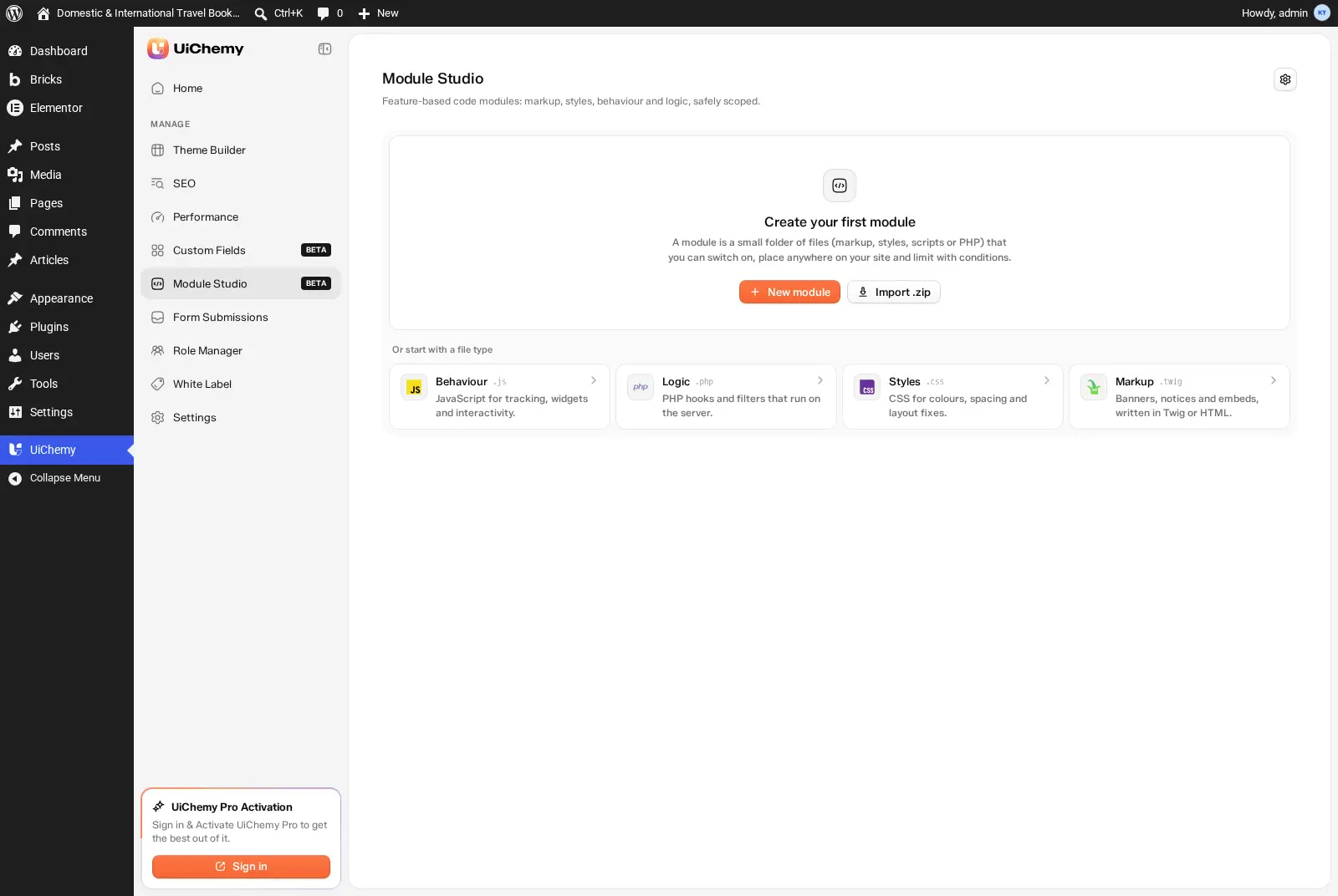
The four starter types
When you create a module you pick a file type. The four starter cards map to file types like this:
| Starter | File | Use it for | Plan |
|---|---|---|---|
| Markup | Twig or HTML | Banners, notices, embeds | Free |
| Styles | CSS | Colours, spacing, layout fixes | Free |
| Behaviour | JavaScript | Tracking, widgets, interactivity | Free |
| Logic | PHP | Hooks and filters on the server | Pro |
Two details save time. Twig files can show live values such as the site name or the current post title, and output is escaped by default. HTML files are filtered for safety, so <script> tags are removed; put scripts in a JavaScript module instead.
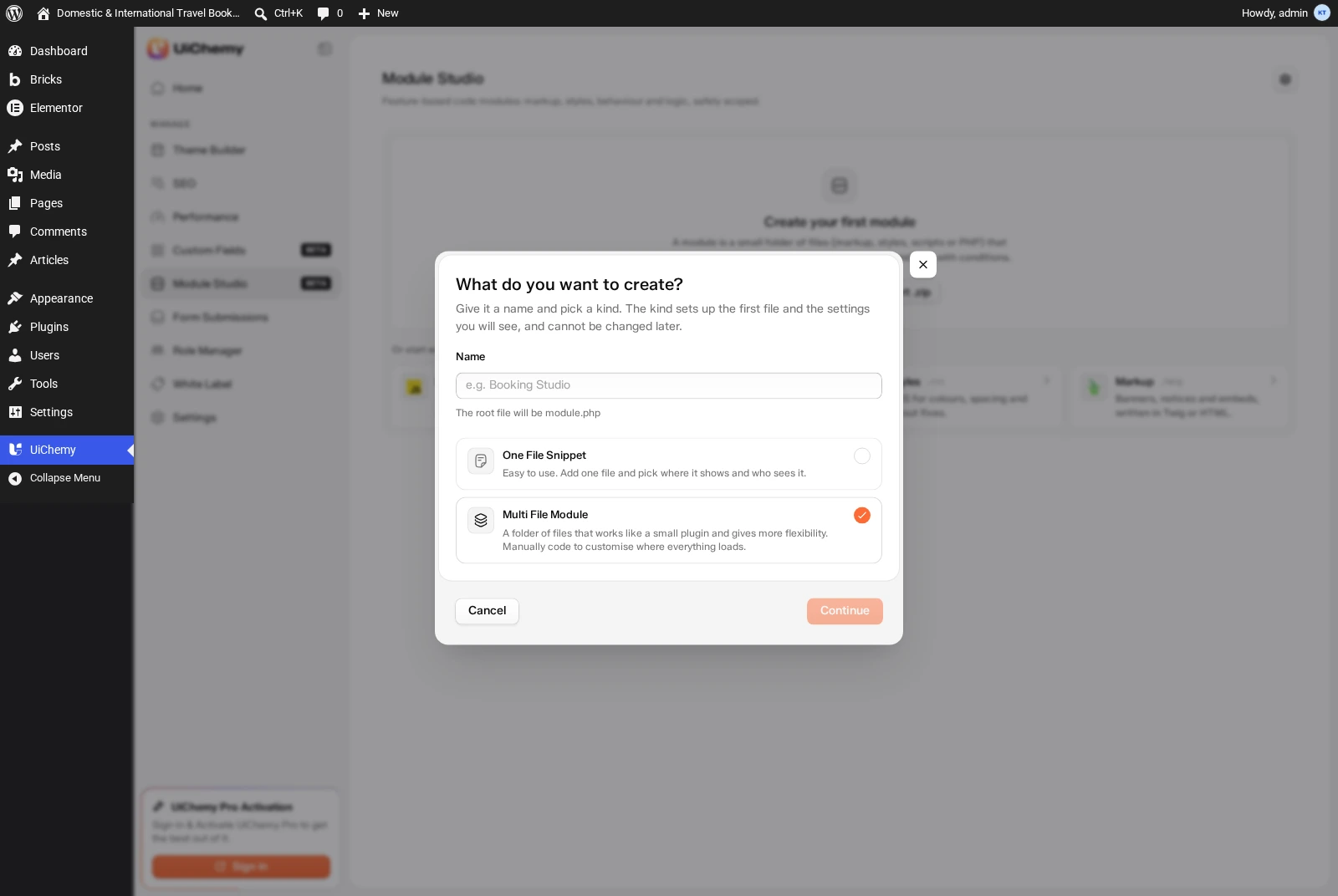
One file snippet or multi file module
You choose a kind when you create the module, and you cannot change it later.
| Kind | What it is | Best for |
|---|---|---|
| One File Snippet (default) | One file, plus where it shows and who sees it | A single style fix, script, banner or PHP hook |
| Multi File Module | A folder of files that works like a small plugin; the root file is module.php | Features that need several files together |
Multiple files and folders are a Pro feature. Free supports one CSS, JS, HTML or Twig file.
Placement: where the code runs
Placement is the part people get wrong first, so read it before you build anything. The free placements are:
- Entire site: Global Header, Global Body, Global Footer (all pages).
- Post content: Before Post Content, After Post Content, After Post Element.
- Admin area: Admin Header Area and Admin Footer Area.
- PHP snippets: All Pages (Frontend + Admin, the default), Frontend Pages Only, Admin Dashboard Only.
Pro adds CSS selector placements (insert before, after, at the start or end of an element, or replace it), in-content positions at 25, 33, 50, 66 and 75 percent, and WooCommerce and Easy Digital Downloads placements such as the product summary or the checkout button.
Watch the default. The default placement, Run on All Pages (Frontend + Admin), only runs code. It does not show markup. For a banner or notice, pick a visible location such as Global Footer or After Post Content.
Display conditions: who sees it
Conditions are off by default, so a module runs for everyone. Turn on “Only when rules match” to add rules, then choose whether All or Any rules must match. The free plan includes User Login Status, User Role Type, Target Post Type and Specific Post or Page. Other conditions (device, browser, country, URL, dates and times, WooCommerce cart total and more) need Pro. Visitor Country needs Cloudflare, otherwise it never matches.
Worked example: a banner for logged-out visitors
This example comes straight from the docs and uses only free features.
- Go to UiChemy, Module Studio and click New module.
- Name it, for example “Free shipping banner”. A name is required.
- Pick One File Snippet, then the file type twig and click Continue.
- Write the banner markup in the editor. A new module starts Active with a Draft badge.
- Open the Placement picker and choose Global Header (All Pages).
- Turn on Only when rules match and add User Login Status is logged out.
- Click Create snippet.
The banner now shows only to visitors who are not logged in. Switch the module off in the list when the promotion ends; the code stays for next time.
Free vs Pro at a glance
| Feature | Free | Pro |
|---|---|---|
| One-file CSS, JS, HTML or Twig modules | Yes | Yes |
| PHP modules | No | Yes |
| Multiple files and folders | No | Yes |
| Site-wide header, body, footer placements | Yes | Yes |
| CSS selector and in-content % placements | No | Yes |
| WooCommerce and EDD placements | No | Yes |
| Login status, role, post type, specific page conditions | Yes | Yes |
| Device, country, URL, date and other conditions | No | Yes |
| Shortcode per module | No | Yes |
| Export JSON, import, Safe mode, crash protection | Yes | Yes |
| Export as plugin (standalone .zip) | No | Yes |
| AI: read and validate | Yes | Yes |
| AI: create, edit, import, export, delete | No | Yes |
Source: UiChemy docs, Free vs Pro table, read 2026-11-11. If Pro is removed later, a module built with Pro features keeps them, but you cannot add new ones.
Safety and recovery
Custom code can take a site down, so the docs list four protections:
- Checks on save: PHP is checked for syntax errors. CSS, JS, HTML and Twig are checked for PHP tags and broken brackets. JSON must be valid and SVG cannot contain scripts. Problems show above the editor with the file and line.
- Crash protection: a module that causes a fatal error is switched off automatically and marked Error.
- Safe mode: pauses every module site-wide, from the Module Studio settings (gear icon).
- Emergency recovery URL: a secret link that turns Safe mode on even when wp-admin will not load. Bookmark it now, not after something breaks.
If a module breaks the site: open the recovery URL, fix or switch off the module, then turn Safe mode off in settings.
Using an AI assistant with modules
AI tools connected through MCP can list and read modules and validate code on the free plan. Creating, editing, importing, exporting and deleting modules with AI needs UiChemy Pro. An AI tool can also switch a module on or off, including a PHP module, so read the code before you let it turn a PHP module on. To weigh modules against HTML widgets, read Composer vs custom HTML widgets and code snippets.
Import, export and permissions
Export JSON is free and downloads a module as a .json file. Export as plugin (Pro) gives a standalone WordPress plugin .zip that runs without UiChemy. Imports show a review of every file and the safety checks first, and imported modules always arrive switched off. By default, Editors and above can view and manage modules.
When to use something else
Module Studio is for code that belongs to the whole site or to a set of pages. If you only need custom code inside one Gutenberg page, see custom code in Gutenberg without plugins. To understand which UiChemy Composer features are free and which are Pro before you plan around PHP modules, read UiChemy Composer plans explained, and for the builder itself see UiChemy Composer. The full reference is the Module Studio docs.
Frequently asked questions
Is Module Studio free?
Most of it is. Free covers modules with one CSS, JS, HTML or Twig file, site-wide header, body and footer placements, and the login status, user role, post type and specific page conditions. PHP modules, multi-file modules, CSS selector placements, most conditions and Export as plugin need UiChemy Pro. Source: UiChemy docs, read 2026-11-11.
What happens if a module breaks my site?
A module that causes a fatal error is switched off automatically and marked Error in the list. You can also open your Emergency recovery URL to turn on Safe mode, which pauses every module, even when wp-admin will not load.
Can I use PHP in Module Studio?
Yes, with UiChemy Pro. PHP modules are checked for syntax errors on save. Free supports one CSS, JS, HTML or Twig file.
Can an AI assistant create modules for me?
On the free plan, AI tools connected through MCP can list and read modules and validate code and conditions. Creating, editing, importing, exporting and deleting modules with AI needs UiChemy Pro. An AI tool can also switch a PHP module on or off, so read the code first.
Is Module Studio still in beta?
Yes. The docs call it Beta, and the dashboard tab shows a Beta badge. It was previously called Snippet Engine and replaces the old Code Snippets menu item.