UiChemy Composer Plans Explained: Solo, Pro, Unlimited and Lifetime
 Sagar Patel

UiChemy Composer has four plans: Solo at $5 a month for 1 site, Pro at $11 a month for 25 sites, Unlimited at $17 a month for unlimited sites with white label and priority support, and Lifetime at $499 paid once. The main difference is how many sites you run, and whether you resell to clients.
Prices below were read from the pricing page on 2026-10-01. Prices change, so check the page before you buy. This post covers Composer plans only. The separate all-in-one credit plans are explained in UiChemy pricing explained: credits, plans and what one site costs.
The Four Plans at a Glance
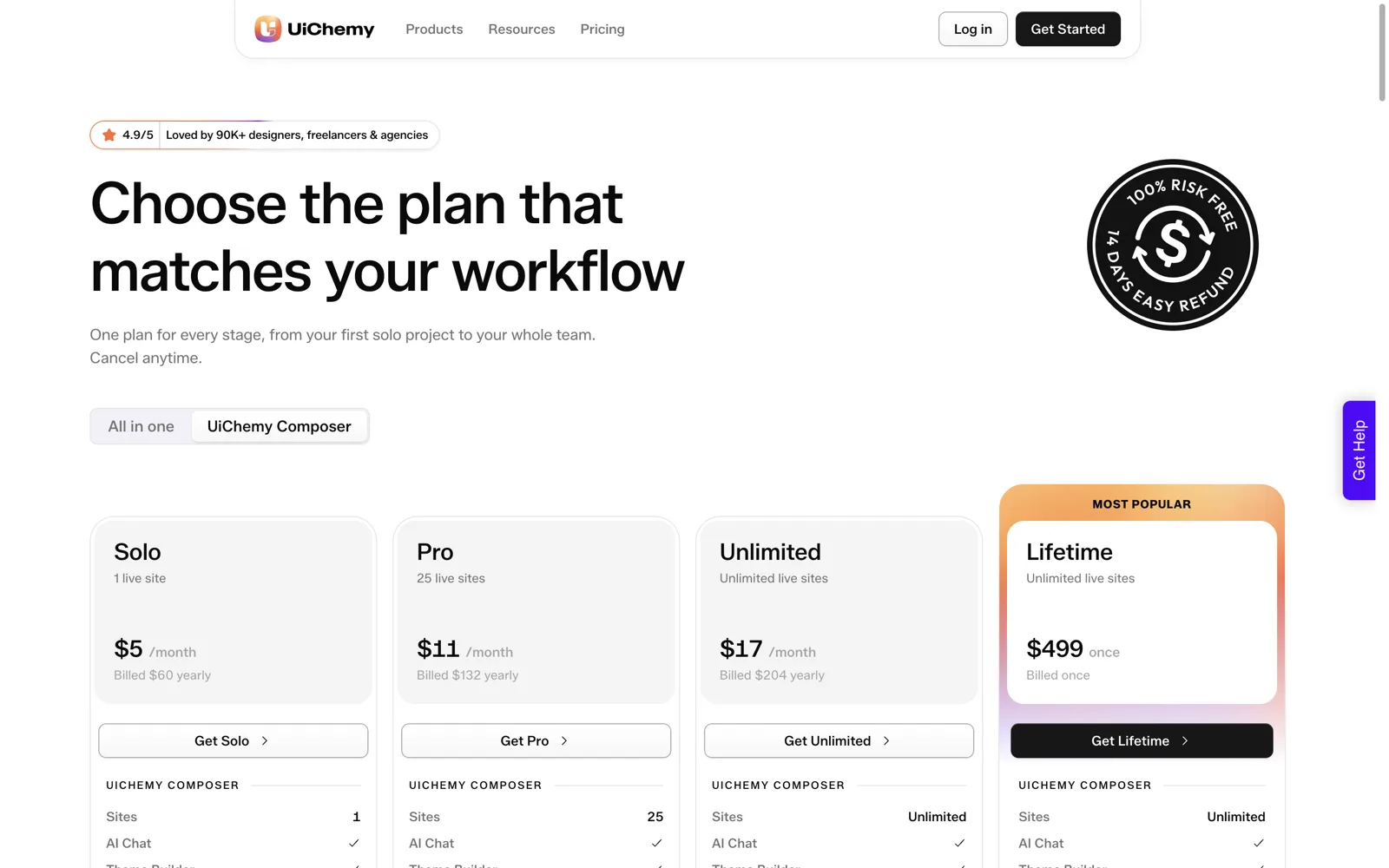
| Plan | Price | Live sites | Also listed |
|---|---|---|---|
| Solo | $5 a month | 1 | Entry plan |
| Pro | $11 a month | 25 | Multi-site use |
| Unlimited | $17 a month | Unlimited | White label, priority support |
| Lifetime | $499 once | Unlimited | One payment |
The pricing page shows a 14-day refund, and the monthly prices above are the ones displayed when billed yearly. I am deliberately listing only what the page states. For what the Composer product is, see writing real HTML, CSS and JavaScript inside Elementor with AI.
Solo: One Site
Solo is $5 a month for one live site. It suits a person with their own site, or a freelancer testing Composer on a first client project before committing to more.
The limit is the site count, and it is firm. If you take on a second client site, you need to move up. That is not a trap, it is simply how the plan is sized, so decide before you build on it whether a second site is likely this year.
Pro: Twenty-Five Sites
Pro is $11 a month for 25 live sites. For a freelancer with a handful of clients, or a small studio, this is the natural fit. Twenty-five is a lot of headroom for most small businesses.
Do the maths on usage. If you run eight client sites, you pay about $1.38 per site per month at the displayed rate. If you fill all 25, it is $0.44 per site. This is simple division, not a promise of savings. Your real cost depends on how many sites you actually keep live.
Unlimited: No Site Cap
Unlimited is $17 a month, with no cap on live sites, and the page lists white label and priority support. Agencies are the obvious audience. If you need white label, this is the plan whose card lists it, so check the card for the exact wording.
It also removes the question of counting. If you add and drop client sites through the year, having no cap means you never stop to ask whether you are at the limit. For how agencies organise many sites at once, see AI website builder for agencies.
Lifetime: Pay Once
Lifetime is $499 once, with unlimited live sites. There is no monthly fee. It appears on the pricing page as the highlighted plan.
Two honest cautions. First, a one-off payment is a larger commitment up front, so use the refund window to confirm Composer fits your workflow. Second, I am not going to describe what “lifetime” covers beyond what the pricing page states. Read the exact terms on the page before you pay. Do not rely on a blog post for contract details, including this one.
Monthly or Lifetime: The Break-Even Table
Lifetime only makes sense if you would pay monthly for long enough. Here is the arithmetic using the displayed monthly prices. Use it as a decision aid, not a forecast.
| If you would otherwise pay | Months until $499 is matched |
|---|---|
| Solo, $5 a month | About 100 months (8.3 years) |
| Pro, $11 a month | About 45 months (3.8 years) |
| Unlimited, $17 a month | About 29 months (2.4 years) |
The formula is price of Lifetime divided by the monthly price. Copy it into a spreadsheet if your numbers differ.
BREAK-EVEN CHECK

Lifetime price:            $499
Monthly plan I would use:  $____
Months to break even:      499 / monthly = ____

Questions:
[ ] Will I still use Composer in that many months?
[ ] Will I need more sites than this plan allows?
[ ] Do I need white label or priority support?
[ ] Have I used the refund window to test it first?
[ ] Is cash flow better with a small monthly fee?
For most solo users the break-even is years away, so monthly is the lower-risk start. For an agency that will clearly run Composer across many sites for years, Lifetime deserves a look. See the wider view of how a studio can price this into client work in how to quote AI-built websites for clients.
Questions to Settle Before You Buy
Pricing pages are easy to read and hard to apply. Before you pick a plan, answer these in writing. It takes five minutes and prevents the two common mistakes: buying too small and moving up a month later, or buying too large out of optimism.
- How many live sites will I have in twelve months? Count real ones, not hopes. A staging copy is not the same as a live site, so check how the page defines live sites if you rely on staging heavily.
- Is the site count mine or my client’s? If a client will own the site and the subscription, they may need their own plan. If you hold everything, your plan must cover all of it.
- Do I need white label? If yes, the card for Unlimited is the one that lists it. If you are not sure, you probably do not need it yet.
- Do I need priority support? Again, listed on Unlimited. Think about how costly a stuck project would be to you.
- What happens if I stop? Know your plan for the sites if you cancel. Keep a backup of anything you build, whichever plan you choose.
If you answer all five and the choice is still unclear, take the smaller plan and test it for the refund window. Moving up is simple. Moving down, or recovering from an overbuy, is not.
Which Plan to Pick
| Your situation | Start with |
|---|---|
| One site of my own | Solo |
| A few client sites, no rebranding | Pro |
| Many client sites, or I want white label | Unlimited |
| Long-term agency use, happy to pay up front | Lifetime, after testing |
| Not sure yet | Start small, move up when the site count demands it |
Two other points. The Composer docs also describe what the free and Pro plugin versions include, which is a separate topic from these billing plans: read Free vs Pro to see how they relate. And if you are weighing Composer against other ways to run custom code, Composer vs custom HTML widgets and code snippets covers that choice.
Agencies weighing plans against real client work can read AI workflows for WordPress agencies. For a comparison against Elementor’s own AI features, see Elementor AI: what it generates and what it cannot.
What Each Plan Costs Over Time
A monthly price hides the real commitment. The table below multiplies the displayed monthly prices over one, two and three years. It is plain arithmetic on the numbers listed above, and it assumes you pay that monthly figure every month for the whole period.
| Plan | 1 year | 2 years | 3 years |
|---|---|---|---|
| Solo, $5 a month | $60 | $120 | $180 |
| Pro, $11 a month | $132 | $264 | $396 |
| Unlimited, $17 a month | $204 | $408 | $612 |
| Lifetime, $499 once | $499 | $499 | $499 |
Read across the Unlimited row. After three years of monthly payments you have paid more than the Lifetime price. Read across the Solo row and you are still far below it. The right column to look at is the one that matches how long you honestly expect to use Composer.
If your own price differs because the page changed or you pay month to month, redo the sums with the figure you see at checkout. Prices can change, so this table is a method, not a quote.
Using the 14-Day Refund Window as a Test Plan
The pricing page shows a 14-day refund. The cheapest way to use it is to treat those two weeks as a structured test, not as time to browse. Read the refund terms on the page first, then plan the fortnight.
COMPOSER REFUND-WINDOW TEST
Day 1:  Pick the smallest plan that covers my first site.
        Write down what "worth it" means (one sentence).
Day 2-3: Build one real section on a staging site.
Day 4-6: Build a second section with different behaviour.
Day 7:  Review both with the AI code checklist.
Day 8-10: Hand one section to a colleague or client.
          Note every question they ask.
Day 11-12: Compare time spent with my usual method.
Day 13: Decide: keep, move up a plan, or request a refund.
Day 14: Act on the decision. Do not leave it to the last hour.
The point of the plan is a decision with evidence behind it. If you finish day twelve and cannot say whether Composer saved you time, that is useful information too, and the refund exists for that case.
Keep the test on staging and keep a backup of anything you build, whatever you decide. For the review step on day seven, use the checklist in how to evaluate any AI website builder: 12 questions, which also helps you write that one-sentence definition of “worth it”.
Mistakes I Would Avoid When Choosing a Plan
These are the choices that tend to cost people money or time. None are dramatic, but each is avoidable.
Buying for sites you do not have yet. A plan sized for twenty-five sites when you have two is paying for optimism. You can move up when the third and fourth clients arrive.
Forgetting that the site count covers every live site you manage. If a client’s site and your own portfolio site both run Composer, both count.
Choosing Lifetime to avoid thinking. A one-off payment feels final and tidy, but it removes the chance to adjust. Use the refund window, then decide.
Mixing up the two pricing models. The Composer plans on this page are priced by site count. The all-in-one plans use a monthly credit balance across products. If you plan to use both, compare them side by side before you buy. If you are unsure UiChemy suits your project at all, read when not to use UiChemy first.
Ignoring your own selling price. If you resell sites, the plan is a cost of delivery and belongs inside your quote. The cost per site falls as you add sites, which is the main argument for the higher tiers once you have the clients to fill them.
FAQ
How much does UiChemy Composer cost?
Solo is $5 a month for 1 site, Pro is $11 a month for 25 sites, Unlimited is $17 a month for unlimited sites with white label and priority support, and Lifetime is $499 once. These were the prices on the pricing page on 2026-10-01, so confirm them there before buying.
Is there a refund?
The pricing page shows a 14-day refund. Use that window to test Composer on a real project before you decide, especially if you are considering the one-off Lifetime payment. Read the refund terms on the page itself for the exact conditions.
Which Composer plan is best for agencies?
Agencies with many client sites usually look at Unlimited, since it has no site cap and lists white label and priority support. Pro at 25 sites can be enough for smaller studios. Count your live client sites, then pick the plan that covers them with room to grow.
Is Lifetime worth it?
It depends on how long you would pay monthly. At the displayed prices, Lifetime matches Unlimited after about 29 months and Pro after about 45. If you expect to use Composer on many sites for years, it can pay off. If you are unsure, start monthly.
Are Composer plans the same as the credit plans?
No. The all-in-one plans use a monthly credit balance across UiChemy products, while Composer plans are priced by site count. The two are listed in separate tabs on the pricing page. Our pricing explainer covers the credit side in detail.
If you want to see the plans for yourself, you can Get Started and check the current prices before choosing.
Every feature named in this post is listed by product: all UiChemy features, UiChemy Composer features.