
UiChemy Pricing Explained: Credits, Plans and What One Site Costs
 Sagar Patel

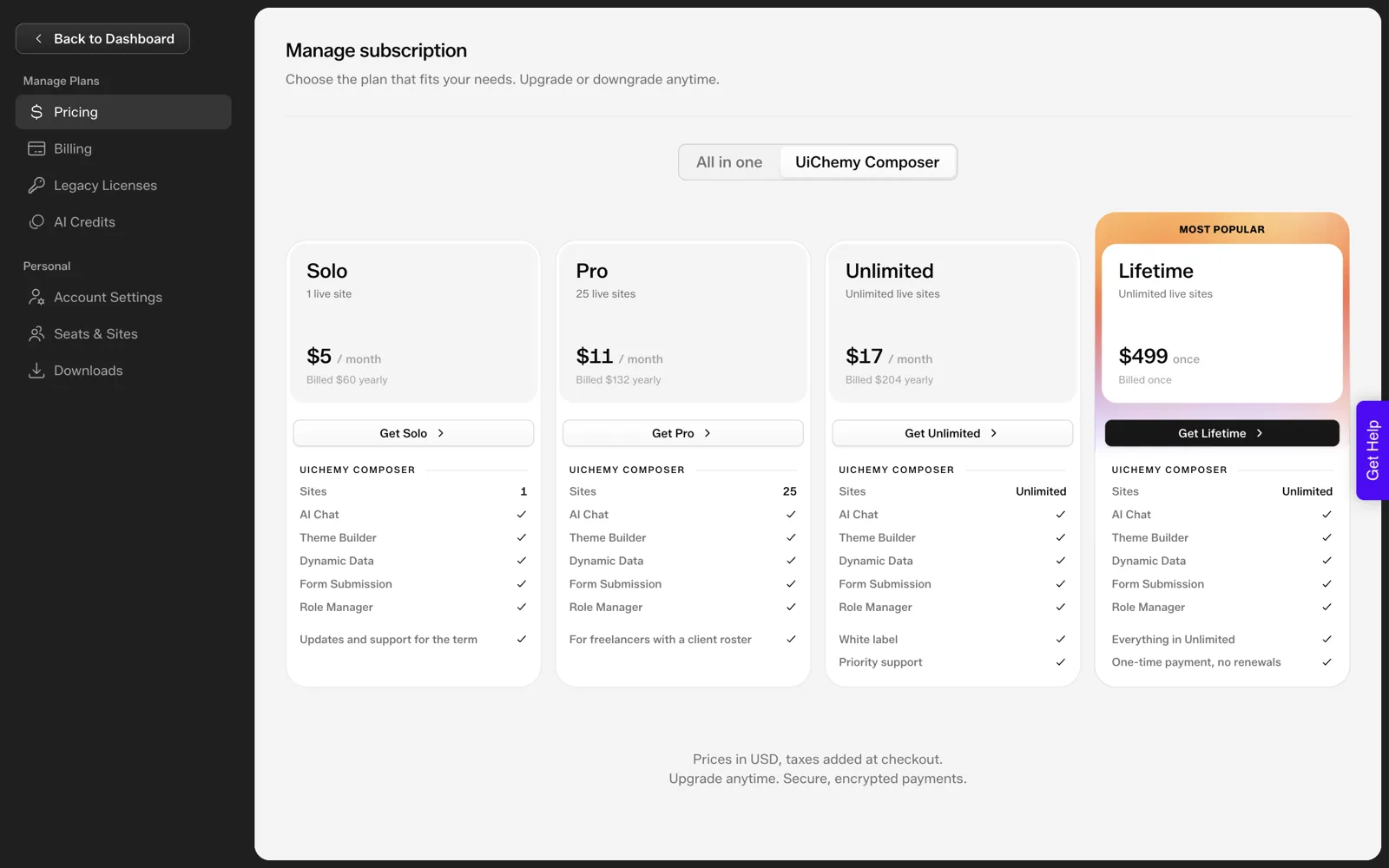
UiChemy has two price lists. The all-in-one plans are Designer at $11 a month with 4,000 credits, Studio at $35 with 12,000 and Agency at $59 with 20,000, cheaper when billed annually. Composer has Solo at $5, Pro at $11, Unlimited at $17 and a $499 Lifetime plan.
Prices below come from the public pricing screens and documentation, captured on 2026-10-01. Plans change, so check the pricing plans documentation before buying. For how credits behave, the AI credits page is the reference. For other tools, see is Figma Make free and free AI website builders and where the free ends.
Two Price Lists
UiChemy is four products: Composer, Figma to WordPress, AI to WordPress and AI Website Creator. Their pricing falls into two groups, and mixing them up is the most common misreading.
- All-in-one plans are credit-based and cover Figma to WordPress, AI to WordPress and AI Website Creator from one balance.
- Composer plans are priced by how many sites you use Composer on, with a lifetime option.
Figure out which product you need first, then read only that table.
All-in-One Plans
| Plan | Monthly price | Per month, billed annually | Credits a month | Figma seats |
|---|---|---|---|---|
| Designer | $11 | $8 ($96 a year) | 4,000 | 2 |
| Studio | $35 | $26 ($312 a year) | 12,000 | 10 |
| Agency | $59 | $44 ($528 a year) | 20,000 | 50 |
Annual billing saves about 25 percent. Export to Elementor is included. Export to Gutenberg is included too. Credits refresh monthly, top-ups are available and one balance covers every product on the plan. There is a 14-day refund, and you can try UiChemy without entering a card.
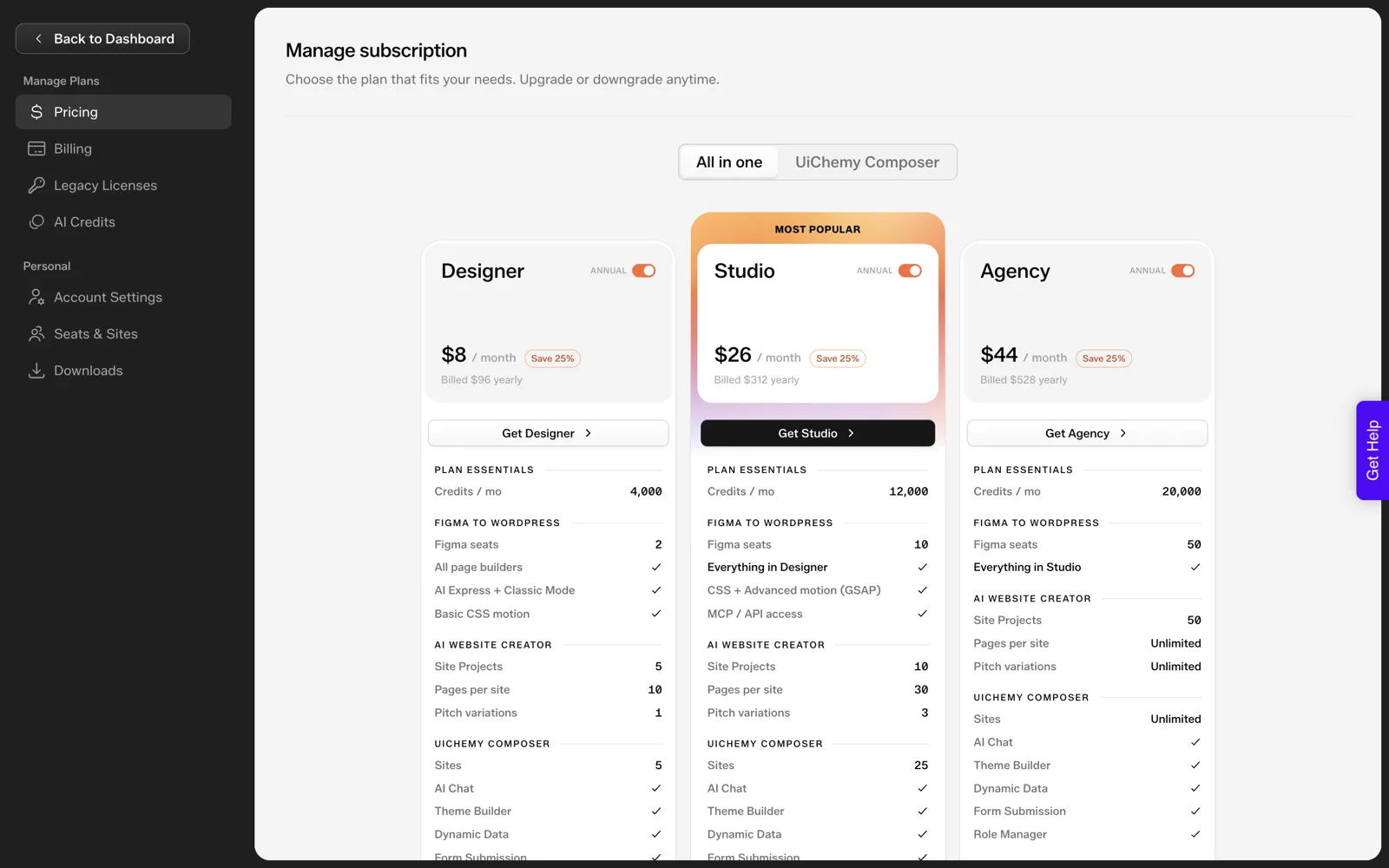
The AI Website Creator is shown as “Soon” on the pricing page, so treat it as early access and confirm availability for your account.
Composer Plans
| Plan | Price | Sites | Also includes |
|---|---|---|---|
| Solo | $5 a month ($60 billed yearly) | 1 | Core Composer |
| Pro | $11 a month | 25 | More sites |
| Unlimited | $17 a month | Unlimited | White label, priority support |
| Lifetime | $499 once | See plan page | One payment |
For the detail on what differs between tiers, see UiChemy Composer plans explained and the free versus pro documentation.
How Credits Work
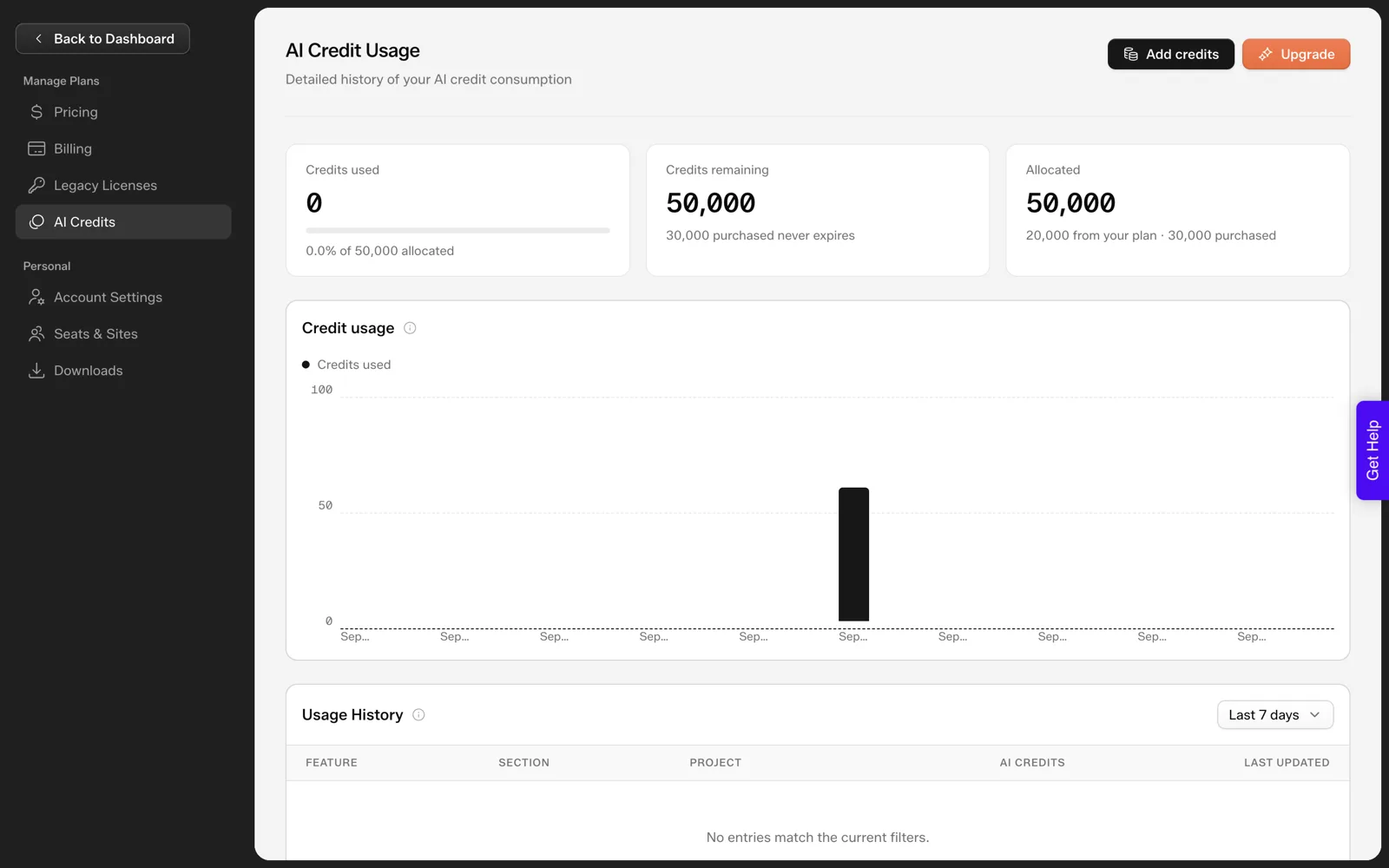
A credit is the unit UiChemy uses for AI work. Generating a sitemap, designing a page or converting a Figma file spends credits from your monthly balance. Credits are shared across AI Website Creator, AI Express Mode and Classic Mode, according to the documentation FAQ, so you do not buy separate allowances per feature.
- The balance refreshes each month.
- If you run out, you can buy a top-up.
- One balance covers every product on the plan.
The understanding credits page explains how this works in more detail.
What One Site Cost in Our Test
On 2026-10-01 we ran one prompt: “A landing page for a boutique coffee roaster with hero, three product cards, testimonials and a newsletter signup”. Creating the sitemap and generating the Home page used about 64 credits. That is one run on one prompt, so treat it as a single data point, not an average.
The test covers only the sitemap and the Home page. We did not generate the other pages, so we do not have a full-site number. The post on how many credits an AI-built website costs goes through the measured test in detail.
As a rough sense of scale, 64 credits against a 4,000-credit Designer allowance is a small fraction, though other pages, edits and regeneration will add to the total.
What One Site Costs You Beyond Credits
Credits are only part of a site’s cost. A client project also carries hosting, a domain, any premium plugins, and your own time to review and hand it over. UiChemy’s plan covers the AI work and the exports. It does not cover the rest, so add those lines yourself when you budget.
A simple way to budget is a table with one row per cost and one column for monthly and one-off amounts. Fill the UiChemy row from the plan you chose, then add hosting and domain from your own provider.
The total tells you what a site costs to deliver, which is the number your client quote has to cover. The same approach works for any client quote.
Because the credit balance is shared and refreshes monthly, plan your heavy generation work for early in the month if you are close to your allowance. A top-up is available if you run short, which is a better outcome than rationing a deadline project.
Annual billing lowers the monthly price, though it commits you for the year, so start monthly if you are still testing whether UiChemy fits your workflow. The 14-day refund gives some cushion either way.
A budget table to copy
| Cost line | Monthly | One-off | Where the number comes from |
|---|---|---|---|
| UiChemy plan | Your plan price | None | The pricing screen |
| Top-up credits | If needed | None | Your balance after a trial project |
| Hosting | Your host | None | Your provider |
| Domain | None | Yearly renewal | Your registrar |
| Premium plugins | If any | If any | Each vendor |
| Your review and handoff time | None | Hours per project | Your own timesheet |
Fill the table for your last real project before you pick a plan. If the plan line is the smallest one on the sheet, the plan tier matters less than the quality of your review. If it is the largest, look at the seat and credit numbers closely, since a higher tier may cost less per credit than repeated top-ups.
Choosing a Plan
Use these questions to pick.
| If you… | Look at |
|---|---|
| Build one or two sites a month from prompts or Figma | Designer |
| Work with several clients and need more seats | Studio |
| Run an agency with a team | Agency |
| Only want custom sections on one site | Composer Solo |
| Manage many client sites with Composer | Composer Pro or Unlimited |
| Prefer to pay once | Composer Lifetime, after reading the plan page |
If you are comparing cost with the alternatives, AI website generator vs hiring a freelancer sets out the trade-offs, and how to quote AI-built websites for clients covers pricing your own work. Start on the lowest plan that fits, since you can compare real usage after a month.
A Worked Example: Measure Before You Pick a Plan
We have one measured number: about 64 credits for a sitemap plus a generated Home page. That is not enough to price a full site, so the honest method is a small pilot. Here is how I would run it.
- Start on a trial with no card. UiChemy lets you try it without entering one.
- Pick a real project and write its page list. Use a client you will actually build, so the numbers mean something.
- Generate the sitemap and one page. Note your balance before and after.
- Generate a second and third page. Pages differ in length, so one measurement is a weak guide.
- Add your edits. Regenerating a section or changing a page spends credits too, so include a realistic amount of tweaking.
- Do the arithmetic. Use the formula below to turn the measurements into a monthly credit need.
CREDIT PLANNING FORMULA

Average credits per generated page (from pilot):   A = ______
Pages per site:                                    P = ______
Allowance for edits and regeneration (your guess): E = ______
Credits per site:                                  S = A x P + E
Sites per month:                                   N = ______
Credits needed per month:                          M = S x N

Compare M with the monthly credits of the plan you are considering.
Round up. If M is close to the limit, price in a top-up.
Notice that every number comes from your own pilot except the allowance, which is a judgement. That is deliberate. A figure from our coffee roaster run says little about your projects, so measure yours and keep the result with your project notes.
Common Pricing Misreadings
Most pricing confusion comes from a few repeating assumptions. This table lists them so you can check yourself before you pay.
| Assumption | What the pricing screens say |
|---|---|
| “There is one UiChemy price list.” | There are two: the all-in-one plans and the Composer plans. |
| “The annual price is what I pay each month.” | The annual figure is a per-month price billed yearly, so you pay the full year up front. |
| “Gutenberg export is included.” | True now. Export to Gutenberg is included on every plan, alongside Elementor export. |
| “AI Website Creator is generally available.” | It is shown as “Soon” on the pricing page, so treat it as early access. |
| “Each feature has its own credits.” | One balance covers every product on an all-in-one plan. |
| “Unused credits will pile up.” | Credits refresh monthly. We have not verified a carry-over rule, so check the credits documentation. |
| “The refund window is open-ended.” | The refund window is 14 days. |
If a number matters to a decision, read it again on the live pricing screen. Plans change, and the documentation is updated before a blog post is. Our post on when not to use UiChemy is also worth reading before you commit, since a plan only pays off when the tool fits the job.
Questions to Ask Before You Pay
Run through this list once, then pick a plan. It takes a few minutes and prevents most regrets.
BEFORE YOU PAY: UICHEMY PLAN CHECK

Product
[ ] Which products do I need: Composer, Figma to WordPress,
    AI to WordPress, AI Website Creator?
[ ] Which price list do those sit on: all-in-one or Composer?
[ ] Is any feature I need marked "Soon"?

Volume
[ ] How many sites a month, and how many pages on each?
[ ] Credit need from my pilot: M = ______ per month
[ ] How many Figma seats do I need?

Money
[ ] Monthly or annual? Am I sure enough to pay a year up front?
[ ] Do I know the refund window (14 days) and the date it ends?
[ ] Have I added hosting, domain and my review time to the quote?

Fit
[ ] Have I read when UiChemy is the wrong tool for this job?
[ ] Did I try it without a card on a real project first?
If you quote clients, bring the same numbers into your proposal. The 12 questions for evaluating any AI website builder overlap with this list and add questions about export and ownership.
FAQ
How much does UiChemy cost?
The all-in-one plans are Designer at $11 a month, Studio at $35 and Agency at $59, with lower per-month prices when billed annually. Composer plans are Solo at $5, Pro at $11, Unlimited at $17 and a $499 Lifetime option. Check the pricing page before buying.
Can I try UiChemy for free?
You can try it without entering a card, and there is a 14-day refund on paid plans. The documentation describes what is included on free and paid tiers, and the details can change, so read the current pricing documentation before you rely on any free allowance for client work.
Do credits roll over?
The pricing page says credits refresh monthly and top-ups are available. We have not verified whether unused credits carry over, so check the AI credits documentation for the current rule before you plan around leftover balance. Until then, assume each month starts fresh and top up if you run short.
How many credits does one website use?
In one test run, a sitemap plus a generated Home page used about 64 credits. A full site depends on the number of pages, edits and regenerations, and we have no full-site figure. Run a small project first and watch your balance.
Is Export to Gutenberg included?
Yes. Export to Gutenberg is included on every all-in-one plan, alongside Export to Elementor. Bricks export is still marked “Soon”, so do not buy a plan expecting it.
To see the plans in the app and try it without a card, you can Get Started.
Every feature named in this post is listed by product: all UiChemy features, UiChemy Composer features.