How Many Credits Does an AI-Built Website Cost? One Measured Test
 Sagar Patel
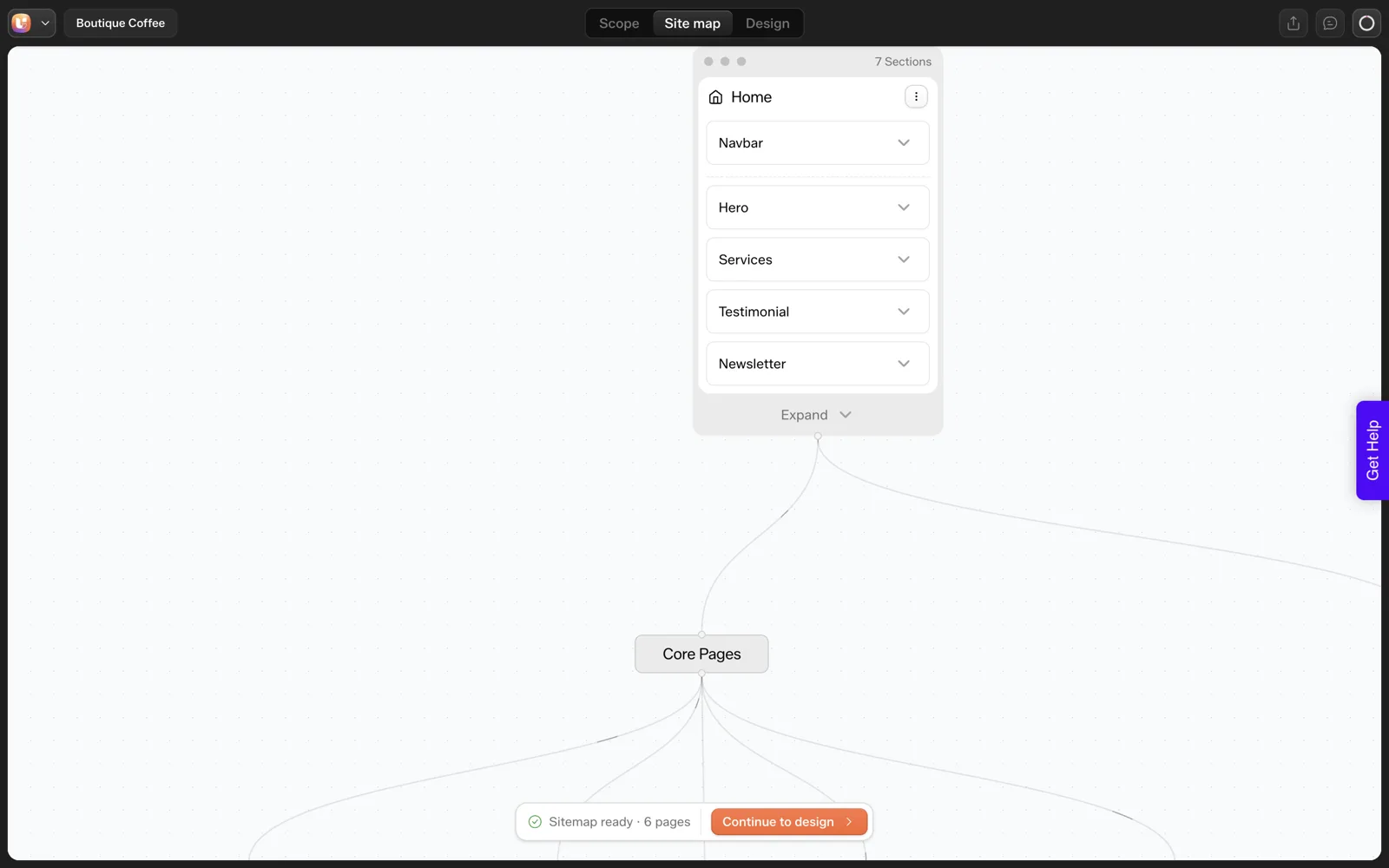
In one UiChemy test on 2026-10-01, a sitemap plus a Home page for a coffee roaster used about 64 credits, taking the balance from 50,000 to 49,936.1. The monthly plans include 4,000, 12,000 or 20,000 credits. We did not measure the other pages, so a full-site cost remains unmeasured.
Pricing pages tell you what a plan includes. They rarely tell you what one real action burns. I wanted one measured data point, so I watched the balance during our coffee roaster test and wrote the numbers down. This post separates what I measured from what I did not.
What Did We Actually Measure?
We used one prompt: “A landing page for a boutique coffee roaster with hero, three product cards, testimonials and a newsletter signup”. The tool created a project, drafted a six-page sitemap and generated the Home page. Before the run the balance read 50,000 credits. After the sitemap and Home page it read 49,936.1.
That gives about 64 credits for those two steps combined. We did not isolate the sitemap from the Home page, so I cannot split the 64 between them. We also did not generate the other five pages, so there is no number for a full site.
| Item | Measured? | Value |
|---|---|---|
| Sitemap plus Home page | Yes, one run | About 64 credits |
| Sitemap alone | No | Unmeasured |
| Each of the other 5 pages | No | Unmeasured |
| Edits, text rewrites, image tools | No | Unmeasured |
| Export to WordPress | No | Unmeasured |
Treat the 64 as a single observation. A different prompt, a longer sitemap or a different day could land elsewhere.
What Do the Plans Include?
These are the all-in-one plans as listed on the pricing page when we checked on 2026-10-01. Prices are in US dollars, with the annual figure shown per month. Annual billing saves 25%.
| Plan | Monthly | Annual, per month | Credits each month |
|---|---|---|---|
| Designer | $11 | $8 | 4,000 |
| Studio | $35 | $26 | 12,000 |
| Agency | $59 | $44 | 20,000 |
The pricing page also states that export to Elementor and Gutenberg is included, Bricks is marked “Soon”, there is a 14-day refund, and you can try it with no card. Credits refresh monthly, top-ups are available, and one balance covers every product.
If you want the plan-by-plan reading rather than the arithmetic, our guide to UiChemy pricing, credits and plans goes through each tier.
How Does 64 Credits Compare to a Plan?
Only arithmetic is safe here. Sixty-four credits is 1.6 percent of the Designer allowance of 4,000, about 0.53 percent of Studio’s 12,000 and about 0.32 percent of Agency’s 20,000. That tells you the scale of one early step relative to a month.
It does not tell you how many full sites a month buys. Later pages, edits and regenerations each draw from the same balance, and we did not measure them. If someone gives you a firm “sites per month” number without showing a run, ask for the run.
What Changes the Cost?
The docs give a general picture for conversions on the credits page. Full Setup costs more than Page Only, richer motion tiers cost more than simpler ones, and a long multi-section page costs more than a short one.
Those statements come from the conversion flow, and I would expect page length and scope to matter for AI-built sites too, but our test only covers a landing-page prompt.
In practice, these habits keep spend predictable:
- Trim the sitemap first. A six-page sitemap for a one-page request means five pages you may never generate. Our test drafted a separate Newsletter Signup page that many people would fold into the footer.
- Fix counts and labels before regenerating. We asked for three cards and got five labelled “Service”. Editing beats regenerating if regenerating costs credits, and the list of common AI misses shows where to catch them.
- Check the balance after each stage. It costs nothing and builds your own per-step table.
Cost questions are easier to answer from a review step than from a pricing page. The sitemap review we describe in this screen walkthrough is the cheapest place to remove pages.
Where Do You See Your Balance?
The docs list four places: the Figma plugin header, your account at app.uichemy.com (the authoritative balance), the WordPress plugin under the account menu where credits appear as AI Tokens, and in AI Website Creator by hovering the circular credits icon in the Design Editor. The Design Editor is the one you will use during a build.
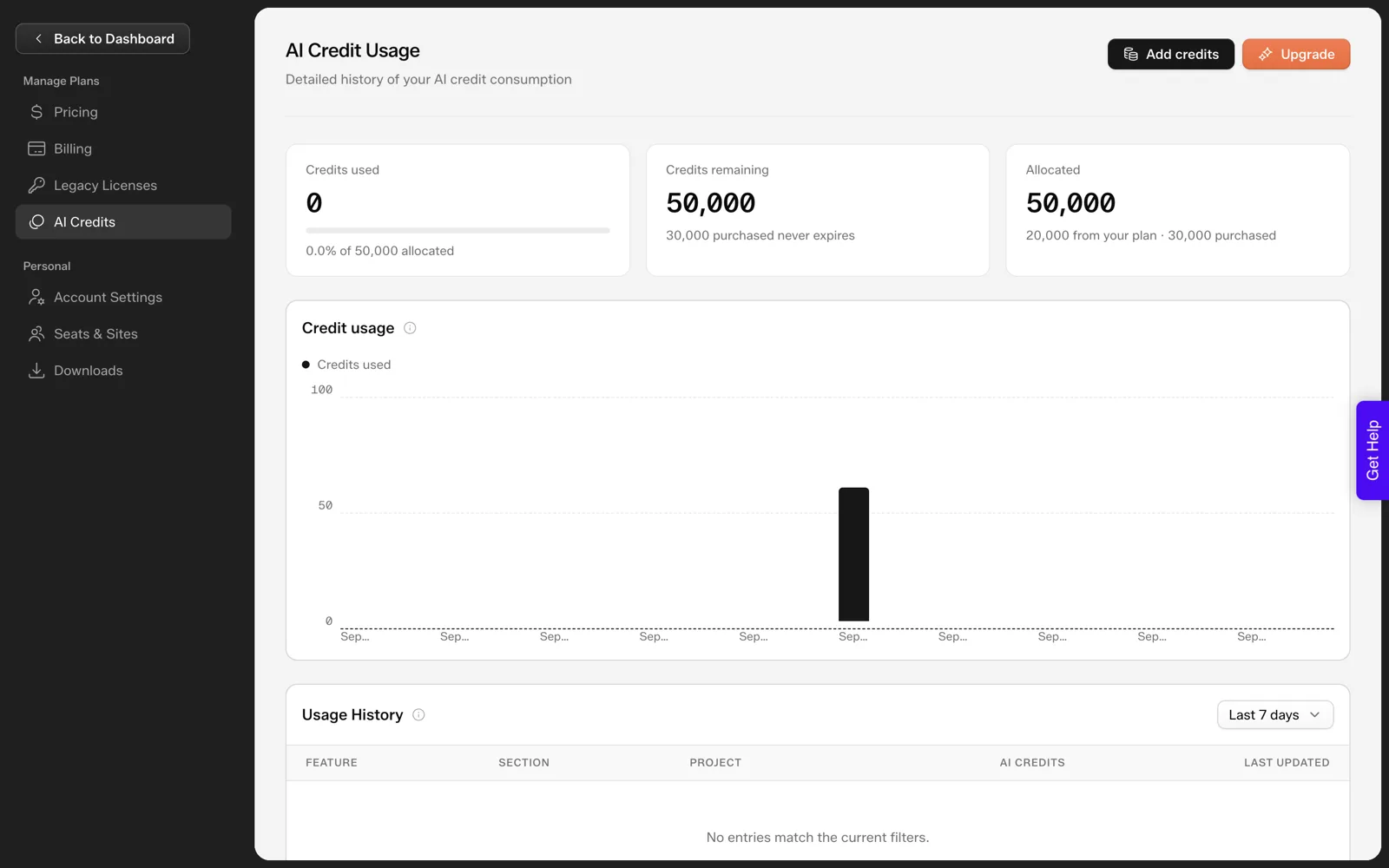
That history table is the useful part for budgeting. It has columns for feature, section, project and AI credits, so after a run you can see which step used what, instead of subtracting balances by hand like I did.
For how credits work across products, read How Do UiChemy Credits Work? in the docs. If you are weighing a free tier first, where the free ends in AI website builders sets expectations across the category.
How Do You Compare Cost Across Builders Fairly?
Subscription price is the easy number and the least useful one. Three questions give a fairer comparison between any two AI website tools.
- What is the unit? Credits, pages, projects or seats. A tool that charges per site and a tool that charges per credit cannot be compared until you convert both to cost per finished site.
- What happens after the first draft? Edits, regenerations and exports may draw from the same balance or from a different one. Ask what each costs.
- What do you pay to leave? A cheap draft that ends in a locked site costs more later. Our ownership and portability explainer covers that side.
For a comparison point from another tool, see what a real Figma Make project costs in credits. Our own answer to the first question is a single credit balance shared across products, with the allowance set by plan. Our answer to the other two is only partly measured, which is why the table above has so many “unmeasured” cells.
A Credit Budget Worksheet
Run one project and fill this in. After three projects you have your own averages, which beat any figure from a blog post, including ours.
CREDIT BUDGET WORKSHEET

Project name:
Date:
Plan and monthly allowance:

Balance at start:
Balance after project created:
Balance after sitemap:
Balance after first page:
Balance after each additional page (one line each):
Balance after edits and rewrites:
Balance after export:

Total credits used:
Pages generated:
Credits per page (total divided by pages):

Share of monthly allowance used (total divided by allowance):
Regenerations I could have avoided by editing instead:

Next project forecast = pages x credits per page + 20 percent buffer
The test site behind these numbers is walked through in the AI-built website for a local coffee roaster.
Does the Export Cost Credits?
The table at the top of this post lists export as unmeasured. We have since checked it on a stage site, so here is that one reading, with the same caveat as everything else: it is a single observation.
Before we clicked Import in the WordPress plugin, the project header read 49,936.1 credits left. After the import finished, it read the same. The AI Credits page showed 63.9 credits used against 50,000 allocated, and the usage history entries were all stamped earlier, when the project was generated.
So in our run, importing a page into WordPress used no credits. The spend came from generating the sitemap and the Home page on uichemy.com, and the import into Elementor added nothing to it.
That reading covers one page imported once. We did not test re-imports or repeated exports, so we make no claim about them. If you plan to re-export after design changes, check the usage page after your first re-export and write the result in your worksheet. Our afternoon timing log has a line for each export step.
How Do You Forecast a Whole Site From One Test?
You cannot forecast from a single number, and I will not give you one. What you can do is build a forecast that improves with every project. Use this table and fill the blanks from your own balance readings.
| Line | How to get it | Your value |
|---|---|---|
| Credits for sitemap plus first page | Balance before minus balance after | |
| Credits for each further page | Balance before minus after, per page | |
| Credits for edits and rewrites | Balance before minus after your editing session | |
| Credits for export | Balance before minus after (we saw none in one run) | |
| Total for one finished project | Sum of the lines above | |
| Buffer for revisions | Add 20 percent as a starting guess, then adjust | |
| Share of the monthly allowance | Total divided by your plan credits |
The buffer line is a planning habit I use, not a UiChemy rule, so change it once you have data. After three projects of the same type, replace the guess with your own average.
If you are an agency, keep one copy of this table per client type. A five-page brochure site and a ten-page service site will land at different totals, and you want to know which is which before you quote. Our guide to quoting AI-built websites shows how to turn a total into a price.
What Should You Do When the Balance Runs Low Mid-Project?
It is better to decide this before it happens. The pricing page states that credits refresh monthly and that top-ups are available, which gives you three options.
- Top up. Right when a deadline matters more than the cost. Record the top-up in your worksheet so the project total stays honest.
- Wait for the refresh. Right when the project can pause. Check the date your allowance refreshes before you promise a delivery day.
- Cut scope. Right when pages are not essential. Drop a page from the sitemap, and the credits you would have spent stay in the balance.
Whichever you choose, stop regenerating. Regeneration is the easiest way to burn credits without moving the project forward, and we have not measured what it costs. Edit the page you have, and only regenerate when the structure itself is wrong.
A rule I use for agency projects
Check the balance before you start a project and make sure it covers the forecast plus the buffer. If it does not, tell the client before you begin, not halfway through. That one conversation is easier at the start.
For the plan lineup and what each tier includes, see our AI website builder for agencies guide, which covers seats and sites as well.
FAQ
How many credits does one page cost?
We measured about 64 credits for a sitemap plus a Home page in one run, and did not measure pages individually. Cost depends on the prompt and scope. Use the worksheet above to record your own numbers across a few projects.
Do the credits expire?
The pricing page says credits refresh monthly and that top-ups are available. For exact rules on unused credits, read the credits pages in the docs, since we have not tested rollover and will not guess.
Is one balance shared across products?
Yes. The pricing page says one balance covers every product, and the docs say AI Website Creator, AI Express Mode and Classic Mode share one credits balance. That means experiments in one product reduce what is available in another.
Which plan should I pick for AI website work?
That depends on how many projects you run and how much you regenerate. Start from your own worksheet numbers. The plans differ by monthly credits, at 4,000, 12,000 and 20,000, so the right tier is the one your measured usage fits inside with a buffer.
If you want to measure your own first project, you can Get Started without a card and watch the balance as you go.
Every feature named in this post is listed by product: all UiChemy features, AI to WordPress features.