Free AI Website Builders and Where The Free Ends
 Sagar Patel
Type a sentence, get a page, pay nothing. That part is true, and it works today on the free tier of more than one serious tool.
What decides whether a free AI website builder is any use to you is what happens on the fifth attempt, and every vendor answers that question with a number rather than a policy.
Those numbers moved again this year. Figma’s Starter plan now carries a hard daily ceiling on AI credits as well as a monthly one, which changes how a free plan behaves on a busy afternoon.
Every figure below was read off the vendors’ own pricing and help pages on 8 September 2026, not off a roundup.
This is a map of where each free tier stops and what the first paid step buys. Where a limit is a credit count, the count is quoted.
Where a feature is missing from a free plan, the vendor’s own documentation is the source.
What The Free Tier Actually Contains
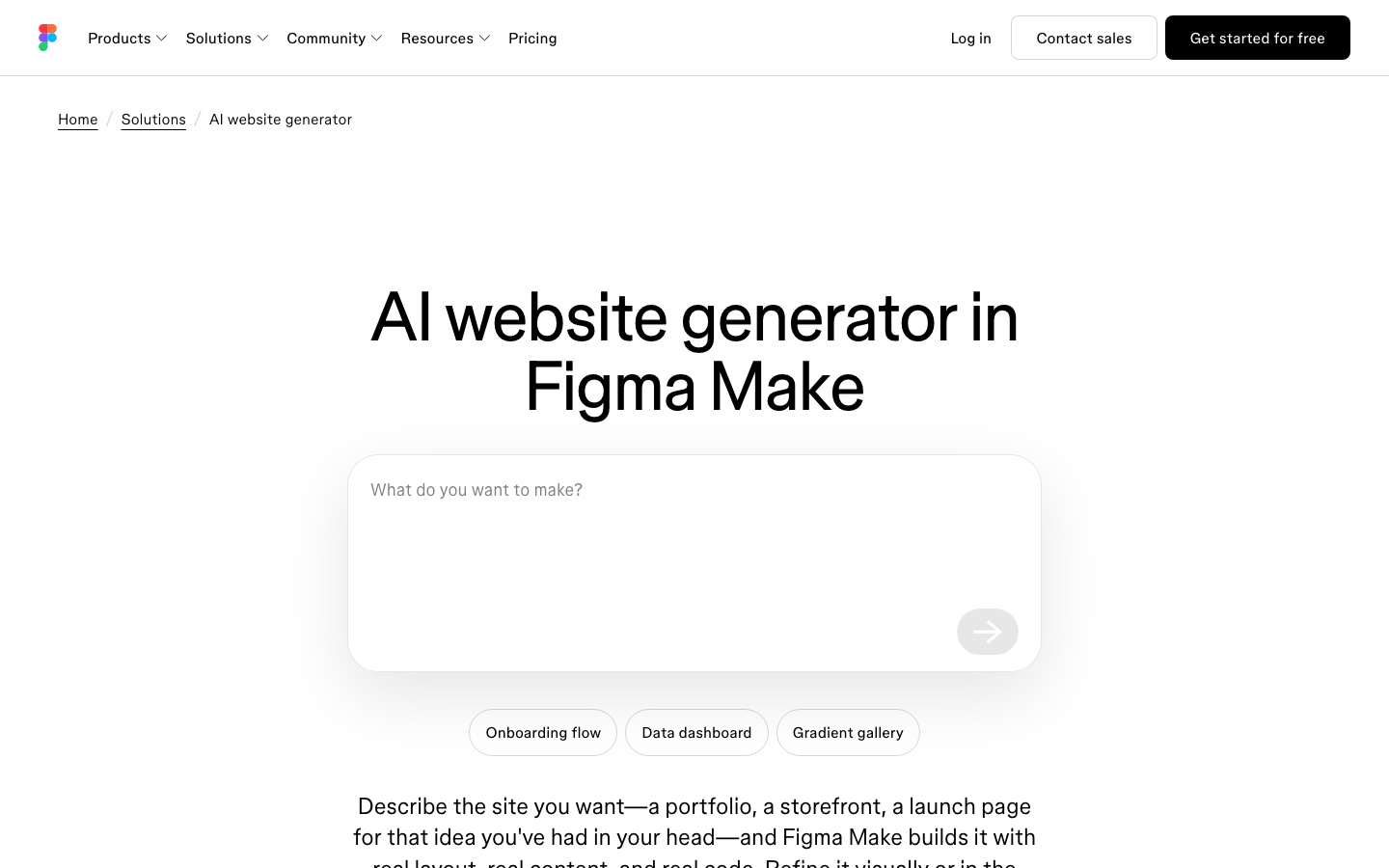
Start with Figma, because Figma Make is the free AI website builder most designers already have an account for. On the Starter plan you can prompt Figma Make and get a working, responsive page back with real code behind it.
Figma’s own AI website generator page says it plainly: you can start with Figma Make on the free Starter plan, and how many AI features you get depends on your credit allowance.
The Starter plan is more generous than its reputation. Unlimited drafts, unlimited viewers on anything you share, and no file cap on Figma Make itself.
The ceilings that matter sit somewhere else entirely.
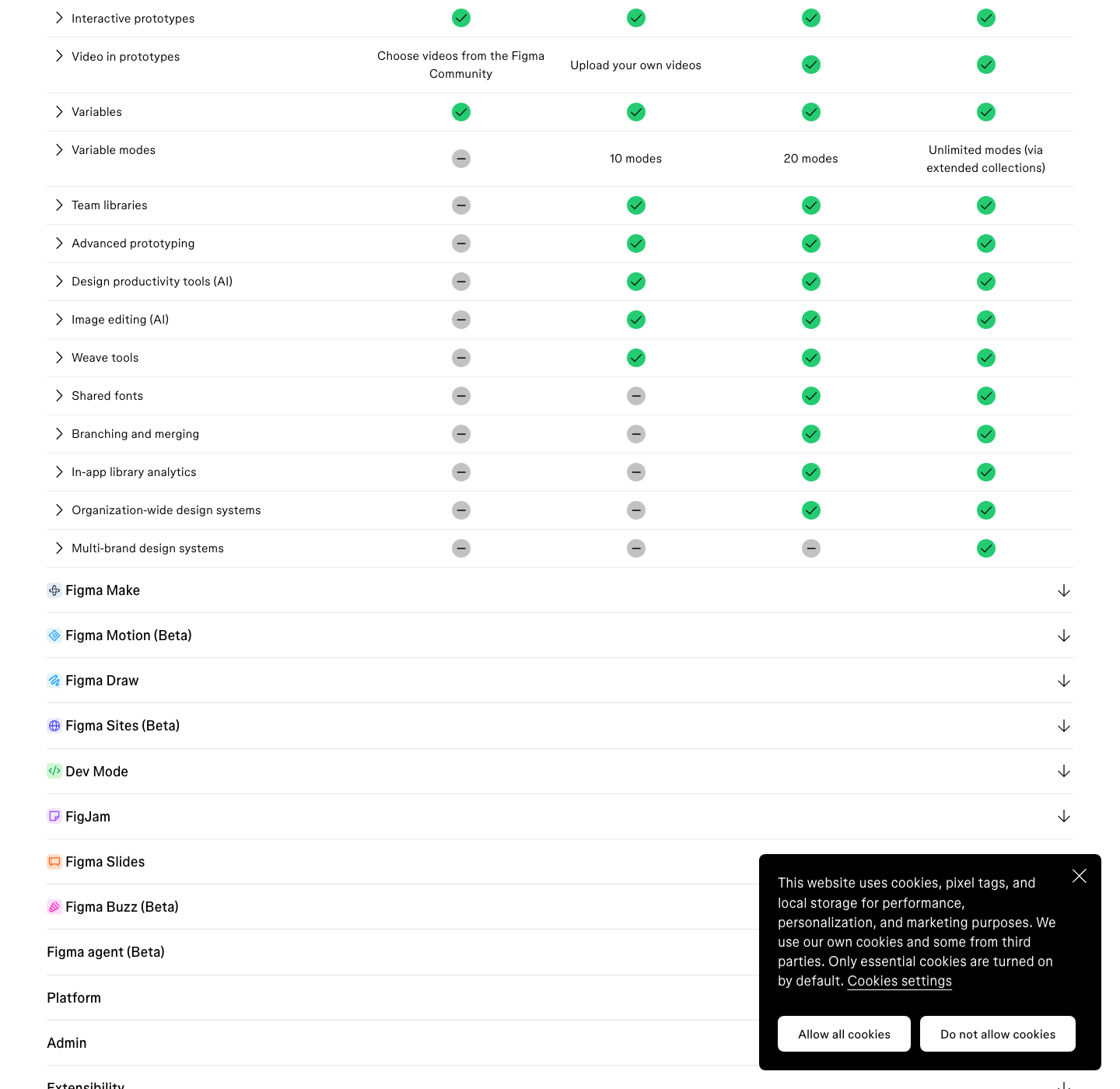
| What you get | Starter, free | Professional, $16 per full seat |
|---|---|---|
| Figma Design and Figma Sites files in the folder | 3 | Unlimited |
| FigJam files and Figma Slides files in the folder | 3 each | Unlimited |
| Drafts | Unlimited | Unlimited |
| Folders | 1 | Unlimited |
| Version history | 30 days | Unlimited |
| Dev Mode | Not available | Included |
| Team libraries | No | Yes |
| AI image tools | No | Yes |
| Publishing in Figma Sites | No | Yes |
| AI credits per month | 500, capped at 150 a day | 3,000 |
Two of those rows do most of the damage for web work. Dev Mode is absent, so the handoff view carrying measurements, variables and code properties is not there.
And Figma Sites will not publish from a Starter plan, which means the site you just generated stays inside Figma.
The Credit Meter Is The Real Boundary
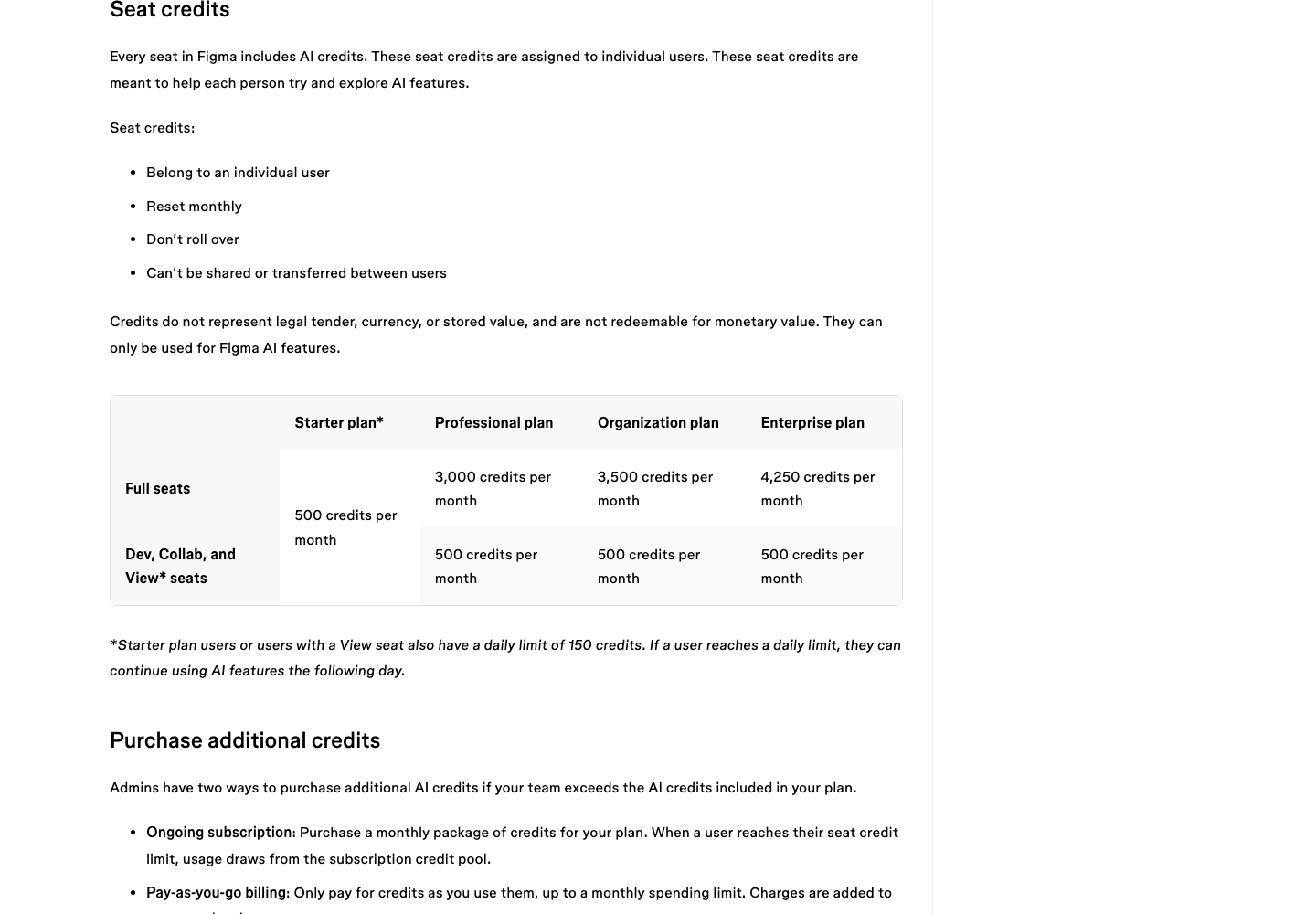
Figma AI runs on one shared credit pool across every AI feature. Every seat on every plan gets an allowance, it resets monthly, it does not roll over, and it cannot be shared or transferred to another user.
Undoing an AI action reverts your file but does not refund the credits, because the work was already processed.
| Plan | Full seat, credits per month | Dev, Collab and View seats |
|---|---|---|
| Starter, free | 500, with a 150 a day cap | 500, with a 150 a day cap |
| Professional | 3,000 | 500 |
| Organization | 3,500 | 500 |
| Enterprise | 4,250 | 500 |
The daily cap is the part most people miss. On Starter you can spend 150 credits in an afternoon and then stop, even though your monthly balance still shows room.
That is a different experience from running out once at the end of the month, and it is the single biggest reason a free plan feels slower than it looks on paper.
A Worked Example on 500 Credits
Abstract allowances are useless. Here is what individual actions cost, taken from the same help article, so you can do the arithmetic against a 500-credit month before you commit an afternoon to it.
| Action | Credits |
|---|---|
| AI search, rename layers, summarise stickies | Free |
| Remove background | 1 to 5 per image |
| Vectorize image | 2 to 5 per image |
| Boost image resolution, erase or isolate an object | 5 to 10 per image |
| Add interactions | 20 per use |
| Figma Make: change the font | About 30 or more |
| Figma Make: make an attached design interactive | About 75 or more |
| Figma Make: generate an app from scratch | About 100 or more |
Take the last row at face value. A from-scratch generation costs about 100 credits, so a Starter month is roughly five of them if you accept the first output every time.
Nobody accepts the first output.
Add two font changes and one interactivity pass to a single generation and you have spent about 235 credits on one page. That is not five attempts a month, it is two, and the second one leaves you 30 credits short of a third.
This is the honest shape of a free tier: enough to evaluate the tool properly, not enough to run a week of client work through it.
Three things push the number up rather than down. Longer prompts trigger more actions, attached files and design libraries add context the model has to process, and a long chat history is itself context.
Plan mode is charged separately from the build that follows it, though Figma argues a well-scoped plan pays for itself in fewer correction prompts.
What The Free Plan Blocks Outright
Some limits are not a meter running down, they are a door that does not open. From Figma’s Starter plan overview, these are absent on the free plan rather than rationed:
- Dev Mode, in full. Free viewers still get basic inspection, measurements and copyable CSS, but not the Dev Mode workspace.
- Publishing in Figma Sites. You can design a site on Starter and you cannot put it online from there.
- Team libraries, so no shared components or shared variables across files.
- AI image tools, which is why background removal and resolution boosting sit behind a paid seat even though you have credits.
- Template publishing in Figma Slides and Figma Buzz.
- Edit access when you invite someone to a draft. On Starter you can only invite with view access.
One more line is worth reading twice if you have wired Figma into Claude, Cursor or Codex. The Figma MCP server allows 20 tool calls a month on Starter.
Professional moves that to 200 a day with a ceiling of 10 a minute, and Enterprise to 600 a day. Twenty calls a month is a demonstration, not a workflow.
WordPress Changes The Arithmetic
Everything above measures a free AI website builder by what it generates. If the finished site has to live on WordPress, the more useful measure is what survives the move, because that is where most free tiers quietly end.
The output is either a hosted page on somebody else’s domain or a code export whose maintenance is now yours, which is the split that makes the no-code label so unreliable.
Figma is refreshingly direct about the limits of generated output.
Asked whether an AI-generated website will rank on Google, its own answer is that it can but not on its own, that ranking needs specific copy, clean semantic markup and strategic headings, and that the content is still yours to perfect.
Asked whether generated copy can be trusted, the answer is to read it before shipping and treat it as a placeholder.
That is the right frame for the whole category. A generator gives you a first draft of a layout.
The work that makes it a website, the copy, the structure, the maintenance path, is unchanged.
What Is Free in the UiChemy Workflow
We should be specific about our own free tier, since the whole point of this post is refusing to be vague about anyone’s. UiChemy publishes a Free plan at $0 a month.
It is a plan on the pricing table with named limits, not a stripped-down build, and it is a different thing from the UiChemy plugin on WordPress.org, which is simply how the software gets onto your site.
Sign up with no card, install the plugin, and the Free plan is what governs what you can spend.
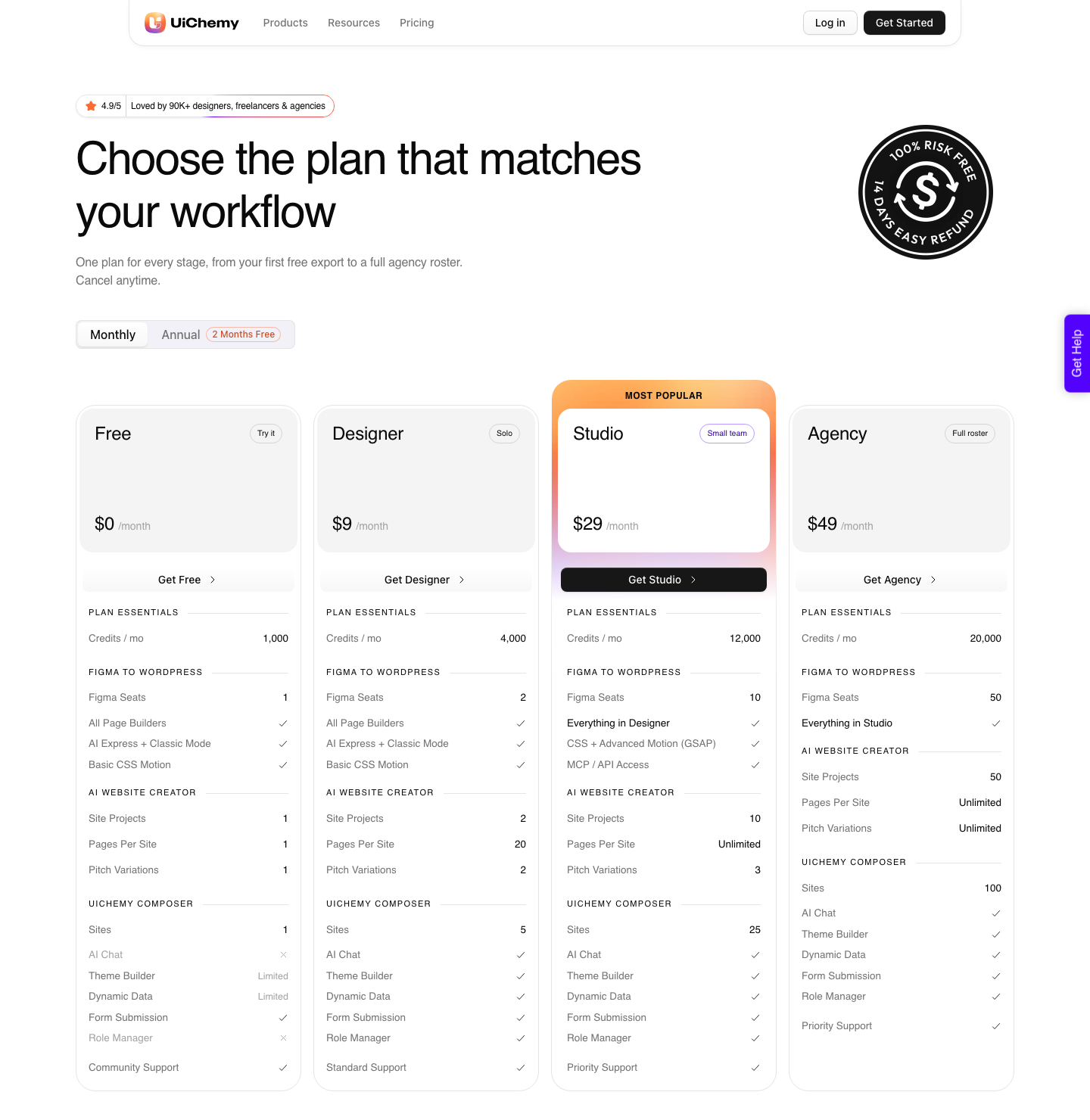
Here is the whole thing, row by row. 1,000 Credits a month.
1 Figma seat. All page builders, both AI Express Mode and Classic Mode, and basic CSS motion, which are the same on Free as on Agency.
1 AI Website Creator project, capped at 1 page, with 1 client pitch variation. 1 UiChemy Composer site, with form submission included.
And here is what Free does not get, which matters more than the headline. Composer’s AI Chat and the role manager are not on Free at all, and its Theme Builder and Dynamic Data are marked Limited rather than full.
Global Collections are capped at 3. White Label is absent.
Support is the community rather than a ticket queue. Advanced Motion with GSAP and MCP or API access do not appear until Studio at $29, so if a post tells you MCP is included without naming a plan, it is wrong.
That Free plan is the honest answer to the question this post asks, because it covers all four routes into WordPress rather than one.
AI Website Creator is the prompt-to-site product: a written prompt or an attached client brief becomes a scope, a sitemap, a design and then an Elementor export. Figma to WordPress converts an approved frame.
UiChemy Composer writes real HTML, CSS and JavaScript sections inside Elementor by prompt. AI to WordPress moves a Lovable, Claude, Bolt or v0 build across through Composer.
One thing to get right before you plan around it: Export To Elementor is live in AI Website Creator, and Export To Gutenberg is marked Soon on every plan including Agency. Paying more does not buy it yet.
| Plan | Monthly | Credits per month | Figma seats | Pages per site | Composer sites | Motion | MCP and API |
|---|---|---|---|---|---|---|---|
| Free | $0 | 1,000 | 1 | 1 | 1 | Basic CSS | No |
| Designer | $9 | 4,000 | 2 | 20 | 5 | Basic CSS | No |
| Studio | $29 | 12,000 | 10 | Unlimited | 25 | CSS plus GSAP | Yes |
| Agency | $49 | 20,000 | 50 | Unlimited | 100 | CSS plus GSAP | Yes |
The credit mechanics are close to Figma’s and it is worth being precise about the one difference. Both balances refresh monthly.
Figma’s explicitly do not roll over. UiChemy’s pricing page says only that the balance refreshes every month and that you can top up between refreshes if you run out before the next one.
It publishes no pack sizes and no top-up prices, so anyone quoting you a pack and a price for UiChemy credits is quoting something that is not on the page.
One detail that matters more than it sounds: credits are spent on completed conversions, so a failed attempt does not drain the balance. Every paid plan carries a 14-day money-back guarantee, which is tight, so plan the trial around one real page rather than a whole client roster.
More detail sits on the pricing page.
Where This Approach Still Costs You Time
AI Express converts to Elementor today. Gutenberg and Bricks are not live in AI Express yet, and both are on the roadmap rather than in the product.
Classic Mode covers all three now, so if your site runs on Bricks and you specifically wanted the no-tagging path, waiting is the correct call.
Conversions arrive responsive across Elementor’s desktop, tablet and mobile breakpoints, and they arrive unfinished. The honest number is a customer’s rather than ours.
A verified reviewer on WordPress.org put it at roughly 70 percent of the design work handled, with 30 percent left to fine-tune in Elementor, which they judged a fair trade for the time saved. Plan a free evaluation around that ratio and you will not be surprised by it.
There is a preparation cost as well, and it is the one people underestimate.
A design that has not been cleaned up converts worse than one that has, and our own optimisation checklist runs to fifteen items.
A frame taller than 12,000 pixels will not upload at all and has to be split before you try.
None of that is free in the sense of costing nothing. It is free in the sense of costing an hour of layer tidying instead of two days of manual rebuilding, which is the trade the whole category is actually offering.
Frequently Asked Questions
Is there a genuinely free AI website builder?
Yes, with a meter attached. Figma Make runs on the free Starter plan with 500 AI credits a month and a 150 a day cap, which is roughly two thorough attempts at a page.
Free in this category almost always means a metered evaluation rather than an unlimited tool, and the useful question is how many real attempts the meter buys.
How many pages can I keep on Figma’s free plan?
Drafts are unlimited. Inside your single Starter folder you are limited to 3 Figma Design and Figma Sites files, 3 FigJam files and 3 Slides files.
Figma Buzz currently has no file limit on Starter, and Figma Make is limited by credits rather than by file count.
Do unused AI credits roll over?
Figma’s do not. They reset monthly, do not roll over, and cannot be shared or transferred between users, and being on two plans gives you two separate balances that never combine.
UiChemy’s balance also refreshes every month; the pricing page adds that you can top up between refreshes, and says nothing beyond that, so treat any specific pack size or price you read elsewhere as unsourced.
Will a site built by AI rank on Google?
It can, but the generator does not do that part. Figma’s own answer on its AI website generator page is that ranking needs specific copy, clean semantic markup, strategic headings and content that answers a real query, and that generated code is optimisable like any other code.
Treat the first output as a layout, not as a finished page.
What does the UiChemy Free plan actually get you?
1,000 Credits a month, 1 Figma seat, 1 AI Website Creator project of 1 page, and 1 Composer site, with every page builder and both conversion modes included. Support is the community.
Theme Builder and Dynamic Data are Limited, Global Collections stop at 3, there is no White Label, and Advanced Motion with GSAP plus MCP and API access start at Studio, $29. Everything you build lives on your own WordPress site and stays yours whether or not you keep a plan.
The Short Version
Free tiers in this category are evaluation budgets, and the honest ones publish the exact size of the budget. Figma publishes 500 credits a month and 150 a day.
We publish a $0 plan with 1,000 Credits, 1 Figma seat, 1 one-page AI Website Creator project and 1 Composer site, then $9 for 4,000 Credits. Anyone who will not give you the number is asking you to find the wall by walking into it.
If you are weighing the generate-then-rebuild route against designing properly and converting once, the comparison worth reading next is our look at Figma Make alternatives for people who need a real website, and the credit mechanics in detail sit in Figma AI credits, explained without the marketing.
If Elementor is your destination, the AI Express Mode page shows what a converted page looks like before you spend a credit on one.