What AI Gets Wrong When It Builds a Website, and the 5-Minute Fixes
 Sagar Patel
In our coffee roaster test, the AI builder ignored an exact count, used a label that did not fit the business and added pages we did not ask for. We asked for three product cards and got five labelled “Service”. Each miss is cheap to fix at the review step and costly to fix after design, so check there first.
Most “AI built my site” posts show the win and skip the misses. We ran one prompt in UiChemy and kept notes on both, which is the same run described step by step in our coffee roaster test. This post is the problems list, with the fix for each.
What Did We Test?
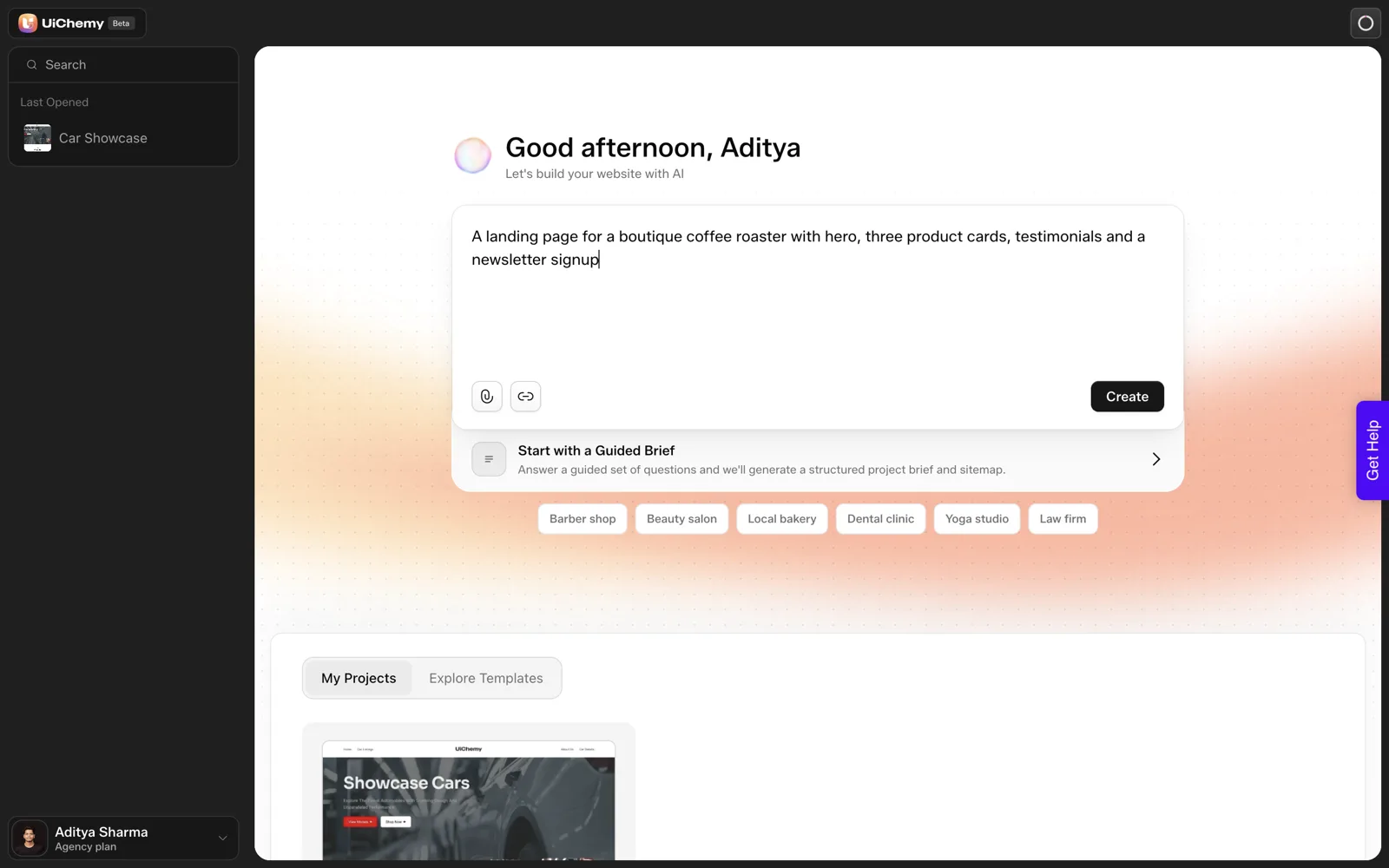
One prompt, word for word: “A landing page for a boutique coffee roaster with hero, three product cards, testimonials and a newsletter signup”. We ran it in UiChemy’s AI Website Creator on 2026-10-01. A project appeared in about 9 seconds, a six-page sitemap in about 13 seconds and the Home page in about 35 seconds. The sitemap and Home page together used about 64 credits.
That is one run, in one product, on one kind of business. Treat everything below as an observation from a single test, not a rate.
What Came Out Right?
It is worth saying what worked, because the structure was usable.
- The Home page had a hero, a cards section, testimonials and a newsletter block, matching every section we named.
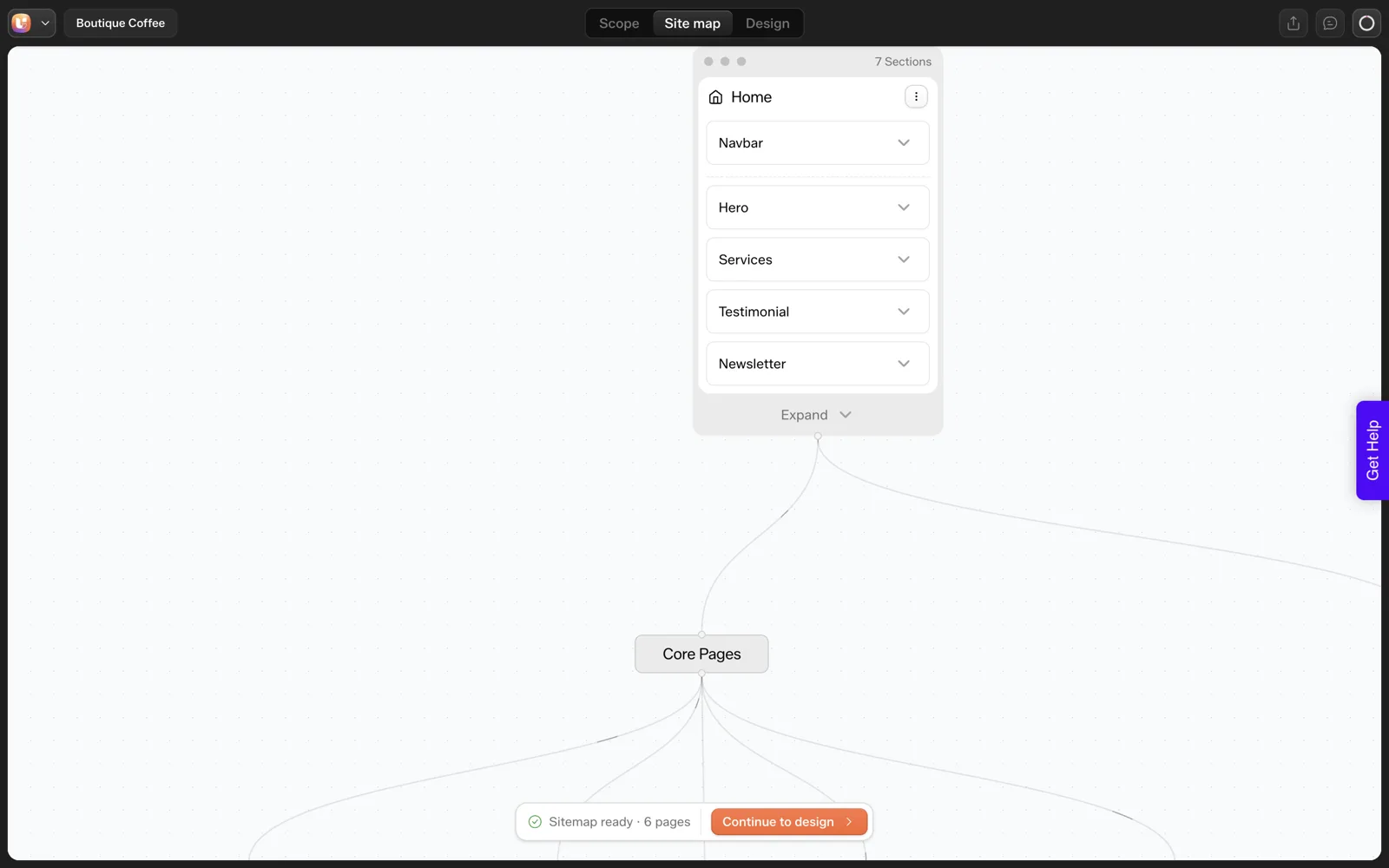
- The sitemap had six pages: Home, Products, Testimonials, About Us, Contact and Newsletter Signup.
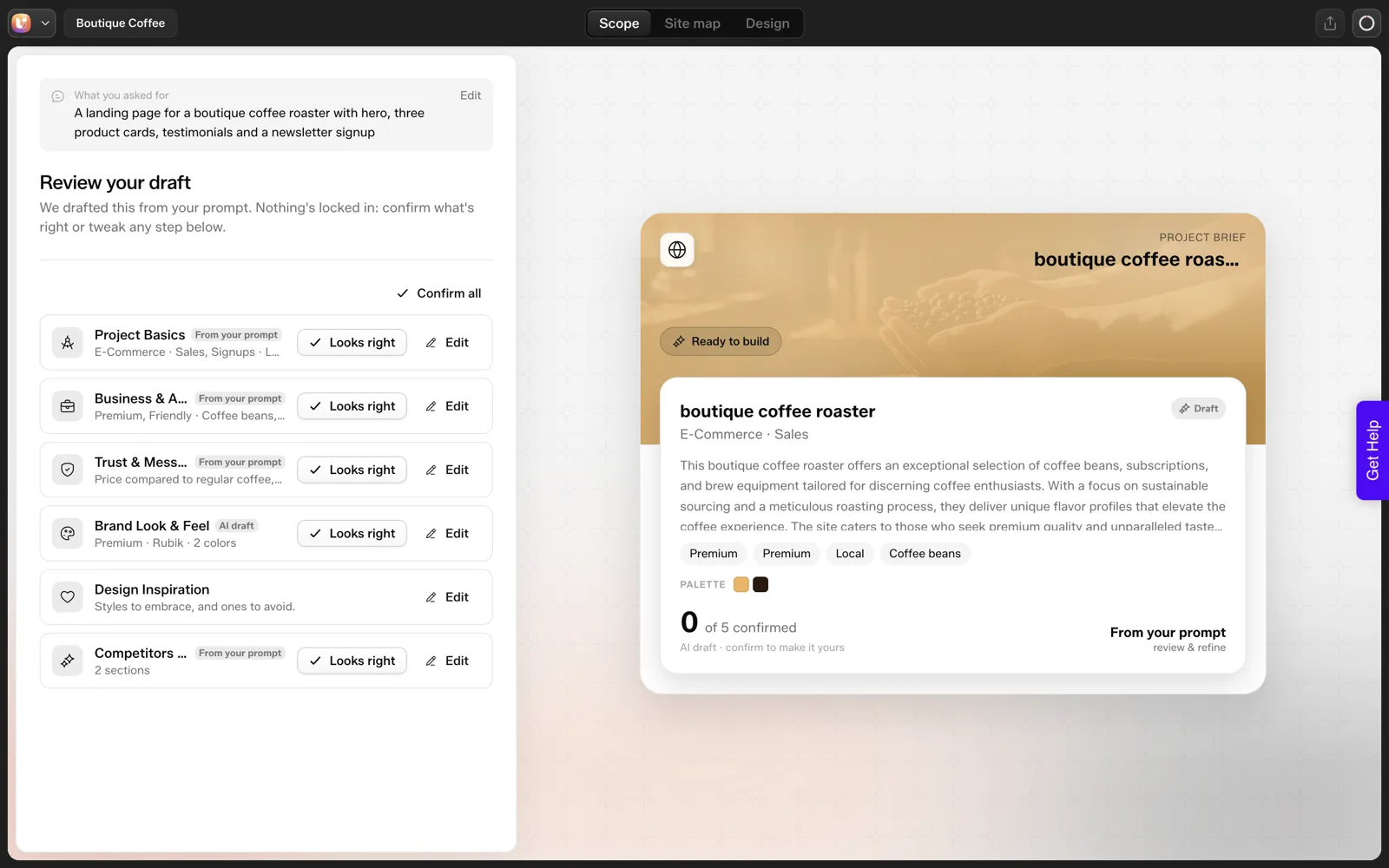
- A “Review your draft” step appeared before design, with the line “We drafted this from your prompt. Nothing’s locked in.” and “Looks right” and “Edit” buttons.
What Came Out Wrong?
Three things, each with a fix that takes a few minutes. The fixes are our suggestions from using the editor, and we have not re-run the prompt to measure whether a tighter prompt avoids the misses.
| Miss | What happened | Fix |
|---|---|---|
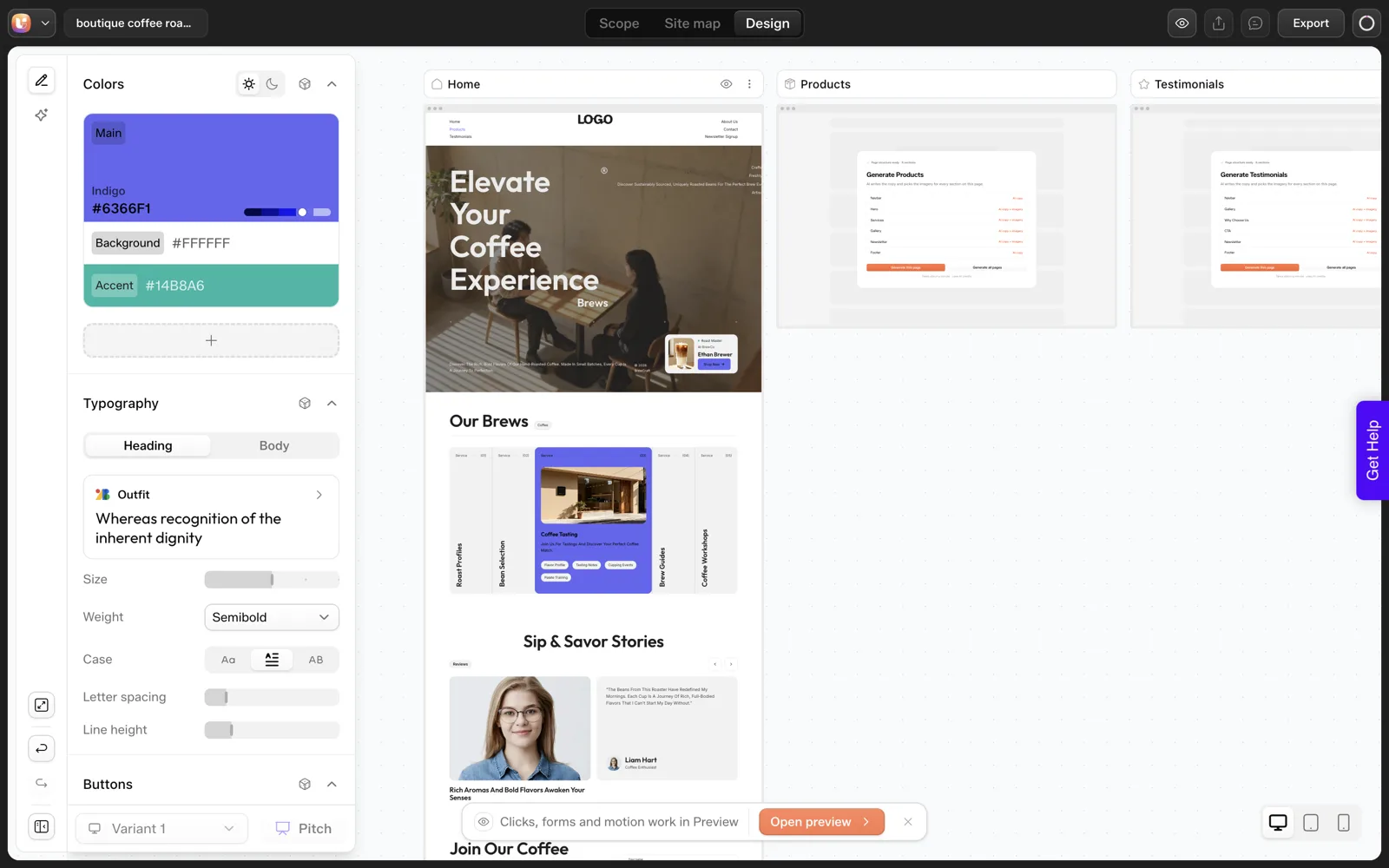
| Exact count ignored | We asked for 3 product cards and got 5 | Delete the extra cards in the editor, and state the count as a number in the next prompt |
| Label does not fit | The cards were labelled “Service”, but a roaster sells products | Rename the label in the editor and check every heading for the same word |
| Pages you did not ask for | The sitemap added a separate Newsletter Signup page when we asked for a newsletter signup section | Remove or merge pages in the sitemap before choosing “Continue to design” |
The count miss
This is the one that matters most, because counts are easy for a reader to check and embarrassing to get wrong. A client who asked for three products and sees five will not remember the other sections. Check every number in your prompt against the output as a matter of routine.
The label miss
The word “Service” is plausible for a generic template and wrong for a business that sells beans. Labels are cheap to change and easy to miss, because they sit in small text. Read the section headings on every page, not just the first screen.
The extra pages
The sitemap is the place to be ruthless. A newsletter signup works as a footer block on most small sites, and each separate page is another page to design, review and maintain. Our piece on how many pages a small business site needs helps decide what stays.
A triage order for any draft
When a draft lands, resist fixing the first thing you see. Work from the biggest decision to the smallest, because a fix at one level can make the next level moot.
- Pages. Is every page needed, and is every needed page present? Fix this first, since removing a page removes all its problems too.
- Sections. Does each page have the sections you named, in the order you want?
- Counts. Do the numbers match the brief: cards, steps, testimonials, plans?
- Labels and headings. Do the words fit the business, or are they template leftovers?
- Facts. Is every price, hour, address and claim real and supplied by you?
This order is our own habit, not a documented procedure. It works because each step is faster than the one after it, and it keeps you from polishing a heading on a page you later delete.
Why Does the Review Step Matter?
Every miss above is cheaper to fix before design than after. The scope step is a draft written from your prompt, shown as cards you can accept or edit, and the sitemap step lets you add, remove, reorder and rename pages, per the Scope Editor docs.
Changing a page list costs nothing but attention. Rebuilding a designed page costs time and, depending on the step, credits.
We did not measure the credit cost of individual steps beyond the single 64-credit figure, so we do not claim that editing is always cheaper than regenerating.
We do claim that a decision made at the sitemap does not need to be made again on every page. Our walkthroughs of the sitemap review screen by screen and why the review step prevents rework go through it in detail.
A Prompt Checklist to Try
These five habits are untested. We have not re-run the coffee prompt with them, so we make no claim about how much they help. They target the three misses above.
- Say the count as a number: “exactly three cards”.
- Name the noun: “product cards for coffee beans, not services”.
- List the pages you want, and write “no other pages”.
- Paste two real facts the page needs, such as a price or a shipping rule, so the tool does not invent them.
- Give the tone in one sentence, with one thing to avoid.
Run your own before-and-after comparison and write down the result. Our guide to prompts that get the sitemap you want expands this into a full framework with templates, and our 30-minute review routine covers what to check once the draft exists.
The same habits apply to other tools. If you are comparing builders, our look at the best AI website builders explains what we weigh.
What Does This Test Not Show?
- It is one prompt and one run. A second run could differ.
- It is one type of business. A different industry may miss in different places.
- We did not run the export into WordPress for this post, so it says nothing about the imported site.
- We did not isolate per-step credit cost beyond the single combined figure.
What Did a Later Import Test Tell Us About These Misses?
The test limits above say we did not run the export. We have since done it, on 2026-10-01, with the same coffee roaster project on a throwaway local WordPress install. It adds three useful readings to the list of misses.
- The page list problem repeats at export. The project has six pages, but the plugin offered only Home for import. If you removed extra pages at the sitemap step you would face fewer surprises here.
- The result is editable. Home opened in Elementor as a native page we could select and edit. That means the fixes in the table above can be made after import too.
- A layout miss appeared on the front end. At a wide desktop width, three short text fragments on the right of the hero were clipped at the viewport edge. We did not investigate the cause.
The import itself used no credits and took about 50 seconds. We make no claim about how a second import would behave.
The lesson for your own review is simple. Check the front end of the real page as well as the editor, because some misses only show up there.
What Review Sheet Can You Copy?
Use this sheet on any draft. It turns the triage order above into a form you can fill in and hand to a client or a colleague.
DRAFT REVIEW SHEET

Project:
Reviewer:
Date:

1. PAGES
Pages wanted (list):
Pages in the draft (list):
Extra pages to remove or merge:
Missing pages to add:

2. SECTIONS
Page / section / present? / in the right order?

3. COUNTS
Item / requested / delivered / fixed?

4. LABELS AND HEADINGS
Page / text found / replacement

5. FACTS
Every price, hour, address, name and quote: supplied by the owner? yes / no
Placeholder text still present (list):

6. FRONT END (after import)
Checked at desktop width: yes / no
Checked at phone width: yes / no
Clipped or overlapping text (page, section):

7. DECISION
Fix in editor / change the prompt and regenerate / start over
Reason:
Section 7 is the one most people skip. Write the reason down, so the next draft starts from what you learned.
Should You Fix a Miss or Regenerate the Page?
We have not measured what a regeneration costs, so this table is about effort and risk, not credits.
| What is wrong | Fix in the editor | Rethink the prompt |
|---|---|---|
| One wrong label | Yes | Add the noun to the next prompt |
| Wrong card count | Yes, delete or add cards | State the count as a number next time |
| Extra pages in the sitemap | Yes, in the sitemap step | List pages and add “no other pages” |
| Wrong business assumptions in the scope cards | Edit the cards | Add the missing facts to the brief |
| The whole page misses the idea | Probably not | Yes, rewrite the brief first |
| Clipped text at one width | Yes, after import | No |
The rule I follow: small and local misses get fixed by hand, and a wrong idea gets a new brief. Our sitemap review walkthrough shows where in the flow each fix belongs.
FAQ
Why did the AI ignore my exact number?
We saw it once, three cards requested and five delivered, and we do not have a verified explanation, so we report only what we observed. Write counts as numbers, name the noun and check the output before you build further.
Can I fix problems after the page is generated?
Yes. The Design Editor lets you edit sections, text and images on the canvas, and the docs say no generated design is locked in. Structure is cheaper to change at the sitemap step than after pages exist.
Does fixing a miss cost credits?
We measured one thing: about 64 credits for the sitemap plus the Home page. We did not measure edits or regenerations, so we cannot give a cost. Log your balance before and after each step, as our credit worksheet suggests.
Is this specific to UiChemy?
We only tested one product, so we cannot say how other tools score on the same prompt. Counts, labels and extra pages are good things to check on any AI website builder, and the review step is where we found them.
If you want to run the same check on your own prompt, you can Get Started and compare the output with your list.
Every feature named in this post is listed by product: all UiChemy features, UiChemy Composer features.