AI Sitemap Generator: Why the Review Step Prevents Rework
 Sagar Patel
An AI sitemap generator turns a prompt into a page list with sections in seconds, and the review step is where you catch wrong assumptions before design. Check page count, page names, section order and missing pages. Fixing a sitemap costs a click, and fixing a designed page costs a redo.
Generated structure looks authoritative, which is the danger. A tidy tree of pages feels finished even when it contains a page the client never wanted and omits the one they cannot launch without.
This post walks through one real sitemap from our own test and gives you a checklist for reviewing any generated one. The wider scope-control argument is in a locked sitemap as a scope creep killer.
Why the Sitemap Is the Cheapest Place to Fix Things
A sitemap is a decision about what exists. Every later step builds on it: page designs, copy, navigation, forms, SEO titles. A wrong decision at this layer travels through everything beneath it.
Compare the cost of the same mistake caught at three stages. At sitemap review, you delete a node. After design, you delete a designed page and every link to it. After the client has seen it, you also have a conversation about why it vanished.
The mistake is the same and the price is not, which is why a review gate belongs before the design step. UiChemy’s AI Website Creator is early access, shown as “Soon” on the pricing page, and it includes a sitemap view with a Continue to design button for this reason.
The Coffee Test Sitemap
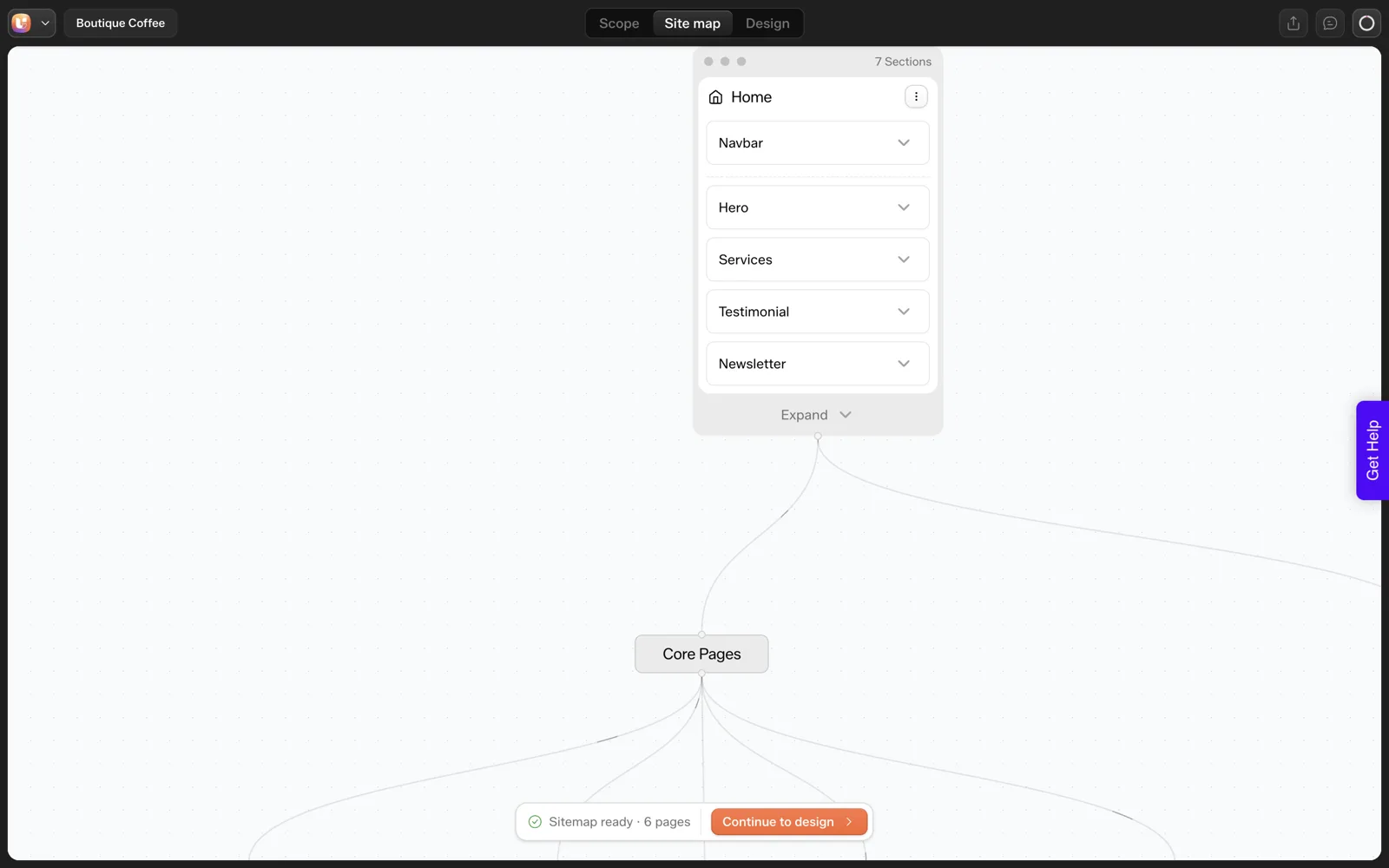
On 2026-10-01 we ran one test, and it is one run, not a benchmark. The prompt was: “A landing page for a boutique coffee roaster with hero, three product cards, testimonials and a newsletter signup”. The project appeared in about 9 seconds, and the sitemap of six pages followed in about 13 seconds: Home, Products, Testimonials, About Us, Contact and Newsletter Signup.
Reading it as a reviewer rather than an admirer, three things stand out.
- The prompt asked for a landing page. The generator returned six pages. That is a scope decision the prompt never made. A reviewer would ask whether a landing page needs About Us and Contact as separate pages.
- Testimonials and Newsletter Signup are pages and also sections of Home. Having both is a choice. Either could be a section only.
- The Home page lists a Services section. We asked for product cards. That mismatch showed up again later, when the generated Home page had five cards labelled Service where we had asked for three products. The sitemap was the first hint of it.
None of that is a failure of the tool, since a draft has to assume something. It is exactly why the review exists. The related Scope review in the same flow lists what was assumed about the brand and audience, and the coffee roaster test, step by step shows that screen too.
What to Check in a Generated Sitemap
A second sitemap from our captures shows a different shape. It is a different project, a car showcase, with a Home page of six sections and five more pages beneath a Core Pages node: Car Listings, About Us, Car Details, Gallery and Contact.
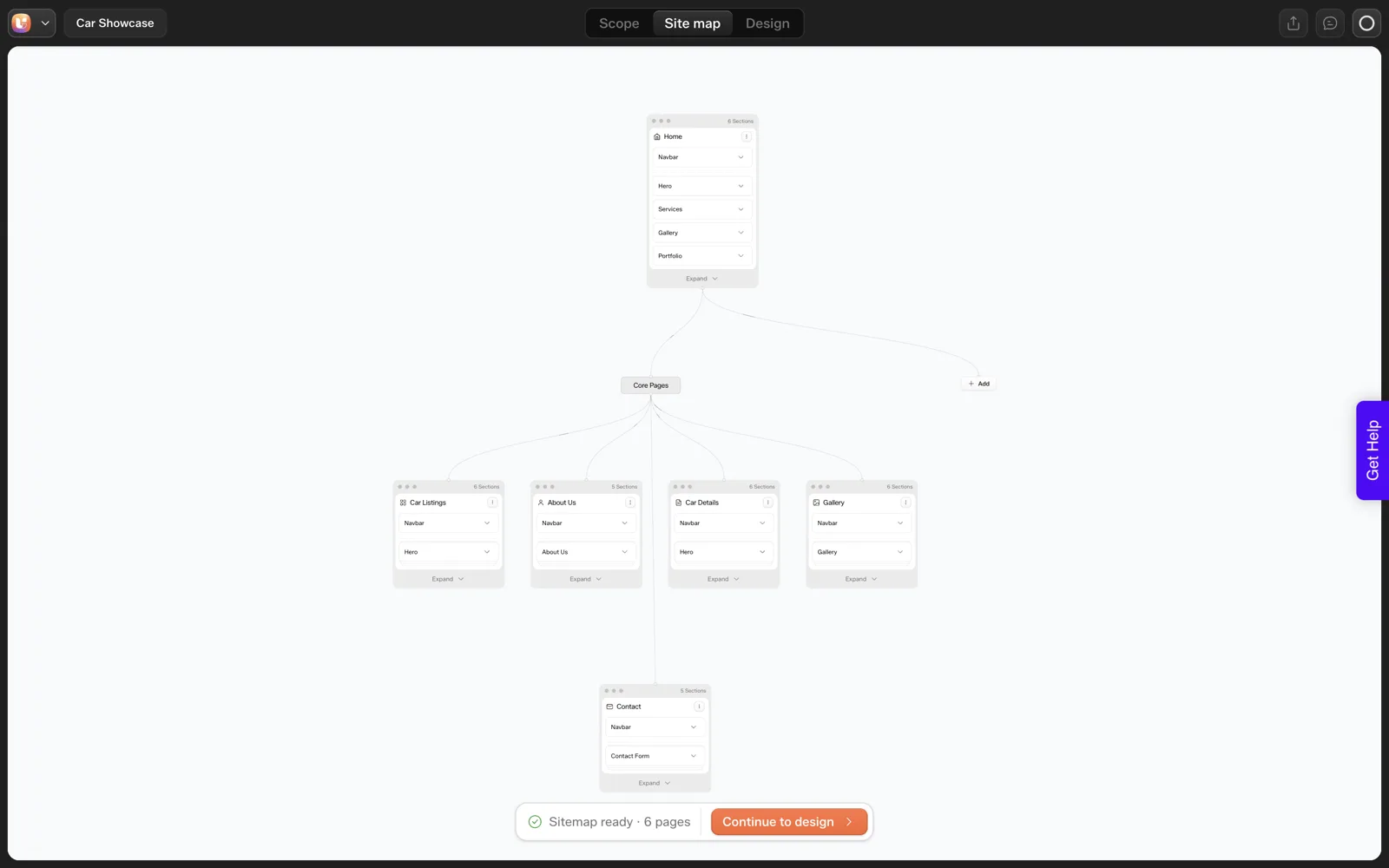
Between the two you can see the pattern a reviewer should look for. Each page card shows a section count, and the Navbar repeats on every page. Repeated sections such as the navbar are shared elements, so check they are meant to repeat. Then walk the tree with four questions.
- Is every page needed? Each page is a promise to write, design and maintain something.
- Is any page missing? Think of legal pages, a thank-you page after a form, a pricing or service page the business depends on.
- Are the sections in a sensible order? A strong first screen, then proof, then the ask.
- Does anything contradict the brief? Count what you asked for and compare it with what is shown.
The brief is the reference for all four, so a written one makes review fast. The free website brief template and the 25-question client questionnaire are the places those answers come from.
Two sitemaps from our captures, side by side:
| Run | What the sitemap showed |
|---|---|
| Coffee roaster (2026-10-01, one run) | Project in about 9 seconds, six-page sitemap in about 13 seconds |
| Car showcase (separate project) | Home with six sections, plus five pages under Core Pages: Car Listings, About Us, Car Details, Gallery and Contact |
The Review Checklist
Run this before you click Continue to design in any sitemap tool. Keep it next to the written brief.
SITEMAP REVIEW: project: ______________  date: ____________

Against the brief
[ ] Page count matches what was asked: asked ___, generated ___
[ ] Every page on the "wanted" list exists
[ ] No page on the "not wanted" list appears
[ ] The single primary goal has a clear path (page or section): ______
[ ] Every product, service or offer named in the brief appears once

Page by page
[ ] Each page has a one-line purpose: ______
[ ] Section order: strong opening, proof, then the ask
[ ] Home does not repeat full pages that already exist
[ ] Counts match the brief (cards, steps, testimonials): ______
[ ] Shared sections (navbar, footer) are intentionally shared

Gaps
[ ] Contact route exists and the form destination is known
[ ] Thank-you or confirmation state planned
[ ] Legal pages needed? yes / no   Where: ______
[ ] Pages the client cannot launch without: ______

Decisions to record
Pages removed: ______
Pages added: ______
Sections renamed: ______
Approved by: ______   Date: ______
The “approved by” line matters more than it looks. A sitemap with a name and a date beside it is a scope document. If a client later asks for a page that was never on it, you have a reference that predates the conversation.
After the Review
Once the sitemap is approved, move to design and keep the written decisions with the project.
If you are building for a client, send the approved sitemap as part of your process, and price extra pages as extra scope. How to quote AI-built websites for clients covers that conversation, and the handoff problem in vibe-coded client sites shows where the review fits in a full client process.
Docs for the post-design end of the flow live at Set Up AI to WordPress.
Common Sitemap Mistakes, and What Each Costs
Generated sitemaps tend to repeat a handful of mistakes. Recognizing them speeds up review, because you are matching a pattern and not reading from scratch.
| Mistake | How to spot it | Cost if it reaches design |
|---|---|---|
| Too many pages for the brief | Page count above what you asked for | Extra pages to write, design and maintain |
| Thin standalone pages | A page that could be one section of Home | Pages with little to say, which weaken the site |
| Missing conversion page | No clear path from interest to action | A redesign once someone notices |
| Duplicate topics | Two pages answering the same question | Competing pages and confused visitors |
| Wrong section order | The ask comes before any proof | Re-ordering after the client has seen it |
| Counts that differ from the brief | Three requested, five shown | Rework in design and copy |
| Invented offers | A section for something you do not sell | A client who asks why it is there |
The sixth row is the one our coffee test hit. The brief said three product cards and the draft later showed five cards labelled Service. A count against the brief at review would have raised it before any design existed.
The fifth and seventh rows are quieter. They look fine until someone who knows the business reads the page. That is why the person who signs off should be the one who knows the offer best. Information architecture for AI-generated sites goes deeper on thin and duplicate pages.
Who Should Review the Sitemap
A review is only as good as the person doing it. Two reviewers catch different things, so I involve both whenever I can.
The builder
You check structure. Does every page have a purpose, is the order sensible, are shared sections like the navbar intentional, and does the count match the brief? This is the checklist from earlier in the post.
The client or business owner
They check truth. Is every product named correctly, does anything appear that they do not offer, and is anything they cannot launch without missing? You cannot check these from the outside, since you do not know their business as they do.
Give the client a short, specific task. “Look at this list and tell me what is missing or wrong” works better than “what do you think?”. Show the sitemap as boxes and lines, so feedback stays about structure and does not drift to colors.
Record what each reviewer changed. A note like “client removed Newsletter Signup page, kept the section on Home” becomes part of the approval trail. The client’s own words are best, so copy them in. For the questions that feed the review, see the 25-question client questionnaire.
From Approved Sitemap to Copy Plan
An approved sitemap is also a copy plan. Each page and section is something someone must write, so the list tells you the writing workload before you start.
COPY PLAN (from the approved sitemap)

Page: ____________   Purpose (one line): ____________
Section        | Who writes | Source of facts     | Due   | Status
---------------|------------|---------------------|-------|-------
Hero           |            |                     |       |
Proof          |            |                     |       |
Offer          |            |                     |       |
Call to action |            |                     |       |

Rules
- Facts come from the client, marked with where they came from
- Nothing invented: no numbers, quotes or claims without a source
- Placeholder text is flagged and replaced before launch
The third rule is the one I enforce hardest. A generated draft contains plausible text, and plausible text is easy to mistake for approved text. Mark every placeholder, and make replacing them a launch condition.
If you count the rows across all pages, you also get a fair measure of the writing job, which feeds your quote. How to quote AI-built websites for clients shows how to turn that count into a price.
FAQ
What does an AI sitemap generator do?
It takes a prompt or brief and drafts a page list with sections for each page, usually in seconds. In our single test on 2026-10-01, a coffee roaster prompt produced a six-page sitemap in about 13 seconds. The draft is a starting assumption, so someone should review it before any design work begins.
Why review the sitemap before design?
Because every later step builds on it. Removing a wrong page at the sitemap stage costs a click. Removing it after design means redoing layouts, links and copy. The review is also the cheapest moment to catch mismatches between what you asked for and what was drafted.
What should I check in a generated sitemap?
Compare page count and names against your brief, look for missing pages such as legal or confirmation pages, check section order on each page, and verify counts such as cards or steps. In our test, three product cards were requested and five cards labelled Service appeared, which the review is meant to catch.
Can I edit the sitemap after it is generated?
The sitemap view in our test showed an Add control and per-page menus, and the draft is labelled as not locked in. Check what edits your own version allows before relying on them, since the product is early access and may change.
How many pages should a small business site have?
As few as the goal needs. Start from the single primary goal and the pages that serve it, then add only what a visitor must have. We do not have a universal number. A review checklist that forces a reason for every page tends to produce a shorter, cleaner sitemap than a generator’s first draft.
To run the review step on your own brief, Get Started and check the first sitemap against the checklist above.
Every feature named in this post is listed by product: all UiChemy features, UiChemy Composer features.