The Scope Creep Killer: A Locked Sitemap and a Scope Review
 Sagar Patel
Website scope creep stops being a surprise when the client signs off on a page list and a brief before any design starts. Write the agreed pages down, name what is out of scope, and price every later addition as a change request. A sitemap is cheap to change; a finished design is not.
Most arguments about scope are really arguments about a page nobody wrote down. If you start from a written brief, the website brief template gives you the structure, and the client questionnaire gives you the answers to put in it. If you are still choosing a tool category, no-code AI website builders: the category nobody defined maps the field.
Where Scope Creep Actually Starts
Scope creep rarely arrives as one big request. It arrives as small sentences: “can we also add a page for…”, “I assumed the blog was included”, “surely there is a Spanish version”. Each one is reasonable on its own. The damage comes from the fact that nobody agreed in writing what “the website” meant on day one.
Three conditions make it likely:
- The page list lives in someone’s head. The client imagines twelve pages, you quoted for six.
- Design starts before the structure is agreed. Every visual round then re-opens structural questions.
- There is no named process for change. Without one, a change is a favour, and favours are hard to say no to.
The fix is boring on purpose: agree the structure first, in writing, while changing it costs almost nothing.
What “Locked” Should Mean
A locked sitemap is a commitment between two people, and it does not need a software switch. It means the client has seen the full page list with the sections on each page, approved it, and understands that changes after approval go through a change request.
To be precise about the tool, UiChemy does not lock anything for you. The review screen says “Nothing’s locked in”, and the documentation states you can edit the sitemap before and after moving to the Design Editor.
That flexibility is useful for you. The lock is therefore your own sign-off, and the product helps by making the thing you are signing off easy to see and share.
That is a helpful split. The software keeps the draft flexible while you explore. The agreement keeps the scope firm once the client says yes.
The Scope Review Screen in UiChemy
When you start a project from a prompt, UiChemy shows a “Review your draft” screen before design. It reads: “We drafted this from your prompt. Nothing’s locked in: confirm what’s right or tweak any step below.” Each card shows where its content came from (“From your prompt” or “AI draft”), with a “Looks right” button and an “Edit” button, plus a “Confirm all” option.
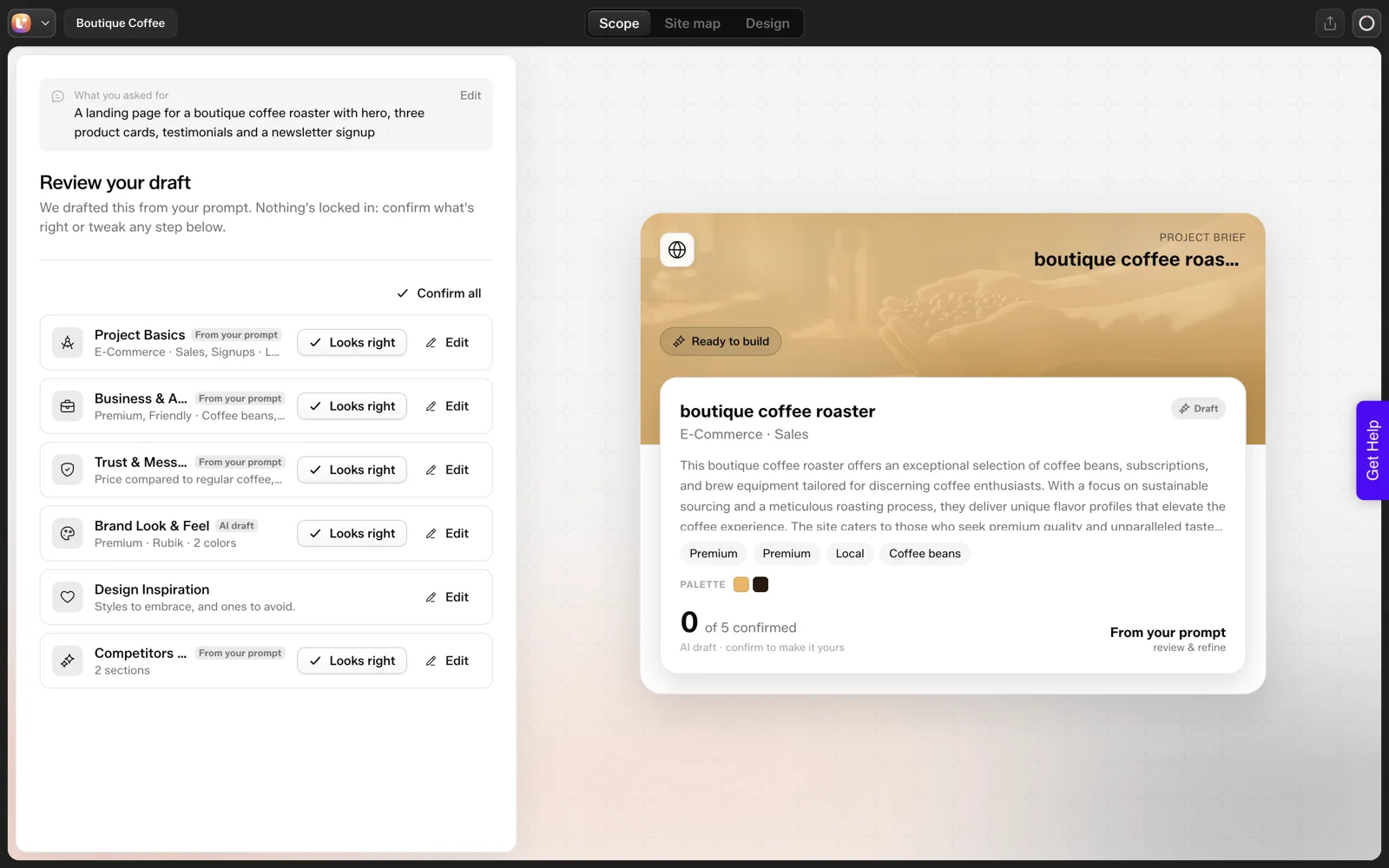
The cards cover project basics, business and audience, trust and messaging, brand look and feel, design inspiration, and competitors and structure. The Scope Editor documentation describes the completed brief as a shareable deliverable you can send the client for sign-off before any design begins.
The same screen in a different project shows the pattern clearly: the draft starts unconfirmed, and you decide which parts are yours.
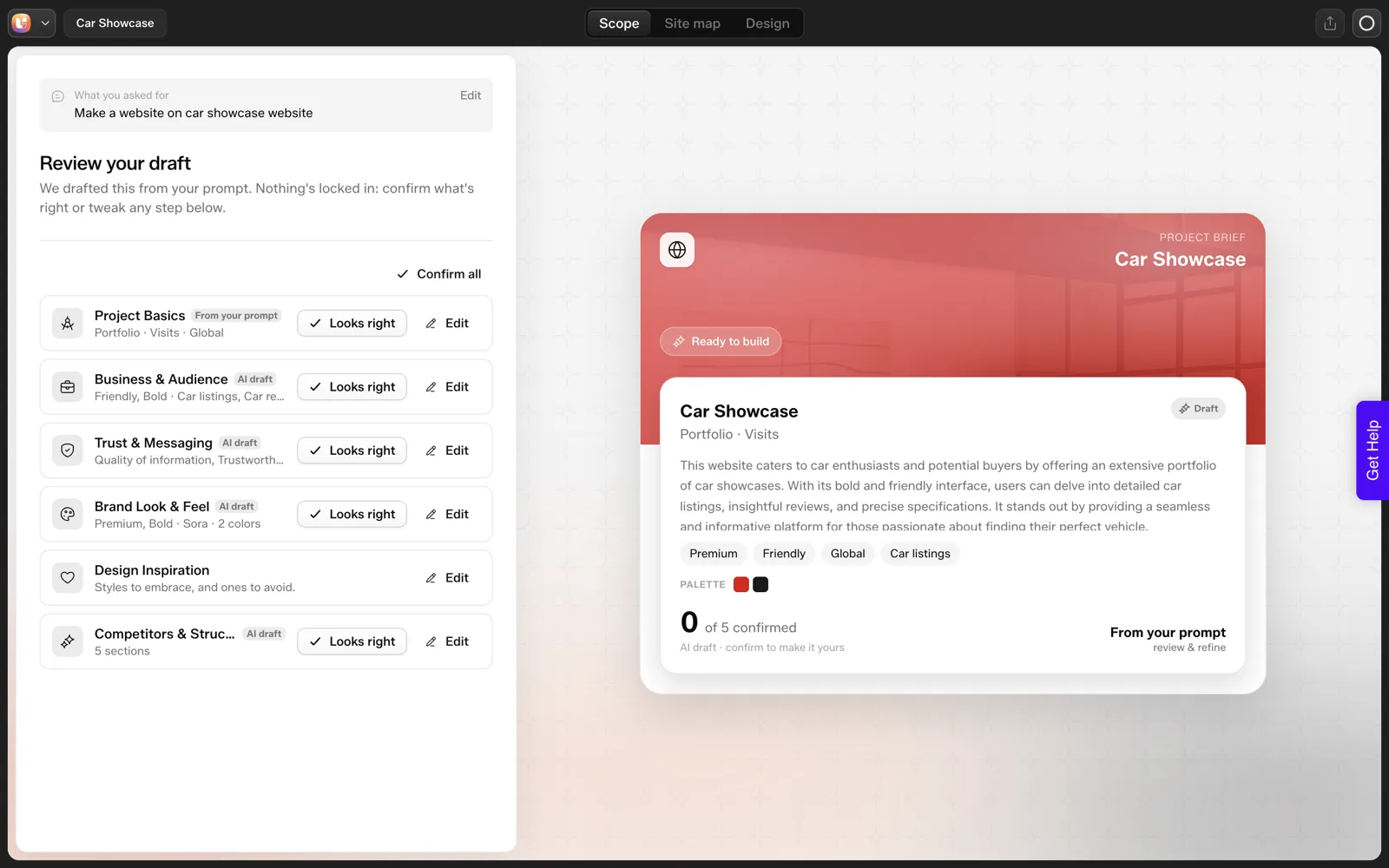
Use this screen as a conversation starter and take your time with it. Walk the client through each card, change what is wrong, then confirm. After that, move to the Site map tab and walk through the page list together. Our walkthrough of the sitemap review, screen by screen covers that second half.
One caution from our test: we asked for three product cards and the draft produced five cards labelled “Service”. An AI draft can drift from the brief in details like counts, so the client’s sign-off should cover what they actually asked for, not only the page names. The post on what AI gets wrong when it builds a website lists the usual misses.
What a change request must state:
| Field | What you tell the client |
|---|---|
| What is added | The request in one sentence |
| How long it adds | The effect on the schedule |
| What it costs | The effect on the price |
A Sign-Off Clause You Can Copy
Put this in your proposal or send it with the sitemap. Edit the brackets to fit your situation, and have a lawyer review it if your contracts need legal wording.
SCOPE SIGN-OFF

Project: [project name]
Date: [date]

1. Pages included
   [Home, About, Services, Contact, ...]
   Each page includes the sections listed in the attached sitemap.

2. Out of scope (examples, edit to fit)
   - Pages not in the list above
   - Blog or news section
   - Additional languages
   - Online store or booking system
   - Copywriting beyond [X] rounds of edits to supplied text
   - Photography or custom illustration

3. Client responsibilities
   - Supply text, logo and images by [date]
   - Consolidate feedback into one list per round

4. Revisions
   [N] rounds of design feedback are included.
   Feedback is limited to the agreed pages and sections.

5. Changes after sign-off
   Anything outside this scope is a change request.
   I will confirm the added time and cost in writing before starting.

Approved by: ________________   Date: __________
The “out of scope” list does the most work. Clients rarely argue about what you excluded when they initialled the exclusion.
Pricing Changes After Sign-Off
A change request needs three pieces of information: what is being added, how long it adds, and what it costs. Send it back within the same working day and the client sees a process instead of a refusal.
CHANGE REQUEST #[n]

Requested by: [name]   Date: [date]
Request: [one sentence]
Pages or sections affected: [list]
Effect on schedule: [+ X days]
Effect on cost: [amount or "included"]
Options:
  A. Add it now at the cost above
  B. Swap it for something already in scope: [name it]
  C. Park it for phase two

Decision: [ A / B / C ]   Approved by: ____________
Option B is underrated. Swapping an in-scope page for a new one keeps the project whole and makes the client weigh what matters most. If you manage many clients at once, the playbook in AI workflows for WordPress agencies covers how to keep these decisions organised across projects.
Holding the Line Without Souring the Client
Most clients are not trying to take advantage. They have realised something they forgot to mention. A few habits keep the conversation friendly:
- Agree before design, not after. Show the sitemap while it is still lines and boxes.
- Say yes to the idea and name the path. “Good idea. Here is how we add it” sounds very different from “that is out of scope”.
- Keep the original list visible. Attach it to every change request so the baseline is never in dispute.
- Review the sitemap again before the first design round. A quick check costs minutes and catches the “oh, we also need” moment early.
If the client signs off and later wants to restructure, the system does allow it, because pages can be changed after design starts. That is a pricing conversation rather than a technical one, and the change request form gives you the language for it.
A Worked Example: One Change Request, Start to Finish
Here is how I would handle a typical request after sign-off. The client and details are invented, and the point is the sequence.
The client writes: “Can we add a pricing page? A friend said we need one.”
- Log it. Date, requester, and the request in their own words. Nothing is decided yet.
- Check the sitemap. Pricing is not on the signed list, so this is a change and not a clarification.
- Ask what it is for. “What should a visitor do after reading it?” If the answer is “book a call”, the Services page may already do that job.
- Size the work. A new page needs copy, a design pass, a link in the navigation and a review. List those parts so the client sees what they are buying.
- State the effect. One line on cost and timing, using the rates already in the agreement. [NEED: your own rate or process, since I have no figure to quote.]
- Offer options. Add it now at that cost, add it after launch, or add a pricing section to Services instead.
- Record the decision. Who chose which option, and when.
The tone matters. Nothing in the sequence says no. It says what the request involves and lets the client choose with the facts in front of them. Most clients choose the cheaper option when they can see the price of the larger one.
That is why the sign-off clause and change request form earlier in this post carry so much weight. They make this conversation routine, and not an argument.
Early Warning Signs of Scope Creep
Scope creep rarely arrives as one big request. It shows up as small signals first, and catching them early is cheaper than reacting later.
| Signal | What it usually means | What I do |
|---|---|---|
| “Just one more page” | The sitemap was not fully owned by the client | Return to the signed list and ask for the page’s purpose |
| Feedback from a new person | An approver was missing | Confirm who signs off, and send new voices through them |
| “While you are in there…” | Small asks are being bundled to avoid a quote | Log each ask separately, then group them in the reply |
| Questions about features not in the brief | Expectations came from a competitor or a demo | Ask what problem the feature solves |
| Long silence, then many changes at once | Review happened late or in a rush | Agree review dates at the start and send reminders |
| Rewording after approval | Copy was signed off without being read closely | Ask for sign-off on named sections, not the whole page |
Each row points to a gap in the setup, not a flaw in the client. A missing approver, an unclear brief or an unreviewed draft will cause trouble on any project. Fixing the gap helps every future request.
The brief template and questionnaire are the places to close those gaps before they open. The website brief template has an approver field for this reason, and the 25-question questionnaire collects the facts the signals above show to be missing.
Keeping the Boundary After Handover
Scope does not end at launch. Clients keep asking for things, and the same discipline helps afterward, in a gentler form.
Three habits keep the relationship healthy once the site is live.
- Write down what “support” covers. A short list of what is included and what is project work, agreed before launch.
- Teach the routine edits. If a client can change text, swap an image or add a post, they do not need to wait for you. That also lowers what each change costs, as discussed in your AI site versus a WordPress site: cost of change.
- Review the log quarterly. Look at the change requests together. Patterns show where the site or the process needs a real improvement.
When a request is bigger than routine, treat it as a new small project. Write a one-line scope, a cost and a date, and get a yes before starting. It takes five minutes and prevents the argument that follows an unpriced favor.
There is also a kindness in this. Clients usually do not know what a change involves, so showing them the parts is a form of respect. A calm, written, repeatable process lets you say yes more often, because each yes comes with terms both sides understand. For pricing the work itself, see how to quote AI-built websites for clients.
FAQ
What is website scope creep?
Scope creep is the gradual growth of a project beyond what was originally agreed, usually through small unpriced requests such as an extra page, another round of edits or a new feature. It happens when the original scope is vague or unwritten, so nobody can say what was and was not included.
How do I prevent scope creep on a website project?
Get a written page list and brief approved before design, list what is out of scope, and route every later addition through a priced change request. Showing the sitemap early, while changes are cheap, gives the client a real chance to raise what they forgot.
Does UiChemy lock the sitemap after I approve it?
No. The scope screen says nothing is locked in, and the documentation says you can edit the sitemap before and after design begins. Treat the lock as your own written sign-off with the client, which the screen helps you prepare by making the page list and brief visible and shareable.
What should a scope sign-off include?
List the included pages and sections, an explicit out-of-scope list, who supplies content and when, how many feedback rounds are included, and how changes after sign-off are priced. Add a signature and date. The out-of-scope list prevents most later disputes.
Should I charge for changes after the sitemap is approved?
Usually yes, or swap the new request for something already in scope. A change request with time and cost makes the trade-off visible. Small clarifications within agreed pages can stay free, but new pages, new sections and new features belong in a change request.
To see the scope and sitemap review screens on your own prompt, you can Get Started with no card needed.
Every feature named in this post is listed by product: all UiChemy features, UiChemy Composer features.