AI Website Prompts That Get the Sitemap You Want
 Sagar Patel
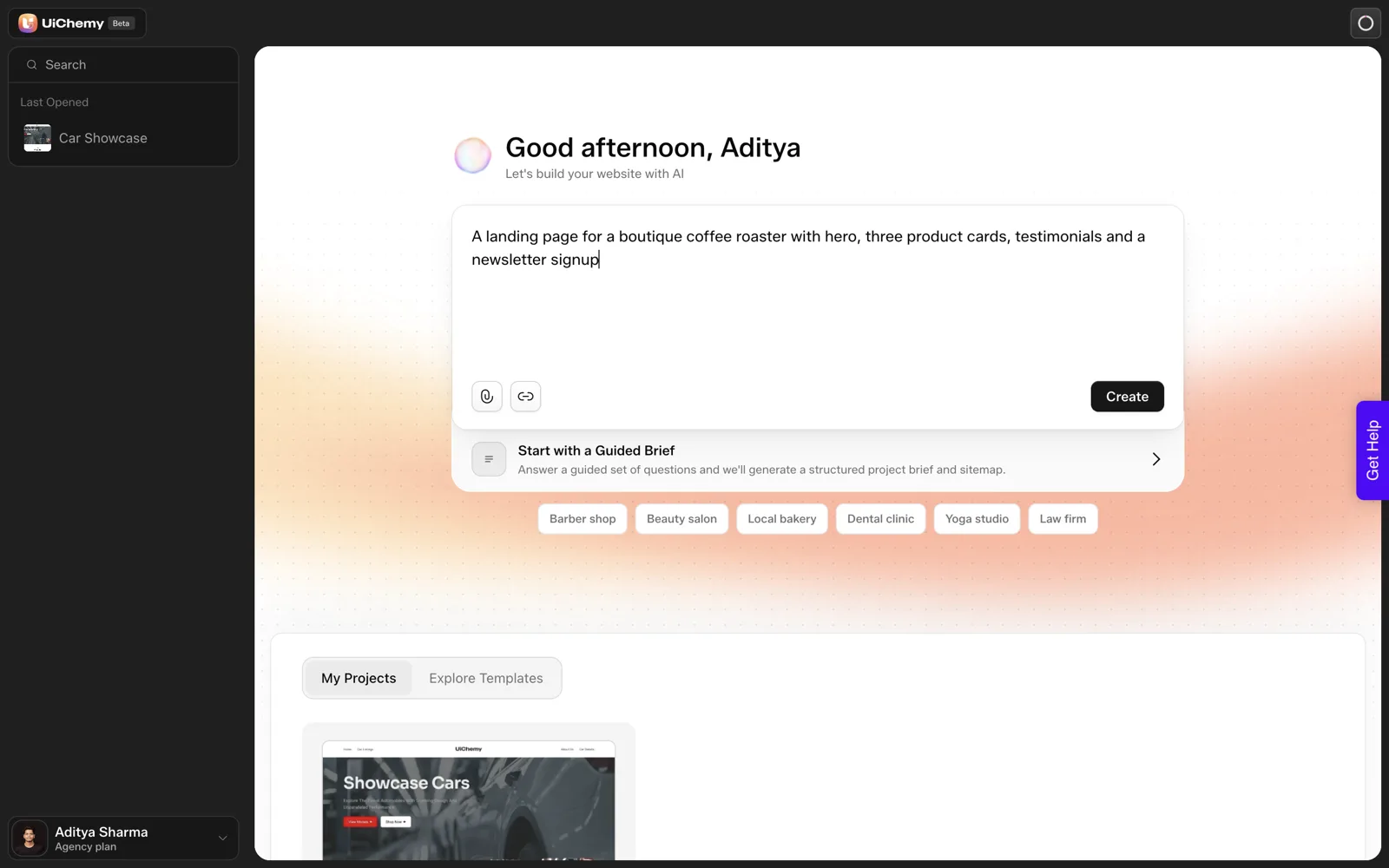
A prompt that gets the sitemap you want names six things: the business type, the offers, the audience, the pages you want, the pages you do not want, and the tone. State counts as numbers and name the noun. In our test, “three product cards” came back as five cards labelled “Service”, so check counts before design.
I wrote this framework after our coffee roaster test, where one sentence produced a usable but imperfect draft. The templates below are untested starting points, labelled as such, and they follow the fields that UiChemy’s own scope step asks for. We also keep a page of copy-ready examples at AI website prompts.
Why Do Prompts Miss the Sitemap You Wanted?
A short prompt leaves most decisions to the tool. That is fine for a first look and expensive for a real project. The sitemap is the part that matters most, because page count and page names drive everything that follows: design time, copy, and for agencies, the quote.
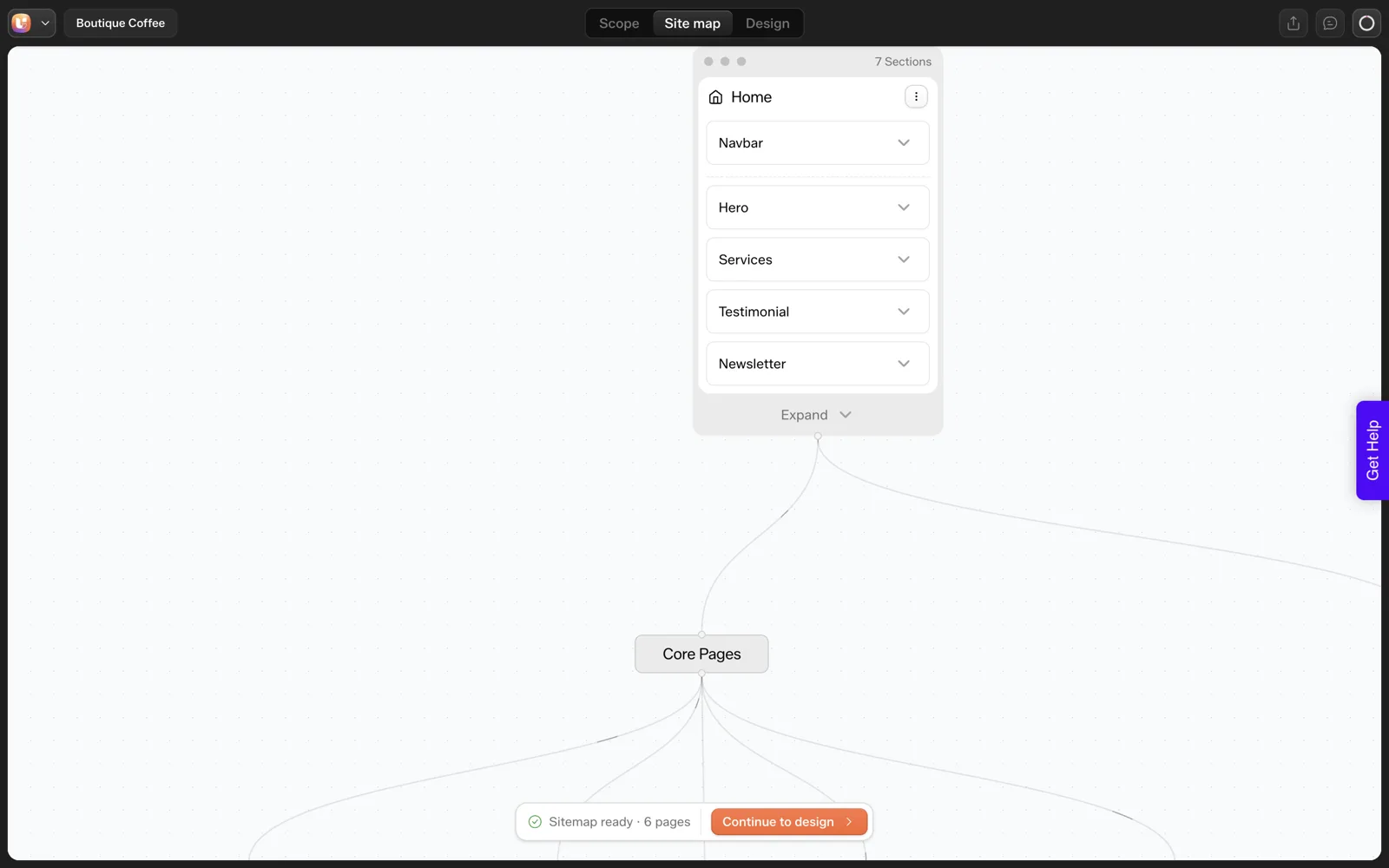
Our own run is a small example. The prompt was one sentence about a boutique coffee roaster. The sitemap came back with six pages: Home, Products, Testimonials, About Us, Contact and Newsletter Signup. Nothing in the sentence asked for six pages. Several of them would be merged by a person with opinions, for example by folding Newsletter Signup into the footer.
That is the real lesson. The tool filled gaps with reasonable defaults, and defaults are generic. The way to get your sitemap is to leave fewer gaps.
What Are the Six Parts of a Good Prompt?
These six parts map onto how a client would brief a human designer. Skip one and you hand that decision to the tool.
- Business type. “A boutique coffee roaster” tells the tool the genre. “A business” tells it nothing.
- Offers. List what is sold, by name. “Whole bean coffee in three roast levels” beats “products”.
- Audience. One phrase: “home brewers who buy online”.
- Pages wanted. Name them. “Home, Shop, About, Contact”.
- Pages not wanted. Say “no other pages”. This one is the cheapest fix for sitemap bloat.
- Tone. One sentence, with one thing to avoid: “warm and direct, not salesy”.
Counts belong inside parts 2 and 4. “Exactly three product cards” is a number. “A few products” is not. If you need a longer intake before prompting, our 25-question client questionnaire turns answers into exactly this kind of input.
What Does the Scope Step Ask For?
If you use the guided path instead of one sentence, the Scope Editor asks for the same information in six steps. The docs list the fields, and they are a good checklist for your own prompt writing, even in another tool.
| Scope step | What it asks for | Prompt part it matches |
|---|---|---|
| Project Basics | Name, website type, primary goals, target locations | Business type |
| Business and Audience | Up to 5 offers, customer description, differentiators, tone, tones to avoid, words never to use | Offers, audience, tone |
| Trust and Messaging | Customer objections, kinds of proof you can show | Optional extra |
| Brand Look and Feel | Design style, font preference, logo, colors to use and avoid | Optional extra |
| Design Inspiration | Sites you like and dislike, with reasons | Optional extra |
| Competitors and Structure | Competitor references and the pages you want or do not want | Pages wanted, pages not wanted |
The docs add that a project created from a prompt drafts all six areas for you, shown as cards with “Looks right” and “Edit” buttons. You can read the full description in the Scope Editor docs. The practical takeaway: a longer prompt does the work of the guided steps in one box.
Prompt Templates You Can Copy
These are templates, not tested prompts. We have not run them, so we make no claim about what they produce. Fill every bracket, then read the output against your own list.
TEMPLATE A: Small local business

A website for [business type] in [city or region].
Offers: [offer 1], [offer 2], [offer 3].
Audience: [one phrase].
Pages: Home, [page], [page], Contact. No other pages.
Home page sections: hero, [exactly N] [named items], testimonials, [one conversion block].
Tone: [two adjectives]. Avoid: [one thing].
Never use these words: [list].

TEMPLATE B: Service business or agency

A website for a [service] studio serving [audience].
Offers: [service 1], [service 2], [service 3].
Pages: Home, Services, Work, About, Contact. No blog.
Goal: [leads, bookings or calls].
Show prices as: [from a price, on request].
Tone: [two adjectives]. Avoid: too salesy.

TEMPLATE C: Product or shop landing page

A one-page landing site for [product].
Sections in order: hero, [exactly N] feature cards, how it works, testimonials, FAQ, signup.
No separate pages for any section.
Audience: [one phrase]. Tone: [one adjective].
The tone options in the scope step include Premium, Friendly, Bold, Minimal, Playful and Corporate, so if your prompt tone matches one of those words the tool has a clean signal. The docs also list “tones to avoid” such as too salesy or too technical. Pairing a tone with an avoid line narrows the output.
How Do You Control Counts and Labels?
Counts and labels slipped in our run, so give them extra attention.
- Write the number and the noun together. “Exactly three product cards, each one a coffee roast” gives two checkable facts.
- Say what the item is not called. Our cards were labelled “Service” on a roaster’s site. A line such as “label them Products” removes the guess.
- Limit pages by name. Replace “a landing page” with “one page only, no separate pages”.
- Re-check at the review step. It is the cheapest place to fix a miss, and our piece on the sitemap review step explains why.
I have not tested whether a tighter prompt removes the card miss. It may reduce it, and it may not. Run your own comparison and write down the result. If you want to see how other tools handle prompts, our look at Figma Make prompts shows a different tool’s patterns, and our assessment of Google Stitch and prompt to UI does the same for another.
What Should You Check After Generation?
Read the sitemap against the prompt like a proofreader. For each part of your prompt, ask whether it appears in the output exactly as written. Then ask the reverse: what appears that you never asked for.
- Is every page you named present, with the name you used?
- Is any page present that you did not name?
- Does every count match?
- Do section labels fit the business?
- Are thin pages worth keeping? Information architecture for AI-generated sites helps decide.
For a baseline on how many pages a small business actually needs, see how many pages a small business website needs, and for what to do with every miss you find, the five-minute fixes are in our list of common AI website problems.
If you are choosing a method first, free, AI and by-hand sitemap generators compared shows where each one fits.
How Do You Turn a Weak Prompt Into a Strong One?
Here is a worked rewrite using our coffee roaster sentence. Each step adds one of the six parts. These versions are untested, so treat them as drafts to compare, not as results.
VERSION 1 (the original, tested once)
A landing page for a boutique coffee roaster with hero, three
product cards, testimonials and a newsletter signup

VERSION 2 (adds offers and audience)
A landing page for a boutique coffee roaster selling whole bean
coffee in three roast levels to home brewers who buy online.
Sections: hero, three product cards, testimonials, newsletter.

VERSION 3 (adds counts, labels, pages and tone)
One page only, no separate pages, for a boutique coffee roaster
selling whole bean coffee in three roast levels to home brewers
who buy online.
Sections in order: hero, exactly three product cards (one per
roast level, labelled Products), testimonials, newsletter signup.
Tone: warm and direct. Avoid: too salesy.
Version 1 left the page count, the audience and the card label to the tool. Version 2 fixes the audience and the offer. Version 3 closes the three gaps we hit in our run: the number of cards, the label and the extra pages.
Run all three on the same day and write down what each returns. That comparison teaches you more about your own wording than any template, and our coffee roaster test gives you the baseline to compare against.
Which Prompt Mistakes Do People Make Most?
These are patterns I see when people describe a site to any AI tool. The fixes cost nothing.
| Mistake | Why it hurts | Fix |
|---|---|---|
| Vague count: “a few services” | The tool picks a number, and you may not like it | Write the number: “exactly four services” |
| No pages named | The tool drafts its own sitemap, six pages in our run | List the pages and add “no other pages” |
| Generic business type: “a company” | Output reads like a template | Name the genre and the audience |
| Style words only: “modern and clean” | Every site is modern and clean | Name one reference site you like and why |
| No facts supplied | The tool fills gaps with plausible text | Paste real prices, hours and a shipping rule |
| Asking for everything in one go | You cannot tell which part caused a miss | Start with the sitemap, then add detail |
The facts row matters most for a real business. A draft with invented details looks finished and is wrong. Our list of common AI website problems shows how that looks on the page.
How Do You Test Two Prompts Against Each Other?
Prompt advice is easy to give and hard to trust, so test your own. Change one thing between runs and record the result. A simple log is enough.
PROMPT COMPARISON LOG

Tool:
Date:

RUN A
Prompt (paste):
Pages returned (list):
Counts requested vs delivered:
Labels that do not fit:
Pages I would remove:

RUN B (change ONE thing from run A)
What I changed:
Prompt (paste):
Pages returned (list):
Counts requested vs delivered:
Labels that do not fit:
Pages I would remove:

Which run needed fewer fixes?
Did the change help? yes / no / unclear
Next thing to change:
Change only one thing per run. If you add a count, a label and a page limit together, you will not know which one worked. This is slower and teaches you more.
A single comparison is still a sample, so repeat it on a second business type before you generalize. Our piece on running an AI builder across client projects shows where a prompt log fits in a repeatable process.
FAQ
How long should a website prompt be?
Long enough to cover the six parts: business type, offers, audience, pages wanted, pages not wanted and tone. That is usually a short paragraph. One sentence works for a first look, but it leaves page structure to the tool’s defaults.
Why did the AI ignore my exact number?
We saw it in one run: three product cards requested, five delivered. We do not have a verified explanation, so we only report what we observed. Restate counts as numbers, name the noun, and check the output at the review step.
Can I fix the sitemap after it is generated?
Yes. The docs say you can add, remove, reorder and rename pages and sections in the Sitemap Editor at any time, before and after the Design Editor. Changing structure early is cheaper than changing it after designs exist.
Should I use the one-box prompt or the guided scope steps?
Use the box for a quick draft and the guided steps for client work. The guided path asks for offers, tone, brand colors and reference sites, and the drafted brief can be shared with a client for sign-off before design begins, as the docs describe.
When you are ready to try a template on a real idea, you can Get Started and compare the sitemap with your own list.
Every feature named in this post is listed by product: all UiChemy features, AI to WordPress features.