Website Sitemap Generator: Free Tools vs AI vs By Hand
 Sagar Patel
A website sitemap generator is a tool that produces a page list or page tree from a URL, a prompt or a form. Free tools suit mapping an existing site, AI tools suit proposing a structure from a brief, and a hand-written outline suits anyone who already knows the pages. Whichever you use, review the result before design.
The word “sitemap” covers two different jobs, and mixing them up causes a lot of wasted time. This guide separates them first, compares the three methods, and gives you an outline you can copy. If you are still deciding how many pages you need, start with how many pages a small business website needs.
Two Kinds of Sitemap, Two Different Jobs
People search for a sitemap generator and mean one of two things.
- An XML sitemap. A machine-readable file listing your URLs for search engines. WordPress has produced one by default since version 5.5, and SEO plugins can add their own. This is about discovery by crawlers.
- A planning sitemap. A diagram or outline of the pages you intend to build, and the sections on each. This is about structure, and it is what this post covers.
If you already have a live site and want to submit it to a search engine, you want the XML kind, and your WordPress install or SEO plugin likely has it. If you are about to build a site and need to decide what goes on it, you want the planning kind. The rest of this guide is about that second job.
Free Sitemap Generators: What They Do Well
Free visual sitemap tools generally fall into two groups: crawlers that read an existing site and draw its tree, and diagram tools where you drag boxes and connect them. Both are useful, and neither costs anything to try.
Where they shine
- Mapping a site you already have, such as before a redesign or migration.
- Giving a client a quick picture of a structure you have already decided.
- Exporting a diagram for a document or a slide.
Where they stop
- They draw what you tell them or what already exists. They do not suggest pages you forgot.
- The diagram usually stays separate from the build, so the sitemap and the real site can drift apart.
- Free tiers commonly limit the number of pages or projects. Check the limits for the specific tool you pick, since they change.
Wireframe-first tools sit near this group. Our post on Relume wireframes and what happens next covers what to do when the structure exists as a wireframe and you still need a working site.
AI Sitemap Generators: What Changes
An AI generator starts from a prompt or a brief and proposes a page list. The advantage is speed and coverage: it can suggest a Contact page or a Testimonials page you had not listed. The risk is that it guesses, and a guess can add pages you did not want.
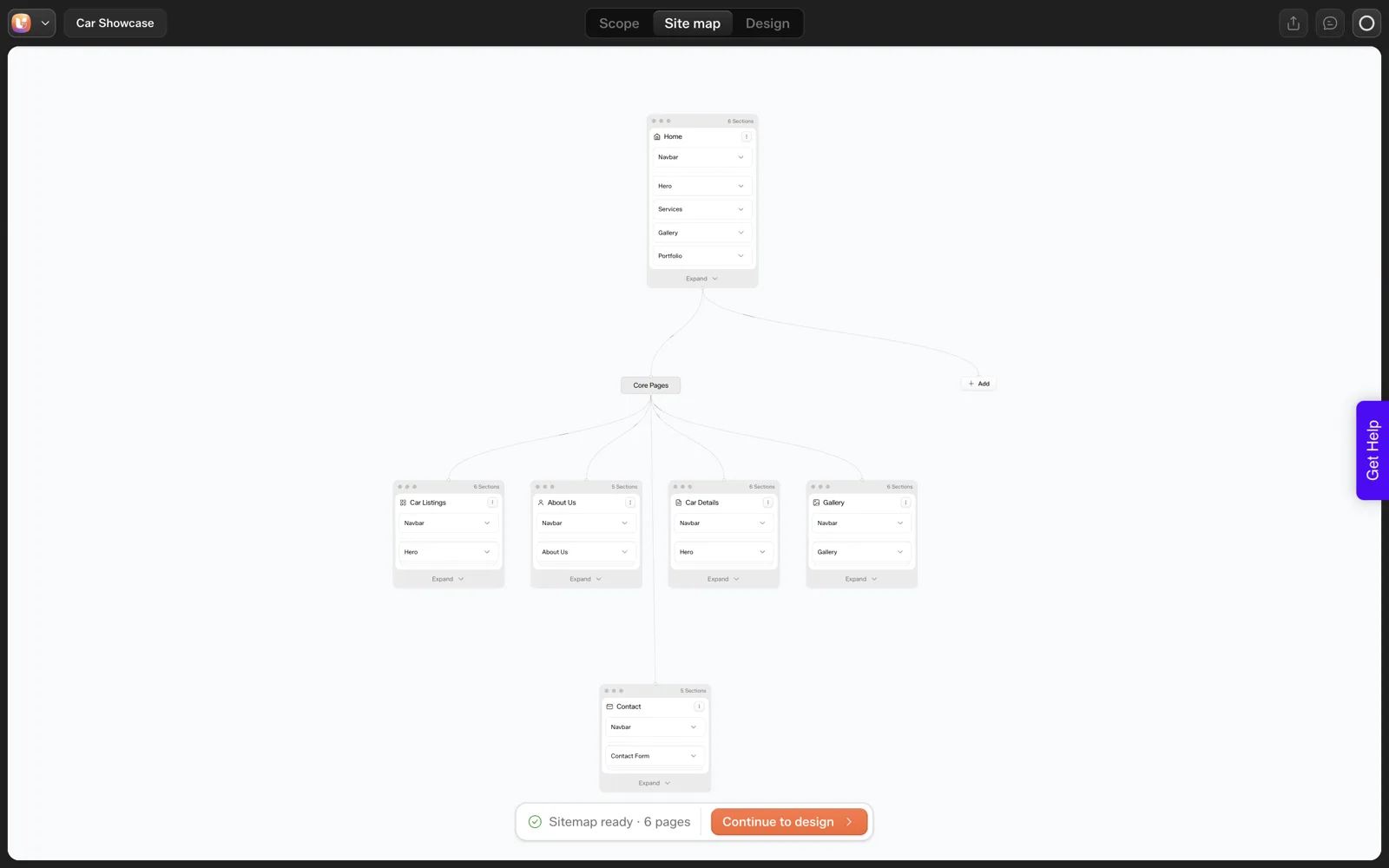
We ran one prompt on 2026-10-01: “A landing page for a boutique coffee roaster with hero, three product cards, testimonials and a newsletter signup”. UiChemy produced a six-page sitemap in about 13 seconds: Home, Products, Testimonials, About Us, Contact and Newsletter Signup. Two of those, Products and Newsletter Signup, were pages we had not asked for as separate pages.
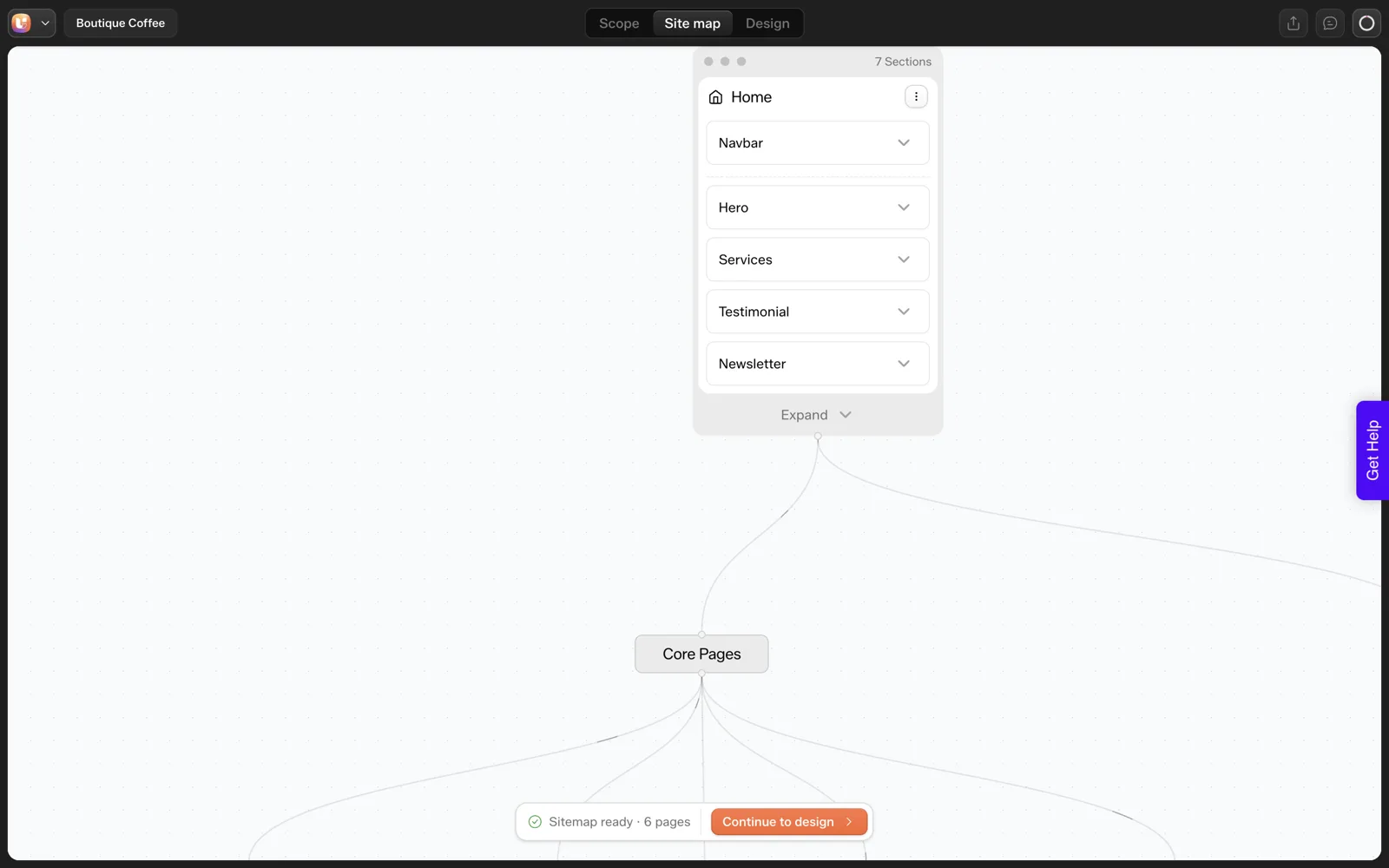
That is one run, so it says nothing about how all AI tools behave. It does illustrate the pattern: AI is quick and plausible, and still needs a human to cut and rename.
The difference in a tool with a built-in review step is that you can edit the result in the same place you will build from, as the Sitemap Editor documentation describes. A tour of that step is in our sitemap review, screen by screen.
By Hand: The Outline Method
The oldest method is still excellent: write the pages as an indented list. It needs no account, no credits and no export. You can finish a first draft in ten minutes, and you will understand the site better afterwards than if a tool produced it for you.
The method:
- List the questions a visitor needs answered.
- Give each question one page. Merge near-duplicates.
- Under each page, list its sections in the order a visitor reads them.
- Mark which sections repeat on every page, typically a header and footer.
- Count the pages and compare with what you quoted.
A structured questionnaire makes step one much easier. Use the 25-question client questionnaire to collect the answers before you outline.
Side by Side
| Question | Free generator or diagram tool | AI generator | By hand |
|---|---|---|---|
| Best for | Mapping an existing site, tidy diagrams | Proposing a structure from a brief | Sites where you already know the pages |
| Speed to first draft | Minutes for diagram, longer for planning | Seconds to a minute for a draft | About ten minutes |
| Suggests pages you missed | No | Yes, and sometimes too many | Only if you think of them |
| Risk | Diagram drifts from the real build | Plausible but unwanted pages and counts | Blind spots and bias |
| Cost | Free tier, with limits that vary | Often credit-based; check the plan | Your time |
| Connected to the build | Usually no | Depends on the tool | No |
| Client sign-off | Export an image | Share the brief or review link if the tool supports it | Send the outline |
The strongest combination for most small projects is hybrid: write a quick outline by hand, let a tool propose a second version, then compare the two and keep the best of each.
An Outline Template to Copy
Paste this into a doc and fill it in. The indented shape works as a plain-text sitemap you can paste into any tool or send to a client.
SITEMAP OUTLINE

Site: [name]
Goal of the site: [one sentence]
Primary visitor: [who]

GLOBAL (on every page)
  - Header: logo, navigation, main button
  - Footer: links, contact, legal links

PAGES
1. Home
   - Hero: promise + main button
   - Proof: [logos, quotes or numbers you can verify]
   - Services summary
   - Final call to action
2. [Services / Products]
   - Intro
   - Items (count: __ )
   - FAQ
3. About
   - Story, team, location
4. [Proof page: Testimonials / Work]
5. Contact
   - Form, hours, map or booking link

EXTRAS (only if needed)
  - Blog (who publishes, how often?)
  - Legal: Privacy, Cookie policy
  - 404

CHECKS
[ ] Every page answers one visitor question
[ ] No two pages say the same thing
[ ] Page count matches the quote: __
[ ] Section counts match the brief: __
Whatever You Use, Review It
All three methods fail the same way: a page nobody needed, a missing page nobody noticed, or two pages doing one job. A short review fixes most of it. Read the list aloud as if you were a first-time visitor, then ask what is missing, what is repeated and what could be a section.
Structure problems are more costly when pages are generated automatically, since thin and duplicate pages multiply quickly. Our guide to information architecture for AI-generated sites covers how to spot them, and Figma wireframe to finished website follows a structure into a finished build when you design visually first.
How to Pick the Method for Your Project
The comparison table above shows the trade-offs. In practice the choice comes down to what you already know on the day you start.
- You know the pages and the client agrees: write the outline by hand. A tool adds nothing you do not already have.
- You have a vague brief and a deadline: ask an AI generator for a first draft, then cut and rename.
- You have a live site that needs a redo: run a free crawler-style tool to map what exists, then outline the new structure by hand.
- You have a client who struggles to describe the project: run the questionnaire first, then pick any of the three.
Whichever route you take, the output is the same artefact: a page list, the sections on each page and a page count. That artefact is what you quote against, so keep it in one place and date it.
A Worked Hybrid: Outline, Generate, Compare
The hybrid method is the one I would use on a small project. It takes three passes and it works with any tool, free or AI.
- Write your outline first, without looking at any tool. Use the template above and stop at ten minutes. This protects you from anchoring on whatever a generator suggests.
- Generate a second version. Feed the same brief to an AI generator, or draw the diagram in a free tool if you prefer a picture. In our single run on 2026-10-01, the generated list had six pages from a landing page prompt.
- Put the two lists side by side. Mark every page that appears in both, every page only in your outline and every page only in the generated one.
- Argue with each difference. A page only in the generated list needs a reason to exist. A page only in your outline may be a blind spot in the brief or a page the tool missed.
- Write the final list and the page count. Send it to the client before design starts.
The comparison step is where the value sits. Neither list is trusted on its own, and the disagreements point you at the questions worth asking the client. If you want the longer reasoning on why that review matters, read why a sitemap review step prevents rework.
Mistakes People Make With Sitemap Tools
Each of these is cheap to avoid when you spot it early.
| Mistake | Why it hurts | What to do instead |
|---|---|---|
| Confusing an XML sitemap with a planning sitemap | You generate a crawler file when you needed a page plan, or the reverse | Decide first which job you are doing |
| Accepting every page a generator proposes | Pages nobody asked for get built and later quoted | Give every page a one-line reason or delete it |
| Letting the diagram live in a separate file | The sitemap and the real site drift apart | Date the diagram and update it when scope changes |
| Planning pages without sections | A page title says little about the work inside it | List sections under each page, in reading order |
| Skipping the page count | Nobody can tell later whether a request is new scope | Write the count at the bottom and agree it with the client |
The scope point deserves its own page. Our post on the scope creep killer, a locked sitemap and a scope review shows how a written page count settles disputes before they start.
A Pre-Design Sitemap Checklist
Run this once the list is final and before anyone opens a design file.
PRE-DESIGN SITEMAP CHECK

[ ] Which job is this: XML sitemap for search engines, or planning sitemap?
[ ] Method used: free tool / AI draft / hand outline / hybrid
[ ] Every page has a one-line purpose
[ ] No two pages answer the same visitor question
[ ] Sections listed under every page, in reading order
[ ] Shared elements (header, footer) listed once
[ ] Page count written down: __
[ ] Section counts written down where the brief names them: __
[ ] Client has seen the list and replied
[ ] Date of sign-off: __
Keep the filled-in version with the project files. When a request arrives three weeks later, you can point at the list instead of arguing from memory.
FAQ
What is the difference between an XML sitemap and a website sitemap?
An XML sitemap is a file that lists your URLs for search engines to crawl. A website or planning sitemap is a diagram or outline of the pages and sections you intend to build. They share a name but serve different jobs, one for crawlers and one for planning.
Are free sitemap generators good enough?
For mapping an existing site or drawing a structure you have already decided, yes. They do not propose pages you forgot, and free tiers often cap pages or projects, so check the current limits. For a new site starting from a brief, a hand outline or an AI draft helps more.
Can AI generate a website sitemap?
Yes. AI tools propose a page list and sections from a prompt or brief in seconds. They can also add pages you did not intend, so review the result. In our single test, six pages came back from a landing page prompt, two of which we would have questioned.
Should I make a sitemap by hand or use a tool?
If you already know your pages, write an indented outline by hand in about ten minutes. If you are starting from a vague brief, let a tool propose a draft and then edit it. Many people do both and compare the two versions.
When should I create the sitemap in a project?
Before design. A sitemap is cheapest to change while it is still a list of boxes. Agree the page list, the sections and the page count with the client first, then start visual design so structural questions do not reopen on every round.
If you want an AI draft to compare against your own outline, you can Get Started and try it on a short prompt.
Every feature named in this post is listed by product: all UiChemy features, UiChemy Composer features.