How Many Pages Does a Small Business Website Need?
 Sagar Patel

Most small business websites need five to eight pages: Home, About, Services or Products, Contact, and one proof page such as Testimonials. Add a page only when a visitor has a question your existing pages cannot answer. A single offer can live on one page, while shops and bookable businesses sit nearer eight.
The number matters less than the reason behind each page. If you are turning a client conversation into a structure, the client website questionnaire is the quickest way to find out which questions your visitors actually bring.
The Short Answer: Start From Questions
Search for “how many pages should a small business website have” and you will find ranges, usually somewhere between five and ten. Those ranges are fine as a sanity check. They are a poor way to plan, because a plumber, a bakery and a two-person design studio have different visitors asking different things.
A better method is to list the questions a stranger needs answered before they contact or buy from you. Then give each question one home.
A visitor asks: what do you do, can I trust you, what does it cost or how do I start, where are you. Those four questions already produce a Home page, a Services page, a proof page and a Contact page.
Every page after that has to earn its place by answering a question the others cannot. If it cannot, it is a section on an existing page, not a page of its own.
A Starting Point by Business Type
Treat this table as a first draft of a sitemap. It is a framework based on how visitors tend to behave in each situation, and it makes no claim about any set of past builds. Adjust it with your own customers.
| Business type | Typical pages | Why these |
|---|---|---|
| Local service (plumber, cleaner, electrician) | Home, Services, About, Reviews, Contact | Visitors want proof and a phone number fast |
| Consultant or freelancer | Home, Work, About, Services, Contact | Past work and a clear offer decide the enquiry |
| Restaurant or cafe | Home, Menu, About, Gallery, Contact and Hours | Menu and opening hours are the main visits |
| Small shop with a few products | Home, Products, About, Shipping and Returns, Contact | Delivery and returns answers remove purchase doubt |
| Appointment business (salon, clinic, studio) | Home, Services, Team, Booking, Contact | The visit ends in a booking, so make it a page |
| Agency or studio | Home, Services, Work, About, Contact, optional Blog | Case work does the selling |
| Single product or one offer | One long page, plus Contact | One decision does not need a menu |
If a row has more than eight pages after you adjust it, check each extra page against the page test further down before you build it.
The Five Pages Almost Every Small Site Needs
Home
Home answers “am I in the right place” in a few seconds. State what you do, who it is for and where to go next. It should link out to the other pages, so keep detail on those pages and a short summary here.
Services or Products
One page that names what you sell in the customer’s words. Split it into separate pages only when each offer has its own audience, its own price logic and enough to say that a single page would become a scroll nobody finishes.
About
People use this page to decide whether you are a real business run by real people. Say who you are, where you are based and what you care about. Keep it factual.
Proof
Testimonials, a Reviews page, a Work page or a gallery. Pick whichever matches what you can honestly show. Proof does most of the persuading, and it can be a section on Home for a business that has very little of it yet.
Contact
Include the way you want to be reached, hours, location if it matters and a form with as few fields as you can manage. If you take bookings, link to the booking page from here as well.
The website brief template has a place for each of these, so you can fill them in before anything is built.
When One Page Is Enough
One long page is a legitimate answer for a launch, a single product, an event or a business with one service and a short story. It works because the visitor makes one decision and the page walks them to it: promise, proof, offer, answer to the main objection, next step.
It stops working when you need different audiences to find different things, when you want to rank for several distinct searches, or when the page grows so long that nobody finds the pricing. At that point, split the page along the questions your visitors ask.
If you are weighing a quick build against a bigger one, the posts on free AI website builders and where the free ends and no-code AI website builders explain what each route tends to hand you at the end.
Pages That Look Useful and Quietly Hurt
Small sites get worse by adding pages that look professional but say little. Watch for these:
- Near-duplicate service pages. Five pages that all say “we do quality work in your area” with one word swapped dilute each other and give visitors nothing new.
- A blog with three posts. A stale blog signals an abandoned business. Add one only when you can publish on a schedule you will keep.
- A standalone Newsletter Signup page. A signup form usually works as a section of Home.
- A Privacy page you copied without reading. Keep a real policy, and file it under legal pages.
- “Our Process” pages with generic steps. If they could belong to any competitor, fold two sentences into Services.
The post on information architecture for AI-generated sites goes deeper on thin and duplicate pages, which matter even more when a tool proposes the page list for you.
The Page Test You Can Copy
Run every proposed page through these six checks. A page that fails two or more should become a section.
PAGE TEST (one page at a time)

Page name: ______________________

1. Question: What single question from a visitor does this page answer?
   (If you need "and", you have two pages or none.)
2. Audience: Who lands here, and from where (search, Home, ad, email)?
3. Action: What is the one next step on this page?
4. Unique content: Can you write 150 words here that no other page says?
5. Maintenance: Who updates it, and how often?
6. Removal: If this page vanished, would any visitor miss it?

Verdict:
[ ] Keep as a page
[ ] Make it a section on: ______________
[ ] Cut

Total pages after the test: ____  (typical small site: 5 to 8)
Run it on paper before you open any tool. The test takes about a minute per page, and it is far cheaper than deleting pages after design. If you want a record of why each page exists, paste the answers into the project brief.
What Happened When We Let AI Pick the Pages
On 2026-10-01 we ran one test in UiChemy: the prompt asked for “a landing page for a boutique coffee roaster with hero, three product cards, testimonials and a newsletter signup”.
We asked for a landing page and the sitemap came back with six pages: Home, Products, Testimonials, About Us, Contact and Newsletter Signup. That is a sensible count for a small business, but it also split Products and the newsletter into pages of their own, which the page test above would question.
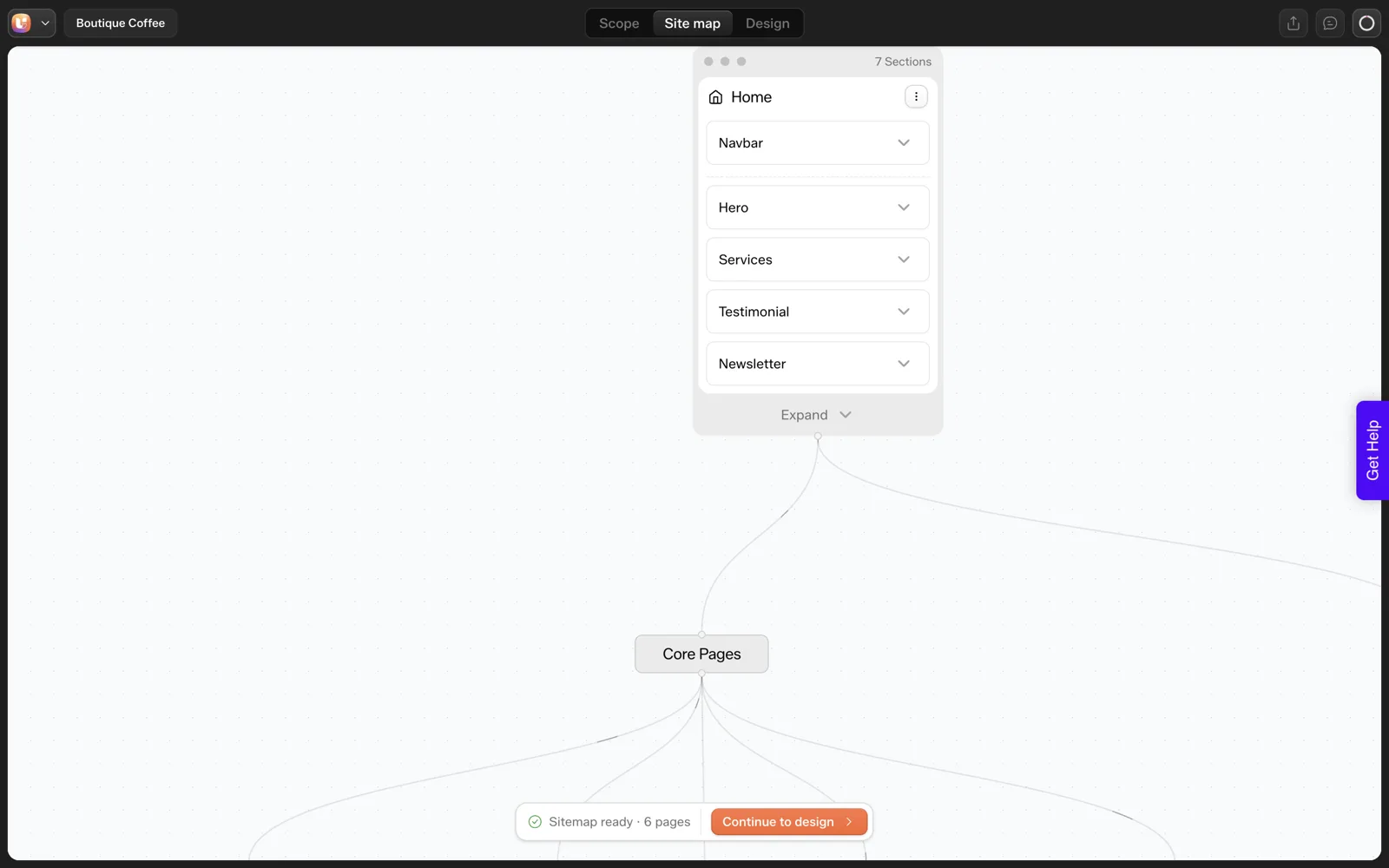
That is why a review step matters. The Sitemap Editor lets you rename, add, remove and reorder pages and sections before design, as the Sitemap Editor documentation describes. Our walkthrough of the sitemap review screen by screen shows where to apply the page test, and the reasoning behind a review step that prevents rework applies whether you build by hand or with AI.
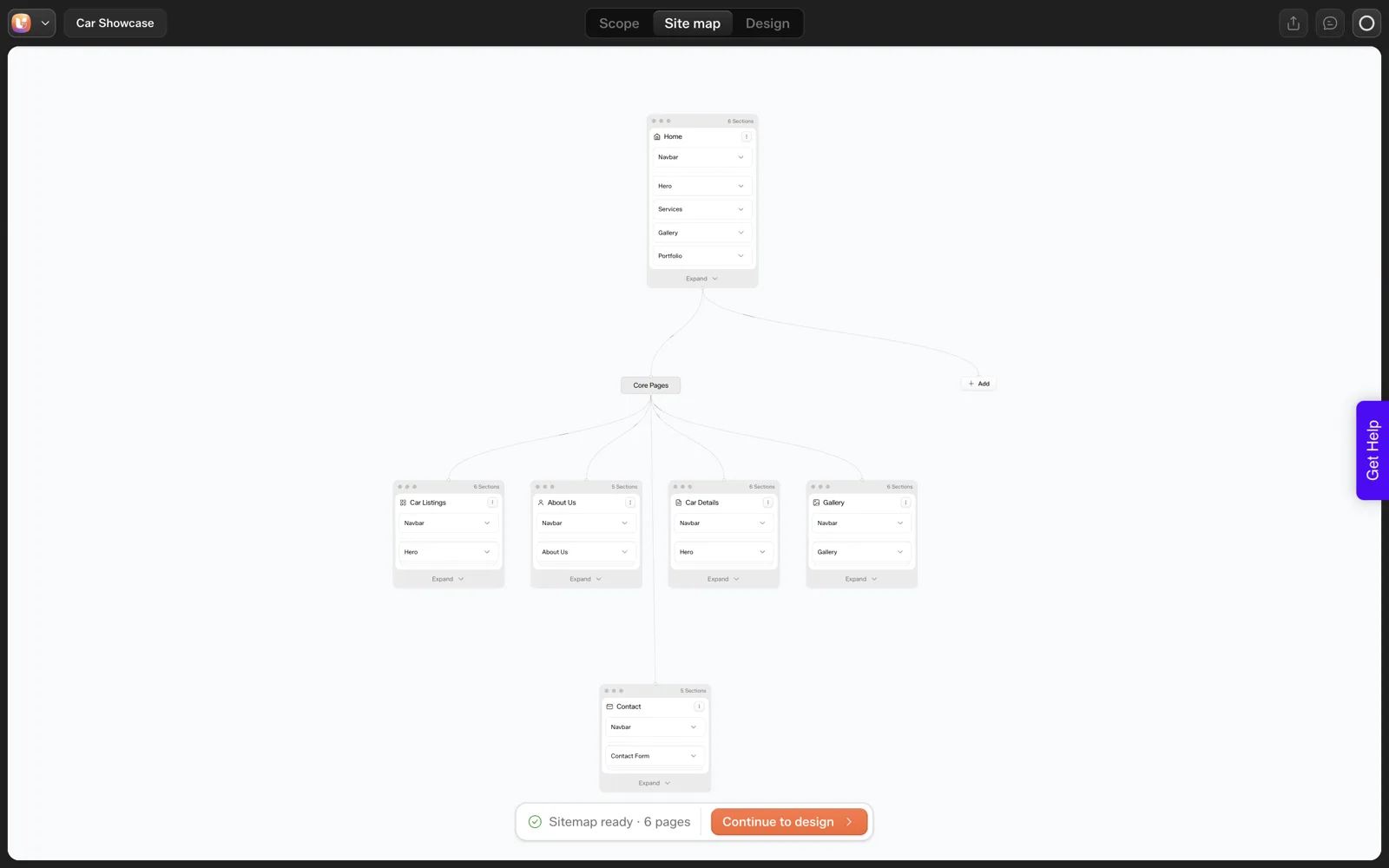
This was a single run on one prompt, so treat it as an illustration of the habit to build, not a measure of how many pages AI proposes in general.
A Worked Example: Counting Pages for a Fictional Business
Here is the page test applied end to end. The business is made up for this illustration: a two-person accounting practice that serves freelancers and wants new clients to book a call.
Start with the goal: book a call. Then list every page someone might propose, and ask whether it earns a place.
| Proposed page | Keep as a page? | Reason |
|---|---|---|
| Home | Yes | Every visitor starts here and it carries the main button |
| Services | Yes | Visitors need to know what is offered before they book |
| About | Yes | For a service run by two people, trust depends on who they are |
| Contact or Book a call | Yes | This is the goal |
| Pricing | [NEED from client: do they publish prices?] | Only if they will state real figures |
| Testimonials | No, a section on Home | Too little content for its own page |
| Blog | Later | Only worth building once someone will write for it |
| Privacy policy | Yes, in the footer | Needed wherever the site collects details |
The result is four core pages, one conditional page, a footer page, and one deferred idea. That is a defensible launch list, and every row has a reason you can say out loud to the client.
Notice what the exercise did. It never asked how many pages a business like this should have. It asked what each page was for. That change of question is the whole method. AI website prompts that get the sitemap you want shows how to carry the answers into a prompt.
Pages or Sections: A Quick Decision Guide
Many page requests are really section requests. Use this guide when a client proposes a new page and you are unsure.
| If the content… | Make it… |
|---|---|
| Is under a screen of text and supports another page | A section on that page |
| Answers a question visitors search for by name | Its own page |
| Needs its own call to action | Its own page |
| Will be linked from outside the site, such as an email or a profile | Its own page |
| Repeats information that already exists elsewhere | A link to the existing page |
| Has no owner who will keep it up to date | Left out until someone does |
The last row is the one people skip. A page nobody maintains goes stale, and a stale page tells visitors the business is not paying attention. Fewer pages that stay accurate beat many pages that drift.
When you move a page down to a section, tell the client where it went. A short note saying “Testimonials now sit on Home, under the services” avoids the feeling that something was dropped. You can always promote a section to a page later, since that is a cheap change on a WordPress site.
The same reasoning applies to generated sitemaps. If a draft proposes ten pages for a small service, run each through the table above before design starts. The review step is covered in how to review an AI-generated WordPress site in 30 minutes.
When and How to Add Pages After Launch
A small launch list is a starting point and carries no promise to stay small. Add pages when evidence says they are needed, and not before.
These are reasons I would accept for adding a page.
- Visitors ask the same question repeatedly. If the inbox keeps filling with one question, a page answers it once.
- A service has outgrown its paragraph. When one offer needs its own proof, pricing or process, give it room.
- A new audience arrives. A different kind of customer may need different wording and a different call to action.
- Someone will own it. A named person has agreed to keep it current.
Before adding, run the same six-question page test from earlier in this post, and then update the sitemap with a date. The sitemap is the record of what the site contains and why.
Adding a page is also a scope event if you have an agreement with the client, so the same rules apply as before. The scope creep killer explains how to price and agree such additions without friction. For where page counts sit in the wider planning process, see information architecture for AI-generated sites.
FAQ
Is five pages enough for a small business website?
For many service businesses, yes. Home, Services, About, a proof page and Contact answer the main visitor questions. Add a page when you can name a question those five cannot answer, such as a menu, a booking flow or a shipping policy. Do not add pages to look bigger.
Should a small business have a blog?
Only if you can publish consistently and have something specific to say. A blog with a few old posts reads as neglect. If you cannot commit to a schedule, put your best answers on the Services and About pages and revisit the blog later.
Does more pages mean better SEO?
No. Pages help when each targets a distinct search and contains content nobody else on your site repeats. Many thin or near-duplicate pages dilute focus and are harder to keep accurate. A smaller site with strong, distinct pages is easier to maintain and usually easier to understand.
Can a one-page website work for a small business?
Yes, when you have one offer and one decision for the visitor. A single page with clear sections for promise, proof, offer and contact can do the job. Move to multiple pages when different audiences need different information or you want to target several searches.
How do I decide which pages to cut?
Ask what question each page answers and whether you can write 150 words on it that no other page contains. If not, fold it into another page as a section. The page test above gives you six checks to run per page before you build.
If you want to try the prompt-to-sitemap flow on your own business, you can Get Started without a card.
Every feature named in this post is listed by product: all UiChemy features, UiChemy Composer features.