How to Review an AI-Generated WordPress Site in 30 Minutes
 Sagar Patel

To review an AI-generated WordPress site in 30 minutes, work in timed passes: structure and content, then mobile, forms and links, then speed and accessibility basics, then handoff. AI output looks finished before it is, so check counts, labels, claims and real behaviour, not only appearance.
AI builds fail in predictable places, which makes a short review effective. For the common misses, see what AI gets wrong when it builds a website. This post turns that knowledge into a routine you can run on any generated site. Two wider reads: best AI website builder: what the roundups miss and AI website builders and the editability problem.
The 30-Minute Plan
Set a timer. Four passes, each with a single job, keep the review from becoming a redesign. Write down every problem as you find it and fix after the time is up, so a small issue does not eat your whole slot.
| Pass | Time | Job |
|---|---|---|
| 1. Structure and content | 8 min | Do the pages, counts and claims match the brief? |
| 2. Mobile, links and forms | 8 min | Does it work on a phone, and does everything click through? |
| 3. Speed and accessibility | 7 min | Is it fast enough and usable by everyone? |
| 4. WordPress handoff | 7 min | Can the owner edit and keep it running? |
This is a first-line review. A site that carries payments, personal data or legal obligations needs deeper testing than half an hour allows.
Pass 1: Structure and Content (8 min)
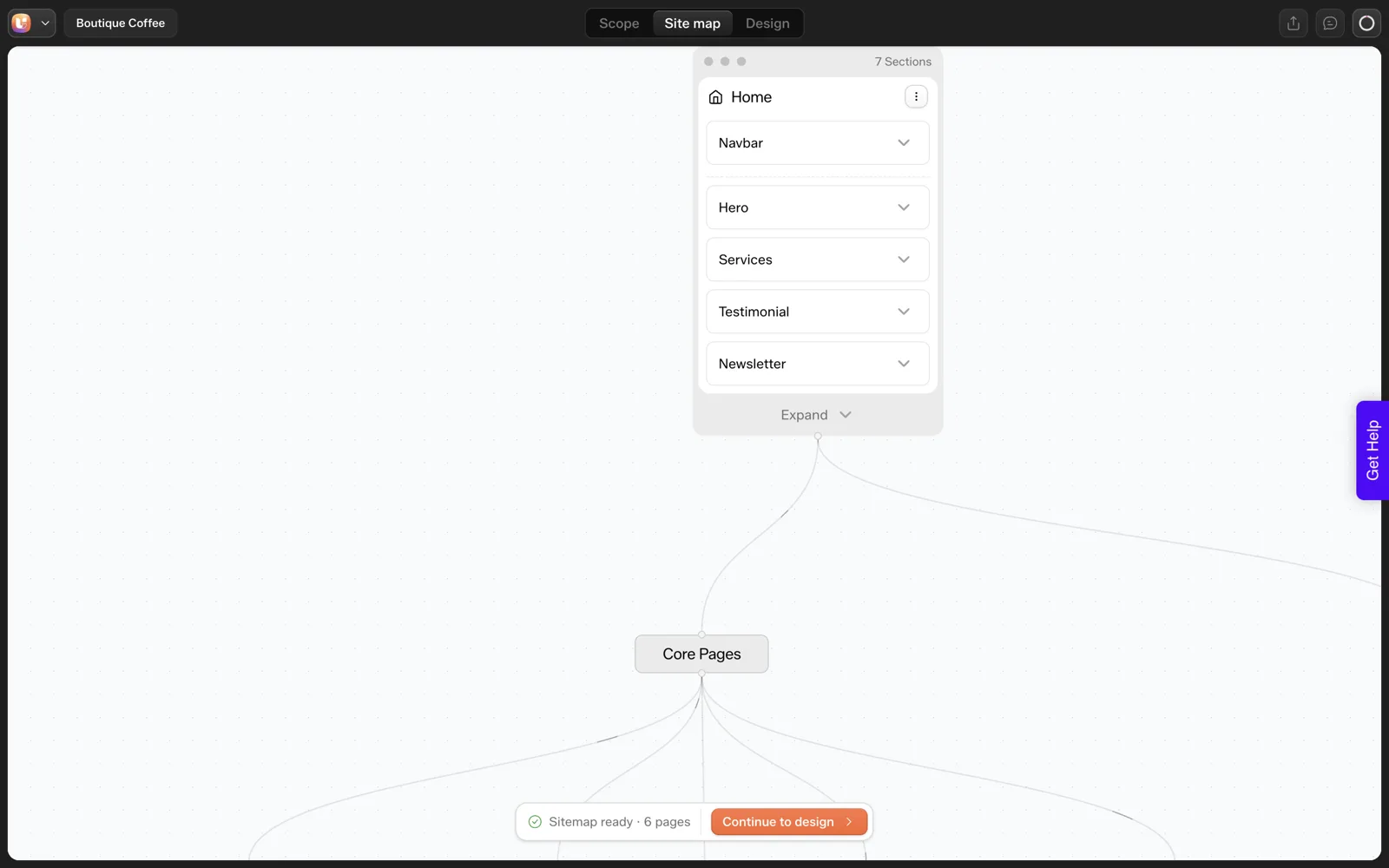
Start with the page list against the brief. If you reviewed a sitemap before design, compare the final result to it. Our guide to the sitemap review screen by screen shows how that earlier step works.
Counts and labels
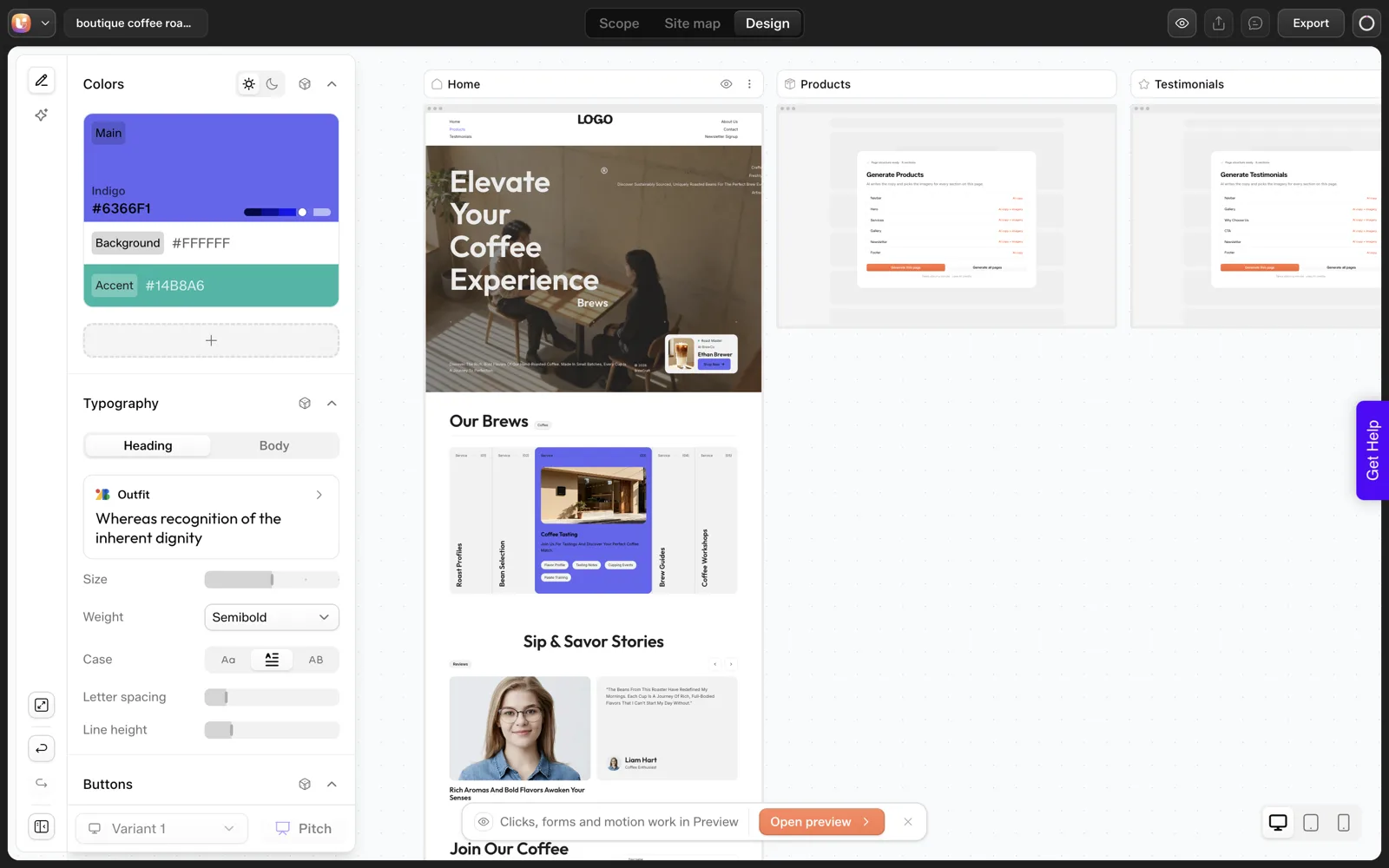
Count what you asked for. In our 2026-10-01 test we asked for three product cards and the Home page produced five cards labelled “Service”. Nothing looked broken at a glance, which is why counting matters.
Claims and facts
Read every statistic, testimonial, price, address and guarantee. AI invents plausible details. Anything you cannot verify should be removed or replaced with something real.
Duplicate and thin pages
Check that no two pages say the same thing. The information architecture check for AI-generated sites gives a table for spotting them.
Pass 2: Mobile, Links and Forms (8 min)
- Phone width. Open the site on a real phone or at 375 pixels wide. Check that text is readable, buttons are tappable and nothing scrolls sideways.
- Tablet width. Check around 768 pixels, where layouts often break between breakpoints.
- Navigation. Open the menu on mobile and click every item.
- Links and buttons. Click each call to action. Placeholder links such as “#” are common in generated pages.
- Forms. Submit each form with real input. Confirm it arrives where the owner expects, and that an error appears for bad input.
- Images. Check alt text and image crops at each width.
Forms deserve extra attention, because a form that looks fine can send nowhere. Always send a real test message.
Pass 3: Speed and Accessibility (7 min)
Run a performance test on the live URL, not the editor. Our post on testing the performance of AI-generated sections goes deeper. For a first-line check, look for oversized images, heavy fonts and slow loading of the first screen.
For accessibility, a few checks catch a lot:
- One H1 per page, with headings in order.
- Text contrast that is readable against its background.
- Alt text on meaningful images.
- Keyboard use: tab through the page and confirm focus is visible.
- Buttons and links with names that say where they go.
The post on keeping AI-written code clean covers quality, performance and accessibility checks for code that was generated rather than hand-written.
Pass 4: WordPress Handoff (7 min)
A generated site is only useful if the owner can run it. Check these as the person who will inherit it.
- Log in as the client role, not as admin, and confirm they can edit text and images.
- Set the site title, tagline, permalinks and favicon.
- Check SEO titles and descriptions on key pages.
- Remove unused plugins, sample content and placeholder pages.
- Confirm backups and updates are in place.
- Write a short note on how to edit the common things.
If the site came through the export flow, the process is plugin-based: install the UiChemy plugin, log in and import into Elementor, which is the flow we ran. The export to WordPress documentation describes the steps. Ownership and portability questions are covered in who owns an AI-built website.
The Review Checklist to Copy
AI-GENERATED WORDPRESS SITE: 30-MINUTE REVIEW

Site: ____________   Reviewer: ________   Date: ______
Start time: ____

PASS 1  STRUCTURE AND CONTENT (8 min)
[ ] Page list matches the brief; no extra pages
[ ] Counts match what was asked (cards, testimonials, steps)
[ ] Labels make sense ("Service" vs "Product")
[ ] Every claim, number, price and testimonial verified or removed
[ ] No duplicate or thin pages
[ ] No placeholder text or stock-photo mismatches

PASS 2  MOBILE, LINKS AND FORMS (8 min)
[ ] 375px: readable, no sideways scroll
[ ] 768px: layout holds
[ ] Menu works on mobile
[ ] Every button and link goes to the right place
[ ] Each form sends a real test message and shows errors
[ ] Images crop correctly

PASS 3  SPEED AND ACCESSIBILITY (7 min)
[ ] Speed test on live URL: first screen loads quickly
[ ] Images compressed; no huge files
[ ] One H1 per page; headings in order
[ ] Contrast readable; alt text present
[ ] Keyboard focus visible

PASS 4  WORDPRESS HANDOFF (7 min)
[ ] Client role can edit text and images
[ ] Title, tagline, permalinks, favicon set
[ ] SEO title and description on key pages
[ ] Sample content and unused plugins removed
[ ] Backups and updates planned
[ ] Edit guide written

Problems found: ____   Fixed: ____   Remaining: ____
Launch decision: [ ] go   [ ] fix first
A Worked Example: Pass 1 on the Coffee Roaster Home Page
Here is how the first eight minutes would run on the page from our 2026-10-01 test. The brief was “A landing page for a boutique coffee roaster with hero, three product cards, testimonials and a newsletter signup”. This is one run, so use it as a model for your own review.
- Minute 1 to 2: page list. The sitemap had six pages: Home, Products, Testimonials, About Us, Contact and Newsletter Signup. The brief described a landing page, so ask whether Products, Testimonials and Newsletter Signup should be sections of Home.
- Minute 3 to 4: counts. The brief asked for three product cards. The Home page showed five. Write that down as a defect, since the client was promised three.
- Minute 5: labels. The cards were labelled “Service”. A coffee roaster sells products, so the label is wrong for the business.
- Minute 6 to 7: claims. Read the testimonial section. If a name, quote or rating appears that the client did not supply, flag it for removal or replacement.
- Minute 8: log and move on. Do not start fixing. Two defects, one structural question and any claim you cannot verify go on the list.
Read this way, the review turns up three issues in eight minutes without opening a single setting: a structural question, a wrong count and a wrong label. None of them looks like a broken layout, which is the reason to read the page against the brief and not only look at it.
How to Log and Triage What You Find
A review produces a list, and a list needs an order. Sort each problem into one of three buckets, then fix in that order.
| Bucket | Meaning | Examples from this checklist |
|---|---|---|
| Launch blocker | The site cannot go live with it | A form that sends nowhere, an invented testimonial, a placeholder link on the main button |
| Fix before launch | It will embarrass you or confuse visitors | Wrong card count, wrong labels, a missing meta description, a menu that breaks on mobile |
| Fix after launch | Worth doing, and safe to leave for a week | A minor spacing difference, a small image crop, a nice-to-have animation |
Write each problem as one line: the page, what is wrong, what right looks like. “Home, five cards labelled Service, want three labelled Product” is a task someone can finish. “Cards look off” is not.
If the client is involved, share the launch blockers and the fix-before-launch list, and leave the third bucket for your own notes. Our post on the scope creep killer explains how a written page list keeps requested changes from sliding into new work.
When 30 Minutes Is Not Enough
The routine in this post is a first-line review. Some sites need more, and it helps to decide that before you start the timer.
| Site type | Add to the review |
|---|---|
| Takes payments | A full test purchase and refund, plus a check of every confirmation email |
| Collects personal data | Where the data goes, who can see it, and whether a privacy page exists |
| Has many pages | A sample of pages in each pass, plus a crawl for broken links |
| Uses custom code | A code quality and accessibility check on every generated section |
| Is regulated or carries legal claims | A review by someone qualified, since a checklist cannot cover it |
| Is for a high-traffic launch | A proper performance test on the live server |
If you review sites for clients regularly, a fixed routine becomes part of your process. An AI website builder for agencies describes handling many client sites without losing track of them, and the 12 questions for evaluating any AI website builder help you decide how much review a tool’s output needs before you trust it.
FAQ
How long does it take to review an AI-generated website?
A first-line review takes about 30 minutes for a small site if you work in timed passes. Larger sites, and sites that handle payments or personal data, need more time and deeper testing. Treat this routine as the minimum before launch.
What do AI website builders most often get wrong?
Counts, labels and invented details are common, as are extra pages, placeholder links and forms that look right but send nowhere. In our single test, a request for three product cards produced five. Check counts and verify any claim you cannot trace to the client.
Should I test on a real phone?
Yes, if you can. Browser resizing catches most layout problems, while a real phone shows tap targets, font rendering and speed more honestly. Test at least once on a phone before launch, and check the menu and every form. Real hardware also shows how slow a page feels on a mid-range connection.
What should I check before handing the site to a client?
Confirm they can log in with the right role and edit text and images, that SEO fields are set (the built-in UiChemy SEO audit lists missing titles and descriptions page by page), that sample content is removed and that backups are planned. A short written note on common edits prevents support requests in the first week.
Can I automate this review?
Parts of it, such as speed tests and basic accessibility scans, can be automated. Counting, claim checking and form testing still need a person. Use tools for the mechanical checks and keep your time for the judgement calls. A scanner cannot tell you that a claim is untrue or a count is wrong.
To generate a site you can run this review on, you can Get Started and try a short prompt.
Every feature named in this post is listed by product: all UiChemy features, UiChemy Composer features.