Claude Design vs Figma: Which Fits a WordPress Build?
 adityauichemy
Claude Design vs Figma comes down to where your WordPress page starts. Claude Design builds a visual draft from a conversation and exports it as HTML, PDF, PPTX or to Canva. Figma holds frames you draw and keep. UiChemy converts either one into an editable WordPress page: the Figma plugin for a frame, and the HTML route for a Claude build. Facts here were read on 12 November 2026.
The short answer
Pick Figma when a designer owns the layout and you want a faithful conversion of that exact frame. Pick Claude Design when you have a brief and no design file, and you want a first version to react to. Both can end in the same place: a native Elementor or Gutenberg page you can edit in WordPress.
| Question | Claude Design | Figma with UiChemy |
|---|---|---|
| Starting point | A text prompt, uploaded files or your codebase | A frame you or a designer drew |
| What you get | Designs, prototypes, slides, one-pagers | A frame ready to convert |
| Exports named by the vendor | Canva, PDF, PPTX, standalone HTML, handoff to Claude Code | UiChemy plugin to Elementor, Gutenberg or Bricks |
| Route to WordPress with UiChemy | HTML to WordPress via the UiChemy MCP | Figma plugin, AI Express Mode |
| Best when | You need a draft fast from a brief | The layout is already designed |
What Claude Design is
Anthropic introduced Claude Design on 17 April 2026 as an Anthropic Labs product. Its announcement says you describe what you need, Claude builds a first version, and you refine it through conversation, inline comments, direct edits or sliders. At launch it was a research preview for Claude Pro, Max, Team and Enterprise subscribers. Source: Anthropic, Introducing Claude Design.
It can read your codebase and design files to build a design system, and it can capture elements from your website so a prototype looks like the real product. Exports named on that page are Canva, PDF, PPTX and standalone HTML, plus a handoff bundle for Claude Code.
What Figma does in this workflow
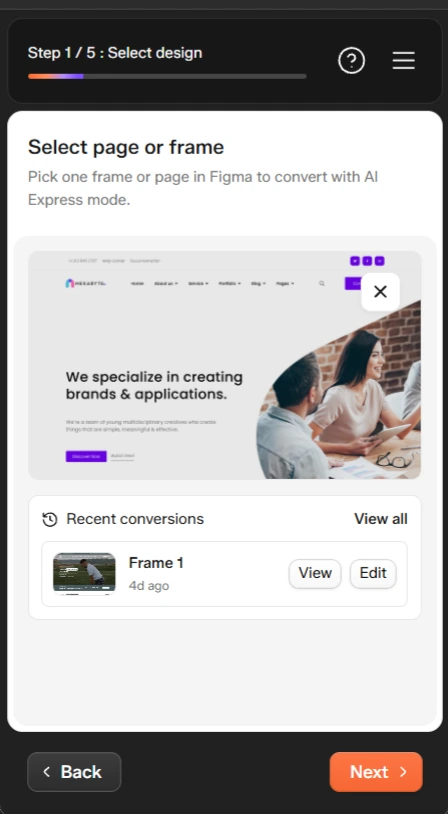
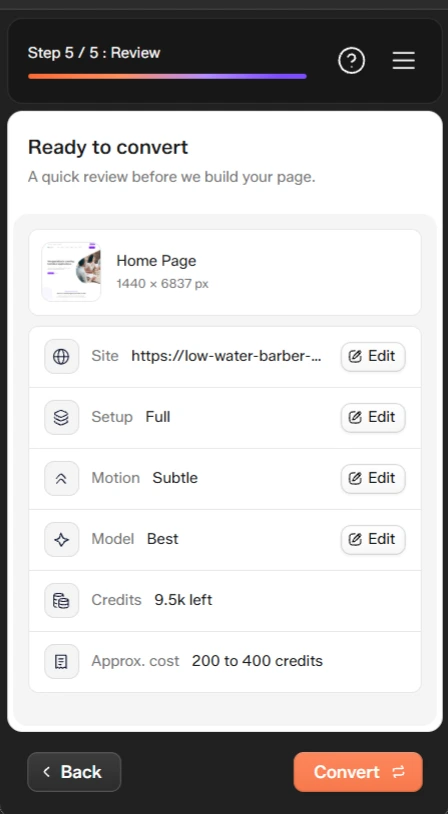
Figma is where a designer draws and maintains the frames. With the UiChemy plugin, you select one page or frame and convert it. The AI Express Mode workflow has five screens: Select design, Connect site, Choose setup, Add motion and Review. The docs state that AI Express Mode takes your design as it is, with no Auto Layout or tidy layers required.
How each one reaches WordPress
Figma frame to editable page
- Install the UiChemy WordPress plugin and the Figma plugin.
- Connect your site with a Connection Link.
- Select a frame and run AI Express Mode.
- Choose Elementor, Gutenberg or Bricks as the builder.
- Review the result and edit it in WordPress.
Claude Design build to editable page
Claude Design can export standalone HTML. UiChemy documents a route for any HTML, CSS and JS build: HTML to WordPress. A plain HTML project does not speak MCP itself, so you package it as a zip and hand it to Claude Desktop, Cursor, Codex or Antigravity with the UiChemy MCP connected.
- Export your design as standalone HTML and package the files as a zip.
- Install the UiChemy plugin and generate your connection under UiChemy, Home, AI Agent (MCP).
- Add the UiChemy MCP to your AI client once.
- Attach the zip and ask the client to convert it to WordPress.
- Edit the result in UiChemy Composer.
Limit: we have not run a Claude Design export through this route and published the result. The docs describe the HTML route in general. Expect to review the page, as you would with any converted build.
Which should you choose?
| If this is true | Start with |
|---|---|
| A designer already finished the layout in Figma | Figma plugin |
| You have a written brief and no design file | Claude Design, then the HTML route |
| You need Bricks output | Figma plugin (the HTML route lists Elementor and Gutenberg, with Bricks coming soon) |
| You want to explore many directions quickly | Claude Design |
| You need brand-exact spacing and type | Figma frame, converted as drawn |
Many teams will use both: explore in Claude Design, rebuild the chosen direction in Figma, then convert. For other AI starting points, see AI to WordPress: pick the route for your build, Figma MCP plus UiChemy and Lovable alternatives when you need WordPress.
Frequently asked questions
Is Claude Design a replacement for Figma?
Not for every job. Anthropic describes Claude Design as a way to create designs, prototypes, slides and one-pagers by talking to Claude. Figma remains the place where designers draw and maintain frames. For WordPress, the question is which one produces the source you convert.
Can I turn a Claude Design project into a WordPress site?
Claude Design can export standalone HTML files, according to Anthropic. UiChemy documents an HTML to WordPress route: package the HTML, CSS and JS as a zip, connect the UiChemy MCP to Claude or another supported client, and ask it to convert. We have not published a tested Claude Design export walkthrough yet, so treat the HTML route as the documented path.
Can I convert a Figma design to Elementor, Gutenberg or Bricks?
Yes. The UiChemy Figma plugin converts a selected frame into an editable page in Elementor, Gutenberg or Bricks. AI Express Mode takes the design as it is, with no Auto Layout or layer cleanup needed.
Do I need a paid Claude plan for Claude Design?
Anthropic’s page says Claude Design is available to Claude Pro, Max, Team and Enterprise subscribers, and is off by default for Enterprise organizations until an admin enables it. Check the page for current terms before you plan around it.
Next step
See the Figma to WordPress converter and the HTML to WordPress route, then pick the starting point that matches your project.