Does Figma Have AI? A Straight Answer and a Full Map
 Sagar Patel
Yes.
Figma ships AI across most of its product line, and as of 8 September 2026 that means a design agent inside Figma Design, a prompt-to-code product called Figma Make, an AI media canvas called Figma Weave, plus AI tooling inside Motion, Sites, Buzz, Dev Mode and an MCP server that hands your designs to Claude or Cursor.
The harder question is which of those you can actually put on a client invoice this month, because several carry a beta label and the credit meter behind them is still moving.
That is the question this post answers, product by product, with the status label Figma itself publishes rather than the one a launch video implies.
Every status and every number below was checked against figma.com and the Figma help centre on 8 September 2026. If you want the deeper treatment of the agent side specifically, the Figma AI agents post covers the MCP server and rate limits in detail, so this one stays a map rather than a deep read.
The Whole Product Line, With Its Real Status Label
Figma’s own AI workflows page is the single most reliable place to read status, because each capability card carries its label in the heading. The help centre navigation carries the same labels on the products themselves, which is how you can tell a beta product from a beta feature inside a shipped product.
| Product or feature | Status on 8 Sep 2026 | What it actually produces |
|---|---|---|
| Figma agent in Design files | Beta, free to try during the beta | Edits, generates and remixes layers on your canvas |
| Figma Make | Shipped, no beta label | Code-backed prototypes and web apps from a prompt |
| Figma Weave tools in Design | Beta | Pre-built AI workflows for imagery and vectors |
| Generative plugins | Beta | A reusable plugin authored by prompt |
| Shaders | Beta | Prompted shader effects and fills |
| Figma Motion | Shipped, tagged New | Production-ready animation on the canvas |
| Figma Sites | Beta | A responsive website published by Figma |
| Figma Buzz | Beta | Branded marketing assets produced in bulk |
| Dev Mode | Shipped | Design context, measurements and code for engineers |
| Figma MCP server | Shipped, with beta sub-features | Design context delivered to an external AI agent |
| Make on your local codebase | Beta | Make working against your own repository |
Two of these are worth separating in your head immediately. Figma Sites and Figma Buzz are beta products, whole surfaces with their own help centre categories.
The agent, shaders, generative plugins and Weave tools are beta features living inside Figma Design, which is not itself in beta.
The Figma Agent Is The One That Changed Your Day
Figma’s help centre states the agent began rolling out in beta on 20 May 2026 and that it is now the entry point for what used to be First Draft. It is available on all plans, but only a Full seat with edit access can ask it to change the file.
View, Dev and Collab seats can chat with it and read the answers without editing.
The supported-features table in Figma’s agent documentation is the most honest thing on the site, because it also lists what the agent cannot do.
Vector editing, icon creation, slots and prototyping are all marked coming soon. Exporting assets and building data visualisations are marked with an X, meaning not planned in this surface.
Three agent capabilities matter more than the rest for anyone building websites. It can connect a library and take @ references to specific components, variables and styles.
It can run several prompts in parallel across different frames. It can review the comments already sitting on a file and act on them.
The library connection is the one to try first. An agent that generates from a blank slate produces generic work; an agent pointed at your own component library produces something your design system already accounts for, and that is the difference between a usable first pass and a novelty.
Figma Make, And Where Its Output Actually Lands
Make is the prompt-to-code product. Figma’s own framing on the AI page is prompt to turn ideas and existing Figma designs into prototypes and web apps, and the newer capability is running Make against your own codebase so it can open a pull request.
That local-codebase mode carries a beta label.
For a WordPress build this is the product most likely to mislead you. Make produces a code artefact, not a page in your builder, so a Make output cannot be opened in Elementor, Gutenberg or Bricks and edited by a client.
It is a fast way to test whether an interaction feels right, and a slow way to arrive at a maintainable site.
The credit maths is where Make gets expensive. Figma publishes approximate figures: roughly 30 credits and up to change a font, roughly 75 and up to make an attached design interactive, roughly 100 and up to generate an app from scratch.
A Professional Full seat carries 3,000 credits a month, so a month of serious Make usage is a real budget line.
Weave, Motion, Shaders And Generative Plugins
Weave is the renamed Weavy, a node-based canvas for imagery, video and audio. Inside Figma Design you get a curated set of Weave tools rather than the full node editor, and those tools carry a beta label on the AI page.
The standalone platform bills on its own credit pool, which the Figma Weave post covers in detail.
Figma Motion is tagged New rather than beta in the product navigation, and it exists to produce animation you can hand off rather than a prototype transition. Shaders let you describe a blur, mesh gradient or pattern and apply it as a fill, and Figma documents export support through Figma Make and the MCP server.
Generative plugins are the quietest of the four and possibly the most useful. You describe the functionality you want, the agent builds a plugin on your canvas, and the result is shareable across your organisation.
Figma states that authoring one requires no code and no plugin publishing process.
Figma Sites And Figma Buzz, Both Still Beta
Figma Sites publishes a responsive website from a Figma file, with a CMS for content updates, direct code editing, and an AI step for creating custom interactions from your designs. It is labelled Beta in Figma’s own navigation and in the help centre category listing.
Figma Buzz is aimed at the marketing side rather than the product side: brand templates that a non-designer can fill in, bulk editing across thousands of assets at once, and image generation. It carries the same beta label.
Its AI tools are the familiar set, background removal, resolution boost, and text rewriting.
The practical read on both is that a beta label is a support commitment, not a quality judgement. Figma Sites builds real sites today.
Whether you want a client’s marketing site living inside a beta surface with its own hosting model is a business decision, not a technical one, and the honest answer differs per client.
Dev Mode And The MCP Server
Dev Mode is the oldest surface in this list and the only one with no beta label anywhere near it. Its AI relevance today is mostly indirect: it is where the handoff conventions live that the MCP server then reads.
Figma documents two directions, write to canvas and code to canvas, both linked from the AI page.
Code to canvas is the underrated one for agency work. It brings production UI back into Figma as editable design layers, which means a file that has drifted from the live site for eight months can be resynced without a designer rebuilding screens by hand.
That is a real invoice-shaped problem solved by an AI feature.
The MCP server documentation is where to start if you already work in Claude or Cursor. The agent inside Figma can also use MCP connectors in the other direction, pulling context in from external tools and writing back out to them.
What Figma AI Costs In Credits
All of it runs on one shared credit pool. Figma’s AI credits documentation confirms credits are assigned per individual, reset monthly, do not roll over, and cannot be shared or transferred between people on the same plan.
| AI action | Credits |
|---|---|
| AI search | Free |
| Rename layers | Free |
| Remove background | 1 to 5 per image |
| Vectorize image | 2 to 5 per image |
| Boost resolution, erase, isolate or expand | 5 to 10 per image |
| Make or edit an image | 2 to 16, depending on the model |
| Add interactions | 20 per use |
| Figma Make, change a font | About 30 and up |
| Figma Make, make a design interactive | About 75 and up |
| Figma Make, generate an app | About 100 and up |
The seat allowances are the number to plan around. A Full seat gets 500 credits a month on Starter, 3,000 on Professional, 3,500 on Organization and 4,250 on Enterprise.
Dev, Collab and View seats get 500 regardless of plan, and Starter and View users also hit a 150-credit daily ceiling.
Two details catch people out. Undoing an AI action reverts your file but does not refund the credits, because the work was already processed.
And credits do not stack across plans, so being a member of three organisations gives you three separate pools rather than one large one. Our Figma AI credits breakdown works through the arithmetic.
Honest Limits, Including The WordPress Gap
Figma states plainly that AI outputs may be misleading or wrong and should be treated as a general reference rather than fact. That is boilerplate, but it maps onto something specific: an agent that restructures your auto layout to satisfy a prompt has quietly changed the frame a converter will later read.
The bigger gap is that none of these products output WordPress. Make produces code.
Sites publishes to Figma’s own hosting. Weave produces media.
Buzz produces marketing assets. If the deliverable is an Elementor, Gutenberg or Bricks page a client can edit next year, a conversion step sits between the Figma file and the site.
The third limit is seat-shaped. Most of the interesting AI needs a Full seat on a paid plan, and Figma Design AI tools are documented as paid-plan only.
A team of six with two Full seats has bought AI for two people, and the other four will keep asking why the button is greyed out.
Where The WordPress Half Actually Happens
Disclosure before the numbers: this is the UiChemy blog, so treat this section as interested rather than neutral and check it against the pricing page yourself. It is here because the gap above is the one readers write in about, and leaving it unanswered would be coy.
Since the 7 September 2026 rebuild UiChemy is one engine with four entry points rather than a single Figma converter. Figma to WordPress takes an approved frame.
AI Website Creator takes a text prompt or a client brief and produces a sitemap and pages.
UiChemy Composer writes real HTML, CSS and JavaScript from one widget inside Elementor. AI to WordPress takes a build that already exists in Lovable, Claude, Bolt or v0.
Map those onto the Figma products above and the pairing is straightforward. An agent-assisted design file goes through the Figma route.
A Figma Make output is a code artefact, so it goes through Composer rather than the converter.
A client brief that never became a Figma file at all skips Figma and goes straight into AI Website Creator, which exports to Elementor today with Gutenberg export marked Soon on every plan.
What all four share is the output: real widgets, blocks or elements rather than a flat export. The marquee still slides, the accordion still opens, and every block stays editable by the client afterwards.
That is the whole reason to add a conversion step instead of shipping generated code.
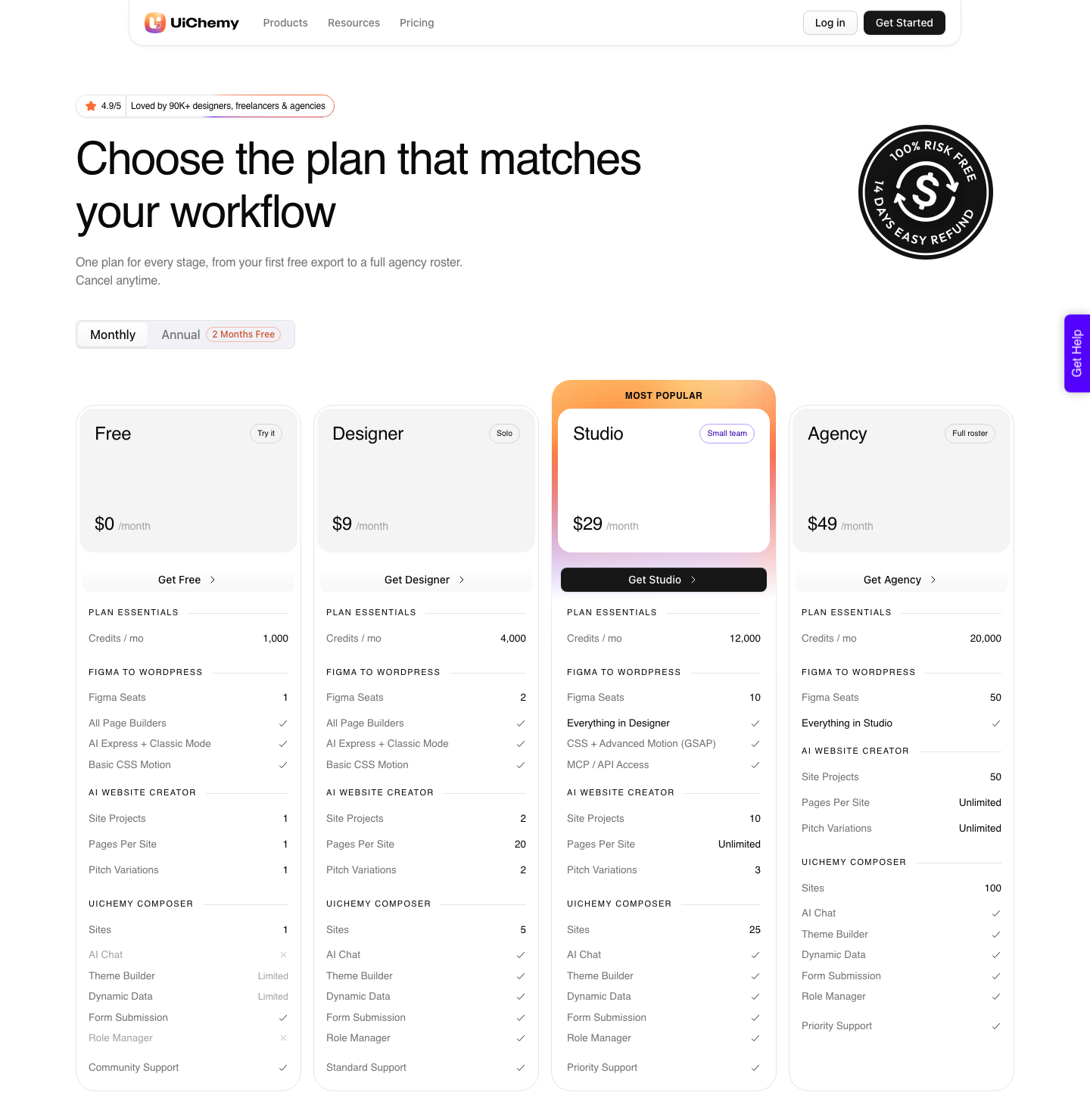
The costs are worth putting next to Figma’s. There is a Free plan at $0 a month with 1,000 credits, one Figma seat, one AI Website Creator project of one page and one Composer site.
Paid plans run $9, $29 and $49 a month, with 4,000, 12,000 and 20,000 credits. Advanced motion with GSAP and MCP access start at Studio, $29.
The refund window is 14 days.
And the honest limit, which matters more than the price list. A verified reviewer describes it as handling about 70 percent of the design work and leaving 30 percent to fine-tune in Elementor.
Anyone promising you a clean 100 percent from any tool in this category, including Figma’s own, is selling.
Questions People Actually Ask
Is Figma AI free?
Partly. Every seat on every plan includes some credits, and AI search and layer renaming cost nothing at all.
The agent is free to try while it is in beta. Figma Design’s AI tools as a group are documented as available on paid plans only, so a Starter account will hit walls.
Can Figma AI build a whole website?
Figma Sites can publish one, in beta, hosted by Figma. Figma Make can produce a web app from a prompt.
Neither produces a WordPress site, and neither hands you a page a non-technical client can edit in a builder they already know.
What happened to First Draft?
The agent replaced it as the entry point, from 20 May 2026 onwards, per Figma’s own note on the AI tools help page. First Draft is still documented, but new work in that direction is routed through the agent.
Does the agent consume credits during the beta?
Figma lists that exact question in the FAQ on its AI page and states the agent is free to try while in beta. Credit consumption for the agent varies with task complexity once billing applies, which is why building a fixed client price on beta pricing is a mistake.
Which Figma AI feature is most useful for WordPress work?
Layer renaming, and it is free. A converter reads your frame structure, so a file with meaningfully named layers and clean auto layout converts better than a file called Frame 47 containing Group 12.
That is true in UiChemy Classic Mode and it still helps in AI Express Mode, which does not require tagging. Our design optimisation guide is the checklist for that.
What To Actually Do With This
Spend one afternoon with the agent connected to your own component library, on a real file, while it is still free. That tells you more than any launch video, and it costs nothing until the beta label comes off.
Note what it restructured, because that is what a converter will read afterwards.
Then keep the WordPress step budgeted separately. Figma’s credits pay for design and generation work; converting the approved frame into a builder is a different meter with a different price list, and treating them as one number is how a project quietly goes over.
Sources checked on 8 September 2026: Figma’s AI workflows page, the help centre articles on AI tools in Figma Design and the agent in design files, the AI credits documentation, and the Figma Sites and Figma Buzz product pages.