UiChemy Composer 5.5: What Changed in 5.5.1 and 5.5.2
 adityauichemy
UiChemy Composer is our AI-first visual builder for WordPress. Two small releases landed in the first week of November 2026. This post covers what each one changed, and what the changes mean if you connect an AI assistant such as Claude, Cursor or Codex to your site. Everything here comes from the UiChemy changelog and the Composer MCP tools reference, both read on November 10, 2026.
The short version
- 5.5.1 (November 2): sample content in ready-made sections, clearer class highlighting, a simpler way to connect your own AI assistant to AI Chat, and a fix so turning off the MCP server in the dashboard really disables it.
- 5.5.2 (November 4): AI instructions, memory and a style guide in Settings > MCP, better Composer Page Builder editing in Gutenberg and Bricks, and Module Studio PHP modules without an approval step.
Composer 5.5.1, November 2, 2026
Composer Free
- Ready-made sections show sample content while you edit, and keep their design on sites that have no posts yet. A blank site no longer makes a section look empty.
- Class highlighting in the Composer Page Builder is clearer.
- Fixed: turning off the MCP server in the dashboard now disables it.
Composer Pro
- A simpler screen for connecting your own AI assistant to AI Chat.
- AI assistants can switch on Module Studio PHP modules for you on any site, staging or live.
- Fixed: font, code file and module uploads failing on some hosts.
Composer 5.5.2, November 4, 2026
Composer Free
- You can manage AI instructions, memory and a style guide in Settings > MCP.
- Improved: Composer Page Builder editing in Gutenberg and Bricks.
- Fixed: missing translations.
Composer Pro
- Module Studio PHP modules no longer need an approval step.
- Fixed: drawing on the canvas in AI Chat for Gutenberg.
- Fixed: missing translations in AI Chat and Module Studio.
What the MCP settings are for
MCP is the connection that lets an AI tool work on your site. You do not run commands. According to the docs, you describe the job in plain English, such as “build a pricing page with three tiers” or “change my brand color to navy”, and your AI tool picks the matching ability and calls it for you.
That is why the new Settings > MCP area matters. Instructions, memory and a style guide are the places where you tell the assistant how your site should look and behave, so you do not repeat yourself in every chat. The changelog lists the three items. How each one behaves in your own workflow is worth testing on a staging site first.
What your AI tool can do
The docs group the abilities by job. A few examples from the reference page:
- Check the site: describe it, and run a readiness check that flags things like a missing logo or tagline, no menu, forms with no recipient, and images without alt text.
- Pages, posts and sections: list, create, add, edit, move, duplicate and publish. Each section is its own editable Composer.
- Theme Builder templates: headers, footers, single and 404 templates, plus archive, product and search templates with Pro.
- Design system: read and change your Global Style: colors, spacing, type scale and reusable classes.
Before it builds, the AI tool reads UiChemy’s own guide and then the skill that matches the request, for example Figma to WordPress, Code to WordPress or Brief to WordPress. The docs describe a skill as a step-by-step build process written by the UiChemy team.
Free and Pro
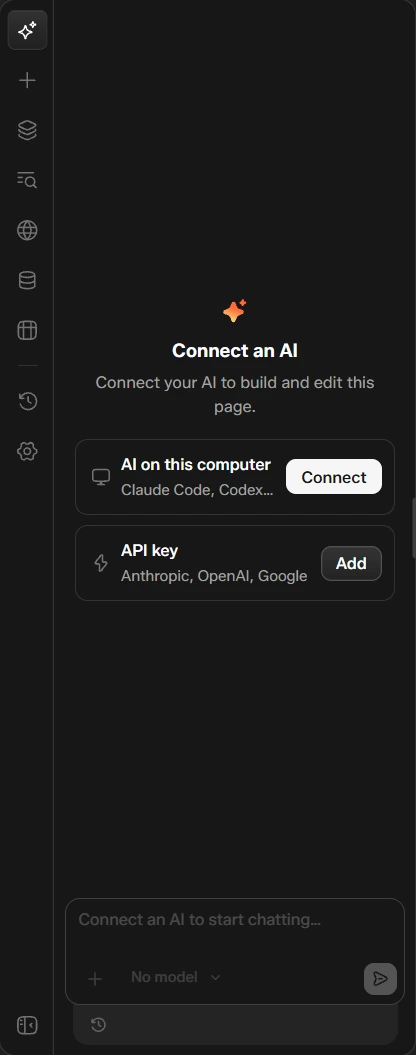
Per the docs, connecting over MCP is included in Free, and most abilities work on Free. Abilities marked Pro need the UiChemy Pro plugin. The AI chat panel inside the page builder needs Pro: you connect an AI running on your computer, such as Claude Code or Codex, or add an API key from Anthropic, OpenAI or Google.
Safeguards the docs describe
- Deleting a section, a template, a menu or a product asks for a second confirmation.
- New pages are created as drafts unless you ask for them to be published.
- Images used in a section are copied into your media library automatically.
One release note deserves care: in 5.5.2 Module Studio PHP modules no longer need an approval step. Use it on a staging site first, and review what your assistant adds before it reaches a live site.
If you build with Gutenberg or Bricks
The 5.5.2 changelog lists improved Composer Page Builder editing in Gutenberg and Bricks. It does not describe the change in detail, so read the entry and try it on a test page. The MCP reference says pages written over MCP go into Elementor or Gutenberg, with Bricks marked as coming soon there.
Try it
Start on the Free plan, connect an assistant over MCP, and ask it to check your site before you build anything. The full ability list is in the docs.
FAQ
What is new in UiChemy Composer 5.5.1 and 5.5.2?
Version 5.5.1 (November 2, 2026) made ready-made sections show sample content while you edit, made class highlighting clearer, and fixed turning off the MCP server in the dashboard. Version 5.5.2 (November 4, 2026) added AI instructions, memory and a style guide in Settings > MCP, and improved Composer Page Builder editing in Gutenberg and Bricks.
Do I need UiChemy Pro to connect an AI assistant over MCP?
No. The UiChemy docs say connecting over MCP is included in Free and most abilities work on Free. Abilities marked Pro need the Pro plugin, and the AI chat panel in the page builder needs Pro.
Where do I manage AI instructions, memory and the style guide?
In Settings > MCP, according to the 5.5.2 Composer Free changelog entry.
Can an AI assistant delete my content by mistake?
The docs say deleting a section, a template, a menu or a product asks for a second confirmation before anything is removed, and new pages are created as drafts unless you ask for them to be published.