Built-In WordPress SEO in UiChemy: What You Get Free
 adityauichemy
UiChemy Composer 5.3.0 (12 October 2026) added built-in SEO to the free UiChemy plugin. It writes a search title, description, sharing image and structured data for every published page, adds redirects and a missing-pages log, controls robots.txt and the sitemap, and runs an audit of about 45 checks. Everything below comes from the UiChemy docs and changelog, read on 12 November 2026.
If you already run Yoast or Rank Math, you do not have to switch. This guide shows what each tab does, what stays manual, and where UiChemy SEO stops, so you can decide before you touch a live site.
What shipped in Composer 5.3.0
The UiChemy changelog lists the 5.3.0 release for 12 October 2026. The Free edition got three headline items: built-in SEO (meta titles, social previews, schema, sitemaps, redirects, llms.txt and a site audit), Custom Fields in beta, and a way to move a site from any page builder to UiChemy with your AI assistant.
The Pro edition of the same release added conditional logic and location rules for Custom Fields, WPML and Polylang compatibility, and wider White Label coverage. None of that touches SEO. The SEO features are in the free plugin.
If you are new to the product, our UiChemy Composer page explains the builder, and Composer plans explained covers what each edition holds.
Where to find UiChemy SEO
Open UiChemy, then SEO under Manage in the dashboard sidebar. Per-page settings live in the editor you already use.
| Place | How to open it |
|---|---|
| Dashboard | UiChemy, then SEO, under Manage |
| Block editor (Gutenberg) | The SEO sidebar from the editor top bar. The Update or Publish button saves your SEO edits too. |
| Classic editor | The SEO box in the main column |
| Elementor | The floating SEO button in the bottom-right corner, which opens a drawer |
| Composer | Inspector, Effects tab, Schema section, for structured data on one section |
The dashboard screen has seven tabs: Audit, Site Settings, AI Search, Schema Templates, Indexing, Redirects and Advanced. We walk through them in that order.
Audit: the fastest way to see what is wrong
The Audit tab shows four status tiles: pages with SEO, who handles SEO, pages to fix, and active redirects. Below them, a Needs attention list sorts findings as Urgent, Important or Tip, each with a button such as Show pages.
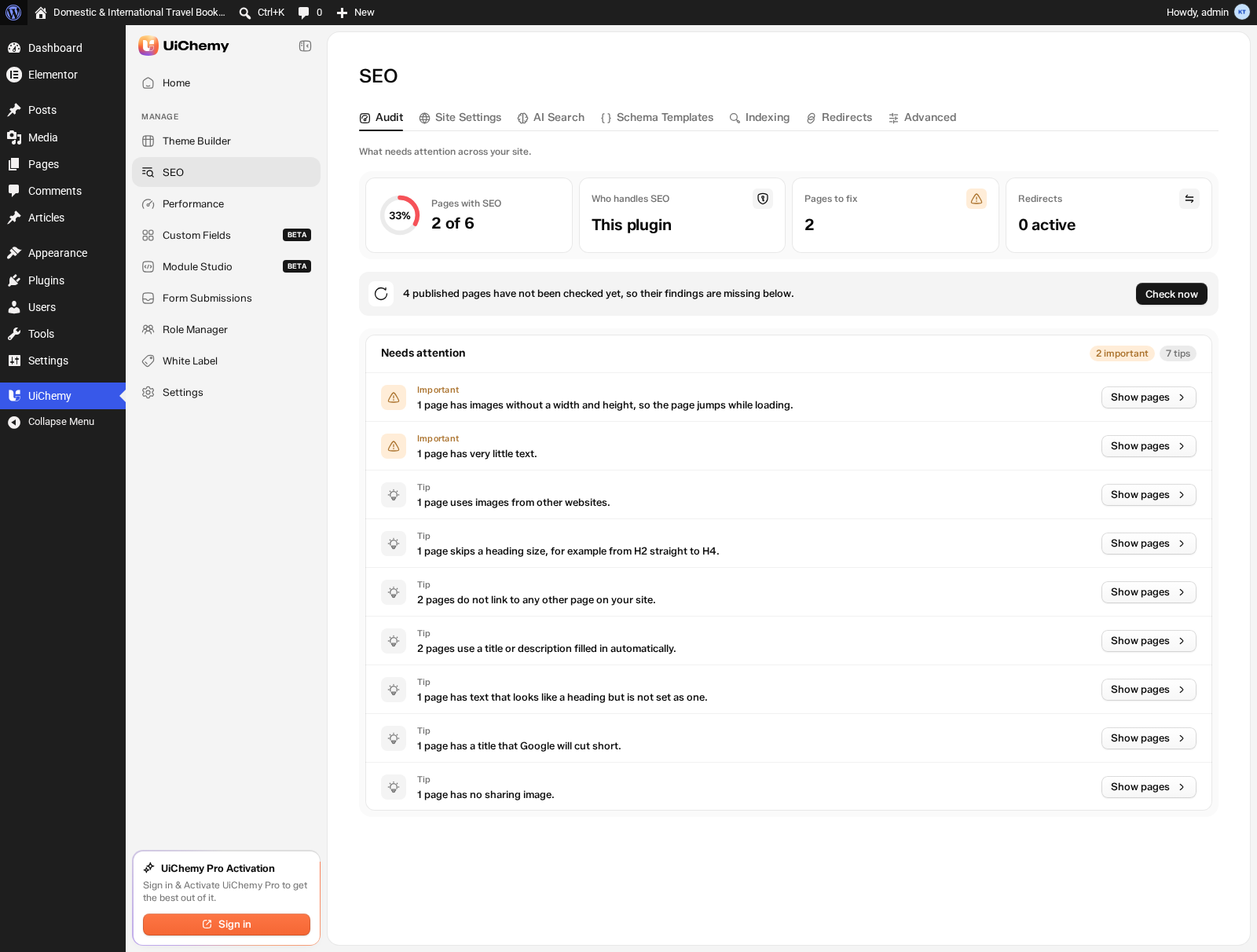
Check now scans pages that have not been checked yet. The audit covers your 500 most recently updated pages. Site-wide checks, such as images over 300 KB, broken links and hidden pages in the sitemap, run during a full refresh and their results are kept for 24 hours.
The roughly 45 checks fall into six groups:
| Group | What it flags |
|---|---|
| Content | Missing or skipped headings; pages with fewer than 150 words |
| Images | Missing alt text, oversized images, images not lazy-loaded, images hosted on other sites |
| Links | Broken links, links through a redirect, pages with no internal links, external links missing noopener, unclear link text, internal links marked nofollow |
| Titles and descriptions | Missing title; title over 60 or under 15 characters; missing description or one outside 70 to 160 characters; auto-filled values; duplicates across pages |
| Search visibility and sharing | Canonical pointing to another site, hidden page still in the sitemap, no sharing image or one under 600 by 315, invalid structured data, whole site hidden from search |
| Structured data | A product with no price, plus hints for FAQ and breadcrumbs |
A practical way to use it: run Check now, open every Urgent finding first, then work through Important items by clicking Show pages. Because each finding lists the affected pages with a View link, you can fix a batch in one sitting instead of hunting page by page.
Site Settings: titles, descriptions and link previews
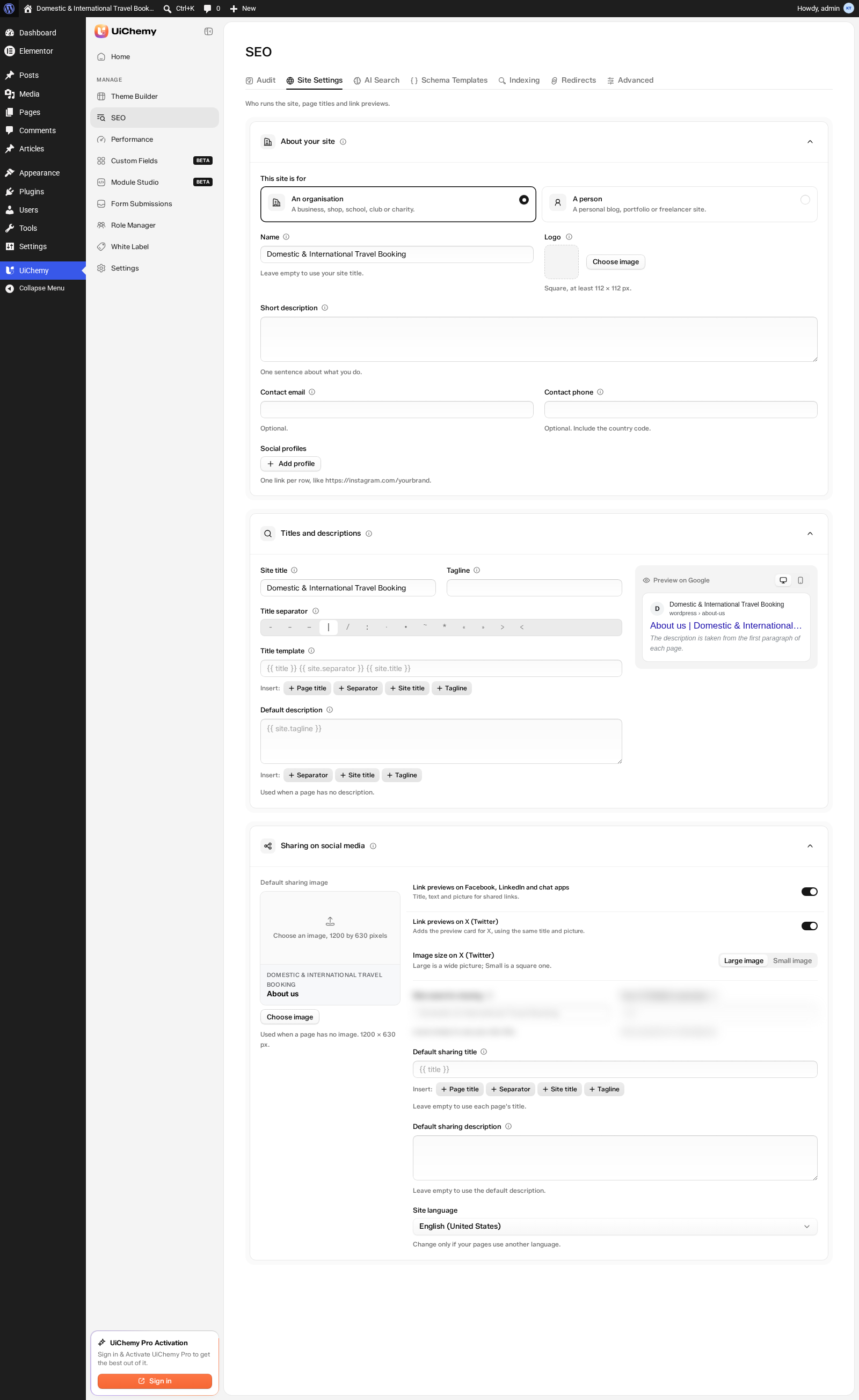
Site Settings is where you define the rules once. It has three groups: About your site, Titles and descriptions, and Sharing on social media.
Titles and descriptions
You pick a title separator from 14 choices and build a title template with Insert chips for Page title, Separator, Site title and Tagline. The docs give a clear example: with the separator set to a vertical bar and the default template, a page called Our Services on a site named Bloom Studio shows in Google as Our Services | Bloom Studio.
When a page has no description, UiChemy takes it from the page first paragraph. A Preview on Google card shows the desktop and mobile result before you save.
About your site
You choose whether the site is for an organisation or a person, then set the name, a square logo of at least 112 by 112 px, a short description, optional contact details and social profiles. These values feed the Organisation structured data that goes on every page.
Sharing on social media
The default sharing image should be 1200 by 630 px. You can switch link previews on or off for Facebook, LinkedIn and chat apps, and separately for X, choose a large or small image on X, and set your X username. Leave the sharing title empty and each page uses its own title.
Schema: automatic types and your own templates
The Schema switch is on by default. Five types are added automatically: Organisation, Website, Web page, Breadcrumbs (from the Home, Section, Page trail on the page) and Blog post (title, date and author). Each has an Edit button with an Extra details (JSON) field, an on/off switch and a Test in Google link.
For details UiChemy cannot find on its own, you add templates. Starter templates include Recipe, Product, Service, Local business, Event, Course, Job posting, Video, Podcast episode, Software or app, Book, Movie, Dataset, Profile page and News article. WooCommerce products get Product schema automatically. Templates take display conditions, the same dialog the Theme Builder uses.
FAQ, How-to and Review describe one section, not a whole page. You add them in Composer through Inspector, Effects, Schema. The available types there are FAQPage, HowTo, Review, Product rating, Event, VideoObject and ItemList, and a new FAQPage is filled in from the questions already in the section.
AI Search: llms.txt and plain-text copies
Two switches live here, both off by default. One publishes an AI file at yoursite.com/llms.txt. The other publishes a plain text copy of each page at the page address plus .md, for example /your-page.md. You choose which content types are included and how many pages are listed per type (1 to 500, default 100).
Be realistic about the payoff. The docs say plainly that AI tools rarely look for llms.txt today and that Google does not use it. Turn it on if you want the files available, not because you expect a ranking change. We cover the wider picture in what WordPress MCP is.
Indexing: robots.txt, sitemap and what to hide
The Indexing tab controls what search engines may visit, show and list. By default WordPress handles robots.txt and UiChemy keeps the sitemap matched to your SEO settings, which leaves out hidden and redirected pages.
| Option | Default |
|---|---|
| Content types: SEO panel, Show in Google, In sitemap | On for public post types |
| Content types: In AI file, Text copy for AI | On for Posts and Pages only |
| Hide author pages from search | On |
| Hide monthly and yearly archive pages | On |
| Hide your site search results from Google | On |
| Hide page 2, 3 and so on of long lists | Off |
One trap: if the WordPress option Let search engines index this site is off, there is no sitemap and no AI files, and the Audit shows an Urgent finding. That option should only be off while a site is being built.
Redirects and the missing-pages log
UiChemy adds a redirect automatically when a page address changes, so old links keep working. You can also add one by hand and choose 301 Moved for good, 302 Moved for now, 307 Moved for now (strict), 410 Removed on purpose or 451 Removed for legal reasons. The redirect editor also has an Advanced option, Use a pattern, for pattern-based redirects.
The Missing pages (404s) sub-tab logs addresses visitors tried but could not find, with visits, last seen and where they came from. Each row has Create redirect and Ignore. The log keeps the 500 most recent entries.
Worked example from the docs: you renamed /old-pricing to /pricing, but an old post still links to the old address. Click Add redirect, enter /old-pricing as the old address and /pricing as the new one, choose 301, and save. Upload list (CSV) reads UiChemy’s own export plus redirect exports from Yoast and Rank Math, and shows a preview before anything is added.
The per-page SEO panel
Each page gets a panel with a Google preview and Title and Description fields with character counters. Leave a field empty and the row reads Automatic; fill it and it reads Custom. The panel also has a social preview, visibility options, page type and canonical URL, schema, and a redirect field.
Visibility includes Show in Google and other search engines, Let search engines follow links on this page, and Keep this page away from AI tools (off by default). Turning off Show in Google also removes the page from your sitemap.
One catch: values you set for a single page are saved in the page head code, so the page needs a Composer section. Without one, the panel shows a message asking you to add a section. Automatic values still work on that page.
Using it next to Yoast, Rank Math and others
UiChemy detects Yoast SEO, Rank Math, SureRank, All in One SEO, SEOPress, The SEO Framework and Slim SEO. Which one handles SEO is set on the Advanced tab.
| Setting | Result |
|---|---|
| Automatic (default) | If another SEO plugin is active, UiChemy steps aside |
| This plugin | UiChemy always adds its tags, even with another plugin active, and the Audit shows an Urgent conflict |
| Another plugin or Nothing | UiChemy prints no SEO tags |
When another plugin is in charge, UiChemy turns off its head tags, robots.txt rules and sitemap syncing. Redirects, the missing-pages log and the AI files keep working, and UiChemy still passes its extra structured data to Yoast, Rank Math and SureRank. Your UiChemy SEO settings stay saved.
What UiChemy SEO does not do
- It cannot import titles or descriptions from other SEO plugins. Only redirect CSV files import.
- It has no separate sitemap. It uses the WordPress sitemap at
/wp-sitemap.xml. - It does not do keyword scoring.
- The audit list holds 500 pages and the missing-pages log holds 500 entries.
- Drafts, private pages, password-protected pages and builder templates are always left out.
- The dashboard SEO screens need an administrator account.
The first point matters most. If you switch from another SEO plugin, plan to re-check titles and descriptions on your key pages by hand, using the Audit to find gaps.
Let your AI assistant run the audit
AI tools connected through MCP can audit a page or the whole site, set image alt text, preview a page structured data, manage site settings and schema templates, and manage redirects and the missing-pages list. The docs say this is free and needs an administrator account with the MCP server setting turned on in UiChemy, Settings, Integrations. Our guide to picking the route for an AI-built WordPress site shows where this fits.
A 15-minute setup checklist
- Open UiChemy, then SEO, and run Check now on the Audit tab.
- On Advanced, confirm who handles SEO. Leave it on Automatic if another SEO plugin is installed.
- On Site Settings, set the title template, default description, logo and a 1200 by 630 px sharing image.
- On Indexing, confirm search engine visibility is on and review the hidden list pages.
- On Redirects, check the missing-pages log and create redirects for the addresses with the most visits.
- Back on the Audit, clear the Urgent and Important findings, then re-run Check now.
Frequently asked questions
Is UiChemy SEO free?
Yes. The UiChemy docs state that every option on the SEO page ships in the free UiChemy plugin, and that UiChemy Pro does not add or lock anything there (docs read 12 Nov 2026).
Can UiChemy SEO run next to Yoast or Rank Math?
Yes. With the default Automatic setting, UiChemy steps aside when it detects another SEO plugin, including Yoast SEO, Rank Math, SureRank, All in One SEO, SEOPress, The SEO Framework and Slim SEO. Redirects, the missing-pages log and the AI files keep working.
Can I import titles and descriptions from my old SEO plugin?
No. The docs say UiChemy cannot import titles or descriptions from other SEO plugins. Only redirect CSV files can be imported, including exports from Yoast and Rank Math.
Does UiChemy SEO create a sitemap?
It uses the WordPress sitemap at /wp-sitemap.xml and keeps it matched to your SEO settings, so hidden and redirected pages are left out. It does not build a separate sitemap.
Does llms.txt help me rank in Google?
No. The docs say AI tools rarely look for llms.txt today and Google does not use it, which is why the option is off by default.
Ready to try it? The SEO features are part of the free plugin, so you can open the Audit on a live site today. Get Started
See also: UiChemy SEO documentation and the Module Studio guide. Sources: UiChemy docs and changelog, read 12 November 2026.