UiChemy MCP: Hosted, Composer or Elementor’s? Which to Use
 Sagar Patel
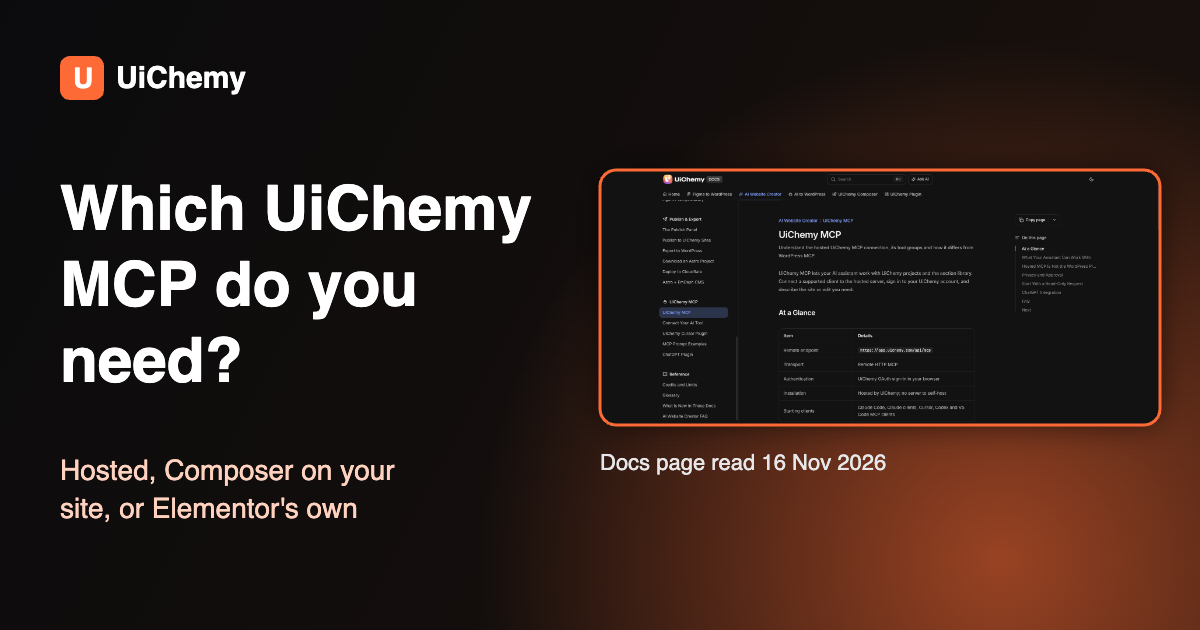
UiChemy has two MCP servers, and Elementor has a third. The hosted UiChemy MCP (app.uichemy.com/api/mcp) works on your UiChemy account and its projects. The Composer MCP runs inside the UiChemy plugin and works on one WordPress site. Elementor’s MCP is Elementor’s own product. Pick by what you want to change.
We checked both UiChemy endpoints ourselves on November 16, 2026, and the sections below show what each one returned. If you only need the quick pick, jump to the decision table.
Last updated: November 16, 2026. Every docs quote was read the same day.
In short
- Hosted UiChemy MCP: one URL, browser sign-in with your UiChemy account, edits UiChemy projects and the section library. It does not touch your WordPress site.
- Composer MCP: set up from UiChemy, then AI Agent (MCP) in WordPress admin, uses an Application Password and Node.js 18 or newer, and builds pages on that site.
- Elementor MCP: set up from Elementor, then Elementor MCP in WordPress admin. It is made and documented by Elementor, not by UiChemy.
- Never paste the hosted URL where a WordPress MCP URL belongs, or the other way round. The docs say so in plain words.
Three servers that people call the UiChemy MCP
| Hosted UiChemy MCP | Composer MCP (plugin) | Elementor MCP | |
|---|---|---|---|
| Made by | UiChemy | UiChemy | Elementor |
| Where it runs | Hosted by UiChemy, no server to self-host | Inside the UiChemy WordPress plugin on your site | Inside Elementor on your site |
| Address | https://app.uichemy.com/api/mcp | https://yoursite.com/index.php?rest_route=/uichemy/v2/mcp | Generated for you under Elementor, Elementor MCP |
| Sign-in | UiChemy OAuth in your browser | WordPress Application Password | Application password created by Elementor inside a copy and paste prompt |
| Works on | Your UiChemy account: projects and the section library | One WordPress site, in Elementor or Gutenberg | Your Elementor site |
| Typical job | Build or edit a UiChemy AI Website Creator project from a brief | Build pages, theme parts and settings on the live site | Build native Elementor structure as drafts |
| Source read 16 Nov 2026 | UiChemy docs, MCP overview | UiChemy docs, Set Up AI to WordPress | elementor.com/mcp |
The UiChemy docs state the split directly: “Hosted MCP Is Not the WordPress Plugin MCP.” The hosted URL “connects to your UiChemy account, its projects and layout library,” and connecting it “does not give an assistant unrestricted access to your WordPress site.” (UiChemy docs, read November 16, 2026)
The hosted UiChemy MCP: projects and the section library
Use this one when the work happens in UiChemy’s AI Website Creator. You add one remote HTTP URL to your AI client, sign in to UiChemy in the browser window that opens, and describe the site. The docs list these tool groups: account and projects, section library, site creation, design system, pages and sections, media, validation, and publishing and export.

How to connect it
- In Claude Code, run the command from the docs:
claude mcp add uichemy --scope user --transport http https://app.uichemy.com/api/mcp. - Start a fresh session, run
/mcpand select uichemy. - Complete the UiChemy sign-in in the browser window that opens.
- Ask for a read-only check before any edit.
Other clients: the docs name Claude clients, Cursor, Codex and VS Code MCP clients, and say to add the same remote URL with HTTP transport and OAuth. (Connect Your AI Tool, read November 16, 2026)
The docs suggest this first request, and we recommend it too:
What it does not do
- It does not import a site you already built. The docs: “HTML, CSS or JavaScript written elsewhere is not imported.”
- It does not publish to Astro, Cloudflare or EmDash. The docs say those are done in the Publish panel, not over MCP.
- There is no MCP page inside the UiChemy app. You add the endpoint in your AI client.
- Any signed-in UiChemy account can connect. Guest sessions cannot, and your plan limits on projects, pages and sections still apply.
The Composer MCP: build on your own WordPress site
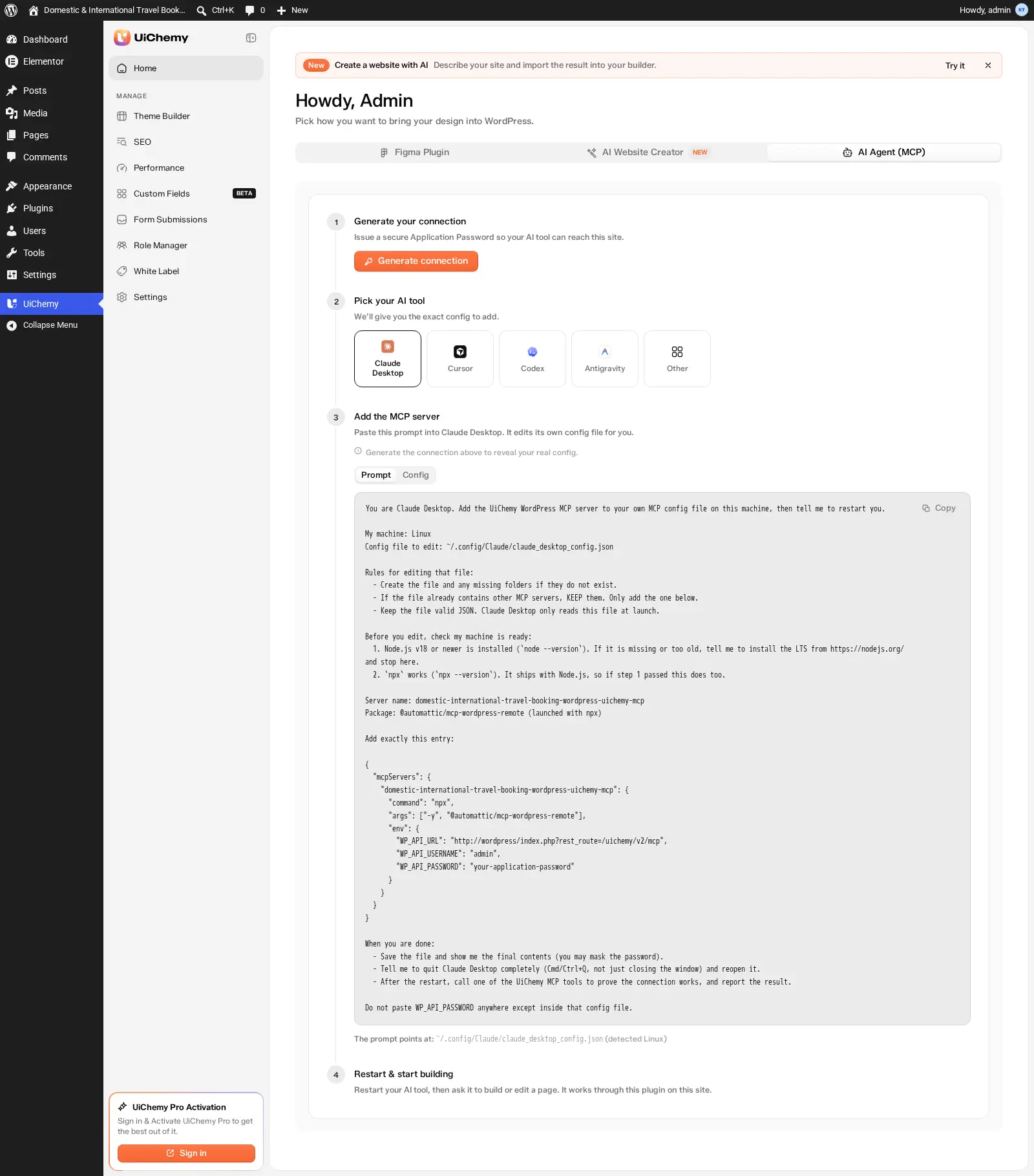
Use this one when the page has to exist on a WordPress site you run. The UiChemy plugin generates the connection, and your AI tool then calls abilities such as building a page, changing brand colours or checking the site before launch. Connecting over MCP is included in the Free plugin, and most abilities work on Free; abilities marked Pro need UiChemy Pro. (MCP Tools Reference, read November 16, 2026)
How to connect it
- Install and set up the UiChemy plugin, and sign in to WordPress as an Administrator. Install Node.js 18 or newer on your computer.
- Go to UiChemy, Home and open the AI Agent (MCP) tab.
- Click Generate connection. UiChemy issues an Application Password for the site and shows Connected.
- Pick your AI tool: Claude Desktop, Cursor, Codex, Antigravity or Other.
- Add the config UiChemy shows, or copy its ready-made prompt. The config runs
npx -y @automattic/mcp-wordpress-remotewith your site address ending in/uichemy/v2/mcp.
The docs say the connection builds into Elementor or Gutenberg, whichever your site uses, and that Bricks is coming soon. (Set Up AI to WordPress, read November 16, 2026)
What your AI tool reads before it builds
Before building, the tool reads UiChemy’s guide and then a skill that fits the request. The docs list ten skills, including Figma to WordPress, Code to WordPress, Brief to WordPress, Motion and Animation, WebGL and 3D, Improve SEO and Improve Performance. You never name a skill; you describe the job.
Elementor’s own MCP: not a UiChemy product
Elementor ships its own MCP, and its page describes it as connecting “Claude, Codex, Cursor, and other AI tools to your Elementor site.” Setup is three steps from the WordPress dashboard: choose your AI tool under Elementor, Elementor MCP; copy the prompt Elementor generates, which includes the application password; paste it into your AI tool. (elementor.com/mcp, read November 16, 2026)
- On Elementor’s page, editing existing pages “currently supports atomic layouts.”
- Some abilities are marked “Requires Angie”, which is a separate plugin, so Elementor’s MCP and Angie are not the same thing.
- We did not test Elementor’s MCP for this post. Everything here about it comes from Elementor’s page. For a longer look, see our guide to Elementor MCP.
What we could not confirm
No UiChemy or Elementor page we read says that UiChemy library prompts are designed to run through Elementor’s MCP. We do not claim it.
What we ran: both UiChemy endpoints, November 16, 2026
We sent one unauthenticated request to each UiChemy MCP address from a terminal at about 09:31 UTC on November 16, 2026. No account was signed in, so this shows only how each server answers a stranger.
| Request | Answer | What it tells you |
|---|---|---|
POST to https://app.uichemy.com/api/mcp (an MCP initialize call) | HTTP 401. The www-authenticate header says: Bearer, error invalid_token, “Sign in to UiChemy to use this server.” | The hosted server wants an OAuth sign-in with a UiChemy account, as the docs say. |
GET to the hosted server’s OAuth metadata, /.well-known/oauth-protected-resource/api/mcp | JSON naming the resource https://app.uichemy.com/api/mcp and the authorization server https://app.uichemy.com/api/auth | Sign-in happens at UiChemy, not on your WordPress site. |
POST to https://uichemy.com/index.php?rest_route=/uichemy/v2/mcp (the Composer route on a site that runs the plugin) | HTTP 401, code rest_forbidden | The route exists and wants a logged-in WordPress user or an Application Password. |
POST to a made up route on the same site, /nonexistent/v2/mcp | HTTP 404, code rest_no_route | A missing route answers 404, so the 401 above means the Composer route is really there. |
The two UiChemy servers answer on different hosts, with different sign-in methods, and refuse a stranger in different ways. That is the practical test for “which one am I looking at”: if the address starts with app.uichemy.com it is the hosted one, and if it ends in /uichemy/v2/mcp on your own domain it is the Composer one.
Which one do you need? A decision table
| If you want to | Use | Why |
|---|---|---|
| Describe a new site and have UiChemy build it as a project | Hosted UiChemy MCP | It builds from the section library into your UiChemy account. |
| Edit the copy or design of a UiChemy project from your AI tool | Hosted UiChemy MCP | The docs list pages, sections and the design system as tool groups. |
| Build or change pages on your live WordPress site | Composer MCP | It runs on that site and writes into Elementor or Gutenberg. |
| Turn HTML, CSS and JS from another tool into WordPress pages | Composer MCP | The Code to WordPress skill takes a file or project folder. The hosted MCP does not import outside code. |
| Check a site for what is missing before launch | Composer MCP | The docs describe a readiness check that flags an empty design system, a missing logo, forms with no recipient and images without alt text. |
| Build native Elementor structure with Elementor’s own tooling | Elementor MCP | It is Elementor’s product, with its own setup and limits. |
| Publish an Astro, Cloudflare or EmDash site | Neither: the Publish panel | The docs say those targets are not done over MCP. |
When this guide is not the right choice
If you only want to try UiChemy, you do not need any MCP. The Set Up AI to WordPress page calls the Figma plugin the recommended way to use AI Express Mode, and describes MCP as the optional route for people who already work in Claude, Cursor or Codex.
UiChemy MCP questions
What is the UiChemy MCP?
There are two UiChemy MCP servers. The hosted one at app.uichemy.com/api/mcp works on your UiChemy account and its projects. The Composer MCP runs inside the UiChemy WordPress plugin and works on one WordPress site.
Is the hosted UiChemy MCP the same as the WordPress plugin MCP?
No. The UiChemy docs say the hosted URL connects to your UiChemy account, while the plugin’s abilities operate on one WordPress installation with their own connection and permissions.
Do I need UiChemy Pro to connect an AI tool to WordPress?
Connecting over MCP is included in Free and most abilities work on Free. Abilities and actions marked Pro in the MCP Tools Reference need UiChemy Pro.
Can the hosted UiChemy MCP import a site I already built?
No. The docs say new projects are built from the UiChemy section library and that HTML, CSS or JavaScript written elsewhere is not imported.
Is Elementor’s MCP made by UiChemy?
No. Elementor’s MCP is Elementor’s own product, set up from Elementor, Elementor MCP in WordPress admin. UiChemy’s Composer MCP is a separate server.
Sources and related
- UiChemy MCP overview, read November 16, 2026: https://docs.uichemy.com/ai-website-creator/mcp/overview
- Connect Your AI Tool, read November 16, 2026: https://docs.uichemy.com/ai-website-creator/mcp/connect-your-ai-tool
- Set Up AI to WordPress, read November 16, 2026: https://docs.uichemy.com/ai-to-wordpress/set-up
- MCP Tools Reference, read November 16, 2026: https://docs.uichemy.com/uichemy-composer/uichemy-widget/mcp-tools-reference
- Elementor MCP, read November 16, 2026: https://elementor.com/mcp/
- Our endpoint requests, November 16, 2026 (table above).
- Related: WordPress MCP options compared, connect Claude to WordPress with MCP and what is WordPress MCP
- Product pages: UiChemy MCP and UiChemy Composer