Vibe Coding a Client Site: The Handoff Problem and a Repeatable Fix
 Sagar Patel
Vibe coding a client site works until handoff, because the client cannot edit what the AI wrote. The repeatable fix is to decide the end state first, brief the AI properly, review the structure before design, move the result into an editor the client can use, then deliver a written handoff pack with logins, backups and an editing guide.
I use vibe coding for first drafts and I would not give it up. The speed is real. What I stopped doing is treating the first working draft as the deliverable. If you want the diagnosis behind that, read why AI-built React sites are hard to hand to clients. This post is the process that follows from it.
Where Vibe Coding Breaks on Client Work
Vibe coding means describing what you want and iterating with an AI until it looks right. For a prototype that nobody else touches, that is a complete workflow. For a client site, three things are missing from the loop.
- A fixed scope. The conversation drifts. The AI adds a pricing section nobody asked for, and the client later expects it.
- An owner for the output. The result is a code project. The client needs a site they can log in to.
- A definition of done. “It looks good in the preview” is not a delivery condition. “The client changed a heading and published it themselves” is.
The process below adds those three things without removing the speed.
The Six-Step Process
Step 1: Decide the end state in writing
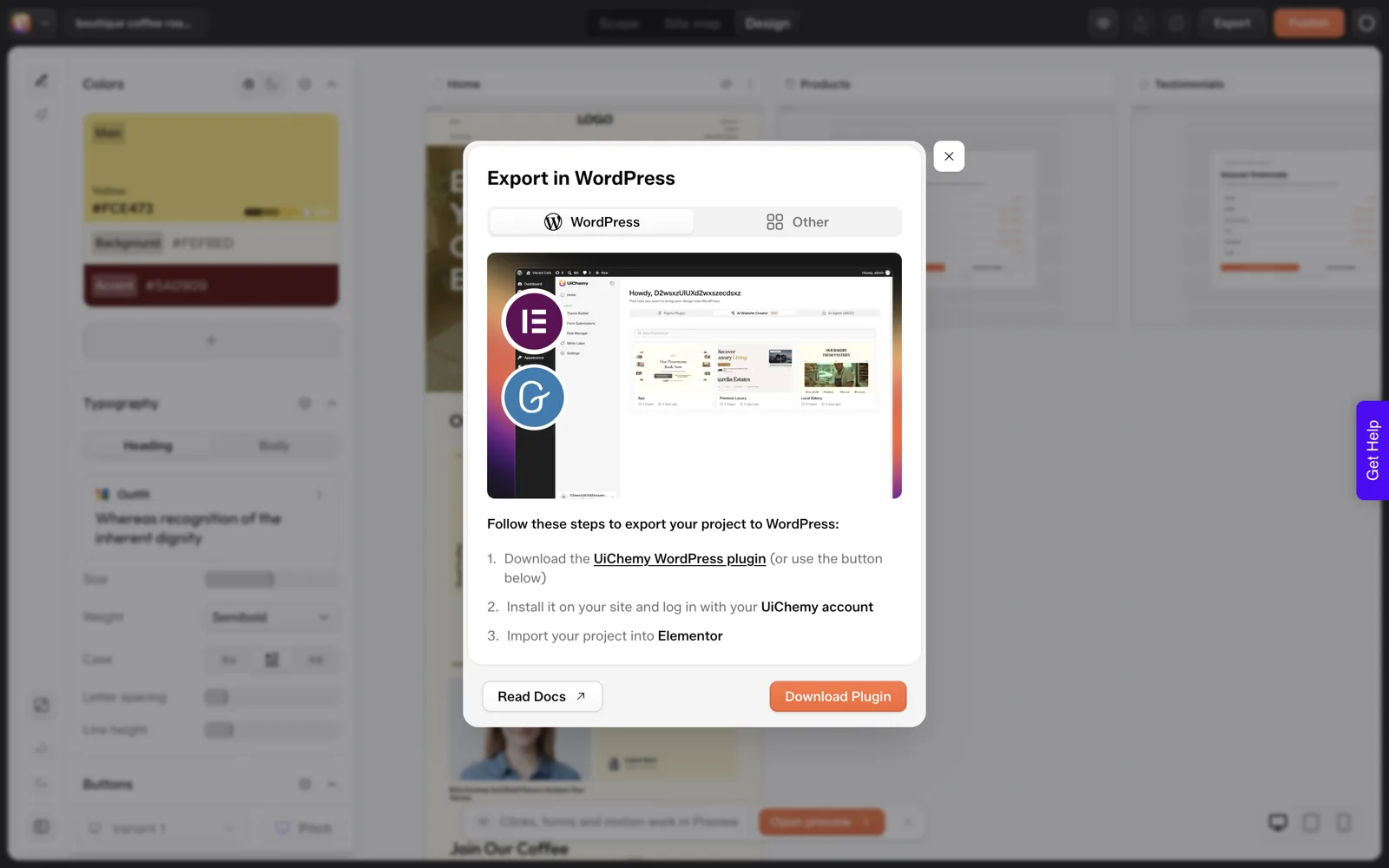
One sentence: where the site will live, who edits it, and in what editor. For most small business work that sentence is “WordPress, the client, Elementor or Gutenberg”. Everything after this step serves that sentence. If the answer is “an app a developer maintains”, the rest of this post does not apply.
Step 2: Write a real brief
Vibe coding from a one-line prompt produces a plausible stranger’s idea of the business. A brief with the goal, audience, pages wanted, pages not wanted, proof and exact facts produces something closer to the real one. Use the free website brief template, or send the client the 25-question questionnaire and turn the answers into the brief.
Step 3: Review structure before you review looks
Check the page list and sections first. Looks are cheap to change, and structure errors are expensive. More on this in the next section.
Step 4: Generate or build the draft
Use whichever tool you like. If WordPress is the end state, you have two honest options: generate into a tool that exports to WordPress, or build anywhere and convert.
UiChemy documents the second route for Lovable, Bolt, v0, plain HTML and cloned sites through Claude and the UiChemy MCP, and the HTML to WordPress page is the one to start with if your build is plain files.
Step 5: Move into the client’s editor and test editing
Convert or export, then make the client’s three most likely edits yourself: change a heading, swap an image, add a page. If any of them is awkward, fix the structure now. Lovable to WordPress shows what that conversion looks like in practice.
Step 6: Deliver the handoff pack
Not an email saying “it is live”. A short document, below, with every login, every backup and every responsibility named.
Why Structure Review Comes Before Design
In our own test on 2026-10-01 (one run, not a benchmark), we gave UiChemy’s AI Website Creator the prompt “A landing page for a boutique coffee roaster with hero, three product cards, testimonials and a newsletter signup”.
The flow stops at a screen called Review your draft, with the line “We drafted this from your prompt. Nothing’s locked in.” The screen lists what the AI assumed, most with a Looks right button and an Edit button.
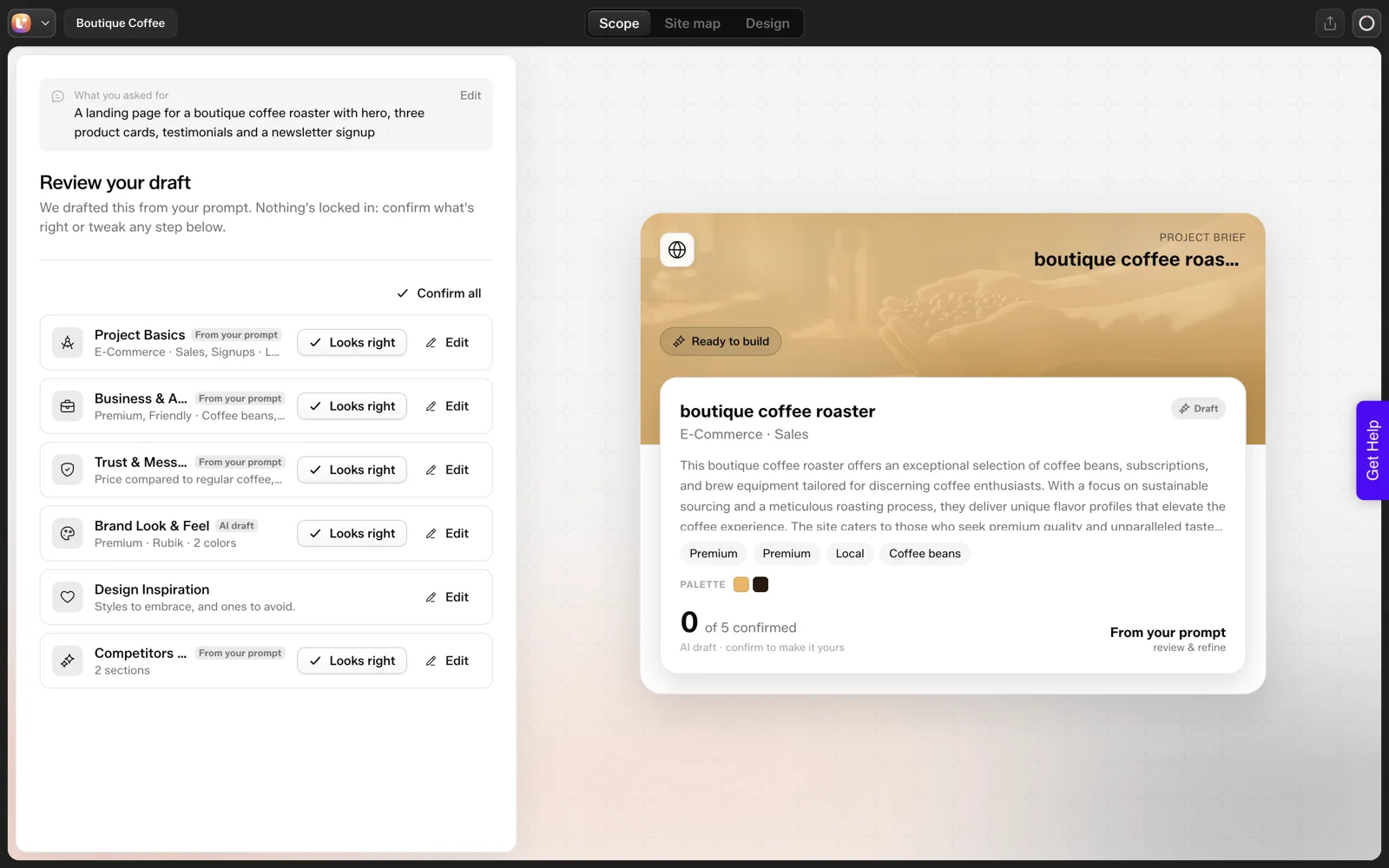
That test is also where we caught an error: we asked for three product cards and the generated Home page showed five cards labelled Service. Catching that at review is cheap.
Catching it after the client has seen the design is not. The full run is in the coffee roaster test, step by step, and the reasoning for why a review gate saves rework is in why a review step prevents rework.
The Handoff Pack Template
Copy this into a document, fill it in, and send it with the site. Anything you cannot fill in is a risk to resolve before launch.
HANDOFF PACK: [Client] website

1. Where things live
Site address: ______
WordPress login URL: ______
Hosting provider and account owner: ______
Domain registrar and account owner: ______
DNS managed by: ______

2. Logins (store in a password manager, not in this document)
Client editor account created: yes / no
Administrator account held by: ______
Agency access ends / continues: ______

3. How to edit (client-facing)
Change text:   open the page, click the text, type, Update
Change image:  click image, replace, add alt text, Update
Add a page:    Pages, Add New, choose layout, Publish
Add a post:    Posts, Add New
Screenshots or short video attached: yes / no

4. Safety
Backup schedule: ______  Last successful backup: ______
Restore tested on: ______
Plugin and core update owner: ______  Frequency: ______

5. Forms and email
Form notifications go to: ______
Test submission sent on: ______

6. SEO basics
Title and description set on all pages: yes / no
Analytics installed: yes / no / not requested

7. What was not included
______ (be specific: extra pages, copywriting, photography, ongoing support)

8. Who to call
For edits you cannot make: ______
Response time promised: ______
Section 7 is the one agencies skip and regret. Writing down what was not included is the cheapest scope protection there is, and it pairs with a locked sitemap and a scope review at the start of the project.
Where the effort goes on a client job:
| Task | Effort |
|---|---|
| Generation | The cheap part |
| Review, conversion and editing test | Your hours |
| Copy replacement | Your hours |
| Handoff | Your hours |
Pricing and Scoping the Last Mile
Fast generation tempts you to quote fast-generation prices. The generation is the cheap part. The review, conversion, editing test, copy replacement and handoff are where your hours still go, and the client is paying for a site they can run, not for a draft. How to quote AI-built websites without underpricing yourself goes through that line by line.
If you run several of these at once, AI workflows for WordPress agencies covers how to keep them organized.
Catching Scope Drift During the Vibe Session
The drift happens inside the conversation, so the defense has to as well. Treat the prompt history like a change log and check it at set points.
Before each new prompt, ask whether it adds a page, a section or a feature that is not in the brief. If it does, stop and decide whether it belongs in this project. Add it to the brief with a date if it does, and park it on a “later” list if it does not.
Vibe session guard rails

Start of session
[ ] Brief open next to the prompt window
[ ] Page list copied from the brief: ______________
[ ] "Not wanted" list copied from the brief: ______________

Before each prompt
[ ] Does this add something that is not in the brief? yes / no
[ ] If yes: add to brief with date, or add to Later list

End of session
[ ] Compare pages generated against the page list
[ ] Compare counts (cards, steps, testimonials) against the brief
[ ] Note anything the AI added that nobody asked for: ______
The last line catches the most surprises. In our own single run on 2026-10-01 the draft produced five cards where the prompt asked for three. A simple count against the brief found it in seconds, and the same habit catches a pricing section the AI added on its own.
Keep the “later” list visible to the client. A parked idea feels like progress and costs nothing, while an unlogged one comes back as an assumption.
A Definition of Done the Client Can Sign
Vibe coding has no natural finish line, so write one. A definition of done is a short list of checks that both sides agree on before the build starts. It turns “is it finished?” from an opinion into a test.
DEFINITION OF DONE: [Client] website

The site is done when all of these are true:

[ ] Every page on the approved sitemap exists and no others
[ ] The client has changed a heading and an image alone, live
[ ] The client has added a blog post or page alone, if a blog is in scope
[ ] A form test message reached the agreed inbox
[ ] Title and description are set on every page
[ ] Mobile layout checked at phone width
[ ] A backup exists and the restore path is written down
[ ] The handoff pack has been delivered and read
[ ] Final approval given by: ______________  Date: ____________
Send it with the sitemap, before design begins. The client then knows what “finished” means and cannot discover new requirements at the end without a change request. It also protects you from the opposite failure, where you keep polishing a site that already meets the agreed standard.
The test on the second line is the one that matters most. If the client cannot make a simple edit alone, the project is not done, however good the preview looks. How to review an AI-generated WordPress site in 30 minutes adds a tight review pass you can run before you ask for sign-off.
When You Can Skip Parts of the Process
Not every project needs all six steps at full weight. Here is how I scale the process, as a judgment call and not a rule.
| Project type | Keep in full | Can be lighter |
|---|---|---|
| One-page campaign with a known end date | End state, brief, definition of done | Handoff pack, editing guide |
| Five-page brochure site the client will edit | All six steps | Nothing, this is the core case |
| Redesign of an existing live site | Brief, structure review, redirect plan | Fresh copywriting if content is reused |
| Internal prototype for a team | End state, brief | Structure review, handoff pack |
The row that never gets lighter is the brochure site a client will edit. That job is where the handoff problem lives, so give it every step.
If you are unsure which row you are in, ask the first question again: who changes the text next year? The answer sorts almost every project. For more on choosing a tool by job, see which AI builder for which job.
FAQ
Can I vibe code a client website?
Yes, for the first draft. The risk is delivering that draft as the final product. Define where the site will live and who will edit it before you start, review the structure before the design, and move the result into an editor the client can use. Then hand over logins, backups and instructions in writing.
What is the biggest problem with vibe coding client sites?
Handoff. The output is usually a code project, and clients need a site they can log in to and edit. Scope drift is the second problem, since a chat-based flow keeps adding things nobody agreed to. A written brief and a structure review step control both.
How do I move a vibe-coded site into WordPress?
Download the project as a ZIP, then convert it. UiChemy documents a route where you install its WordPress plugin, connect the UiChemy MCP to a client such as Claude Desktop, attach the ZIP and ask for a conversion into editable Elementor or Gutenberg content. Test one page on staging first.
What should a website handoff include?
Where the site, hosting and domain live and who owns each account, a limited editor login for the client, an editing guide, backup details with a tested restore, an update owner, form and email checks, and a plain list of what was not included. The template above covers all of it.
How long does the handoff take?
Plan for a real block of time, not minutes. Converting or exporting, replacing placeholder copy, testing the client’s likely edits, setting up logins and backups and writing the guide all take effort. I will not give a fixed number because it varies with site size. Time one project and use it as your baseline.
To try the review-first flow on your next client draft, Get Started and run one prompt through the sitemap review.
Every feature named in this post is listed by product: all UiChemy features, AI to WordPress features.