ChatGPT Website Builder: How to Build, Edit and Export a Site with UiChemy
 adityauichemy
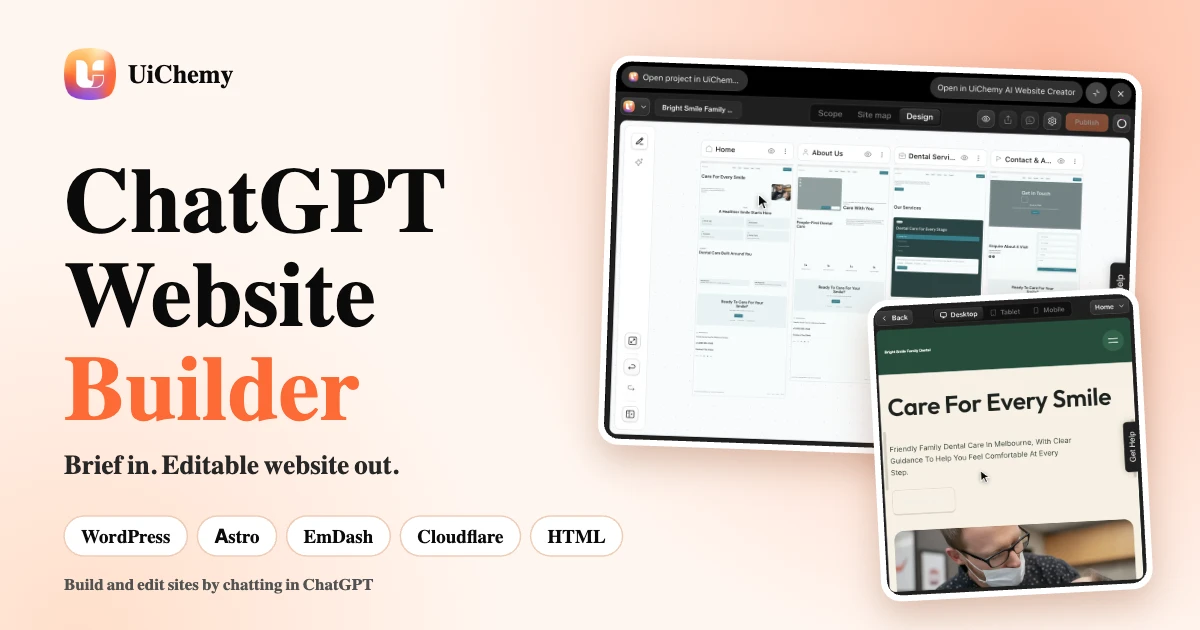
This guide covers one route to a ChatGPT website builder: the UiChemy AI Website Creator plugin for ChatGPT. It explains what the plugin does, how to use it, and where your site can go next. You get an editable multi-page website in your own UiChemy account, and you keep editing it by chat or on the UiChemy canvas.
UiChemy is an AI website builder. Describe a business or paste a client brief, and build a multi-page website or landing page by chatting in ChatGPT, then publish it to WordPress, Astro, EmDash or Cloudflare, or download the code. Use it to create a website for a small business, a portfolio website, a landing page for a new product, or a client site for your agency.
Last updated: November 12, 2026. For a walkthrough of one full build, read the launch announcement.
In short
- UiChemy AI Website Creator is a ChatGPT plugin that builds multi-page websites from a brief or a client brief.
- The result is a real project in your own UiChemy account. You keep editing it in ChatGPT or on the UiChemy canvas.
- It builds from the UiChemy section library: more than 1,000 hand-built sections, with copy written to fit each slot.
- Routes out from your UiChemy project: WordPress (Elementor or Gutenberg), a live preview on a UiChemy address, and, from the UiChemy Publish panel, Astro, Cloudflare, the EmDash CMS and HTML, React or Next.js code.
- You sign in with your own UiChemy account. ChatGPT asks for your confirmation before it deletes a page, section, post or project, or publishes or unpublishes a site.
- It does not connect custom domains or change your DNS or hosting.
What the ChatGPT website builder is
The name is UiChemy. UiChemy is built by POSIMYTH INC, and the plugin you add to ChatGPT is called UiChemy AI Website Creator. It uses the same UiChemy account as the AI website builder, and it connects to ChatGPT through the UiChemy MCP server, which UiChemy hosts. You can read more about that server on the UiChemy MCP page.
Can ChatGPT build a website with UiChemy?
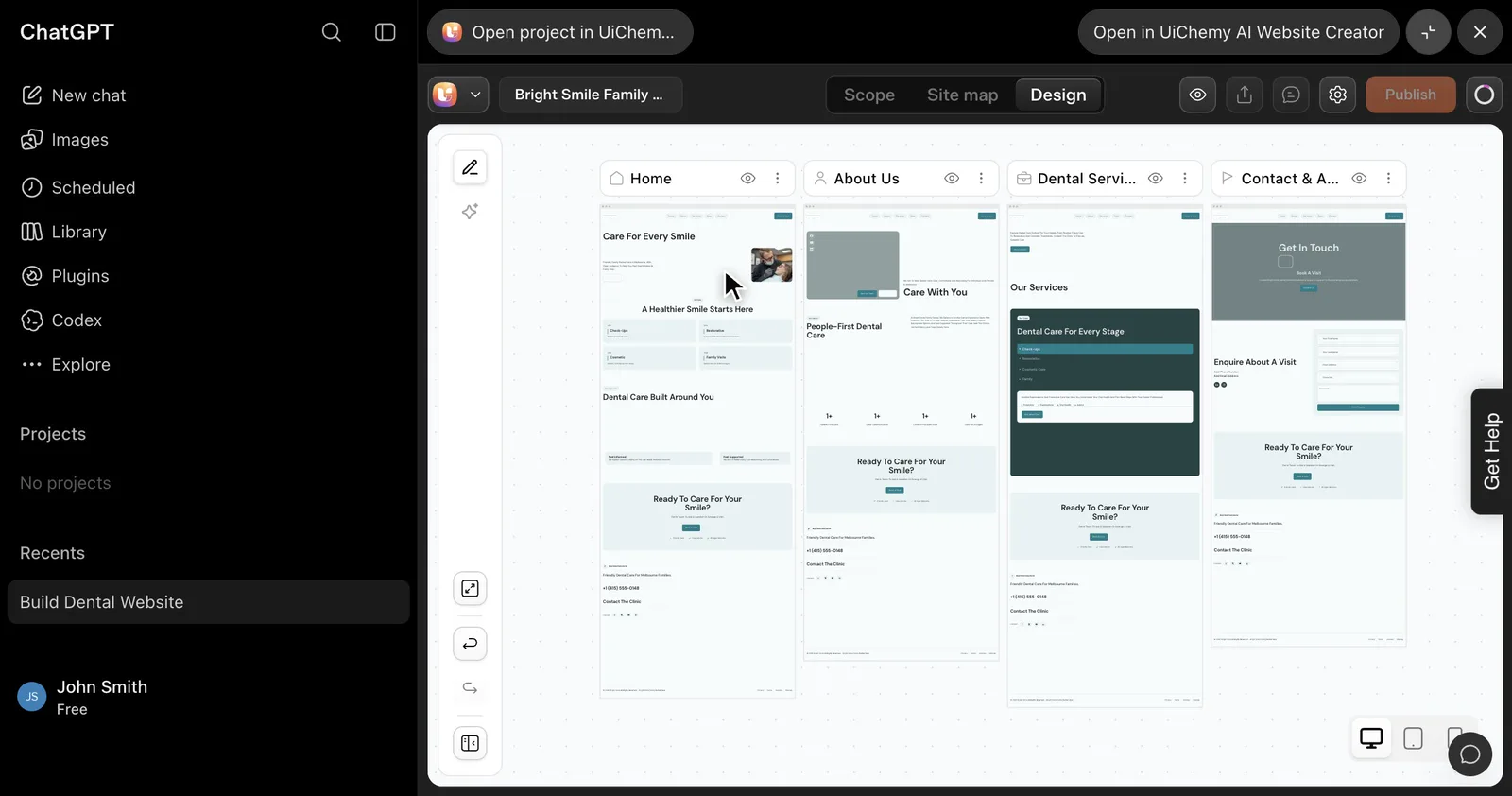
Can ChatGPT build a website? With UiChemy, yes. ChatGPT drafts the pages, layouts, copy, colours and fonts from the UiChemy section library: more than 1,000 hand-built sections, with copy written to fit each slot. The result is a real project in your own UiChemy account that you keep editing on the UiChemy canvas.
The UiChemy plugin gives ChatGPT tools that create and change a real project in your UiChemy account, so you describe the site and UiChemy builds it from its section library.
Because the project lives in your account, you can open it in the UiChemy editor, check it on a phone, and take it to WordPress, a live preview address, an Astro project, Cloudflare, the EmDash CMS, or plain HTML, React or Next.js code. The sections below cover each route.
Watch the ChatGPT website builder in action
Watch the UiChemy ChatGPT website builder go from a brief to an editable website, in one video.
What you can do with the UiChemy ChatGPT plugin
- Build a website or a landing page from a brief: a business name, a client brief or a short description is enough to start.
- Edit an existing project: palette, fonts, buttons, cards, spacing, headings, body copy, logo, sections and pages.
- Rebuild a single page, add a blog, add a custom section in code, or compare alternative colour variants.
- Import a site you already have (HTML, CSS and JS, a zip, or a build from Lovable, Bolt or v0) into an editable project.
- Check a project before handover: responsive and validation checks run from the chat.
- Publish a live preview site on a UiChemy address.
- Export for Elementor or Gutenberg and import into your own WordPress site, step by step.
- Download an Astro project, or publish it to your own Cloudflare account, with or without the EmDash CMS.
- Download the site as code (HTML, Astro, React or Next.js) when you want to host it yourself.
- Open the UiChemy dashboard, editor and page preview inside the chat.
Who is it for? Freelancers and agencies who hand clients editable websites, small business owners who want a first draft they can edit without code, and developers who want clean Astro, HTML, React or Next.js code.
Agencies can read more in AI website builder for agencies.
| Who you are | What the plugin gives you |
|---|---|
| Freelancer | A first draft from a client brief that you can edit on the UiChemy canvas before you show it, then hand over as a WordPress site or as code. |
| Agency | Projects in your own account, a route to put each client site in the client’s own Cloudflare account, and the EmDash CMS when the client wants to edit content themselves. |
| Small business owner | A multi-page draft from a plain description that you can change by chatting, without writing code. |
| Developer | Clean code to take further: an Astro project, or HTML, React or Next.js code you host yourself. |
How to install the UiChemy plugin in ChatGPT and sign in
You need a ChatGPT account and a UiChemy account. A guest session without an email cannot connect, and some accounts need access to creation features before the tools work. Your plan limits on projects, pages and sections still apply. If you plan to bring the site into WordPress, you also need a WordPress site with the UiChemy plugin.
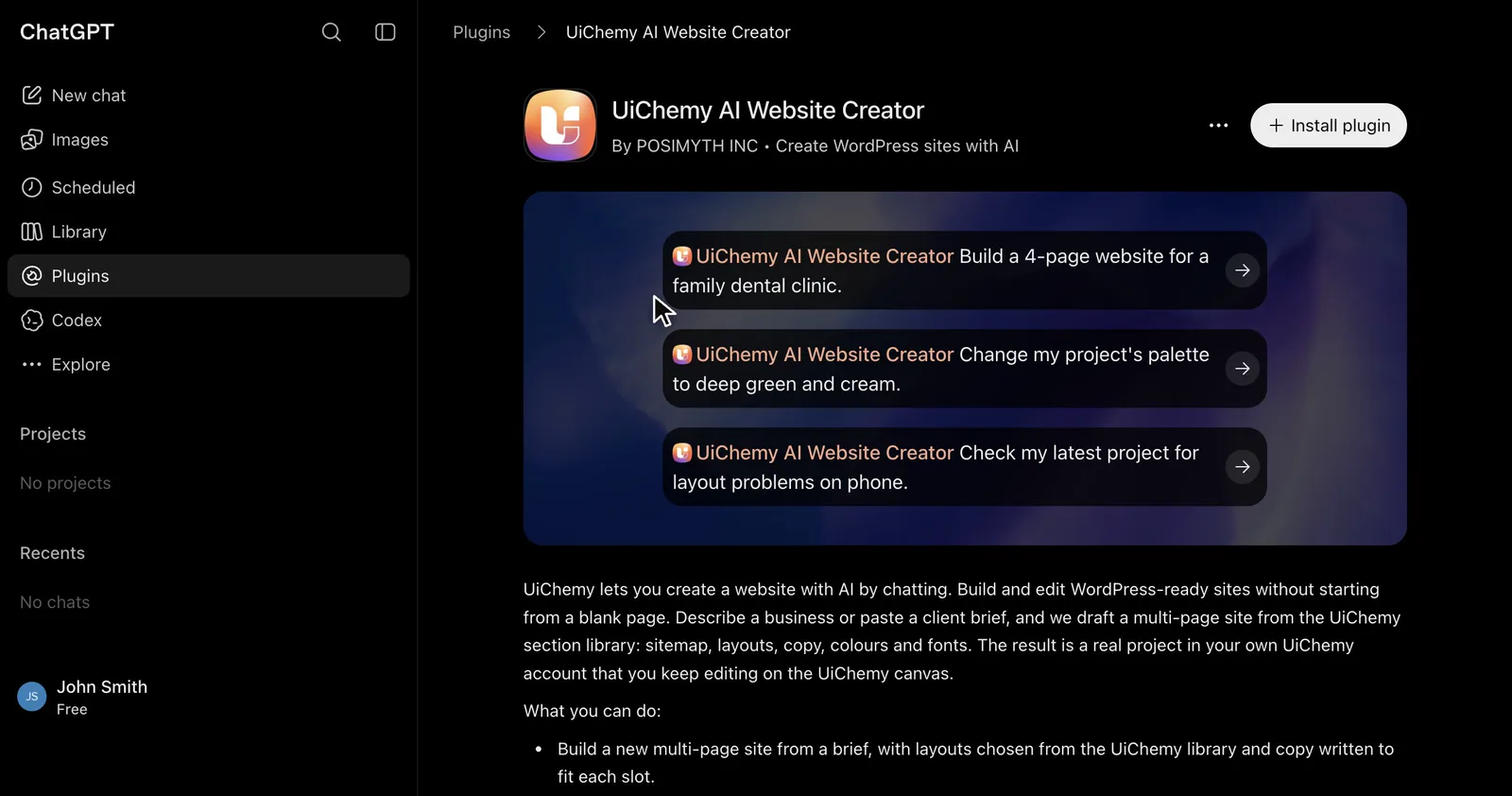
- Open UiChemy AI Website Creator in ChatGPT’s plugin directory.
- Click Install plugin.
- Sign in with your own UiChemy account. The plugin only reaches projects in the account you connect.
Sign-in uses OAuth, so you do not type a password into the chat. When connected, ChatGPT may share relevant chats and memories with the plugin to help with your requests. You can manage your preferences or disconnect the plugin at any time in your ChatGPT settings. Full steps are in the ChatGPT plugin setup guide.
How the ChatGPT website builder works, step by step
Step 1
Connect your UiChemy account (OAuth sign-in, no password in chat).
Step 2
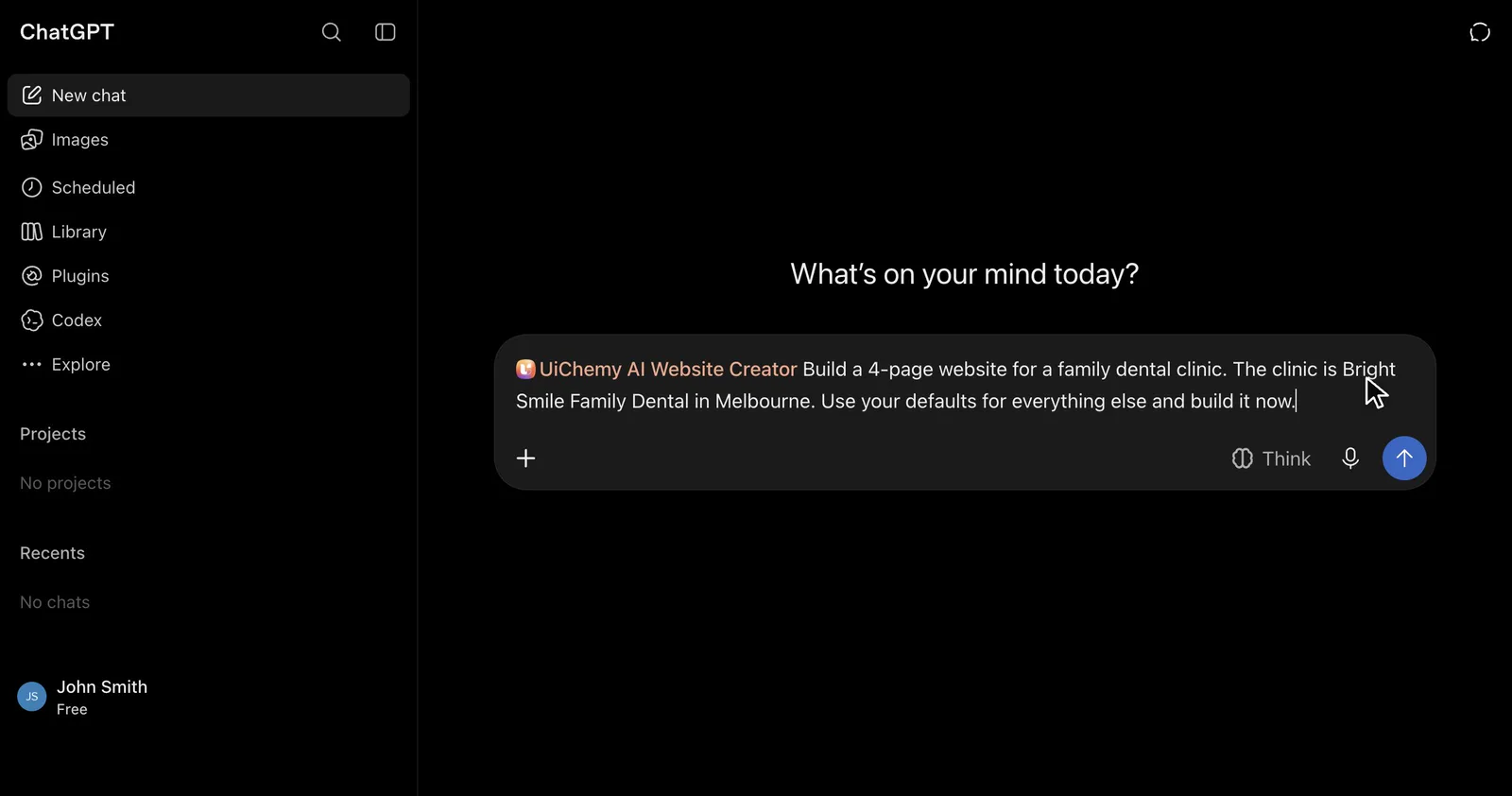
Describe the business or paste the client brief.
Step 3
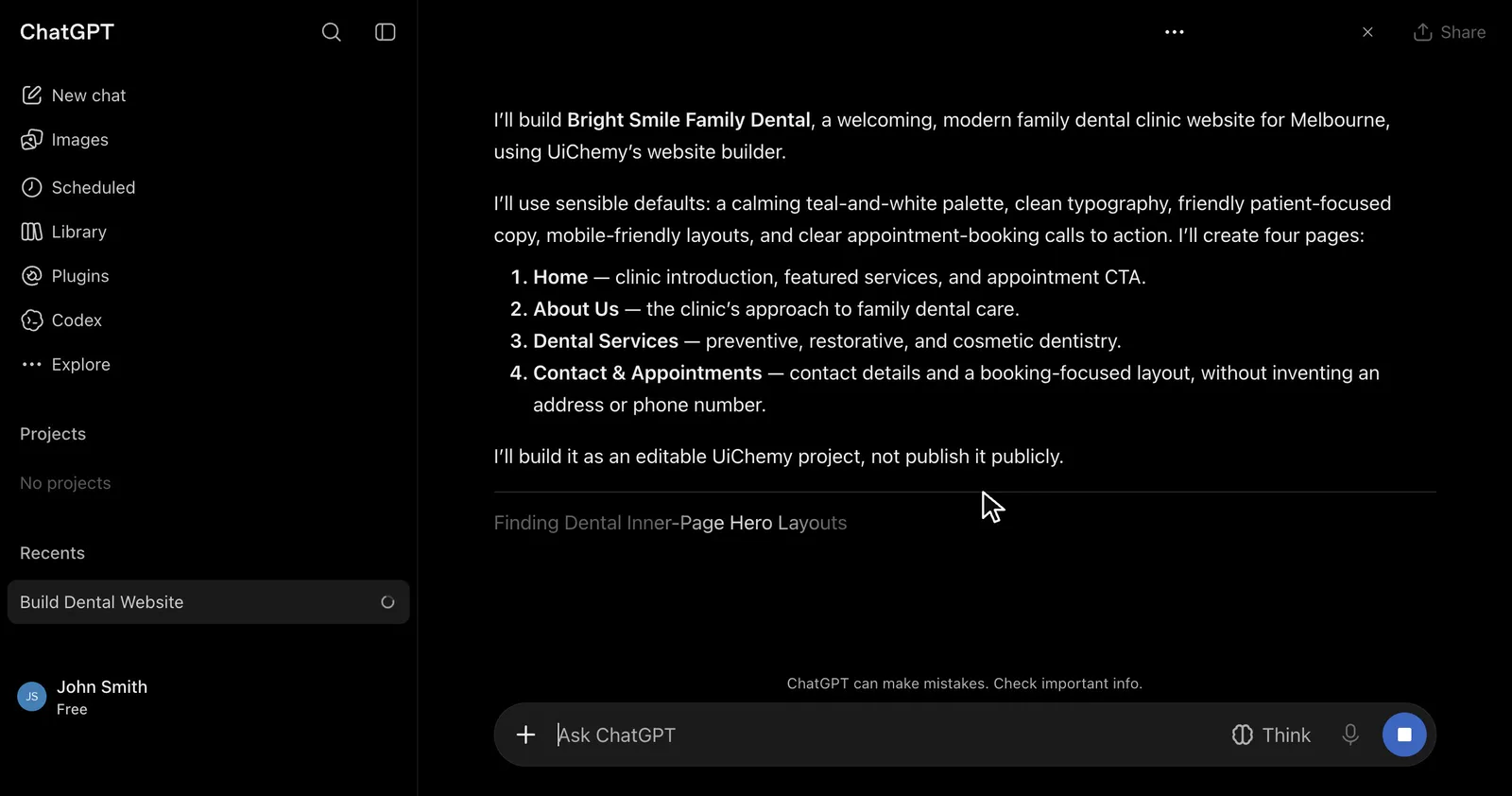
ChatGPT drafts the website: pages, layouts, copy, colours and fonts.
Step 4
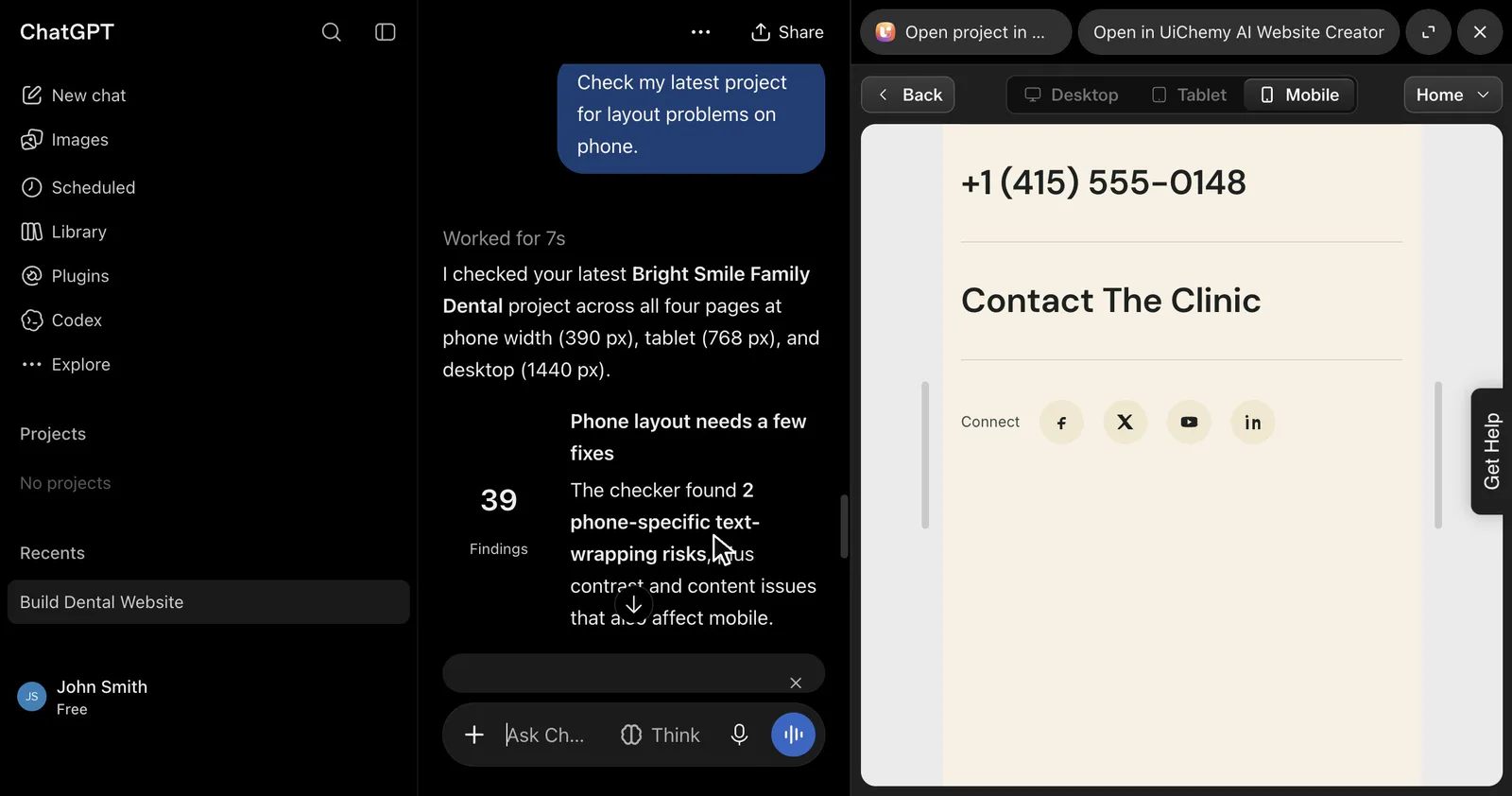
Refine it in the chat or on the UiChemy canvas, check it on mobile, then publish, export or download.
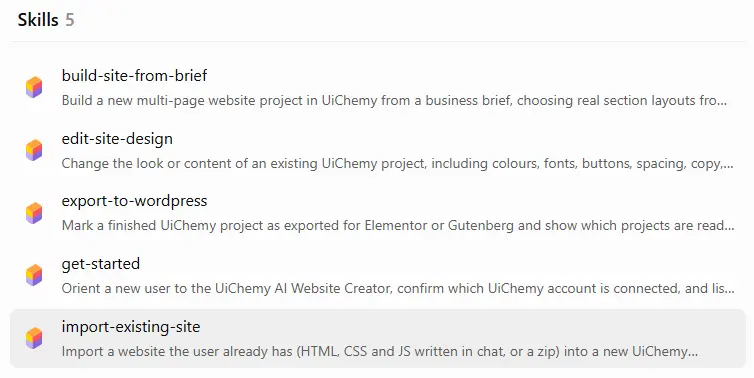
The five skills inside the plugin
The plugin comes with five skills in ChatGPT. You do not have to name them. ChatGPT picks the one that fits your request.
| Skill | What it does |
|---|---|
| get-started | Introduces the plugin and confirms which UiChemy account is connected. |
| build-site-from-brief | Builds a new multi-page project from a business brief, with real section layouts. |
| edit-site-design | Changes the look or content of a project: colors, fonts, buttons, spacing and copy. |
| import-existing-site | Imports a site you already have (HTML, CSS and JS written in chat, or a zip) into a new project. |
| export-to-wordpress | Marks a finished project as exported for Elementor or Gutenberg, and shows which projects are ready. |
Source: the UiChemy docs.
Build a website with ChatGPT from a brief
Tell ChatGPT what you want in plain language. Describe the business, the pages you need and the look you are after, or paste a client brief. UiChemy drafts the sitemap, picks layouts from its section library, writes the copy, and sets the colors and fonts. The site is saved as a project in your UiChemy account.
Write a brief that works
- The business: what it is, who it serves and where.
- The pages you need, for example Home, About, Services and Contact.
- The look and tone: colors, mood, and whether it should feel formal or friendly.
- The goal of the site: bookings, calls, sign-ups or enquiries.
- Content and images you own or have the right to use.
Review the plan before the build
Ask ChatGPT to show the page and section plan first and to build only after you approve it. Asking for the plan first lets you change the structure before layouts are created. A prompt that works: Build a landing page for a yoga studio and show me the plan first.
The UiChemy section library: more than 1,000 hand-built sections
The site is not free-form code written from scratch each time. UiChemy builds from its section library: more than 1,000 hand-built sections. Each layout has text slots with character limits, and the copy is written to fit each slot.
That is why the output stays editable. Every section is a real part of your project, so you can change it by chat or on the canvas, add a section, or remove one.
Edit your site by chatting
Keep chatting to change the project. You can update the palette, fonts, buttons, cards, spacing, headings, body copy, logo, sections and pages.
The site is a real project in your UiChemy account, so you can also open it on the UiChemy canvas and keep editing there. Both places edit the same project. Read about the canvas in the Design Editor docs.
Check your site on a phone before you hand it over
Before you hand a site over, ask for a responsive or validation check. ChatGPT runs the check from the chat and reports what it finds.
In the UiChemy editor you can also preview the site at desktop (1440 px), tablet (768 px) and phone (390 px) widths, and drag to a custom width. Use this checklist before you share the link:
- Open every page at phone width and scroll to the footer.
- Check that the menu opens and every link goes to the right page.
- Read the headings and buttons for text that wraps badly or gets cut off.
- Check forms by sending a real test submission. Previewing a form does not prove that form delivery is set up for production.
- Replace placeholder text and links.
Source: Preview and responsive in the UiChemy docs.
Preview your site on a UiChemy address
You can publish a finished project as a live site on a UiChemy address, check its status, list your sites and take one offline. In the UiChemy Publish panel, this option is called Publish sandbox, and the docs mark it as Beta. The address looks like your-site.uichemysites.com, it is a real WordPress site, and it can use Elementor or Gutenberg. A first publish takes about 2 to 3 minutes. You choose between two site types:
| Temporary site | Sandbox site | |
|---|---|---|
| How long it stays online | 24 hours | Until you unpublish it |
| Use it for | Client reviews, quick tests, sharing a draft | A site you keep working on or share over time |
| Real WordPress admin | Yes | Yes |
| Change it later | Make it permanent to turn it into a Sandbox site | Unpublish to delete it |
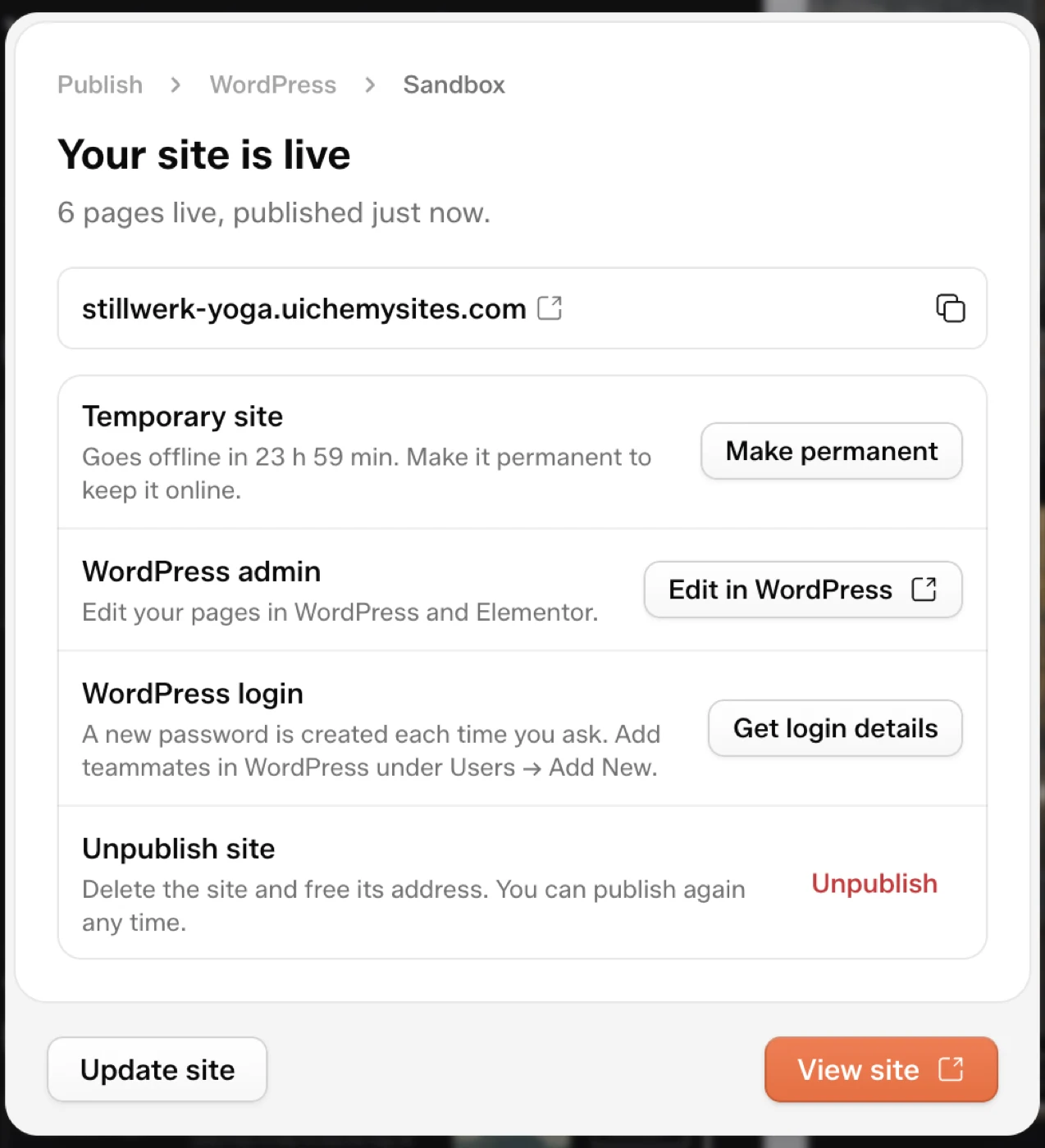
The address cannot be changed after the first publish, so pick it carefully. You get one site per project, and your plan sets how many Temporary and Sandbox sites you can have at once. A preview does not connect your own domain, change your hosting, or log in to your WordPress site. Read the Publish to UiChemy Sites guide for every option.
ChatGPT to WordPress: export to Elementor or Gutenberg
To put the site on your own WordPress, you export in two parts. First ChatGPT marks the project as exported, then the UiChemy WordPress plugin pulls it in. You sign in to WordPress yourself, and ChatGPT never asks for your passwords.
In ChatGPT
- Ask ChatGPT to mark the project as exported for Elementor or Gutenberg. You can also ask which of your projects are ready to import.
In WordPress
- Install the UiChemy plugin: Plugins, Add Plugin, Upload Plugin. Choose the downloaded zip without unzipping it, then click Install Now and Activate. You can also get UiChemy from wordpress.org.
- Open UiChemy, choose AI Website Creator, and click Log in to continue. Sign in with the same UiChemy account that owns the project.
- Search for your project and open it.
- Choose Elementor or Gutenberg in the Choose Your Builder popup.
- Select the pages and templates to import, then click Import.
- Click Visit Site and check navigation, templates, images and forms before you hand the site to a client.
Export to Elementor
In Elementor, the imported layouts arrive as UiChemy Composer sections, and you keep editing them there.
Export to Gutenberg
Gutenberg is selectable from UiChemy 5.4.0. If it looks dimmed, update the plugin first. Bricks is not offered in this import.
Back up first, and read the warnings
- Take a full backup before you import into a live site. The import also brings media, menus and styles and applies site, plugin and theme settings.
- The option Reset Previous Content Before Import is off by default. When you turn it on, existing pages, posts and Theme Builder content move to draft. Nothing is deleted.
- An import can finish with a warning, for example when a template is skipped because the installed plugin tier cannot create it. Read the warnings.
- Changes you make in WordPress do not flow back to the UiChemy editor. If you change the design in UiChemy, import again.
Read the full steps in the Export to WordPress guide, or see why the export arrives as real WordPress pages in AI website builder export to real WordPress.
Astro export: download your site as an Astro project
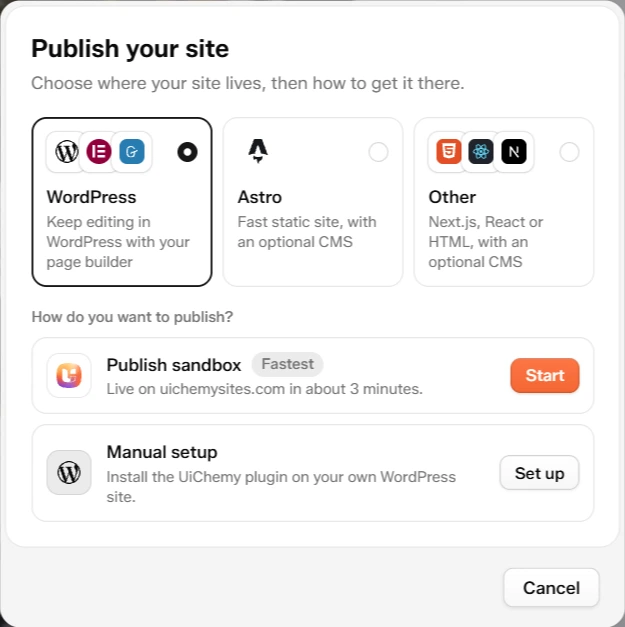
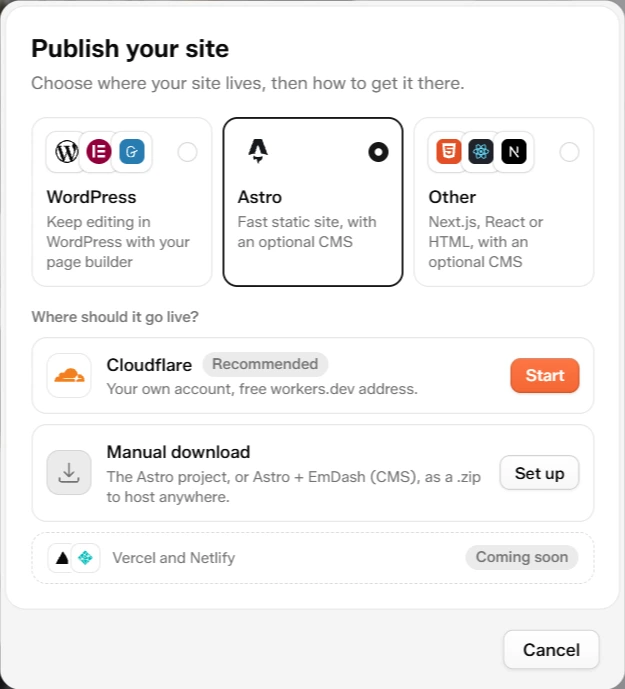
These routes run from the UiChemy editor’s Publish panel on your saved project. Astro is a framework for building websites. In the Publish panel, Astro, then Manual download, gives you your whole site as a ready-to-run Astro project in a .zip file. The zip is built from your saved project and takes up to a minute to prepare. You need Node.js 22.12 or newer on your computer.
| Path in the project | What it holds |
|---|---|
src/pages/ | One file per page. Each page is a list of its sections. |
src/components/ | One component per section, with its styles in a .css file next to it. The header and footer are in src/components/site/. |
src/layouts/Base.astro | The page shell: head, fonts, header and footer. |
src/styles/site.css | Site-wide styles and the color and font variables. |
src/content/blog/ | Blog posts, one Markdown file each, only when your site has a blog. |
README.md | Run steps, written for your project. |
npm install
npm run dev       # preview at http://localhost:4321
npm run build     # builds the static site into dist/
Upload the dist folder to any host that serves static sites. What changes in the Astro project:
- Forms keep their fields and messages but have no backend. Add your own endpoint to receive submissions.
- Images load from the UiChemy image CDN. To host them yourself, download them into
public/and update the paths. - WordPress-only widgets are skipped. Only UiChemy sections are converted, so check your pages after you run the project.
- No CMS is included in the plain zip. Content lives in the code. For a CMS, use Astro with EmDash.
Vercel and Netlify one-click publishing is marked Coming soon in the panel. You can still build the Astro zip and host it there yourself. Read the Download an Astro project guide, or the longer walkthrough Astro website builder: from brief to live site.
Publish to Cloudflare from UiChemy
Cloudflare puts your design online as a fast Astro site in your own Cloudflare account. You sign in to Cloudflare once, click Publish, and UiChemy builds the site and deploys it to a free workers.dev address. The site lives in your account, not in UiChemy. You need a Cloudflare account, and the free plan works. Cloudflare’s own limits still apply.
- In the UiChemy editor, click Publish, select Astro, then click Start on Cloudflare.
- Click Connect Cloudflare and approve every permission on the consent screen.
- Under What to publish, choose Astro + EmDash (with a CMS) or Astro frontend (static pages only).
- Click Publish and keep the window open. When it is done, a card shows your live address and an Open site button.
- Update: change your design in UiChemy, then click Resync.
- Unpublish: click Unpublish on the site card. Your design stays in UiChemy, so you can publish again.
- Disconnect: disconnecting does not take your sites down. They stay in your Cloudflare account.
- Custom domain: shown as Coming soon in the panel. For now the site uses its workers.dev address.
Agencies can use this to keep each client’s site in the client’s own Cloudflare account. Cloudflare publishing asks you to connect your own Cloudflare account the first time. If the Cloudflare screen says publishing is not available on this server yet, use Manual download instead. Read the Deploy to Cloudflare guide.
EmDash CMS: let clients edit their own content
EmDash is a content management system (CMS) built into the published site. A CMS is an admin area where you or your client change text, images, pages and blog posts in the browser, without touching UiChemy or code. You get it by choosing Astro + EmDash when you publish to Cloudflare. It is required when your site has a blog, because blog posts need the CMS.
| In the CMS | What you can do |
|---|---|
| Pages | One entry per page, with its sections listed in order. Reorder, remove, duplicate or hide them. |
| Sections | Every heading, paragraph, button, link and image in a section is its own field. |
| Header and footer | Edit them the same way as page sections. |
| Blog posts | Write posts with a body, featured image, categories and tags. |
| SEO | Each page has an SEO panel for title, description, share image, canonical URL and noindex. |
| Users | Invite teammates so everyone has their own login. |
The admin lives at your-site-address/_emdash/admin, and you sign in with a passkey such as Touch ID, Windows Hello or your phone. Right after the first publish, UiChemy gives you a private setup link that makes you the site admin, so keep it private.
When you change the design in UiChemy and click Resync, Resync is designed to keep edits made in the CMS. A field nobody changed gets the new design value, a field someone changed in the CMS is kept, and entries with unpublished CMS drafts are left alone. Check the notes shown after a Resync. The database, login storage and, when available, media storage live in your Cloudflare account. Read the Astro and EmDash CMS guide.
Download HTML, React or Next.js code
If you want the source code and your own hosting, the Publish panel offers three downloads under Other.
| Download | What you get |
|---|---|
| HTML | Plain HTML, CSS and JavaScript. No build step. |
| React | A Vite app. Plain code, or with Sanity as the CMS. |
| Next.js | Plain code, or with a CMS: Payload built in, or Sanity. |
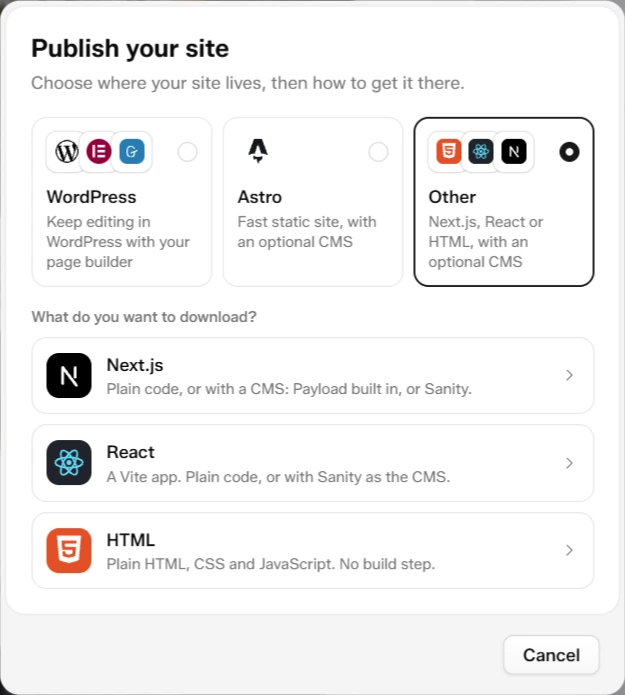
Together with the Astro zip, that covers the code routes the plugin listing names: HTML, Astro, React and Next.js. Read the Publish panel guide for what each option does.
Import an existing site into UiChemy
The ChatGPT plugin docs say you can paste a site’s HTML, CSS and JS into the chat, or share a zip, and UiChemy imports it into a new project in your account. From there you edit it by chat or on the UiChemy canvas, like any other project.
Follow the prompt with your HTML, CSS and JS.
Choose your route: preview, WordPress, Cloudflare or code
The table lists the options in the UiChemy Publish panel for your saved project.
| You want | Choose | Hosting | Edit after launch in | Own domain today |
|---|---|---|---|---|
| A quick live link for a review or a test | Publish sandbox, then Temporary site | UiChemy, your-site.uichemysites.com, online for 24 hours | WordPress, with Elementor or Gutenberg | No |
| A hosted site that stays online | Publish sandbox, then Sandbox site | UiChemy, your-site.uichemysites.com | WordPress, with Elementor or Gutenberg | No |
| The site on WordPress hosting you already have | Manual setup | Your WordPress host | Elementor (as UiChemy Composer sections) or Gutenberg | Yes, through your host |
| A fast site you or a client edit in a CMS | Cloudflare, then Astro + EmDash | Your Cloudflare account, free workers.dev address | The EmDash CMS admin | Not from the panel yet |
| A fast static site, edited only in UiChemy | Cloudflare, then Astro frontend | Your Cloudflare account, free workers.dev address | UiChemy, then publish again | Not from the panel yet |
| The source code, to host anywhere | Manual download (Astro), or Other: Next.js, React or HTML | Anywhere you host code | Your code editor, or the CMS you picked | Yes, through your host |
Not sure? Start with a Temporary site to get a link you can share today, then make it permanent if you want to keep it. You can still import the same project into your own WordPress or deploy it to Cloudflare later.
What the ChatGPT website builder does not do
| It does | It does not |
|---|---|
| Build and edit multi-page sites in your UiChemy account | Connect custom domains or change your DNS or hosting |
| Mark a project as exported so the UiChemy WordPress plugin can import it | Log in to your WordPress site or ask for your passwords |
| Publish a live preview on a UiChemy address | Let you choose your own address on a preview, or change it after the first publish |
| Publish to your own Cloudflare account | Add a custom domain from the panel yet (Coming soon) |
| Export an Astro project | Include a form backend. Add your own endpoint |
| Import a project into WordPress again after you change the design | Send changes made in WordPress back to the UiChemy editor |
Safety: what ChatGPT asks before it deletes or publishes
ChatGPT asks for your confirmation before anything that deletes a page, section, post or project, overwrites a section you edited, or publishes or unpublishes a site.
- The plugin only reaches projects in the UiChemy account you connect.
- You sign in with OAuth, so no password goes into the chat.
- Review what your ChatGPT settings let the plugin do, and disconnect it any time in ChatGPT settings.
- Try your first build on a project you can afford to lose, and keep a backup before you import into a live WordPress site.
Credits, limits and your account
AI work in UiChemy uses credits, and the amount depends on the model and the operation. Your plan sets limits such as how many projects, pages, sections and hosted sites you can have. For current details, see the UiChemy pricing page and the credits and limits docs. Wondering what a site costs in credits? Read how many credits an AI website costs.
Prompts to copy: build a website with ChatGPT
Copy a prompt into ChatGPT after you install the plugin. Change the business to your own.
| Goal | Prompt |
|---|---|
| Build a site | Build a 4-page website for a family dental clinic. |
| Landing page | Build a landing page for my new yoga studio. |
| Portfolio website | Create a portfolio website for a freelance photographer. |
| Show the plan first | Build a landing page for a yoga studio and show me the plan first. |
| Change the look | Change my project’s palette to deep green and cream. |
| Check on a phone | Check my latest project for layout problems on phone. |
| Import HTML | Import this landing page into a new UiChemy project. (Then paste your HTML, CSS and JS.) |
| See what is ready | Which of my projects are ready to import into WordPress? |
| Export for WordPress | Mark my dental clinic project as exported for Elementor so I can import it into WordPress. |
| Astro project | Export my site as an Astro project. |
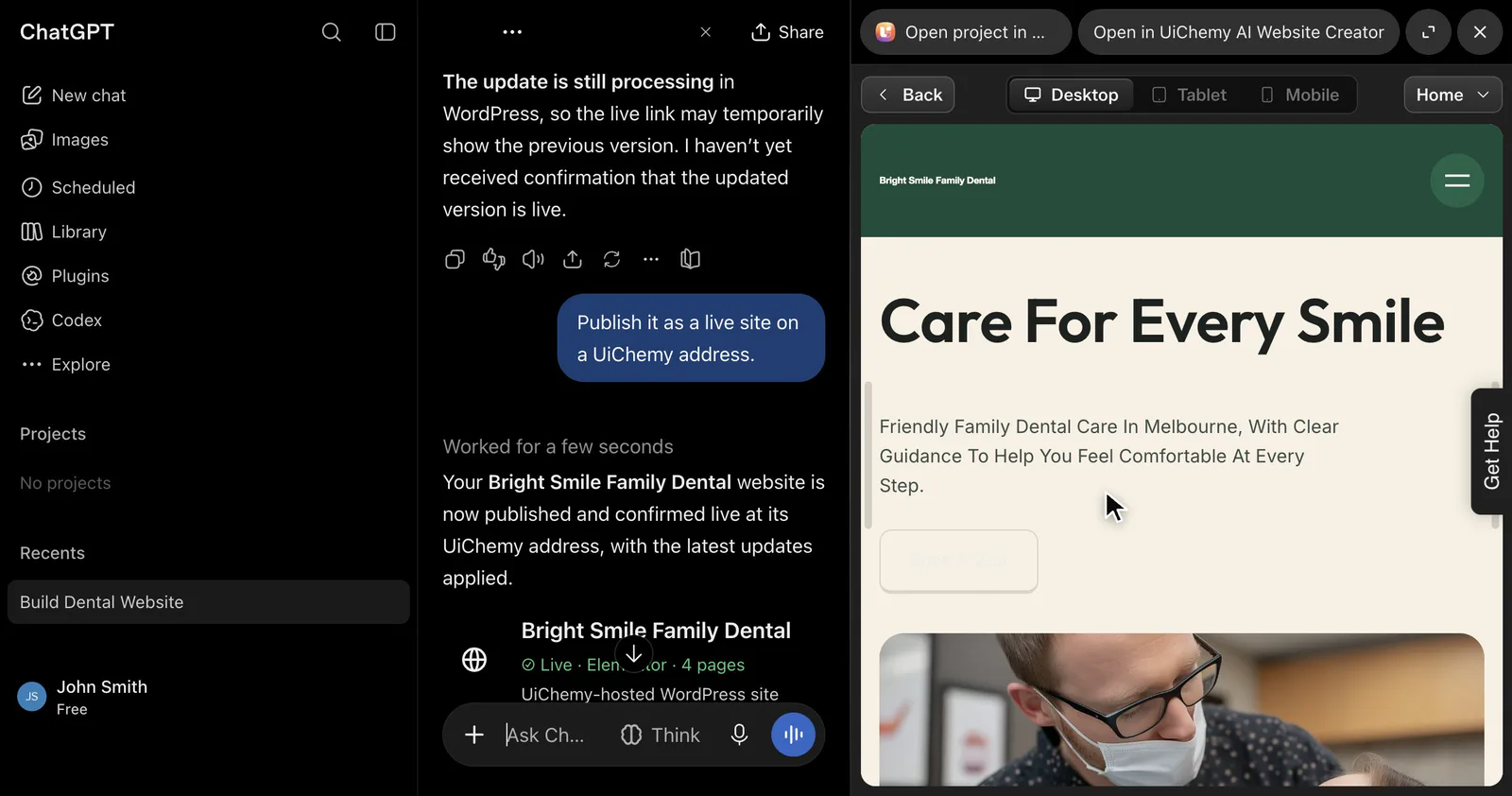
| Live preview | Publish it as a live site on a UiChemy address. |
More prompts are in the prompt examples docs.
Troubleshooting
The tools do not work after signing in
Make sure you signed in with a full UiChemy account that has an email, not a guest session. Some accounts also need access to creation features before the tools work. Then try again.
ChatGPT cannot find my project
The plugin only reaches projects in the UiChemy account you connected. Make sure you signed in with the same account that owns the project.
My project does not show up in WordPress
Ask ChatGPT to mark the project as exported first, and make sure the UiChemy WordPress plugin is logged in to the same UiChemy account.
Good to know before you start
- You sign in with your own UiChemy account. The app reaches only the projects in the account you connect, and some accounts need access to creation features before the tools work.
- ChatGPT asks for your confirmation before anything that deletes a page, section, post or project, overwrites a section you edited, or publishes or unpublishes a site.
- A UiChemy-hosted preview can be a temporary 24-hour link or a permanent one, depending on your account. ChatGPT tells you which one it is creating.
- Cloudflare publishing asks you to connect your own Cloudflare account the first time.
- For your own WordPress site, you sign in to WordPress yourself and ChatGPT guides the import. It never asks for your passwords.
- It does not connect custom domains or change your DNS or hosting.
- Use your own content and images, or content you have the right to use.
ChatGPT website builder: frequently asked questions
Can ChatGPT build a website?
With UiChemy, yes. ChatGPT drafts the pages, layouts, copy, colours and fonts from the UiChemy section library. The result is a real project in your own UiChemy account that you keep editing on the UiChemy canvas.
Can ChatGPT make me a WordPress website?
It builds the site as a project in your UiChemy account. You then ask ChatGPT to mark it as exported for Elementor or Gutenberg and import it into your own WordPress with the UiChemy plugin. You sign in to WordPress yourself, and ChatGPT never asks for your passwords.
Is the ChatGPT website builder free?
You need a ChatGPT account and a UiChemy account. Plan limits apply and AI work uses credits, so check the UiChemy pricing page for current details.
Does it publish to my own domain?
No. It does not connect custom domains or change your DNS or hosting. It can publish a live preview on a UiChemy address, and you can bring the project into your own WordPress with the UiChemy plugin.
Will ChatGPT publish or delete things without asking?
No. ChatGPT asks for your confirmation before it deletes a page, section, post or project, or publishes or unpublishes a site.
Can I get the code instead of WordPress?
Yes. Your site is a project in your UiChemy account, and the UiChemy Publish panel can download an Astro project, publish it to your own Cloudflare account with or without the EmDash CMS, or download HTML, React or Next.js code.
Related guides and sources
- UiChemy AI Website Creator
- UiChemy MCP
- Launch announcement: UiChemy AI Website Creator is now in ChatGPT
- Docs: ChatGPT plugin
- Docs: Export to WordPress
- Docs: The Publish panel
Converting a Figma design instead? UiChemy has a separate Figma to WordPress plugin for that.
This guide follows the UiChemy docs pages linked above, read on November 12, 2026.