AI-Generated Code to Elementor or Gutenberg Blocks: The Mapping
 Sagar Patel
Converting HTML to Elementor or Gutenberg is a mapping exercise. Wrapper elements become containers or group blocks, headings and paragraphs become heading and text widgets or blocks, images and buttons map one to one, and CSS becomes widget settings or global styles. Scripts and forms are the parts that need a human check.
AI tools produce HTML, CSS and sometimes JavaScript. WordPress builders store layouts as structured elements instead. Knowing how one maps to the other lets you review a conversion quickly and spot the places it can go wrong.
This is a conceptual guide to the general mapping, not a description of any tool’s internals. If you want the practical route for a Lovable, Bolt or v0 project, read what carries over from Bolt and v0.
Two Vocabularies for the Same Page
An AI-generated page is a tree of tags. A section contains a div, which contains a heading, a paragraph and a button. The browser reads the tree and draws it.
Elementor and Gutenberg describe the same tree with their own parts. Elementor uses containers that hold widgets. Gutenberg uses blocks, some of which hold other blocks. Both store the structure in the WordPress database, and both let an editor select any part and change it with a panel, with no source file to open.
The interesting question is how closely the two trees line up. For layout and content they line up well. For behavior they do not, because a builder’s elements describe what to show, and a script describes what to do. The UiChemy docs describe conversion of an AI project into native, editable Elementor or Gutenberg elements, and the HTML to WordPress page lists the steps.
The Mapping Table
This is a general model of how HTML pieces correspond to builder pieces. Different tools make slightly different choices, so use it to know what to look for, and verify each page.
| In the HTML | Elementor equivalent | Gutenberg equivalent | Review note |
|---|---|---|---|
section, wrapper div | Container | Group or Row block | Check nesting depth, flatten needless wrappers |
| Flex or grid layout | Container direction, gap, columns | Row, Stack or Grid layout settings | Compare at phone width |
h1 to h6 | Heading widget | Heading block | One h1 per page, order stays logical |
p, lists | Text editor widget, icon list | Paragraph, List block | Inline links and bold survive |
img | Image widget | Image block | Alt text, file size, lazy loading |
a styled as a button | Button widget | Button block | Link target and rel values |
| Repeated cards | Several containers, or a loop or template | Columns, or a query loop | Decide: static copies or dynamic content |
Navigation nav | Nav menu widget in the header template | Navigation block | Use a real WordPress menu |
header and footer | Theme Builder templates | Template parts | Appear once, apply sitewide |
form | Form widget or a form plugin | A form plugin block | Test a real submission |
iframe, video embeds | Video or HTML widget | Embed block | Privacy and loading behavior |
Inline script | HTML widget or custom code | Custom HTML block | Test every interaction |
Where CSS Goes
CSS is where a good conversion and a messy one part ways. A page can have the same look in two very different ways.
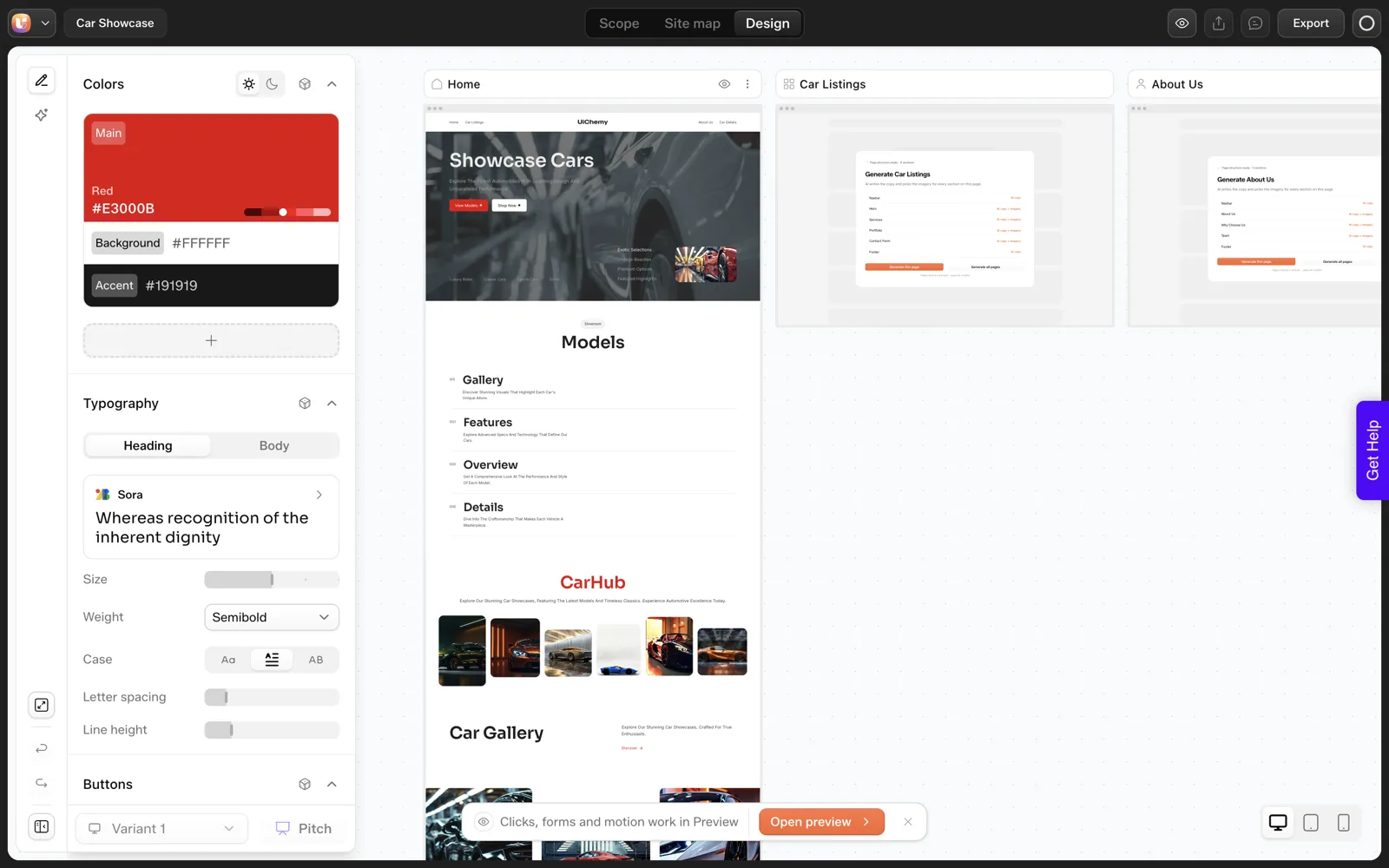
- Settings per element. Every heading carries its own color and size. The page looks right, and changing the brand color means editing every element.
- Global styles. Colors, fonts and spacing are defined once and referenced everywhere. Changing the brand color is one edit.
The UiChemy docs say colors, typography and spacing are kept as global styles during an AI to WordPress conversion. Whatever tool you use, run the one-edit test: change a global color and watch whether the whole page follows. If half the page stays the old color, the styles were baked into elements.
Custom CSS that does not fit a settings panel usually lands in a custom CSS field or a code widget. It works, and it is also the part a future editor is least likely to understand, so label it. If you want code to stay editable on purpose, writing HTML, CSS and JavaScript inside Elementor with AI covers a cleaner way to hold it.
The Cases That Do Not Map Cleanly
Interactive behavior
Tabs, accordions, sliders, filters and calculators run on scripts. Builders ship native versions of the common ones. If a native widget matches, use it. If the page relies on a custom script, keep it in a code widget and test it. See how to test the performance of AI-generated sections before you ship it.
Repeated content
Ten blog cards in the HTML are ten blocks of markup. In WordPress they should usually be ten posts shown by a loop, so the list grows when someone writes a post. The mapping tells you the cards exist. Only a decision from you turns them into dynamic content.
Forms and data
A form tag without a backend is only a picture of a form. Pick the form tool, wire the email destination and run a test submission before launch.
Application state
Logins, carts and dashboards belong to an app and have no builder element. Three routes for converting React to WordPress explains what to do with them.
The Review Checklist
HTML to Elementor or Gutenberg: post-conversion review

Structure
[ ] One h1 per page; heading order logical
[ ] No needless wrapper containers (more than 3 levels deep, check why)
[ ] Header and footer exist once as templates, not copied per page

Styles
[ ] Change one global color: whole page follows
[ ] Change one global font: whole page follows
[ ] Custom CSS listed and labelled: ______

Content
[ ] Every heading, paragraph and button editable in the panel
[ ] Alt text on every image
[ ] Placeholder copy replaced
[ ] Repeated cards: static or dynamic? Decided: ______

Behavior
[ ] Menu opens on a phone
[ ] Every interactive element clicked once
[ ] Form submitted; notification received
[ ] Anything left unconverted: ______

Responsive
[ ] Checked at 1440, 1024, 768 and 390 px
If a page passes everything except the Behavior block, the conversion did its job and the remaining work is development, which is a normal place to end up. The cost of keeping such a site healthy afterward is the subject of the cost of change for an AI site versus a WordPress site.
A Worked Example: Mapping One Hero Section
Take a typical AI-generated hero as a concrete case. The markup is a section containing a wrapper div, a small label, an h1, a paragraph, two links styled as buttons and an image. Here is how I would map it, piece by piece, using the table above.
- The section and wrapper become one container in Elementor or one Group block in Gutenberg. If the wrapper only centers content, keep a single level.
- The label is a short paragraph or a heading widget with a small size. Give it a text style from your global styles.
- The h1 becomes the page’s only top-level heading. Confirm no other element on the page claims that level.
- The paragraph becomes a text widget or a Paragraph block.
- The two buttons become two Button widgets or blocks. Check each link target.
- The image becomes an Image widget or block, with alt text written for the meaning of the picture.
Then compare the layout. A side-by-side hero in the original is probably a two-column flex layout, which maps to container direction and gap settings. The test is the same on both sides: shrink the window to phone width and see whether the columns stack in a sensible order.
That order check is where hero sections most often go wrong. The image can end up above the heading on a phone when the heading should come first. Fix it in the container’s responsive settings, and not by duplicating elements.
Repeat this walk for one section per page type and you will know how the whole conversion behaves. Three routes for converting React to WordPress shows what to do when the project holds more than markup.
Accessibility Checks Worth Running After Any Mapping
A conversion can look identical and still lose accessibility details. These checks take a few minutes per page and catch the common losses.
- Heading order. Headings should descend in order without skipping levels, and each page needs one
h1. - Alt text. Every meaningful image needs a short description. Decorative images should have an empty alt value so screen readers skip them.
- Link and button names. “Learn more” repeated five times tells a screen reader user nothing. Make each name say where it goes.
- Keyboard path. Press Tab through the page. Focus should move in a sensible order and show a visible outline.
- Contrast. Text on a colored section needs enough contrast against its background. Check it with any contrast tool.
- Landmarks. The header, main content and footer should be marked up as such, which template parts normally do for you.
These checks matter for real visitors and also for search, since a clean heading structure helps both. They also catch problems that came from the source, because an AI-generated page can contain a skipped heading level or empty link text long before any conversion.
The wider quality pass for generated code is in keeping AI-written code clean: quality, performance and accessibility checks. Run it on the converted page, since the result is what visitors will use.
Mapping Mistakes and Their Fixes
Some conversion problems repeat across projects. Knowing the pattern lets you fix a whole class at once.
| What you see | Likely pattern | Fix |
|---|---|---|
| Containers nested four or five levels deep | Every wrapper div became a container | Flatten wrappers that only add spacing, and use gap settings instead |
| Same color set on every heading | Styles baked into elements | Move the color to a global style, then reset the elements |
| Text looks right but spacing is odd on a phone | Fixed pixel values in the source | Replace with responsive spacing settings |
Two h1 elements on one page | A logo or label marked as a top heading | Demote the extra one to a paragraph or lower heading |
| Custom CSS in many places | Rules that did not fit a settings panel | Collect it into one labelled custom CSS field |
| Cards identical but built separately | Repeated markup became static copies | Rebuild as a loop if the content should grow |
Fixing by pattern is faster than fixing by page. Find the first instance, solve it properly, then search the rest of the site for the same shape. A rebuilt style at the global level also fixes every page that uses it at once.
Keep a short list of the patterns you meet. After a few projects it becomes your own review sheet, and it makes your next conversion quicker. How to review an AI-generated WordPress site in 30 minutes is a good base to extend.
FAQ
Can you convert HTML to Elementor?
Yes. HTML structure maps onto containers and widgets: wrappers become containers, headings and text become widgets, images and buttons map directly. CSS becomes widget settings or global styles. Scripts and forms need a human check. Tools such as UiChemy automate the mapping, and you still review every page.
Is HTML to Gutenberg conversion different?
The idea is the same, with different parts. Wrappers become Group, Row or Stack blocks, headings and paragraphs become their own blocks, and header and footer become template parts. Gutenberg leans on the block editor and theme styles, so global styles and the theme choice matter more.
Will the converted page keep my CSS?
The visual result should carry across, either as widget settings, global styles or custom CSS. Quality varies by how it is stored. Run the one-edit test: change a global color and see whether the whole page follows. If it does not, styles were baked into individual elements.
What about JavaScript in the original page?
Layout converts more reliably than scripted behavior. Use a native widget when one matches, or keep the script in a code widget and test it. Check every interactive element after conversion, on a phone as well as a desktop.
Do I need Elementor to use converted content?
You need the builder you converted to. The UiChemy docs name Elementor and Gutenberg as the targets for AI to WordPress. Pick the one your client already uses or is willing to learn, since they will live in that editor after handoff.
To see the mapping on a real page, Get Started and convert one section, then run the checklist above.
Every feature named in this post is listed by product: all UiChemy features, UiChemy Composer features.