
Figma to Gutenberg Blocks Without Hand-Coding
 Sagar Patel
You can get from Figma to Gutenberg without writing block code by hand, using a design-to-blocks tool, a block plugin workflow or an AI-written Composer. Pick by how much you want to control. UiChemy’s Export to Gutenberg is now live on every plan, alongside Elementor export.
This post is about the hand-coding you can avoid. For the technical comparison of native block approaches, read Figma to Gutenberg: native blocks, five ways, and for block-plugin design habits see designing for Spectra, Kadence and GenerateBlocks.
What “Hand-Coding” Means Here
Building a custom Gutenberg block the traditional way means writing PHP to register it, JavaScript to build the editor interface, and CSS for the look. It is a developer task, and it takes hours per block. That is the work most designers want to avoid, and a reasonable thing to avoid.
There is a lot of ground between a hand-written block and a page you can edit. You can use the blocks WordPress ships with, a block plugin, or a tool that generates the markup. Each trades control for effort in a different way.
Routes That Avoid It
| Route | Code you write | Control | Trade-off |
|---|---|---|---|
| Core blocks and patterns, built by hand in the editor | None | Medium | Slow for complex layouts |
| A block plugin library (for example Spectra, Kadence or GenerateBlocks) | None to a little CSS | Good | You depend on that plugin |
| A design-to-blocks converter | None | Depends on the tool | Output needs a review |
| AI-written sections (Composer) | None, you write prompts | Good for custom sections | Generated code needs checking |
| Hand-coded custom blocks | PHP, JavaScript, CSS | Full | Most time and developer skill |
The first four routes need no block code from you. The fifth is the one this post helps you skip unless you truly need it.
Where UiChemy Fits Today
UiChemy Composer is described as an AI-first visual editor that writes real HTML, CSS and JavaScript inside Elementor or Gutenberg.
So for custom sections in Gutenberg, Composer is a route that avoids you writing the code yourself. Custom code in Gutenberg without code plugins or embeds explains how that works in practice, and Composer vs custom HTML widgets and code snippets shows where it beats the alternatives.
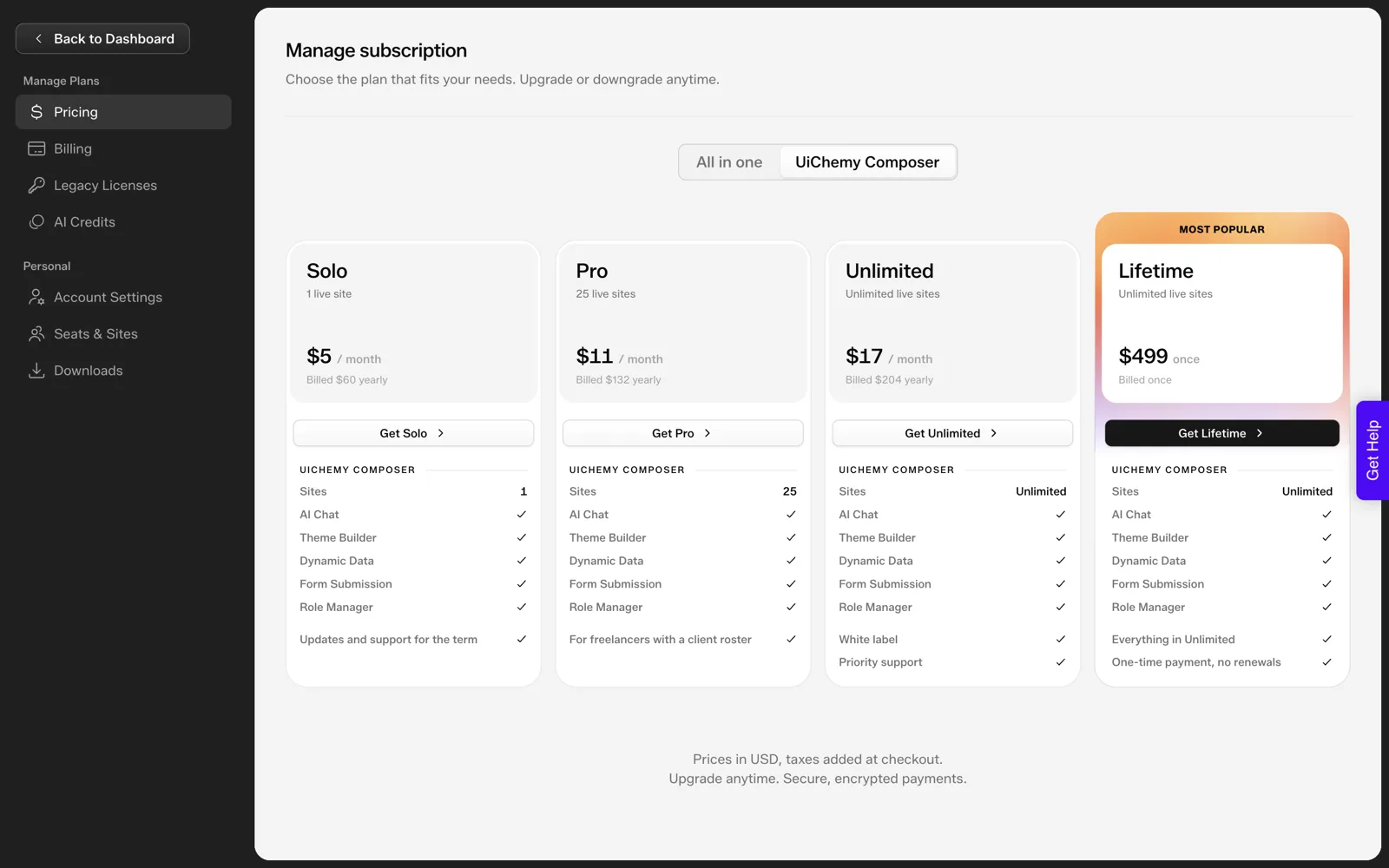
The plans list is public. Composer comes in four tiers: Solo at $5 a month for one site, Pro at $11 for 25 sites, Unlimited at $17 for unlimited sites with white label and priority support, and a Lifetime option at $499 once. The free versus pro documentation explains what changes between free and paid, and UiChemy Composer plans explained covers the tiers in detail.
What Is Live and What Is Soon
To be direct: in the UiChemy all-in-one plans, Export to Elementor and Export to Gutenberg are both included on every plan, and Bricks is marked “Soon”.
The export dialog also has an “Other” tab that works as a vote for the next target, with React, Bricks, Divi, Gutenberg Core, Webflow, Framer, Wix and others on the list.
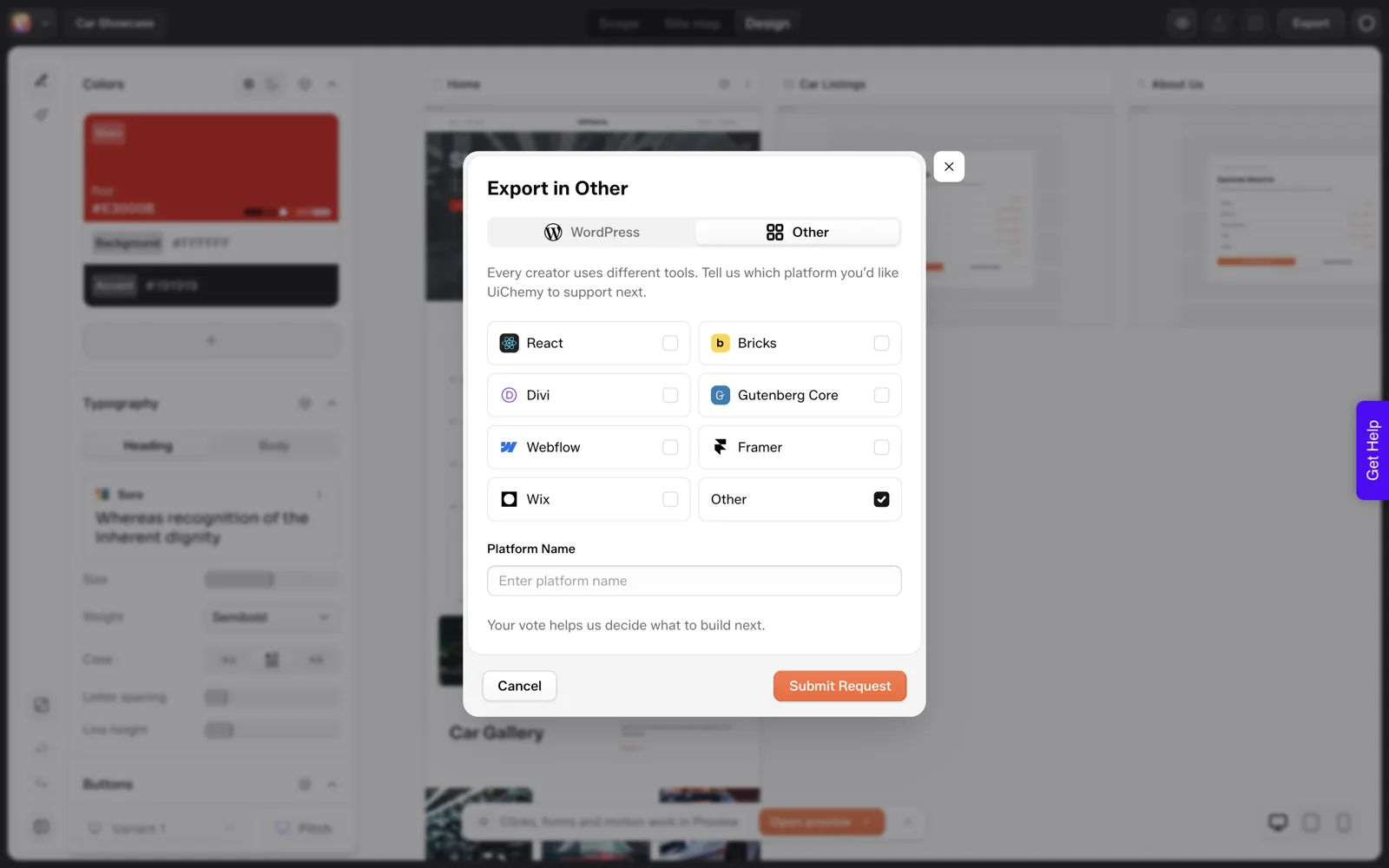
That means a full “export my site as Gutenberg blocks” workflow is something you can plan around today, from AI Website Creator. If your project starts from a Figma design rather than a brief, the other routes in the table still apply.
Designing Your Figma File for Blocks
Whichever route you choose, a file designed with blocks in mind converts and builds more easily.
- Design in sections that map to a block or pattern: hero, feature grid, testimonial, call to action.
- Use a small set of spacing and type values, so they can become theme settings.
- Prefer simple stacks and grids, which map cleanly to Gutenberg’s Group, Columns and Grid blocks.
- Keep decorative effects separate from layout, so they can be added with CSS later.
The post on Figma for web design: the 2026 working method goes deeper on structuring a file this way. Whatever you build, review the live page before handing it over, using the 30-minute review checklist.
Where the Time Actually Goes
Designers often assume the hard part of Gutenberg is the code. In practice the time goes into three other places, and they matter whichever route you choose.
- Translating spacing. Figma uses free-form padding and gaps, while Gutenberg uses block spacing settings and theme values. Decide early which tokens become theme settings.
- Responsive behaviour. A design with one desktop frame leaves mobile and tablet to guesswork. Design at least three widths for pages that matter.
- Editing experience. A page that looks right but is awkward to edit will cost the client time every month. Test editing as the client would.
Avoiding hand-written block code removes one cost and leaves these three. Plan for them and the build goes more smoothly. For a related look at what an editable result means for handoff, see your AI site vs a WordPress site: the cost of change after launch.
A Route Chooser to Copy
FIGMA TO GUTENBERG: ROUTE CHOOSER

1. Must the site be Gutenberg native right now?
   yes -> go to 2        no -> Elementor export is available today

2. Do you already use a block plugin (Spectra, Kadence, GenerateBlocks)?
   yes -> design to that plugin's blocks and build with it
   no  -> go to 3

3. Do you need custom sections that no block provides?
   yes -> consider AI-written sections (Composer) and review the code
   no  -> core blocks and patterns are enough

4. Is the layout simple (stacks, columns, grids)?
   yes -> build with core blocks, check at three widths
   no  -> a block plugin or Composer will save time

5. Do you need a block that edits in a special way?
   yes -> this is the one case where hand-coding may still be justified

Always: review on mobile, check headings, test speed, hand over a short edit guide.
A Worked Example: A Three-Section Page Without Block Code
Take a simple landing page from Figma with a hero, a three-card feature row and a closing call to action. Here is how I would build it in Gutenberg with no custom block code. The block names are the standard ones that ship with WordPress.
- Hero. Use a Group block as the section wrapper, with a Heading, a Paragraph and a Buttons block inside. Set the background colour and padding on the Group so the section reads as one unit.
- Feature row. Use a Columns block with three columns. In each, place an Image or icon, a Heading and a Paragraph. Build one card, then duplicate it twice.
- Call to action. Use another Group with a Heading and a Buttons block, matching the hero’s spacing so the page feels consistent.
- Save the sections as patterns. If you will reuse them on other pages, save each section as a pattern so the same structure is one click away.
- Check at three widths. Preview desktop, tablet and phone, and adjust the Columns behaviour on small screens.
The page needs no PHP and no JavaScript. It does need patience on spacing, which is where the Figma file helps if you recorded the values. For a section that no standard block can produce, such as a custom interaction, see how AI-generated code maps to Elementor or Gutenberg blocks.
Mistakes That Bring Hand-Coding Back
Designers usually end up writing code because of a decision made earlier. These are the patterns I would avoid.
| Mistake | Why it forces code | Better move |
|---|---|---|
| Designing every section as a one-off | No block or plugin fits, so you build a custom one | Reuse a small set of section types |
| Choosing a layout no block can reproduce | You fall back to custom CSS or a custom block | Check the layout against Group, Columns and Grid before you finalise |
| Skipping tablet and phone frames | You invent responsive rules during the build | Design three widths for key pages |
| Mixing two block plugins on one site | Styles clash, and fixing them takes custom CSS | Pick one library and stay with it |
| Building a custom block for a simple section | Hours of work for what a pattern could do | Use a pattern first, then ask whether a block is really needed |
| Forgetting what “Soon” means | The plan depends on a feature that is not available | Plan around Elementor or Gutenberg export today, or use the other routes |
Generated code needs checking whichever route you take. The post on keeping AI-written code clean covers the quality, performance and accessibility checks, and how to test the performance of AI-generated sections shows how to measure before launch.
Handing a Block-Based Site to a Client
The point of avoiding hand-coding is a site someone else can run. Spend the last hour on the handoff and the client will thank you for months.
GUTENBERG HANDOFF CHECKLIST

Editing
[ ] Client logs in with the role you intend them to have
[ ] They can change a heading, a paragraph and an image unaided
[ ] Saved patterns are named in plain words
[ ] Any section they should not edit is noted in the guide

Quality
[ ] Headings in order, one H1 per page
[ ] Images compressed with alt text
[ ] Buttons and links checked
[ ] Mobile, tablet and desktop previewed
[ ] Speed checked on a real device

Documentation
[ ] A short edit guide: how to change text, swap an image, add a section
[ ] Which route built each page (core blocks, plugin, Composer)
[ ] Who to contact, and what is covered
Writing down which route built each page pays off when someone reviews the site later. They will know whether a section is core blocks, a plugin library or generated code, and where to look when something needs to change.
FAQ
Can I convert Figma to Gutenberg blocks automatically?
Some tools generate block markup from a design, and results vary, so review the output. UiChemy’s all-in-one plans now include Export to Gutenberg alongside Elementor export, for sites built in AI Website Creator. For a Figma design, consider block plugins or AI-written Composer sections.
Do I need to write PHP or JavaScript to use Gutenberg blocks?
No, not to use them. Core blocks and block plugins need no code. Writing a custom block does need PHP and JavaScript, which is the work this post helps you avoid with plugins, converters or AI-written sections for most projects. Coding becomes a choice you make for a reason, not a default.
Does UiChemy Composer work with Gutenberg?
Composer is described as writing real HTML, CSS and JavaScript inside Elementor or Gutenberg. That gives you a way to build custom sections in Gutenberg without writing the code yourself. Check generated code for quality, since AI output needs a review.
When is hand-coding a Gutenberg block still worth it?
When a block needs a special editing experience, deep integration with data or reuse across many sites as a distributed product. For ordinary page sections, a plugin or generated markup is faster and easier to hand to a client. Reserve the custom block for features that a plugin cannot supply.
Is Gutenberg export available now?
Yes. Export to Gutenberg is live on every plan, alongside Elementor export, and Bricks is still marked Soon. The export dialog also has a vote tab for the next targets. Check the current status before you plan around it.
To try Composer or Elementor export on a real page, you can Get Started without a card.
Every feature named in this post is listed by product: all UiChemy features, Figma to WordPress features.