Is Figma Free? What The Starter Plan Actually Blocks
 Sagar Patel
A client asks for three landing pages and a component sheet. You open Figma on the free account you have used for two years, create a team, drop in the fourth file, and Figma tells you the team is full.
Nothing has been taken away. You have simply hit the line that was always there.
Is Figma free? Yes, permanently, with no trial clock.
The Starter plan is a real plan rather than a countdown, and a solo designer can run a whole project on it. The interesting question is which specific things stop working, and the answers are published rather than hidden.
Every number below was read from Figma’s live pricing page and help centre on 8 September 2026. Where a limit is a hard block, it is named as one.
Where it is an inconvenience you can design around, it is named as that instead.
What Free Actually Includes
The Figma pricing page lists Starter as free with unlimited drafts, UI kits and templates, and 150 AI credits a day up to a monthly ceiling of 500. Unlimited drafts is the part people miss.
The three file limit applies to team files, not to your personal drafts folder.
The editor itself is not cut down. Auto layout, components, styles, interactive prototypes, advanced animations, transitions, overlays, vector networks and the arc tool are all on Starter.
So is unlimited cloud storage, and so is importing a .sketch file or a PNG.
Two Starter features matter more than any paid one for client work. Viewers are unlimited on every plan, so a client can open, comment on and export from your file without paying anything.
And inspect works for free viewers: measurements, property values, copy CSS, iOS and Android code, and asset export.
Community resources are open too. Plugins, widgets and community files all work on Starter, which is the reason a free account can still run a Figma to WordPress conversion.
The plugin runs inside your file and does not ask what you are paying Figma.
The Four Limits That Actually Bite
Figma’s plans and features article is the definitive list, and four rows on it change how you work rather than merely trimming a feature you were never going to use.
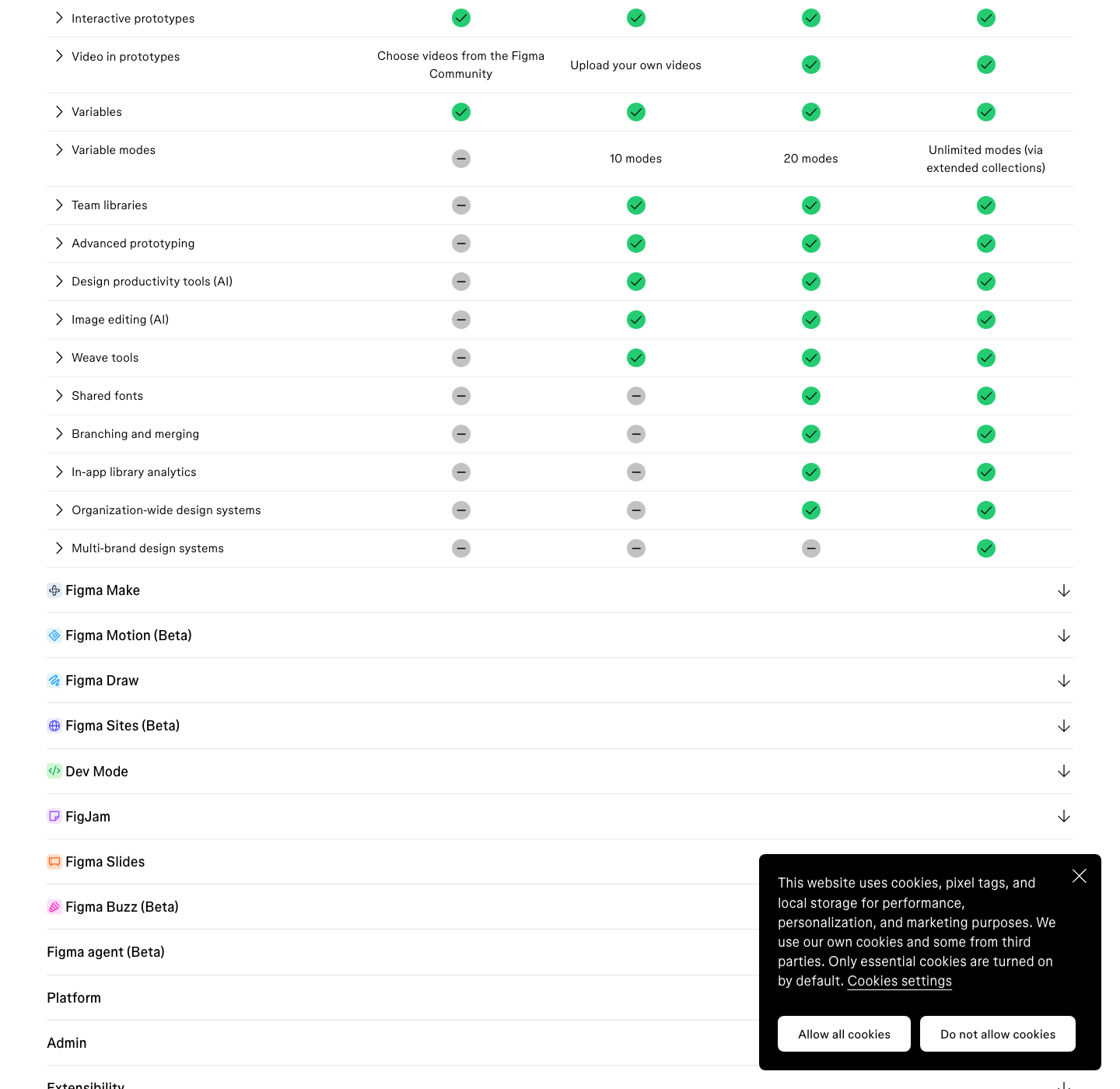
The first is file organisation. Starter gives you a single team with one folder and three files.
That is the wall most people hit, and it arrives around the third client rather than the third year.
The second is version history, capped at 30 days. Figma auto-saves a version every 30 minutes on every plan, but on Starter anything older than a month is gone.
A client who wants the layout from six weeks ago is asking for something you no longer have.
The third is libraries. Shared libraries for components, styles and variables are Professional and above.
You can build components on Starter, you simply cannot publish them for reuse across files, which makes a design system a copy and paste exercise.
The fourth is Dev Mode, which is not on Starter at all. Free viewers still get basic inspect, so a developer is not blind, but the handoff feed, ready-for-dev statuses, comparison of frame versions and the VS Code extension all sit behind a paid seat.
| Capability | Starter | Professional | Practical effect |
|---|---|---|---|
| Team files | 1 team, 1 folder, 3 files | 1 team, unlimited folders | Third client project blocks |
| Version history | 30 days | Unlimited | No rollback past a month |
| Shared libraries | Not available | Available | No publishable design system |
| Dev Mode | Not available | Available | Basic inspect only for devs |
| Variable modes | Not available | Up to 10 per collection | No light and dark theming |
| Prototype-only sharing | Not available | Available | Client can open the source file |
The Client Sharing Problem Nobody Warns You About
Prototype sharing controls are a paid feature, and the consequence is specific rather than abstract. Figma’s sharing documentation states that on Starter, if you share a file from presentation view, viewers can open the source file by selecting the dropdown next to the file name and choosing Open in editor.
In plain terms: a free prototype link is a link to everything. The abandoned direction, the pricing comments, the version you were told to delete.
Password protection is also Professional and above, so there is no second lock to fall back on.
There is a second sharing quirk worth knowing. If a file sits in a Drafts folder on a Starter team and its access is set to Anyone, people with the link can only view it.
To grant edit access you have to move the file into a folder, which then counts against your three.
The workaround costs nothing and is worth building into your process. Keep exploration in a separate file from the one you present, delete dead frames before a review rather than parking them off-canvas, and treat every prototype link you send as public.
AI On The Free Plan, And Where It Runs Out
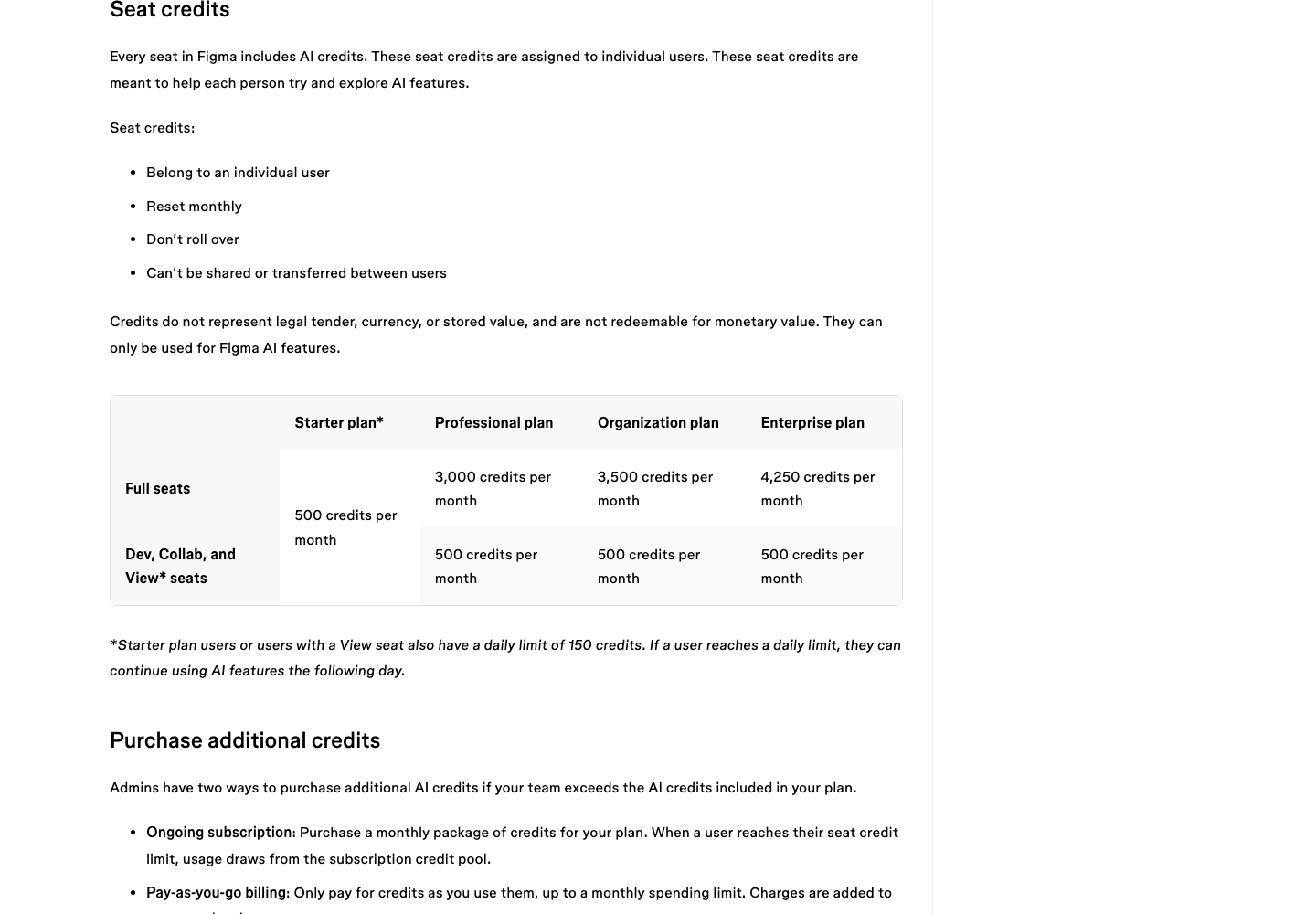
Starter includes AI credits, which surprises people who expect AI to be the first thing withheld. The allowance is 150 a day up to 500 a month, and the daily cap is the binding one.
Burn 150 in an afternoon and the rest of that day is unavailable regardless of your monthly balance.
Those rules are set out in Figma’s How AI credits work article.
Credits are assigned to an individual, reset monthly, do not roll over, and cannot be shared or transferred between users. The article also states plainly that they are not redeemable for monetary value.
Comparing seats makes the gap concrete. A Professional Full seat carries 3,000 credits a month, six times the Starter ceiling, and Organization and Enterprise Full seats carry 3,500 and 4,250.
Every Dev, Collab and View seat on every paid plan gets the same 500 a month a Starter user gets.
| Plan | Full seat price | Full seat AI credits | Figma MCP server limit |
|---|---|---|---|
| Starter | Free | 500 a month, 150 a day | 20 tool calls a month |
| Professional | $16 a month | 3,000 a month | 200 a day, 10 a minute |
| Organization | $55 a month | 3,500 a month | 200 a day, 15 a minute |
| Enterprise | $90 a month | 4,250 a month | 600 a day, 20 a minute |
The MCP column is the one to read twice if you plan to drive Figma from an AI assistant. Twenty tool calls a month on Starter is enough to test that a connection works and not enough to build anything with it.
One real session with a coding agent will spend that.
One temporary exception is worth knowing while it lasts. Figma’s pricing FAQ states that the AI agent is free during beta and consumes no credits for any prompt or action, with standard usage applying once it becomes generally available.
Free For Students, And What Free Means There
Figma for Education is a different kind of free, and a much larger one. The education documentation says K-12 students and educators get the Enterprise plan through their school or district, while higher education, approved bootcamp and secondary school users get the Professional plan.
The eligibility rules are narrow and the exclusions are listed by name. Self-directed education does not qualify, and neither do startups, edtech companies, or non-profit organisations.
You must be a current student or educator applying with a school email, and old enough to consent for yourself.
Two details catch people out. Education status is tied to the email you verify with, and changing that email afterwards revokes it.
And AI tools including Figma Make are available only to higher education and bootcamp users, not to K-12 or high school ones, while the AI agent is not available to any education user during beta.
The Honest Case For Staying On Starter
A freelancer running one site at a time, presenting to clients who only need to look and comment, and handing off to a developer who is happy with basic inspect, has no reason to pay Figma $16 a month. That is a real profile and it is more common than the upgrade prompts suggest.
Three signals mean the free plan has stopped paying for itself. You are duplicating the same button across files because you cannot publish a library.
You are keeping a spreadsheet of which draft is current because history expires. Or you have started deleting a client’s finished file to make room for the next one.
The third of those is the dangerous one. Deleting a delivered file to free a slot means the 30 day history window becomes the only record of the work, and then that expires too.
If you are doing this, the $16 is cheaper than one afternoon of rebuilding.
Where The Free Plan Stops And WordPress Starts
None of these limits touch the part of the job that takes longest, which is turning the approved frame into a working page. Figma’s plan tier does not change how long that rebuild takes, because the rebuild happens outside Figma entirely.
UiChemy reads the Figma file through the plugin, so a Starter account converts on exactly the same terms as an Enterprise one. Community plugins are available on Starter, which is the only Figma-side requirement.
What you pay Figma has no bearing on what comes out the other end.
Worth saying, since this post is about where a free plan runs out: the Figma frame is one of four ways into UiChemy now, and the other three do not involve Figma at all.
AI Website Creator takes a written prompt or a client brief and produces a scope, a sitemap, a design and an Elementor export. UiChemy Composer writes real HTML, CSS and JavaScript sections inside Elementor by prompt.
AI to WordPress moves an existing Lovable, Claude, Bolt or v0 build across through Composer. If Starter’s three file wall is what pushed you here, that is a genuine alternative rather than a consolation.
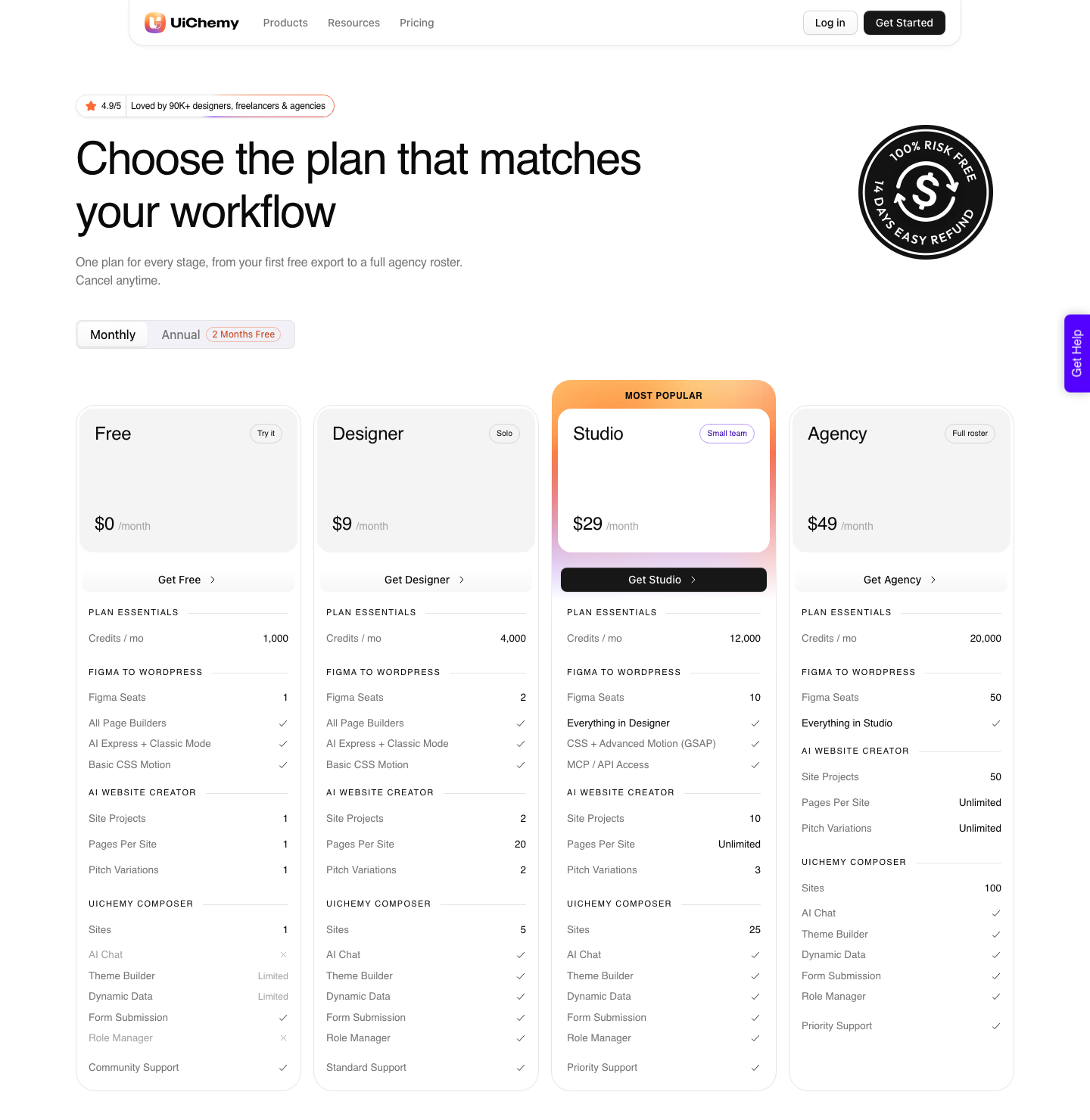
UiChemy has its own free plan and it deserves the same scrutiny this post gives Figma’s. Free is $0 a month with 1,000 credits, 1 Figma seat, 1 AI Website Creator project capped at 1 page, and 1 Composer site, on community support.
Its walls are named too: Composer’s Theme Builder and Dynamic Data are Limited, Global Collections stop at 3, and there is no White Label.
Above that, Designer is $9 a month with 4,000 credits and 2 Figma seats, Studio is $29 with 12,000 and 10, and Agency is $49 with 20,000 and 50.
The balance refreshes monthly and you can top up between refreshes; the pricing page publishes no pack sizes or top-up prices, so treat any figure you have seen quoted as unsourced.
The plugin on WordPress.org is the install step rather than the plan, and it costs nothing either way. Every paid plan carries a 14-day money-back guarantee, so a single client page is a fair test rather than a commitment.
What Free Will Not Fix
Staying on Starter does not make a badly structured file convert better, and paying Figma does not make a badly structured file convert better either. A frame full of absolutely positioned layers produces the same mess on either plan, because the plan tier has nothing to do with layer discipline.
The free plan also cannot give you a second opinion on your own file. Shared libraries are the thing that stops two designers drifting apart, and on Starter that discipline has to be a habit rather than a system.
On a team of one this is fine. On a team of three it fails quietly.
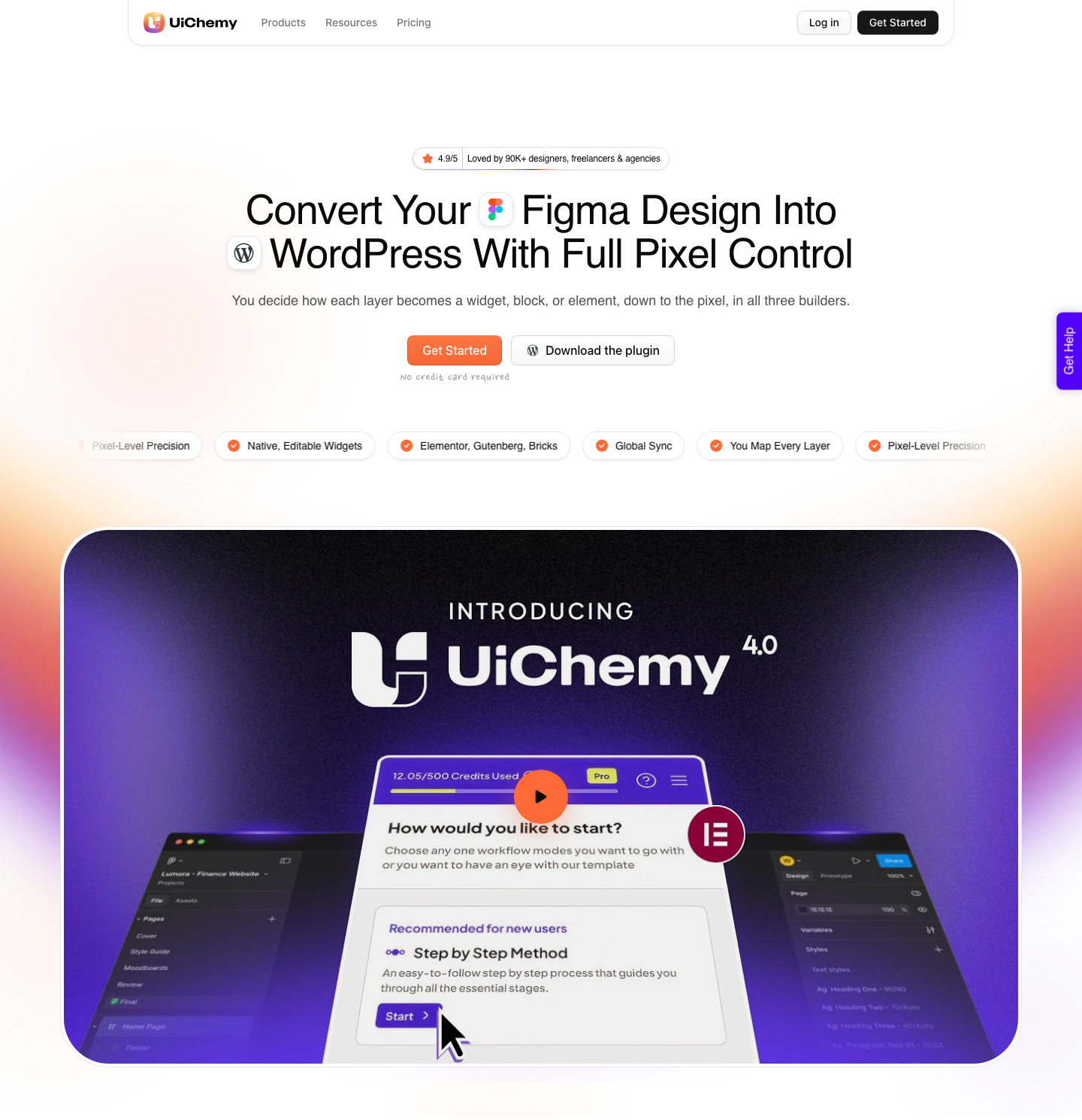
And free does not remove the rebuild. Whatever plan you are on, the design still has to become HTML that a browser can lay out.
A verified reviewer puts the conversion at roughly a 70 to 30 split, with the last 30 percent tuned by hand in Elementor, and no Figma subscription changes that ratio.
Frequently Asked Questions
Is Figma free forever, or is it a trial?
It is a permanent plan called Starter, not a trial. There is no expiry date and no card required.
Figma lists it on the pricing page alongside the paid tiers, with unlimited drafts and 150 AI credits a day.
How many files can I have on the free Figma plan?
Three files, in a single team with one folder. Drafts are unlimited and do not count, so the practical limit is on files you have deliberately moved into a team to collaborate on or to grant edit access to.
Can clients view my Figma file without paying?
Yes. Viewers are unlimited on every plan, and they can comment, inspect, and export.
On Starter they can also open the source file from a presentation link, so send only what you are happy for them to read.
Does Dev Mode work on the free plan?
No. Dev Mode starts at Professional.
A free viewer still gets basic inspect, which covers measurements, property values, copying CSS, iOS and Android code, and exporting assets, so a developer can work without it.
Can I convert a Figma design to WordPress on a free account?
Yes. Community plugins run on Starter, so the conversion reads your file the same way it would on any paid tier.
What matters is how the frame is built, not what you pay Figma for it.
Free Is A Real Plan, With Four Real Walls
Three team files, 30 days of history, no shared libraries and no Dev Mode. Those four lines are the whole answer, and everything else on Starter is the full editor with the full community behind it.
If you are shipping WordPress sites from Figma, none of the four sit on the critical path. The work that decides your afternoon happens after the design is signed off.
The rules that make a design survive the build matter more than your plan tier, the AI credit rules matter if you generate rather than draw, and AI Express Mode or Classic Mode decides how much of the rebuild you do by hand.