AI Workflows for WordPress Agencies: A Practical Playbook
 Sagar Patel
Maya and her client are fictional. Their story illustrates a proposed way of working, not a measured customer case study. Images are original AI-generated illustrations, not product screenshots.

Maya opens a message from a client who runs a gardening business.
“Can we add a page for our new service? The menu is also acting strangely on my phone. And please make sure I can change the pictures myself.”
Maya builds WordPress websites. She understands clients, page layouts and deadlines. She has used Claude to write headlines and explain error messages. But connecting AI to a website feels different.
What can it change? Will it remember the client's preferences? What if she connects another client's site? And what do people mean by tools, abilities and MCP?
If those questions sound familiar, you do not need to become an AI researcher. You need to understand a few parts of the system, then learn how to give it a job and check the result.
This guide follows Maya through that process. You can use the same approach as a freelancer or adapt it for a team.
Start With a Job You Can Describe
Maya's first instinct is to type:
Fix the website and create the new page.
That leaves too many decisions unstated. Which website? What does “fixed” look like? Is the new service description approved? Can the assistant publish?
Think about giving the same request to a new colleague. Even a skilled person would need more information.
Maya writes a clearer brief:
Work on the gardening client's test site. First, inspect the existing service pages and mobile menu. Use the approved service description I provide. Suggest a plan for the new page and explain how you would investigate the menu problem. Keep the existing branding. Do not publish or change the live site.
She has supplied an outcome, a place to work, source material and boundaries.
A test site, often called staging, is a separate environment where you can try changes before customers see them. It should resemble the live site closely enough to make testing useful. It still needs its own access controls and appropriate handling of client data.
Your first improvement does not need a new subscription or a more elaborate prompt. Write down what success means.
Meet the Parts of Your AI Assistant
People often use “Claude,” “AI” and “agent” as if they mean the same thing. Separating them makes the rest easier.
The model is the part that interprets information and produces responses. The application is the software you use to interact with it. That application may also provide file access, a browser, tools and permission controls.
An agent is a system that can choose steps and use tools toward a goal. For example, it might inspect a file, make a change, run a check and decide what to do next. An agentic approach means giving it room to choose those intermediate steps within a defined assignment. Anthropic distinguishes this from a workflow whose path is predefined. Read the official explanation of agents and workflows.
Claude Code is a specific coding product. Codex is another product you may encounter in coding workflows. “Agent” describes how a system works; it is not simply another name for either product.
Maya does not need to understand how to build a model. She needs to know which application she is using, which tools it has, and what she has authorized it to do.
What Is MCP? Think of a Connection Desk
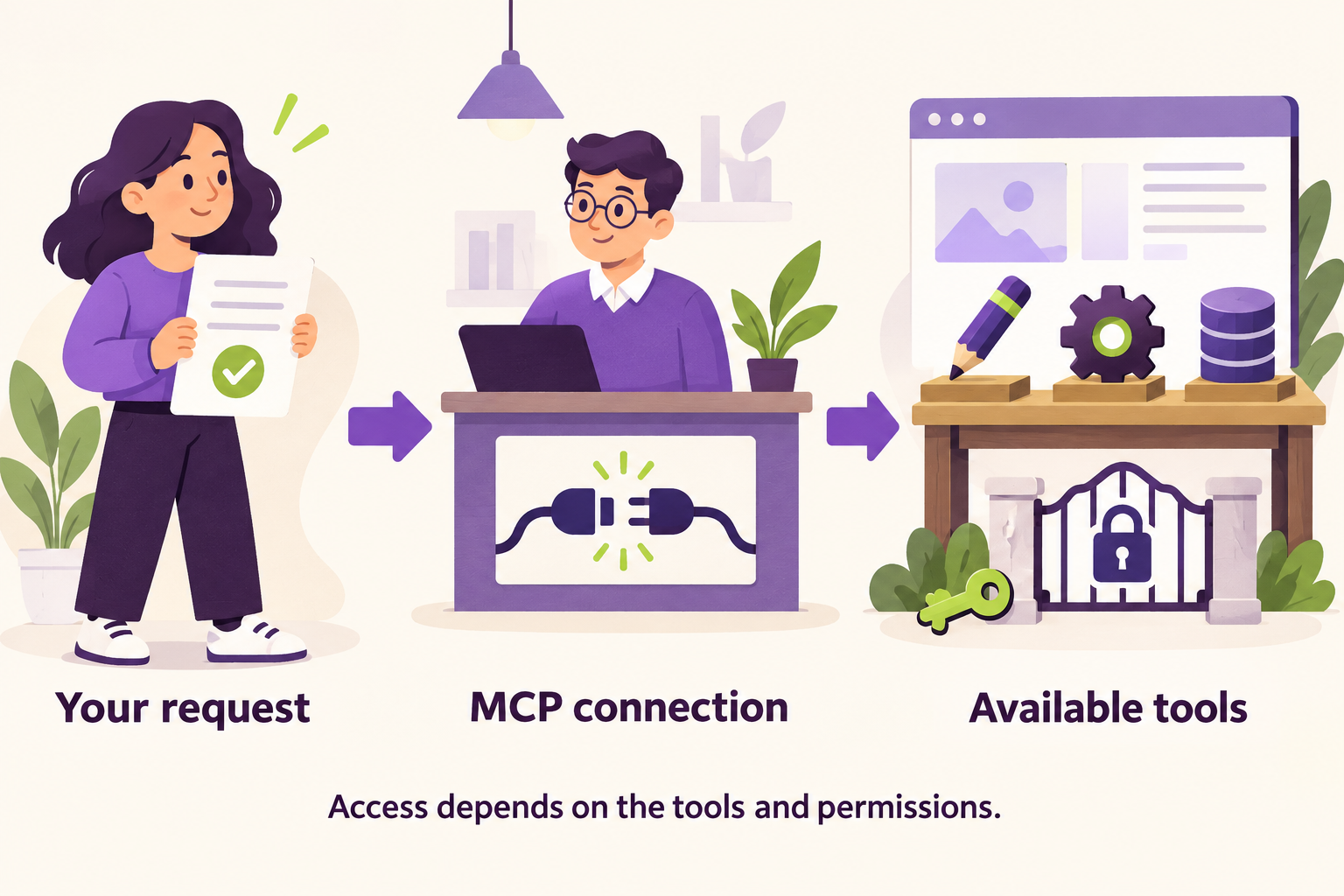
Imagine an office with a connection desk. Maya brings a request. The desk helps route it to a service that can do the work.
MCP, short for Model Context Protocol, provides a common way for AI applications to communicate with connected services. An MCP server is the integration that exposes capabilities or information. Despite the name, it does not always mean a separate physical computer you must buy or manage.
A WordPress integration might expose page operations. Another integration might provide access to documentation. MCP also supports resources and reusable prompts, not just actions. See the MCP architecture documentation.
The analogy has a limit: the connection desk is not a person making business decisions. The assistant still needs instructions, and the connected service controls which operations are available.
What Is the Difference Between a Tool and an Ability?
A tool is an operation the assistant can call. Think of a labelled button: “read this page” or “create a draft.”
A WordPress ability is a registered piece of functionality inside WordPress, with defined inputs, outputs and permission checks.
The tool is the interface offered to the assistant. The ability is functionality that WordPress can provide behind that interface. A WordPress adapter can offer discovery and execution tools that work with multiple abilities. There does not have to be one separate tool for every ability. WordPress explains this relationship in its MCP Adapter guide.
Not every WordPress MCP integration uses the same adapter or abilities. That is why a server's name is not enough to tell you what it can do.
An API is another term you will meet. It is an interface that software uses to request information or actions from other software. MCP integrations may use APIs behind the scenes.
“Connected” Is the Beginning of the Conversation
Maya connects her test site. Before requesting changes, she asks:
Use a read operation to identify the connected site's address. Tell me which available tools can help with this job. Separate what you can inspect, what you can change, and what needs additional access. Make no changes yet.
This gives her a capability inventory: a plain list of available actions and missing access.
| Maya wants to… | The assistant may need… |
|---|---|
| Read a service page | A permitted page-reading operation |
| Change its content | A compatible writing operation and permission |
| See why a menu fails on a phone | Browser access and a way to reproduce the problem |
| Investigate a PHP error | Relevant error records, source code and possibly runtime access |
| Create a small plugin | A coding workspace and a test environment |
| Analyze search traffic | Search Console or other relevant performance data |
| Keep checking the site tomorrow | A scheduler and an agreed reporting mechanism |
Reading page text is not the same as seeing its layout. Creating a file is not the same as installing it. Connecting WordPress is not the same as connecting Search Console.
Ask the assistant to show evidence of the operation it performed. A confident sentence saying “I checked” is less useful than the page, error or test result it actually retrieved.
What Happens When You Connect Two MCPs?
Maya later wants access to her agency's documentation too. Can she connect both?
Multiple connections can be useful, but there are three different situations to understand.
Two different services. A WordPress connection can provide site information while a documentation connection provides approved instructions. The assistant coordinates those calls. The services do not automatically merge their knowledge or permissions.
Two client sites. The assistant must know which site each job targets. Name connections clearly, keep client work separated, and use appropriately separated credentials. “Update the homepage” becomes “prepare a change to the gardening client's staging homepage.”
Two integrations that can edit one site. They may update content differently. Assign a clear route for the operation and avoid concurrent changes to the same content. Read back the result before another edit.
Connection names are helpful labels, not security controls. An application with access to two services may be able to move information between them. Your actual permissions and data-handling rules must support the separation you want.
Maya keeps the live site out of this first task. That makes the intended target easier to understand and enforce.
Give Yourself a Small, Useful Setup
You do not need ten agents and a collection of unfamiliar services to start.
For the first job, prepare one supported assistant, one test site, an approved brief and a way to inspect the output. Know who owns the connection and how to revoke its credentials.
For coding work, add a project folder, version control and relevant tests. Version control records changes so you can review them and recover earlier versions. A regression test checks that a problem stays fixed or that existing behavior still works after a change.
Some integrations connect directly to a remote service. Others use a small program on your computer as a bridge. Follow the current setup instructions for your application rather than pasting an old configuration from an unrelated tutorial.
For UiChemy, use the Claude-to-WordPress MCP setup guide. Its current route-specific documentation requires Administrator access and describes Elementor support for that route. Check the current UiChemy setup requirements before connecting.
Keep passwords and connection secrets out of client briefs and shared documents. Also remember that a webpage or support ticket can contain instructions that were not written by you. Treat that content as material to examine, not authority to change the task.
Will Claude Remember the Client?
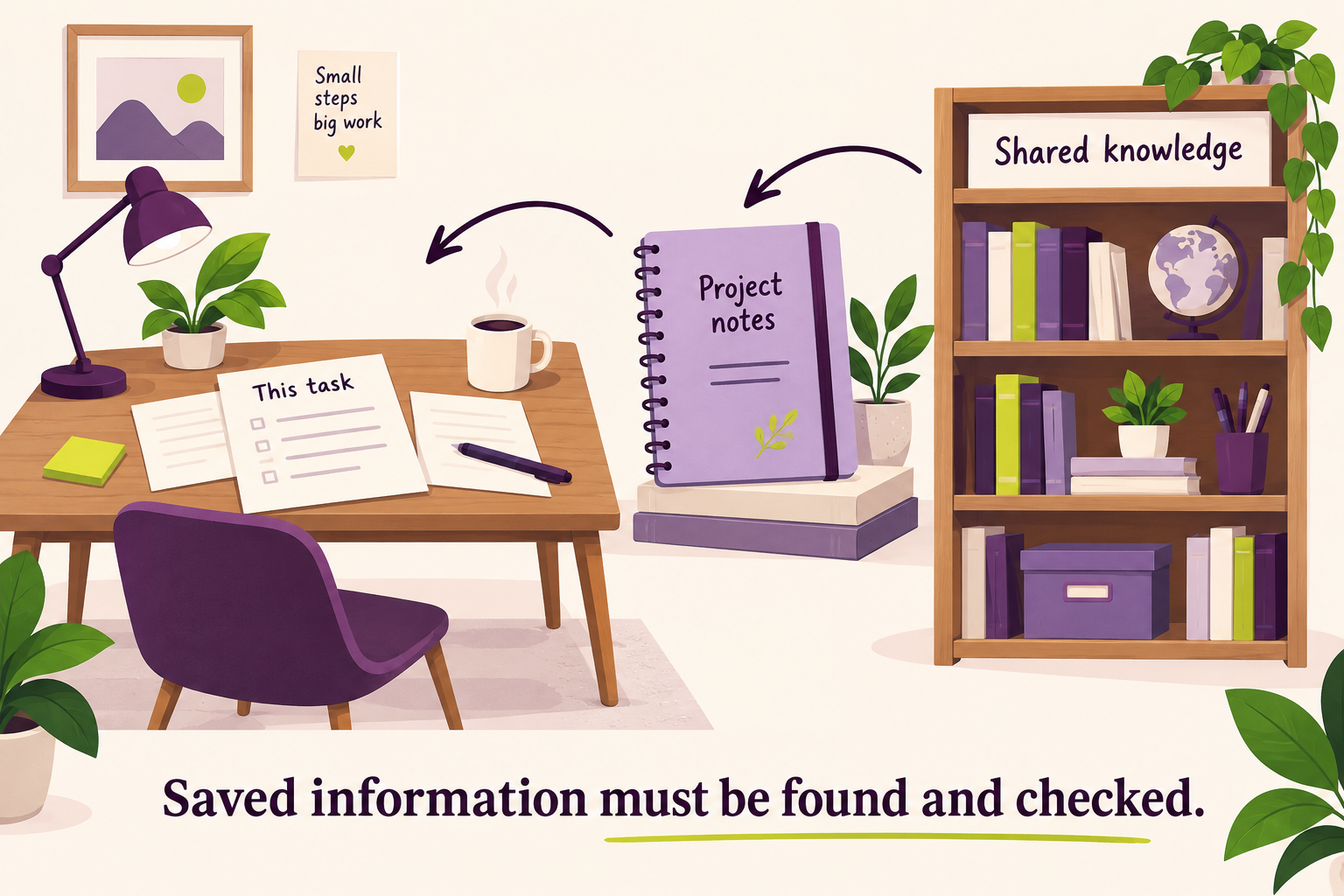
Maya tells the assistant that the gardening client prefers short sentences. Will she have to repeat that next time?
The answer depends on where the information is stored and how the application retrieves it.
Context is the information available for the current task: messages, files, instructions and tool results. Think of it as the papers on your desk. A context window limits how much the model can work with at once. Tokens are units used to measure that input and output; they are not exactly the same as words.
Claude's chat application has its own memory and project features. Claude Code separately documents project instruction files, such as CLAUDE.md, and automatic memory notes. Those are not automatically one shared agency memory. Instructions guide behavior; they are not a substitute for enforced permissions. Claude chat memory, Claude Code memory
What Is an Agency Brain?
“Brain” is an informal name for a maintained knowledge system. It might begin as a small collection of documents.
Maya creates a client brief containing approved service descriptions, brand preferences, the current website setup and decisions the client has made. Each important entry has a source, an owner and a review date.
She keeps temporary experiments separate from approved decisions. When a decision changes, she marks the previous one as superseded. She does not save passwords or unnecessary personal information there.
There is no single memory product every agency needs:
| Your situation | A reasonable starting point |
|---|---|
| You work alone | Plain-text project notes and clear project instructions |
| Your team already maintains a wiki | Use that source through an appropriate supported integration |
| Your developers work in repositories | Keep development instructions beside the code |
| You are building a custom assistant | Evaluate a dedicated memory layer with an engineer |
For example, Notion documents an MCP integration for connecting AI tools. Mem0 documents memory operations scoped by identifiers such as users and applications. These are different kinds of systems, not interchangeable purchases. Neither removes the need to design access, retrieval and retention properly. Notion MCP, Mem0 memory scope
You may hear RAG, meaning retrieval-augmented generation. In plain language: find relevant material first, then use it to answer. Asking an assistant to retrieve the approved service description before writing is the kind of behavior you want.
The important question is not “Do we have a brain?” It is “Can the assistant find the right, current information for this client?”
Solve the Menu Problem Through Small Checks
Now Maya returns to the mobile menu.
Instead of asking for a broad repair, she defines the failure: on a specified page and screen size, tapping the menu button should open the navigation, but it does not.
She asks the assistant to reproduce that behavior on staging and collect evidence before changing anything. If the problem cannot be reproduced, the next useful output is a focused question or a proposed diagnostic step.
If it can be reproduced, the assistant can investigate with the available browser, source and error information. Maya asks for the smallest justified change, followed by checks of both the reported problem and nearby behavior.
Does the menu open? Does it close? Can a keyboard user reach the links? Does desktop navigation still work?
This is a proposed workflow, not a claim that every bug will yield to the same steps. Missing logs, third-party systems and environment differences can all leave uncertainty.
What Is Loop Engineering?
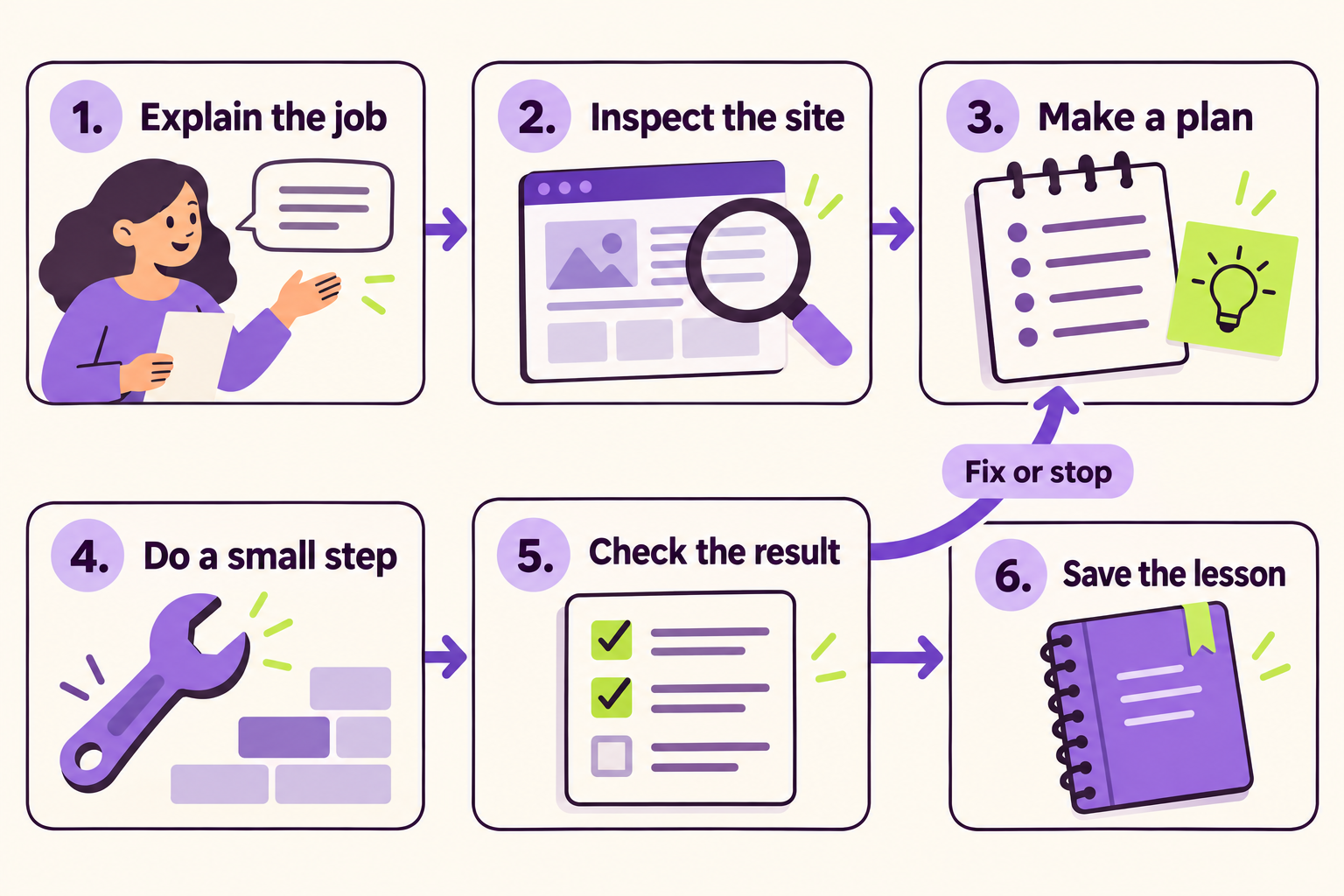
People sometimes call this loop engineering: designing the cycle of action and feedback. It is a practical label, not a special WordPress feature or MCP standard.
The process is simple:
- Explain the job and success criteria.
- Inspect the actual situation.
- Make a plan.
- Do a small permitted step.
- Check the result and correct or stop.
- Save useful, verified knowledge.
Claude Code's documentation describes a tool-driven cycle of gathering context, taking action and verifying results. The surrounding environment and controls are sometimes called the harness. Think of that as the working setup that makes the cycle possible. How Claude Code works
Maya adds a limit: after two unsuccessful repair attempts, stop and explain the evidence, attempts and remaining uncertainty. “Keep going forever” is not a useful plan.
A reusable procedure for this job can become a skill: instructions and resources the assistant can use for a particular kind of task. A skill explains how to work; it does not itself grant access. Claude skills
Can AI Create a Plugin or a Code Snippet?
The client has another request: show a small notice on selected service pages.
Maya could immediately ask for PHP code. A better first question is where this behavior belongs.
An existing setting might already solve it. A small snippet might suit a bounded behavior. A custom plugin may be easier to maintain when functionality needs its own structure, settings or reuse.
A snippet is a small piece of code. A plugin packages functionality so WordPress can load it. Plugins use mechanisms such as hooks, which are defined places where code can respond to or alter WordPress behavior. WordPress plugin basics
AI can help compare those options and write an implementation when it has the relevant context. That does not make generated code tested code.
Maya asks:
Check whether our existing tools can do this first. If code is needed, explain whether it belongs in a snippet or a small plugin. Include how we will test it, disable it and maintain it. Prepare the implementation for staging review.
For anything involving user data or privileged actions, the implementation needs appropriate checks. A novice should have a qualified developer review code they cannot evaluate themselves.
UiChemy Composer's HTML, CSS and JavaScript editing serves a different purpose from a PHP plugin. Do not treat an editable design container as a general replacement for backend functionality.
Turn Audits Into Work You Can Finish
“Audit my entire website” can produce a long report with little practical progress. Start with a defined area and require evidence for each finding.
An audit is an organized examination. The quality depends on what was examined, how it was checked and what the examiner could not see.
| Area | A useful AI-assisted job | What still needs care |
|---|---|---|
| Accessibility | Group navigation findings, propose fixes and record retests | Automated tools cannot establish full accessibility conformance |
| SEO | Examine page titles, links and crawl findings; combine with search data where available | A WordPress connection alone does not provide ranking data |
| Performance | Compare measurements and investigate likely causes | Test conditions must be comparable; one score is not the whole user experience |
| Security | Review relevant code and configurations within an authorized scope | No scan proves the absence of vulnerabilities |
| Content | Find inconsistent approved service names and outdated statements | Verify changes with the client's current source material |
For accessibility, include keyboard use, focus behavior, reading order and human evaluation of meaning. W3C explicitly says no tool alone can determine whether a site meets accessibility standards. W3C accessibility evaluation guidance
For SEO, or search engine optimization, ask what helps people and search engines understand the page. For AEO, commonly used to mean answer engine optimization, make answers clear and well supported. Neither a checklist nor AI-written copy guarantees rankings or citations. Google's guidance emphasizes useful content rather than producing pages at scale without value. Google's generative AI content guidance
Maya's preferred output is a repair queue: finding, affected page, evidence, proposed action, owner and retest. It is easier to act on than an unexplained “site health” number.
Make the New Page Useful After the Handoff
The client asked to change pictures themselves. That requirement belongs in the original plan, not the final email.
For a supported Elementor workflow, UiChemy Composer provides a container for HTML, CSS and JavaScript designs with editing interfaces. Prepared content can be exposed through controls such as slots. It does not mean every part of an imported design becomes an independent stock Elementor widget. What Composer is
Maya's handoff check is concrete: the intended editor must be able to change a heading, replace an image and update a button link. Then the team checks the resulting page on relevant screen sizes.
If a change requires code or structural work, explain that honestly. “Editable” should describe the client's real tasks.
For the detailed route, see Claude to Elementor: editing with Composer. If you are deciding between website development, content work and moving a design, start with the Claude-to-WordPress workflow guide.
Use other products where an actual requirement calls for them. A familiar, maintainable solution is more valuable than adding another tool simply because AI can operate it.
Where Else Can Your Agency Use This Approach?
Once Maya understands the process, the possibilities become more interesting than “write a paragraph.” These are candidate workflows to test, not promises of automatic results.
Before a project starts: compare a client's brief with the existing site, identify unanswered questions, and prepare page objectives and acceptance checks.
When a client changes a service: inventory affected pages, FAQs, navigation and metadata, then prepare one coherent change proposal. Preserve URLs unless a migration is deliberately approved.
Before a release: rehearse key journeys on staging and compare results before and after the change. Capture what passed and what remains uncertain.
After repeated support requests: turn permitted, appropriately redacted tickets and verified solutions into a diagnostic guide. Draft replies for human review.
Across maintenance clients: collect separately authorized inventories, prioritize work and assign owners. Pilot changes on an appropriate test site before proposing a wider rollout.
For client reporting: draft a report from actual delivery records and test evidence. Do not let a task marked “done” become an invented business result.
A team can divide this work without building a different knowledge system for every person:
| Team function | Useful knowledge | First practical assignment |
|---|---|---|
| Sales | Approved offers and qualification criteria | Prepare discovery questions |
| Project management | Scope, decisions and dependencies | Draft a delivery plan |
| Design | Brand rules and component constraints | Review a page against the brief |
| Development | Architecture and test commands | Investigate one staging issue |
| Quality assurance | Expected behavior and prior failures | Collect release-check evidence |
| SEO and content | Current facts and research | Prepare a sourced content brief |
| Support | Verified solutions and escalation rules | Suggest the next diagnostic step |
An AI agent team means multiple configured workers, often with separate assignments. It is useful only when responsibilities and outputs are clear. Two workers making conflicting changes can create more work. Start with one reliable process before adding parallel execution.
Help Your Team Learn Through One Real Exercise
Maya eventually brings in a teammate. She could send a collection of prompts and say “use AI more.” Instead, they choose a small, repeatable task and work through it together.
They provide the same brief, the same source material and the same definition of completion. One person performs it; the other reviews the evidence. Then they switch roles.
Ask your team questions that expose missing process:
- What did you repeat this week that could become a documented procedure?
- What would a capable new colleague need to know before starting?
- Which decision needs your judgment?
- What evidence proves the result works?
- How would you prevent a change to the wrong site?
- When should the assistant stop and ask for help?
- Which correction have you made twice without updating the instructions?
- Did AI reduce total work, including checking and rework?
Give people the basics before expecting adoption: an approved tool, a safe practice environment, current project facts, access rules, an example brief and time with a reviewer.
| Week | Practice | What to look for |
|---|---|---|
| 1 | Inspect a test site and explain available access | A correct capability inventory |
| 2 | Make one small change and test it | A reviewable result and recovery path |
| 3 | Document the procedure; have another person repeat it | Clear instructions and consistent checks |
| 4 | Pilot the process within a real project | Evidence about time, quality, cost and rework |
This is a suggested training schedule, not a guarantee that every team will progress at the same speed.
Can This Help You Serve More Clients?
Potentially, but measure the whole job. Faster drafting may not help if review and correction take longer.
Track delivery time, review time, reopened problems, tool costs and client handoff quality. Compare similar work. Keep human review where it adds value, and stop using a workflow when it creates more effort than it saves.
The useful mindset is to move from personally performing every step toward defining and supervising repeatable work. Your knowledge of WordPress and clients becomes the basis for better instructions and better judgment.
Maya's fictional story ends with a clearer process, not a claim that she has become a ten-person agency overnight. She knows which site the assistant can access, what it needs to do, how the result will be checked and which knowledge is worth retaining.
Your First Task Can Be Small
Choose one test site and one reversible job. Copy this brief:
Our goal is [specific outcome]. Work only on [named test site]. Use [approved sources]. First confirm your available access and inspect the current situation. Propose a small plan. Changes allowed are [scope]. Success means [observable checks]. Stop if [missing access, uncertainty or attempt limit]. Show what you did, what you checked and what remains unresolved.
If your goal is moving an AI-assisted design into editable WordPress, explore the UiChemy Claude-to-WordPress workflow. Choose the supported route for your setup and test the edits your client will actually make.
Common Questions
Does Connecting MCP Give Claude Full Control of WordPress?
No. Available actions depend on the integration's exposed tools, the connected account's permissions and the application's controls. Inspect those capabilities before making changes.
Can I Connect More Than One Client Site?
Yes, in applications that support multiple connections. Use explicit targets, separate client contexts and appropriate credentials. Names alone do not enforce isolation.
Does AI Remember Everything I Tell It?
Do not assume that. Memory behavior depends on the application and settings. Keep important approved information in a maintained source, and verify it is retrieved when needed.
Can AI Fix Every Bug or Fully Audit a Website?
No. It can assist with investigation, implementation and checking where appropriate tools and evidence are available. Some problems require additional access or specialist judgment. Report the limits of each audit.
Do I Need to Know How to Code?
You can start with planning, content review and permitted site inspection without writing code. When a task requires code, someone must be able to evaluate the implementation and its tests.
Will It Keep Working After I Close the Chat?
Do not assume so. Continued or scheduled work requires a supported execution mechanism, a defined task and a reporting plan. MCP connectivity alone does not provide ongoing monitoring.