Figma Make Credits: What a Real Project Costs
 Sagar Patel
You are on a Professional Full seat with 3,000 AI credits a month, a client has approved six pages, and somebody has to decide before Monday whether Figma Make can carry the build or whether it is a prototyping detour. The credit balance in the file menu tells you what is left.
It does not tell you what the job will cost.
Figma publishes enough numbers to work this out, they are just spread across four help centre articles and a pricing page. This post pulls them into one place, prices a realistic six page marketing site using Figma’s own published approximations, and marks clearly where an estimate stops being a fact.
Every figure below was read from Figma’s live documentation on 8 September 2026. Consumption rates are stated by Figma as current as of 25 August 2026 and can change as models change.
What A Credit Buys, By Seat And Plan
Credits are attached to a person, not to a team.
The How AI credits work article is direct about the rules: seat credits are assigned to an individual user, reset monthly, do not roll over, and cannot be shared or transferred to other users.
It also states that credits are not legal tender and are not redeemable for monetary value.
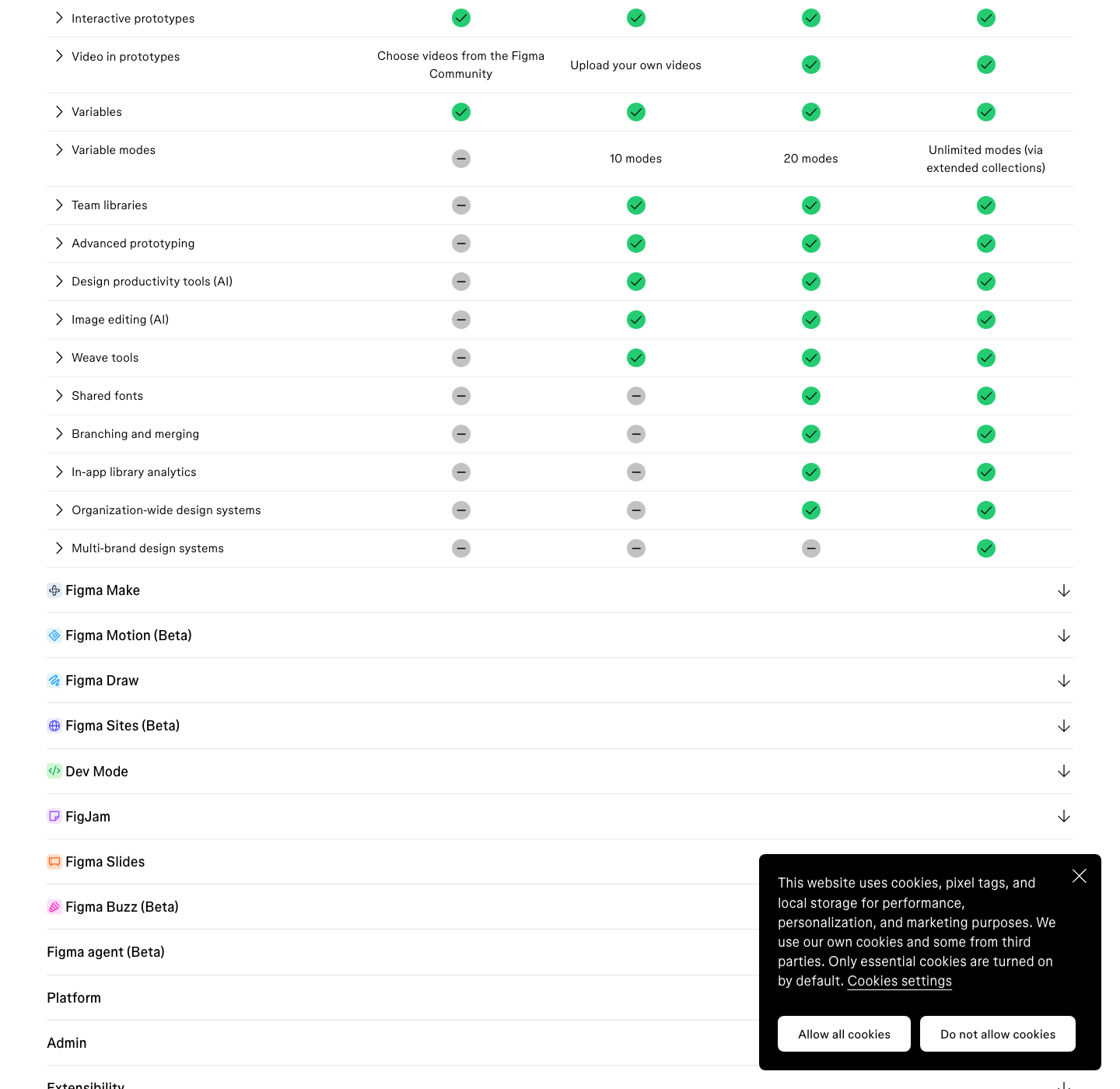
The monthly allocation depends entirely on which seat you hold, and the Figma pricing page lists it beside each seat price. A Dev, Collab or View seat gets 500 a month whatever the plan is paying, which surprises people who assume an Enterprise contract buys everyone headroom.
| Plan | Full seat price | Full seat credits | Dev, Collab and View seats |
|---|---|---|---|
| Starter | Free | 500 a month, 150 a day cap | Same cap applies |
| Professional | $16 a month | 3,000 a month | 500 a month |
| Organization | $55 a month | 3,500 a month | 500 a month |
| Enterprise | $90 a month | 4,250 a month | 500 a month |
One more rule worth internalising before you plan a budget: credits do not stack across plans. If you sit in two organisations, you have two separate allocations and neither can subsidise the other.
The Actions With A Fixed Price
Image work is the predictable half of the meter. These are published per use rates, so you can budget them exactly, and the model you pick changes the cost by a factor of eight on image generation alone.
| Action | Credits |
|---|---|
| AI search, rename layers, summarise or cluster stickies | Free |
| Remove background | 1 to 5 per image |
| Vectorize image | 2 to 5 per image |
| Boost image resolution, erase object, isolate object, expand image | 5 to 10 per image |
| Make image or edit image | 2 to 16 per image depending on the model |
| Generate templates and diagrams in FigJam | 2 to 24 per prompt |
| Add interactions | 20 per use |
| Figma Make | Varies, see the estimates below |
The Variable Ones, And Figma’s Own Estimates
Figma Make is agentic, so the cost of a prompt depends on what the model decides to do about it.
Figma gives three worked examples and labels all of them approximate: changing a font is approximately 30 or more credits, making an attached design interactive is approximately 75 or more, and generating an app from scratch is approximately 100 or more.
Two extra costs sit outside those headline numbers. Plan mode generates a structured plan before any code is written, and the documentation is explicit that the planning step is a separate action from the build, so approving a plan and clicking Build spends again.
Generating a Figma Slides presentation through ChatGPT is quoted at 28 to 72 or more credits, while generating FigJam diagrams that way does not consume credits at this time.
The honest reading of that spread is that a Make session has no advertised price. Figma says so itself: because the model chooses its own actions, it cannot predict credits in advance, and you can only see the cost after a task completes by hovering the AI credits icon under the prompt.
Costing A Six Page Marketing Site
Here is the arithmetic, built only on Figma’s published approximations. Treat it as a planning model, not a measurement, because your prompts and your context are not the ones Figma used for its examples.
- One initial build to establish the shell, layout and theme: approximately 100 credits.
- Six approved Figma frames attached and made interactive at approximately 75 each: approximately 450.
- Four correction prompts per page at the approximately 30 rate for a small change: 24 prompts, approximately 720.
- Twelve generated images on a mid tier model at 8 credits each: 96.
- Background removal on eight supplied photographs at up to 5 each: up to 40.
- Six uses of Add interactions at the fixed 20 per use: 120.
That totals roughly 1,526 credits, or about half of a Professional Full seat’s 3,000 a month, for one site with a disciplined four corrections per page. It is also roughly 3 times the entire monthly allowance of a Dev, Collab or View seat, and roughly 3 times what a Starter user gets in a month.
The number that moves this model is the correction count. Go from four corrections a page to ten and the correction line alone climbs from roughly 720 to roughly 1,800, which puts the project past a single month’s allocation before the images are done.
That is the real cost driver, and it is the one you control.
The Three Levers That Move The Number
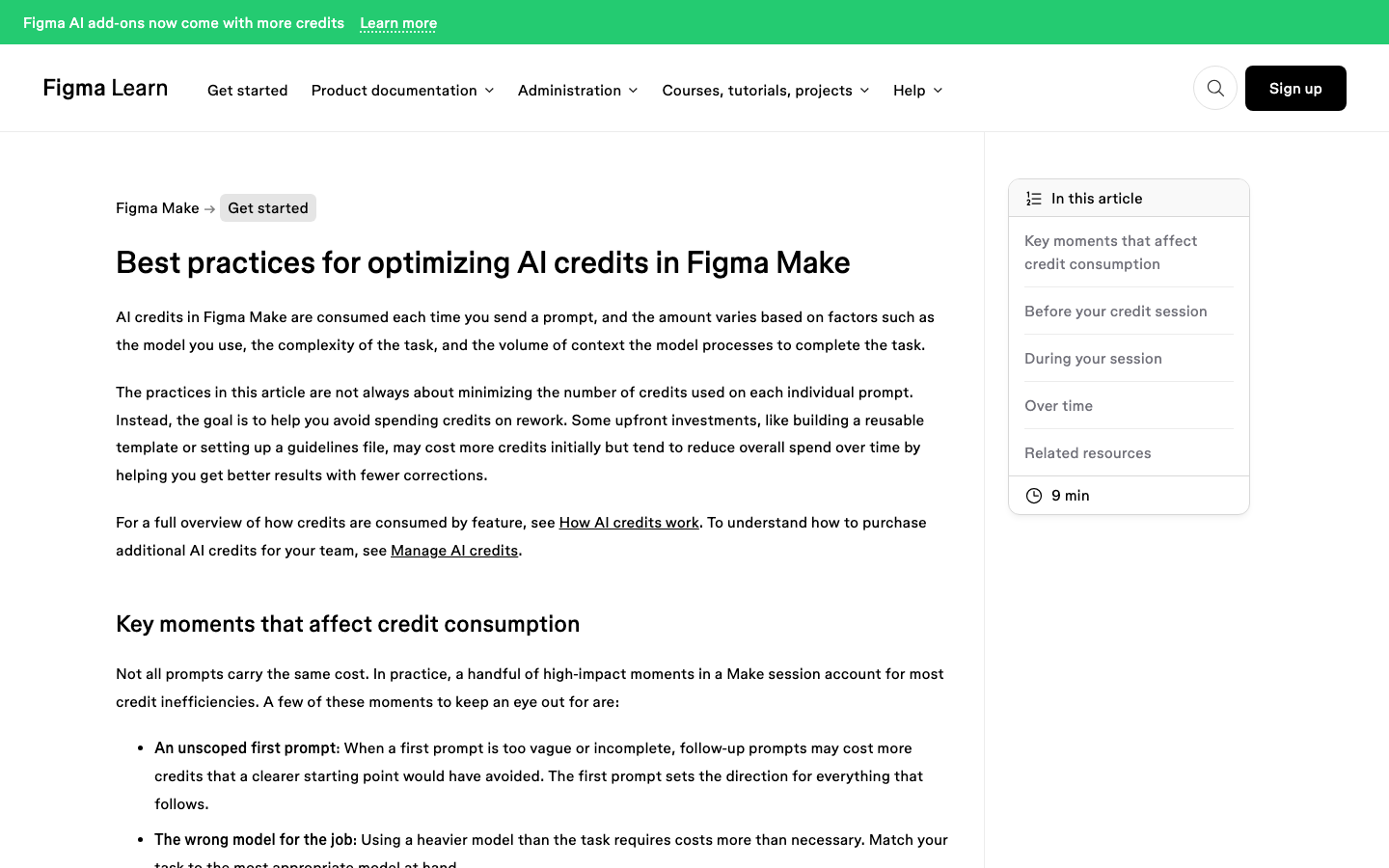
Figma names them plainly in its best practices article: model selection, task complexity and context materials. The advice attached to each is more specific than the usual “write better prompts”.
On models, Figma recommends Claude Opus for exactness such as a detailed replica of an existing design, Gemini Flash for minor styling and quick iterations as the most credit efficient option, and Auto when you are unsure. It also says to choose at the task level rather than prompt by prompt.
On context, the guidance is to stop sending everything. Figma design frames carry precise metadata and are worth the cost for fidelity work, but a screenshot is lighter and often just as effective when pixel accuracy is not required.
Duplicating a file costs no additional credits, and clearing chat context stops Make reprocessing a history that no longer matters.
What Changed On 25 August 2026
Two changes landed that affect any budget written before that date.
First, AI credit add-ons now include more credits for the same cost: 2 times more on the Professional plan and 1.6 times more on Organization and Enterprise, applied automatically to existing subscriptions and pay as you go billing. Seat credits were not changed by that update.
Second, and more consequential for planning, Weave tools and the agent in Figma Design are moving from open beta to general availability.
Figma states they are free during the beta and do not consume credits yet, but that they will draw from the same pool as Figma Make once they are generally available. Organization and Enterprise admins can download a CSV of free beta usage specifically to forecast that.
If your team leans on the design agent daily and has never seen it on the meter, that CSV is the most useful thing in this whole article. The forecast you build from it will be a better number than any estimate here.
Where The Meter Stops Being Generous
Five documented behaviours are worth knowing before you commit a deadline to this workflow. Credits expire monthly and do not roll over.
Undoing an AI action reverts the file but does not refund the credits, because the task was already processed. Starter and View seats carry a 150 a day cap on top of the monthly one.
When you run out, you are blocked from further AI actions until credits reset or an admin adds more, and an admin can also set a custom per person limit or turn off paid credit access entirely.
Long prompt histories quietly raise the cost of simple prompts, which is why Figma recommends duplicating the file or clearing chat context when the project scope has shifted.
What The Credits Do Not Buy
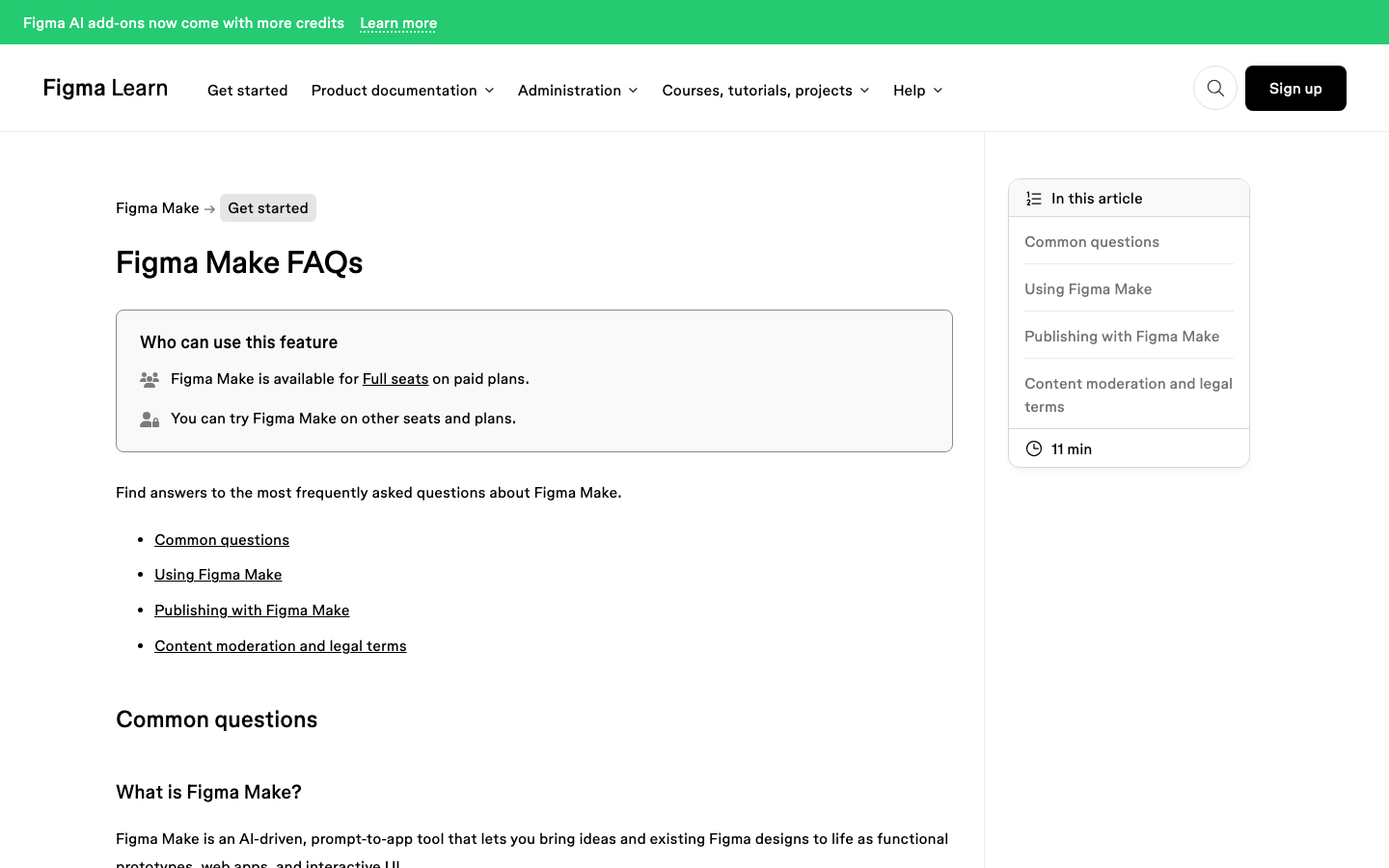
Spending 1,500 credits produces a published web app, and it is worth being precise about what that is. Per the Figma Make FAQ, a published file lands on the public web at a dedicated URL but is not indexed by search engines by default, and Figma “does not currently offer specific customizability for SEO optimization”.
There is no analytics dashboard, only the option to add a Google Analytics ID. Only Full seats on paid plans can publish.
Custom domain limits are shared with Figma Sites, with Professional capped at 10. And deleting the Make file automatically unpublishes whatever was published from it.
For a prototype you are testing with eight users next Thursday, none of that matters. For a client’s marketing site that has to be found, measured and edited by a marketing team, all of it does.
A Second Meter, With Different Rules
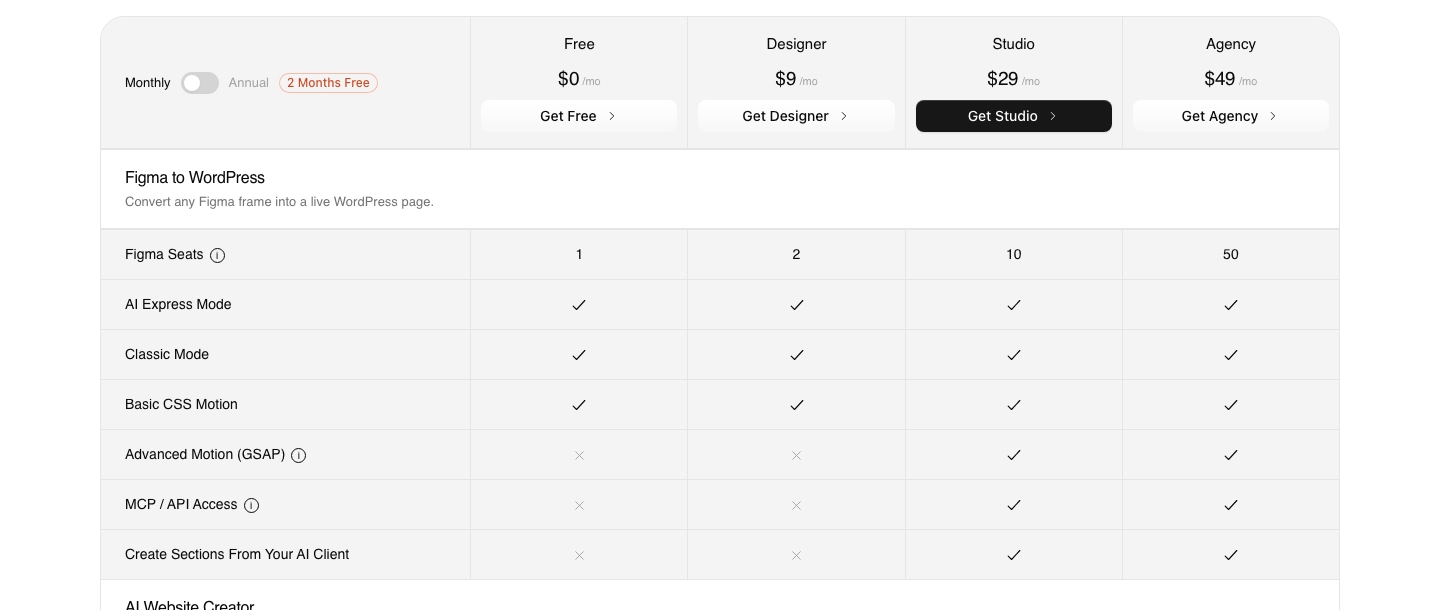
If the destination is WordPress, the conversion step runs on its own credits and the mechanics are worth comparing directly. The Free plan is $0 a month with 1,000 credits, one Figma seat, one AI Website Creator project of a single page and one Composer site.
Designer is $9 a month for 4,000 credits and 2 Figma seats, Studio is $29 for 12,000 and 10 seats, and Agency is $49 for 20,000 and 50 seats. Annual billing is advertised as two months free.
Two gates on that table are the ones people get wrong in comparison posts. Advanced Motion with GSAP and MCP or API access both begin on Studio at $29.
Neither is on Free and neither is on Designer, so a developer planning to drive conversions from Claude or Cursor is budgeting for the $29 tier whether or not they need the extra credits. There is a 14-day refund window if the fit turns out to be wrong.
Those credits are also not only buying conversions any more.
The same monthly pool covers AI Website Creator, which turns a prompt or a client brief into a sitemap and pages, and UiChemy Composer, the single Elementor widget where AI writes real editable HTML, CSS and JavaScript.
If you are pricing a six page site, the Figma frame is one route to it rather than the only one.
| Rule | Figma AI credits | UiChemy credits |
|---|---|---|
| Assigned to | An individual seat | The plan, across its seats |
| Monthly reset | Yes | Yes |
| Roll over | No | No, for plan credits |
| Extra credits | Admin subscription or pay as you go | Move up a plan, from $0 to $9 to $29 to $49 |
| Cheapest way to try it | Starter, 500 a month with a 150 a day cap | Free, $0 a month with 1,000 credits |
| Shared across features | One pool across all Figma AI features | One pool across Figma conversion, AI Website Creator and Composer |
The honest limits apply here too. AI Express Mode outputs to Elementor today, with Gutenberg and Bricks listed as coming next, and AI Website Creator exports to Elementor while Gutenberg export is marked Soon on every plan including Agency.
A verified reviewer’s description of the split, “about 70% of the design work” handled with “the remaining 30% for us to fine-tune using Elementor”, is still the most accurate summary anyone has published.
How To Spend Fewer Credits On The Same Page
- Check the balance and reset date from the file main menu before you start, so the model choice is deliberate.
- Write one long, scoped first prompt. Figma’s guidance is that the first prompt sets the direction for everything after it.
- Use point and edit or a direct code edit for colour, radius, spacing and type. Those bypass the model entirely.
- Attach one design at a time. The FAQ is specific that multiple attachments in a single prompt behave worse.
- Duplicate the file rather than starting a new one, since duplicating costs nothing and preserves the build state.
- Clear chat context once the project direction has moved on, so old history stops being reprocessed.
Frequently Asked Questions
How many credits does one Figma Make prompt use?
There is no fixed answer, and Figma says so. Its published examples put a font change at approximately 30 or more credits and a from scratch app build at approximately 100 or more, but the model decides how many actions a request needs.
After a task completes you can hover the AI credits icon beneath the prompt to see the actual cost.
Do Figma Make credits roll over to next month?
No. The help centre states that AI credits expire monthly and do not roll over, and that they cannot be shared or transferred between users.
Credits also do not stack if you belong to more than one plan, since each plan carries its own separate allocation.
Does undoing an AI action give the credits back?
No. Undo reverts the change in your file but does not refund credits, because the task has already been processed.
Auto fix and Fix for me are different: those error correction actions are documented as not consuming additional credits, since they adjust existing output rather than issuing a new request.
Will the Figma Design agent start costing credits?
Figma has said yes. Weave tools and the agent in Figma Design are free during their open beta and do not consume credits yet, but both are moving to general availability and will then draw from the same pool as Figma Make.
Weave tools will carry set per tool costs, while the agent will behave like other agentic features and vary by prompt.
Is Figma Make cheaper than converting a design into WordPress?
They are priced for different outcomes, so compare the finished page rather than the credit. A Make build produces a hosted app on Figma’s infrastructure with no SEO customisation and no analytics dashboard.
A conversion produces a native page inside your own WordPress site that the client keeps regardless of whether the subscription continues.
The Short Version
A Professional Full seat’s 3,000 credits will carry one carefully run six page site, on Figma’s own approximations, with roughly half the pool left for exploration. Ten corrections a page instead of four erases that margin.
The levers that matter are the first prompt, the model, and how much context you keep sending.
If the finished pages belong in WordPress, the credits you spend on rebuilding inside Make are the ones worth reallocating.
More on the surrounding decisions in Figma AI credits explained without the marketing, Figma Make alternatives for people who need a real website, Figma for UI and UX design applied to real websites, and the AI Express Mode overview.