One Prompt to a WordPress Site: The Coffee Roaster Test, Step by Step
 Sagar Patel
In one run on 2026-10-01, a single sentence about a boutique coffee roaster gave us a project in about 9 seconds, a six-page sitemap in about 13 seconds and a finished Home page in about 35 seconds. The sitemap and Home page cost about 64 credits. The AI ignored one instruction, which the review step lets you catch.
I keep reading posts that say an AI built a website in a minute and show a hero section. I wanted the whole path with a stopwatch, so we ran one prompt through UiChemy’s AI Website Creator and wrote down everything.
If you are comparing tools, our roundup of the best AI website builders explains what we weigh, and this post is the hands-on evidence behind it.
What Was the Exact Prompt?
One sentence, word for word:
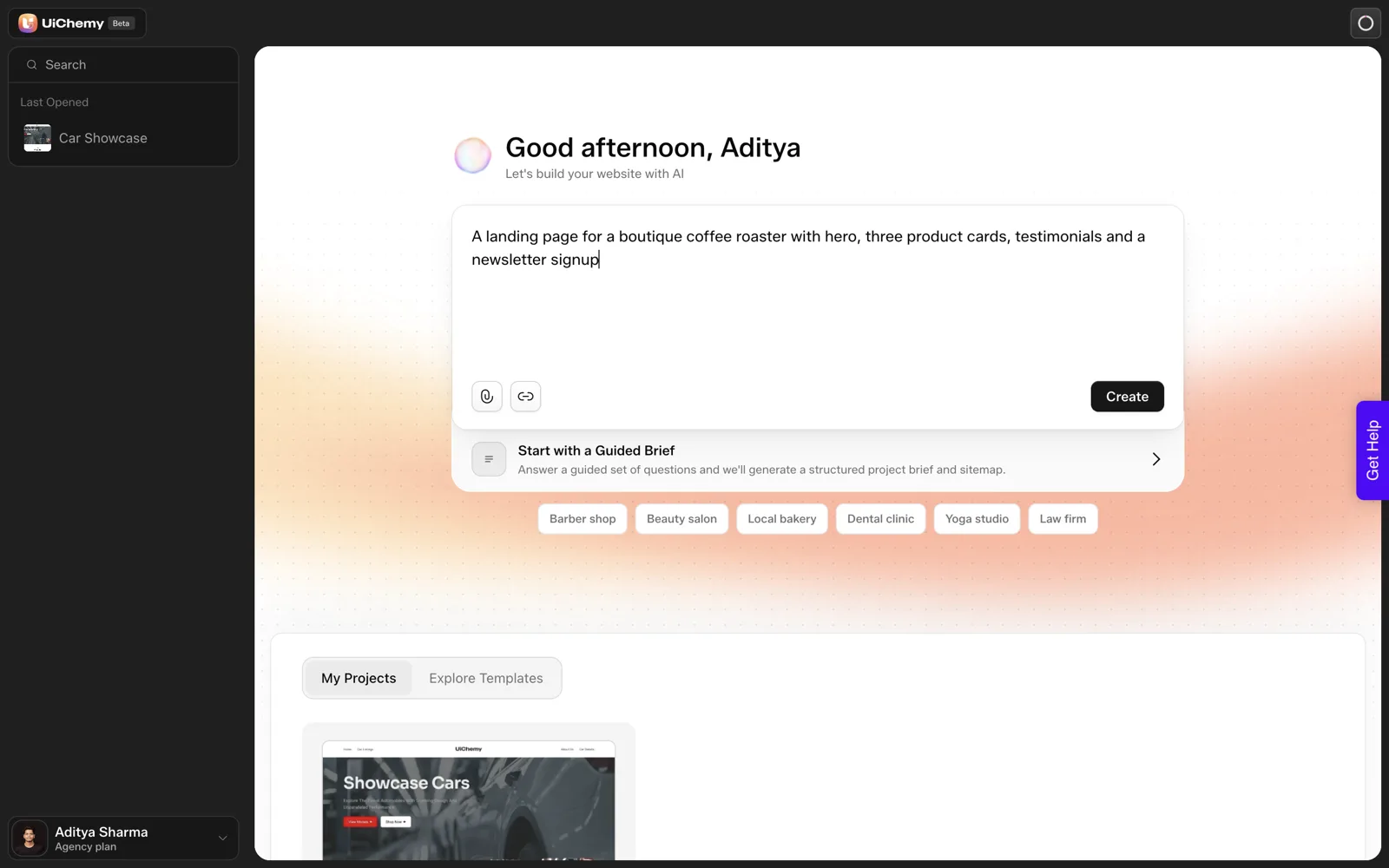
A landing page for a boutique coffee roaster with hero, three product cards, testimonials and a newsletter signup
On the dashboard there is a box that asks you to describe the website you want to build. We pasted the sentence and pressed Create. The project existed about 9 seconds later.
A note on how to read everything below: this is one run, one prompt and one product category. Timings will vary. Treat the numbers as a single observation.
What Does the Review Step Show?
Before any design happens, the flow shows a “Review your draft” screen with the line “We drafted this from your prompt. Nothing’s locked in.” Each section carries “Looks right” and “Edit” buttons, and a “Continue to design” button moves you on.
The docs describe this screen as the first phase of four, with the cards labelled by where their content came from. You can read the full description in the Scope Editor docs.
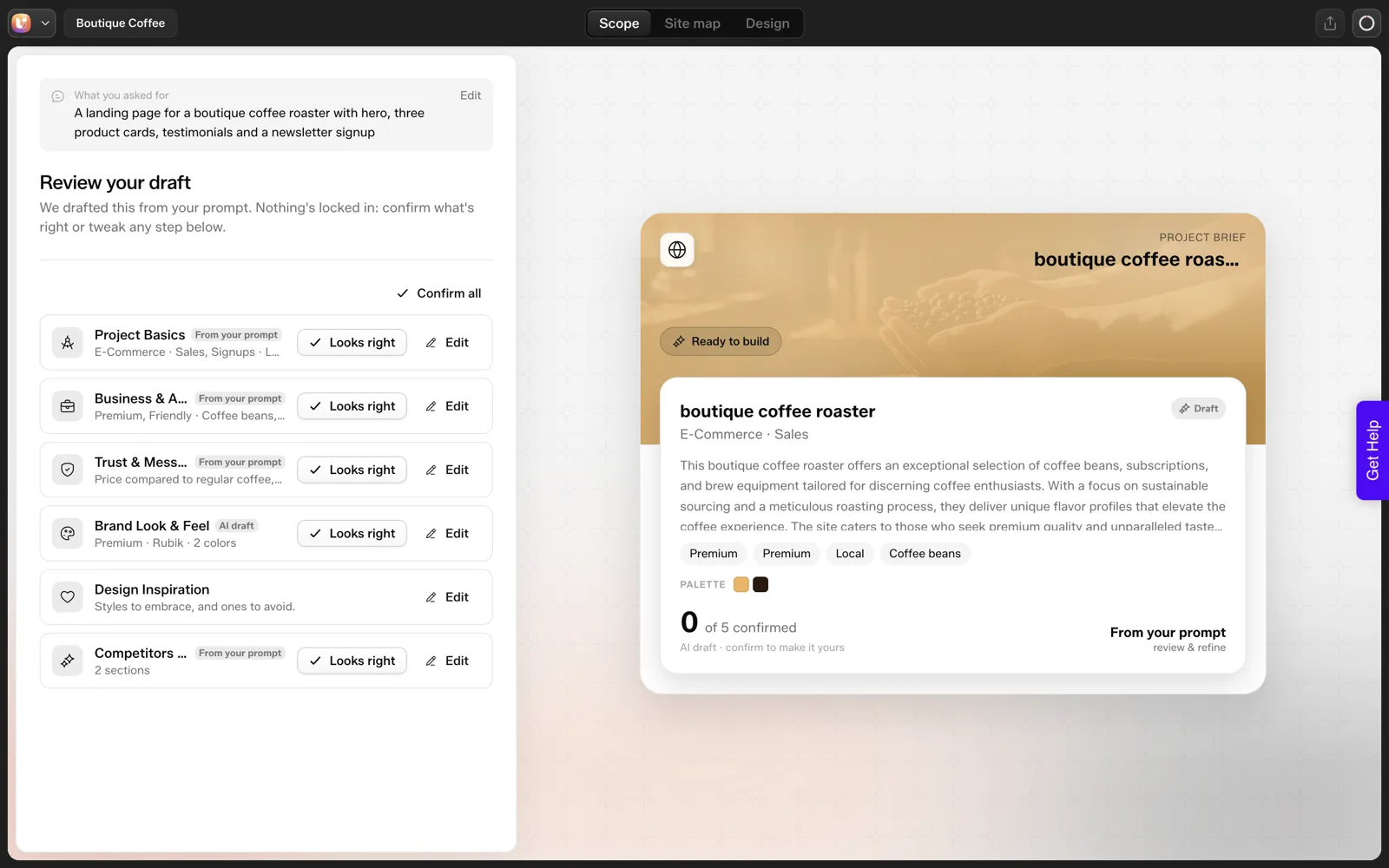
This is where I would catch problems. Fixing a sentence here costs far less than regenerating a page. Our piece on why a review step prevents rework makes the longer case.
What Sitemap Did It Draft?
The status line read “Sitemap ready” with six pages after about 13 seconds:
- Home
- Products
- Testimonials
- About Us
- Contact
- Newsletter Signup
A reasonable person would fold Newsletter Signup into the footer, and Testimonials into Home. The point of the step is that you can say so before design starts. Our screen-by-screen sitemap review shows how to do that without rebuilding anything.
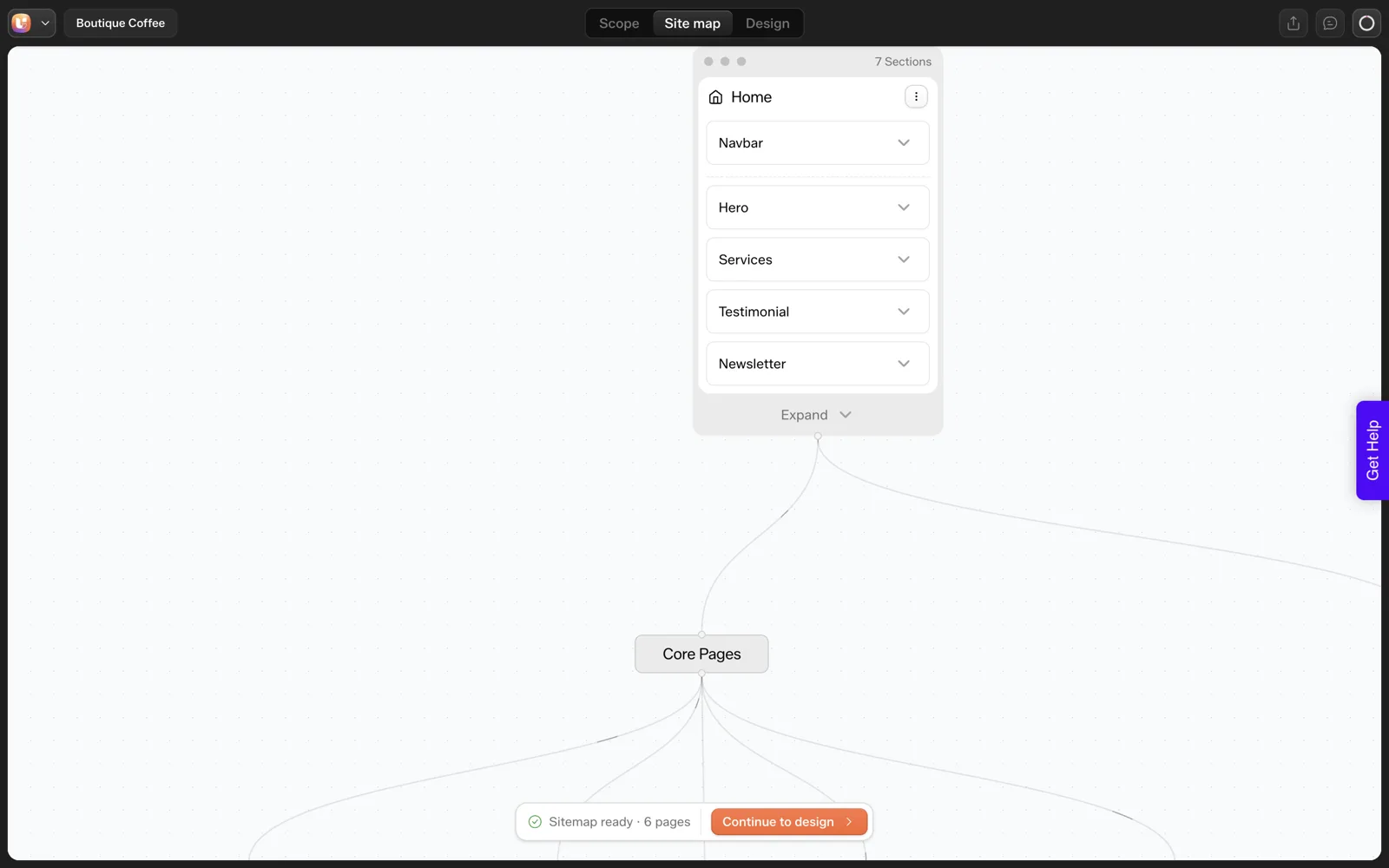
How Long Did the First Page Take?
The Home page generated in about 35 seconds. It had a hero, a cards section, testimonials and a newsletter block. Sitemap plus Home used about 64 credits: the account balance went from 50,000 to 49,936.1.
We did not measure the cost of the other five pages, so we make no claim about the price of a full site. The measured numbers are here:
| Step | Time in our run | Credits |
|---|---|---|
| Project appears | About 9 seconds | Not separated |
| Sitemap, 6 pages | About 13 seconds | Sitemap plus Home: about 64 |
| Home page | About 35 seconds | Included in the 64 |
| Other 5 pages | Not measured | Not measured |
For how those credits relate to plan allowances, see our credit breakdown.
What Did It Get Wrong?
We asked for three product cards. It drew five cards, and they were labelled “Service”. The count was ignored, and the label is wrong for a roaster that sells beans.
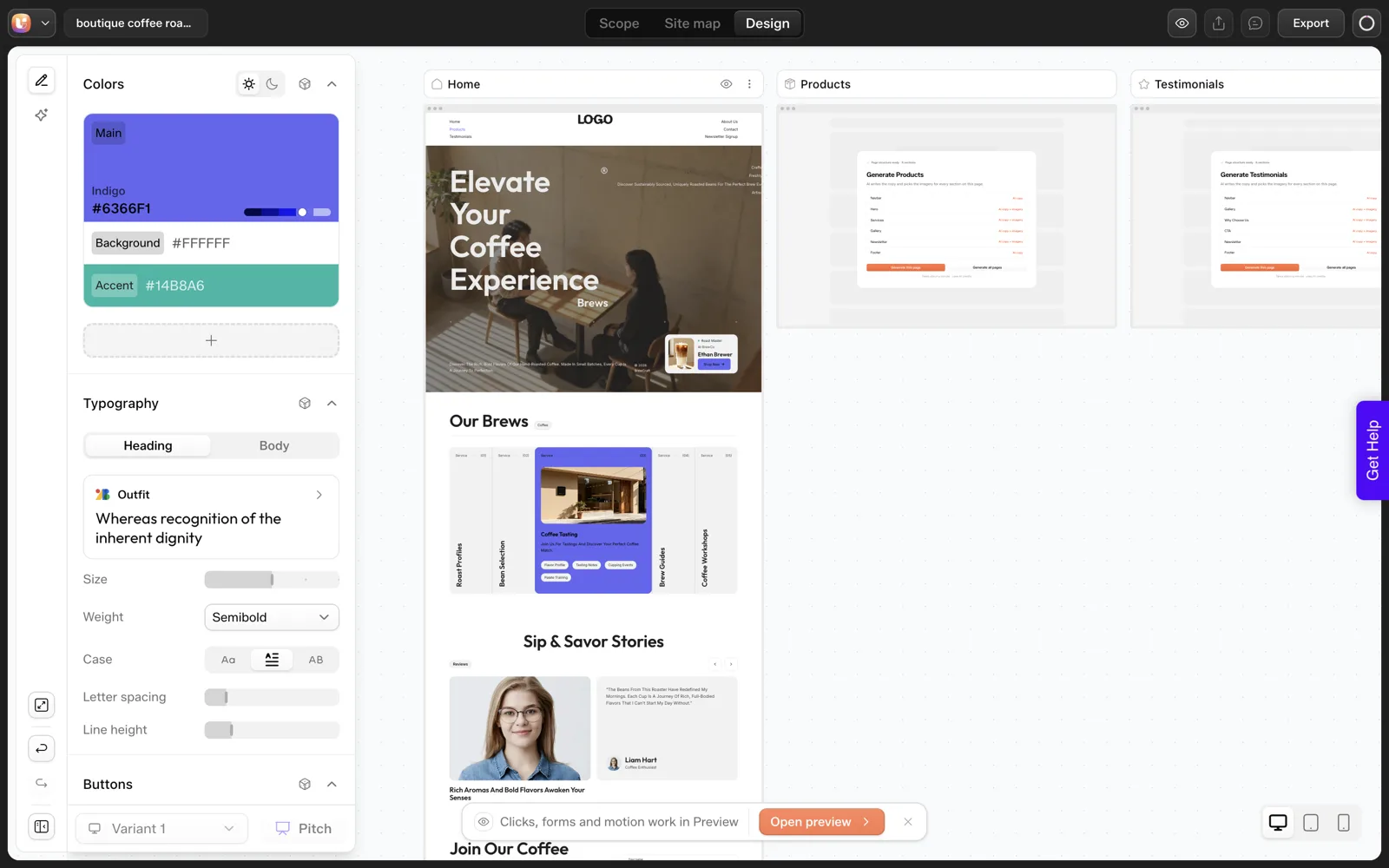
We would not publish this page as it came out. We would fix the card count and rename the label in the review step or the editor.
Every AI builder does something like this, and the useful thing is to know where you catch it. The full list of misses from this run, with a five-minute fix each, is in What AI Gets Wrong When It Builds a Website.
What held up in the draft
It is easy to focus on the miss, so here is what the run did right. Every section we named in the sentence showed up: a hero, a cards section, testimonials and a newsletter block.
The sitemap was complete enough to build from, and the review step gave us a place to object before any design work. The structure was usable on the first pass. The detail was where it slipped.
What I would change in the prompt next time
Counts and nouns are the cheapest things to pin down. A tighter version of our sentence would say “exactly three product cards, each for a coffee roast, no other pages beyond Home, Products and Contact”.
We have not re-run the prompt with that wording, so I cannot tell you it fixes the miss. It is a hypothesis worth testing, and our guide to prompts that get the sitemap you want lists the wording patterns we plan to try.
Why one run is a sample, not a benchmark
Generation speed depends on load, prompt length and the number of sections. A second run of the same sentence could produce a different sitemap and different timings. When you read any “built in 35 seconds” claim, ask how many runs sit behind it. Ours is one, on one day, and we say so in every number above.
How Does It Get Into WordPress?
Export is plugin-based. The Export in WordPress dialog lists three steps: download the UiChemy WordPress plugin, install it and log in with your UiChemy account, then import your project into Elementor. There is no one-click push and no site picker. The plugin is available from wordpress.org.
We did not run the import for this article, so we cannot report a live URL, an import time or how the finished front end looked. The docs describe what happens after you click import in the Export to WordPress guide. If you want a free-tier angle on all this, see where the free ends in AI website builders.
A Test Sheet to Run Your Own
Copy this and fill it in during your own run, with any builder. It forces you to write down the numbers instead of remembering them.
ONE-PROMPT TEST SHEET

Tool and date:
Prompt (paste exact words):

Seconds until project exists:
Seconds until sitemap:
Seconds until first page:
Credits (or cost) before:
Credits (or cost) after:

Did I ask for a specific count (cards, pages, sections)? Count requested / count delivered:
Labels that do not fit my business:
Pages I would merge or remove:
Where I could fix each miss (review step, editor, prompt):

Export route (plugin, download, hosted only):
Did I test the export on a throwaway site? yes / no
How Would We Fix This Draft Before Design?
I would not publish the first draft, and I would not regenerate it either. Every problem we saw is cheaper to fix at the review step, so here is the order I would work in. The order is my habit, not a documented procedure.
- Cut the sitemap. A landing page request returned six pages. I would fold Newsletter Signup into the footer and move Testimonials onto Home, which leaves four.
- Pin the counts. We asked for three product cards and got five. Delete two, or edit the section so it matches the request.
- Rename the labels. The cards were labelled “Service”. A roaster sells coffee, so the word should say so.
- Add real facts. Replace placeholder text with coffee names, prices and a real shipping rule.
- Read every heading. Small text is where wrong labels hide.
None of that needs a second generation. It needs a person with the original brief open next to the draft.
The same sentence, tightened
This table shows how I would rewrite the prompt for a second run. It is a hypothesis. We have not re-run it, so we make no claim about the result.
| Part | Original | Tightened version to test |
|---|---|---|
| Page type | A landing page | One page only, no separate pages |
| Cards | Three product cards | Exactly three cards, each for a coffee roast, labelled Products |
| Proof | Testimonials | A testimonials row on Home, three quotes |
| Signup | A newsletter signup | A newsletter block in the footer |
Our guide to how many pages a small business site needs explains the thinking behind cutting to four.
How Do You Compare Two Tools With the Same Sentence?
The test sheet above works for one tool. If you want to compare two, the comparison is only fair when you control a few things. These are the rules I follow.
- Paste the same sentence. Copy it into a note and paste it, so no word changes between tools.
- Run both on the same day, back to back. Load changes through the day, and generation speed moves with it.
- Write down failures with the same weight as wins. A tool that is fast and ignores counts is not ahead of a slower one that gets them right.
- Count what you asked for. Cards, sections, pages and any fact you supplied. Check each against the output.
- Stop at the first usable draft. Do not tune the prompt for one tool and not the other.
- Run it twice if you can. A single run is a sample. Two runs begin to show variance.
Then compare the sheets row by row. The rows that usually decide it are the export route and the fix cost, not the seconds on the clock.
I would also note what each tool lets you change after the first draft. A tool that locks the layout after generation turns every miss into a regeneration. That cost shows up in your balance, as our credit test explains.
What Would We Keep From the Draft?
A fair review lists what to keep, because a draft is not all or nothing. From our single run, these parts were worth keeping on a real project:
- The section order. Hero, cards, testimonials, newsletter block is a sensible order for a small shop landing page.
- The page names. Home, Products, About Us and Contact are plain and searchable.
- The review step itself. It gave us a place to object before design work started, and I would use it on every project.
These parts needed work:
- The card count and the card label.
- The extra pages in the sitemap.
- All placeholder detail. A draft cannot know your prices, your hours or your story.
That split is the honest summary of the run. The structure was usable on the first pass, and the detail was where it slipped. If you want a ready-made routine for the detail, see how to evaluate any AI website builder in 12 questions.
FAQ
How long does it take to generate a site?
In our single run, the sitemap took about 13 seconds and the Home page about 35 seconds. We did not time the other five pages, so we cannot give a full-site figure. Your result will depend on the prompt and the load at the time.
How many credits does one page cost?
Sitemap plus Home cost about 64 credits in our run, with the balance moving from 50,000 to 49,936.1. We did not measure the other pages separately. Plan allowances and top-ups are listed on the pricing page.
Does it follow my exact instructions?
Not always. We asked for three product cards and got five labelled “Service”. Counts and labels are the easiest things to check, so check them at the review step before design.
Is the result a real WordPress site?
Export goes through the UiChemy plugin and imports into Elementor on your own WordPress install. We have not shown the imported result in this post, so check the docs for the steps and test on a throwaway site first.
If you want to run the same test on your own idea, you can Get Started without a card.
Every feature named in this post is listed by product: all UiChemy features, AI to WordPress features.